SMTP error code · permanent failure (5xx)
SMTP error 550 4.4.7: message expired in the queue

By Samuel Chenard · CEO & Co-Founder, Palisade · Reviewed November 10, 2026
550 4.4.7 QUEUE.Expired means Exchange Online kept trying to deliver your message for 24 hours, the receiving server never accepted it, and the message expired in the queue. It usually points to the recipient's side: a server that's offline, a missing or wrong MX record, or filtering that refuses Microsoft 365. Resending only helps once that's fixed.
550 4.4.7 at a glance | |
|---|---|
| Code | 550 4.4.7 |
| Class | Permanent (5xx): the message was refused and will not retry |
| Category | DNS / routing |
| Side at fault | Either side |
| Auth-related | Rarely: Microsoft lists an incomplete SPF record among the sender-side checks, but most 4.4.7 bounces are delivery and DNS problems |
What the bounce actually says
The exact wording varies by provider. These are the documented strings, verbatim. Match yours to pin down which variant you hit.
Microsoft 365 (Exchange Online), diagnostic line
#550 4.4.7 QUEUE.Expired; message expired ##Source: learn.microsoft.com
Why you're seeing 550 4.4.7
The two numbers in this bounce disagree on purpose. The enhanced code 4.4.7 is a temporary one: RFC 3463 puts x.4.x in the network and routing class and names x.4.7 delivery time expired, and a 4 in front means the destination answered with temporary errors or didn't answer at all, rather than rejecting the message. Microsoft explains what happens next. Exchange Online repeatedly tries to deliver the message over 24 hours, and only after 24 hours of unsuccessful attempts does the sender receive this NDR. So by the time you read it, the retrying is over and the message is gone. That's our reading of why Microsoft's line carries a 550 in front of a temporary code; Microsoft doesn't explain the pairing. Microsoft's NDR reference says this usually indicates an issue on the receiving server. Its fix page lists four causes: the destination server is offline or unreachable, it won't accept delivery, a network problem makes delivery time out, or the destination domain's MX record is missing or wrong.
Likely causes, ranked
| Likely cause | What's happening |
|---|---|
| The recipient's mail server is offline, unreachable, or refusing Microsoft 365 | Microsoft's fix page says the destination might be unable or unwilling to accept the message, and lists a server that's offline or unreachable, one that won't accept delivery, and aggressive anti-spam settings that block all senders from Exchange Online. If the bounce only happens for one recipient domain, Microsoft says the problem is likely that domain. |
| The recipient domain's MX record is missing or wrong | Microsoft names an incorrect DNS record of the destination domain, for example a missing or incorrect MX record, as a cause. With no valid MX to deliver to, every attempt fails until the message expires. |
| A network problem makes delivery time out | Microsoft lists network problems that cause delivery to time out. The NDR reference adds that the code can also mean a message header limit was reached on the remote server, or another protocol timeout happened, and suggests reducing the number of recipients for that host. |
| Exchange Online can't resolve the recipient uniquely | If the NDR says "Transient Failure during recipients lookup AmbiguousRecipientTransientException", Microsoft says Exchange found more than one directory object for the same recipient: for example a mailbox and a mail user sharing an SMTP address, duplicate proxy addresses, or an object present both on-premises and in Exchange Online. That's a directory clean-up in your own tenant. |
| Something in your own setup: SPF, an expired domain, or hybrid routing | When the destination's admins find nothing wrong, Microsoft points at the sender: an SPF record that doesn't include all your sending sources, a domain that expired for non-payment, or, for on-premises recipients in a hybrid deployment, a hybrid configuration that needs the Hybrid Configuration Wizard rerun after IP or firewall changes. |
How to fix 550 4.4.7
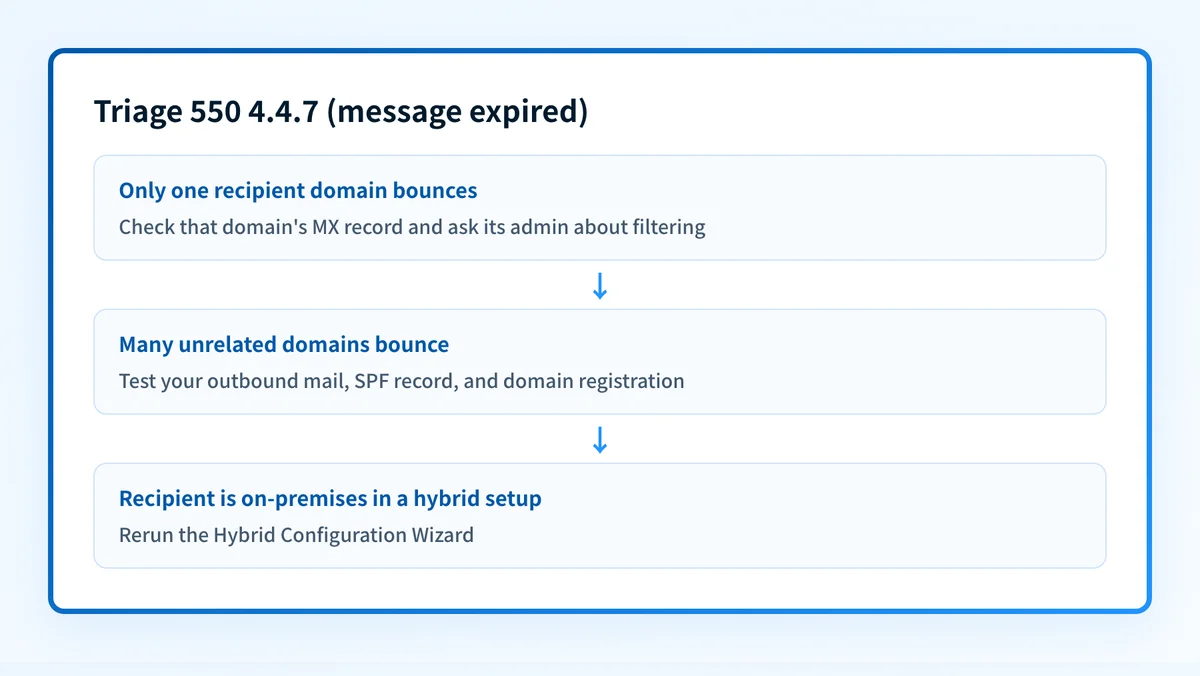
Check whether one domain or many are bouncing, and look up that domain's MX
If only one recipient domain returns 4.4.7, start there. Look up its MX record: no record, a record pointing at a host that doesn't answer, or a record left over from an old provider all produce this bounce. If many unrelated domains bounce, skip to step 4.
Sources: Microsoft: fix NDR error 550 4.4.7
Run the check now
Enter the domain from the step above and the check runs instantly on the next page. Free, no signup.
Send the recipient's admin what they need
Microsoft tells senders to contact the recipient another way and pass on the name of the destination mail server, the error it returned, and a copy of the NDR. Their admin needs to stop blocking Exchange Online, or allow your domain, and confirm their MX and DNS records. Microsoft says they can test their MX record with the Outbound SMTP Email test in the Microsoft Remote Connectivity Analyzer.
Sources: Microsoft: fix NDR error 550 4.4.7 · Microsoft Remote Connectivity Analyzer
Look for an AmbiguousRecipientTransientException in the NDR
If that string is present, the problem is in your directory, not the network. Find the recipients sharing the same SMTP or proxy address in Exchange Online and Microsoft Entra ID, remove or correct the duplicate, and give directory sync time to finish before resending.
Sources: Microsoft: fix NDR error 550 4.4.7
If many domains bounce, test your own tenant
Run the Outbound SMTP Email test in the Microsoft Remote Connectivity Analyzer. Check that your SPF record lists every service that sends as your domain with the SPF checker, and confirm with your registrar that the domain hasn't expired. For on-premises recipients in a hybrid deployment, ask the on-premises admins to rerun the Hybrid Configuration Wizard.
Sources: Microsoft Remote Connectivity Analyzer · Microsoft: fix NDR error 550 4.4.7
Resend once the cause is fixed
Microsoft's NDR reference says a resent message goes back in the queue and is delivered if the receiving server is available. Resending before anything changed just starts another 24 hours of retries.
Sources: Microsoft: Exchange Online NDR reference · RFC 3463, sections 2 and 3.5
Related free tools: MX lookup · DNS lookup · SPF checker
Why it matters for MSPs
A cluster of 4.4.7 bounces to one client domain usually means that client's inbound path broke: an MX left pointing at a retired gateway after a migration, a filtering service that started refusing Microsoft 365, or a lapsed domain registration. Bounces from one client to many domains point at that client's own tenant or hybrid routing instead. Check the MX record and the registrar expiry date for every client domain after any migration, not just the main one. Palisade doesn't deliver or route mail. What it does is read each client domain's DMARC reports, identify every source sending as that domain, and file SPF and DKIM problems as tickets in ConnectWise, HaloPSA, or Autotask, which covers the SPF check Microsoft lists here. Your own MSP domain is a free NFR domain.
Questions readers ask