SMTP error code · permanent failure (5xx)
SMTP error 5.4.14: hop count exceeded, possible mail loop

By Samuel Chenard · CEO & Co-Founder, Palisade · Reviewed November 10, 2026
5.4.14 Hop count exceeded means Exchange Online stopped a message that kept bouncing between servers in a loop. Microsoft ties it to two configuration problems: a recipient domain that's accepted but can't be routed, usually an accepted domain set up wrong, or misconfigured hybrid connectors. Microsoft says it typically takes an Exchange Online admin to fix it, not the sender.
5.4.14 at a glance | |
|---|---|
| Code | 5.4.14 |
| Class | Permanent (5xx): the message was refused and will not retry |
| Category | DNS / routing |
| Side at fault | Recipient |
| Auth-related | None: this is a routing loop in Exchange configuration, not an authentication failure |
What the bounce actually says
The exact wording varies by provider. These are the documented strings, verbatim. Match yours to pin down which variant you hit.
Microsoft 365 (Exchange Online)
5.4.14 Hop count exceeded - possible mail loop ATTR34Source: learn.microsoft.com
Exchange Server on-premises (5.4.6, seen in hybrid deployments)
554 5.4.6 Hop count exceeded - possible mail loopSource: learn.microsoft.com
Why you're seeing 5.4.14
Every server that relays a message adds a Received header. RFC 5321 requires servers to detect and stop routing loops, and describes counting those headers as an effective way to do it, with a large threshold of at least 100. Microsoft describes a related safeguard in Exchange: when delivering a message generates another message, which generates a third, Exchange interrupts the loop after 20 iterations and sends this NDR to the sender. Exchange Online reports it as 5.4.14, and on-premises Exchange reports 5.4.6, which is why hybrid organizations see both. Microsoft's fix page is direct about where the loop comes from. Either Exchange Online accepted the message for the recipient's domain but couldn't route it to the recipient, which points at the accepted domain configuration, or the hybrid connectors between Exchange Online and on-premises are set up wrong. Forwarding rules that send mail back and forth between two mailboxes can produce the same loop.
Likely causes, ranked
| Likely cause | What's happening |
|---|---|
| The recipient domain is accepted but configured with the wrong type | Microsoft's first cause: based on the recipient's domain, Exchange Online accepted the message but couldn't correctly route it, which is likely an accepted domain configuration issue. Its first fix is to confirm the recipient's domain is configured as an authoritative accepted domain. |
| Hybrid inbound routing uses DNS instead of the on-premises smart host | When the hybrid domain's MX points to Exchange Online, Microsoft says this error happens if the connector that routes mail to on-premises uses DNS routing instead of smart host routing. Exchange Online looks up the MX, finds itself, and sends the message back to itself until the hop count runs out. |
| Centralized outbound routing with a wrongly scoped on-premises connector | If the hybrid connector has RouteAllMessagesViaOnPremises set to True, Microsoft says the error comes from the connector from Office 365 to your organization's email server: either no such connector has the Connector Type On-premises, or it's scoped to one or more accepted domains when its scope should be empty. |
| Forwarding rules that send mail back and forth | Microsoft's NDR reference tells admins to check the sender's and recipient's mailbox rules for automatic forwarding. Two mailboxes forwarding to each other, or a forward to an external address that forwards back, loop until Exchange stops them. |
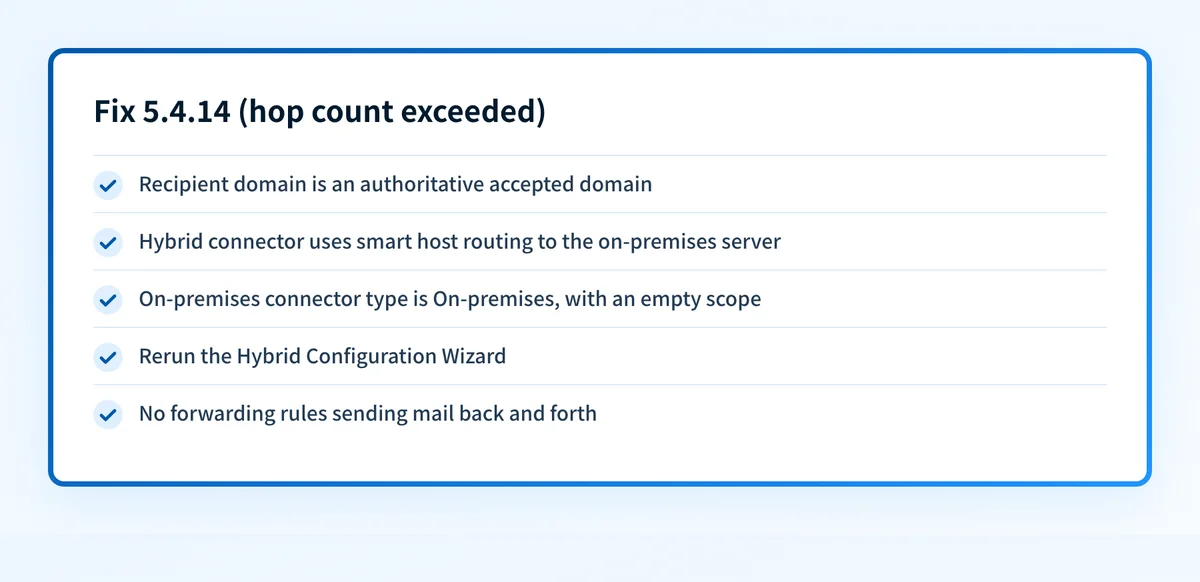
How to fix 5.4.14
Confirm the recipient domain is an authoritative accepted domain
In the Exchange admin center, open Mail flow > Accepted domains and check the recipient's domain. Microsoft's first fix for 5.4.14 is to make sure it's configured as authoritative in Exchange Online. Before switching a hybrid domain from Internal Relay to Authoritative, confirm every on-premises recipient exists in Exchange Online as a mail user or mail contact, usually through directory sync. Otherwise mail to them bounces with 550 5.1.10.
Sources: Microsoft: fix NDR errors 5.4.6 through 5.4.20 · Microsoft: manage accepted domains
Hybrid inbound: check the connector's smart host
In the Exchange admin center, go to Mail flow > Connectors, open the connector used for hybrid, and under Routing choose Edit routing. Make sure it uses smart host routing with the correct IP address or FQDN of your on-premises hybrid server, not DNS routing.
Hybrid outbound: check RouteAllMessagesViaOnPremises and the connector scope
In Exchange Online PowerShell run
Get-OutboundConnector -Identity "<Connector Name>" | Format-List Name,RouteAllMessagesViaOnPremises. If it's True, open the connector from Office 365 to your organization's email server and confirm General shows On-premises and Scope has no accepted domains listed.Rerun the Hybrid Configuration Wizard
Microsoft calls rerunning the Hybrid Configuration Wizard in the on-premises organization the easiest way to fix both hybrid connector problems, because it rebuilds the connectors with the right routing and scope.
Check forwarding rules on both mailboxes, then confirm the MX
Look for Inbox rules, mailbox forwarding, and mail flow rules that redirect between the two addresses in the loop. Then confirm the domain's MX record points where you expect with the MX lookup, so mail arrives at the system your connectors were built for.
Sources: Microsoft: Exchange Online NDR reference · RFC 5321, section 6.3 · RFC 3463, section 3.5
Related free tools: MX lookup · DNS lookup · Email header analyzer
Why it matters for MSPs
5.4.14 tends to appear right after a client's MX record moves to Exchange Online during a hybrid migration, when the old connectors still use DNS routing, or after someone scopes the on-premises connector to a domain to fix a different problem. Rerunning the Hybrid Configuration Wizard is the fastest fix and leaves a configuration you can document. When the MX moves, the set of servers sending for that domain changes too, so recheck SPF and DKIM for the client domain afterwards. Palisade reads each client domain's DMARC reports, identifies every source sending as that domain, and files the ones failing authentication as tickets in ConnectWise, HaloPSA, or Autotask. Your own MSP domain is a free NFR domain.
Questions readers ask