SMTP error code · temporary failure (4xx)
SMTP error 421 4.7.28: Gmail unusual rate of email

By Dominic Landry · Deliverability & DNS · Reviewed September 20, 2026
421 4.7.28 is Gmail's temporary rate limit. Google saw an unusual rate of email, often mail it classes as unsolicited, tied to your IP address, netblock, DKIM domain, SPF domain, a URL in the message, or a reused Message-ID. The message is deferred and your server will retry. Pause sending to Gmail for 10 minutes, then resume slowly.
421 4.7.28 at a glance | |
|---|---|
| Code | 421 4.7.28 |
| Class | Temporary (4xx): the message is deferred and the sender retries |
| Category | Rate limiting |
| Side at fault | Sender |
| Auth-related | Not an authentication failure. The DKIM-domain and SPF-domain wordings name the domain whose sending rate Gmail is limiting; they do not mean DKIM or SPF failed. |
What the bounce actually says
The exact wording varies by provider. These are the documented strings, verbatim. Match yours to pin down which variant you hit.
Gmail (Google Workspace): unusual rate, no identifier named
421 4.7.28 Gmail has detected an unusual rate of email. To protect our users from spam, email has been temporarily rate limited. To review our bulk email senders guidelines, go to Email sender guidelines.Source: knowledge.workspace.google.com
Gmail (Google Workspace): rate limit on the sending IP address
421 4.7.28 Gmail has detected an unusual rate of email originating from your IP address ip-address. To protect our users from spam, email sent from your IP address has been temporarily rate limited. To review our bulk email senders guidelines, go to Email sender guidelines.Source: knowledge.workspace.google.com
Gmail (Google Workspace): rate limit on the IP netblock
421 4.7.28 Gmail has detected an unusual rate of unsolicited email originating from your IP Netblock ip-address. To protect our users from spam, email sent from your IP Netblock has been temporarily rate limited. To review our bulk email senders guidelines, go to Email sender guidelines.Source: knowledge.workspace.google.com
Gmail (Google Workspace): rate limit on the DKIM signing domain
421 4.7.28 Gmail has detected an unusual rate of unsolicited email originating from your DKIM domain domain-name. To protect our users from spam, email sent from your domain has been temporarily rate limited. To review our bulk email senders guidelines, go to Email sender guidelines.Source: knowledge.workspace.google.com
Gmail (Google Workspace): rate limit on the SPF (envelope) domain
421 4.7.28 Gmail has detected an unusual rate of unsolicited email originating from your SPF domain domain-name. To protect our users from spam, email sent from your domain has been temporarily rate limited. To review our bulk email senders guidelines, go to Email sender guidelines.Source: knowledge.workspace.google.com
Gmail (Google Workspace): rate limit on a URL domain inside the message
421 4.7.28 Gmail has detected an unusual rate of unsolicited email containing one of your URL domains. To protect our users from spam, email with the URL has been temporarily rate limited. To review our bulk email senders guidelines, go to Email sender guidelines.Source: knowledge.workspace.google.com
Gmail (Google Workspace): IP address temporarily blocked
421 4.7.28 Gmail has detected an unusual amount of unsolicited email originating from your IP address. To protect our users from spam, email sent from your IP address has been temporarily blocked. To review our bulk email senders guidelines, go to Email sender guidelines.Source: knowledge.workspace.google.com
Gmail (Google Workspace): too many messages with the same Message-ID
421 4.7.28 Gmail has detected this sender exceeded the quota for sending messages that have the same Message-ID:. To best protect our users, the message has been temporarily rejected. For more information, go to Why has Gmail blocked my messages?.Source: knowledge.workspace.google.com
Why you're seeing 421 4.7.28
421 4.7.28 is a Gmail code. The 421 half is RFC 5321's "Service not available, closing transmission channel" reply, and the leading 4 in 4.7.28 is RFC 3463's persistent transient failure class, so the message is delayed and your server is expected to retry. RFC 3463 puts every X.7.x code under security or policy status, but it only defines X.7.0 through X.7.7. The 28 comes from the IANA enhanced status code registry, where X.7.28 is registered as "Mail flood detected": the message looks like part of a flood of similar abusive messages. Google uses it in that spirit. Its sender guidelines say that when you exceed your quota, Gmail typically answers with 4.7.28, and its SMTP error reference lists eight wordings that differ mainly in what the quota was counted against: the sending IP, the surrounding netblock, the DKIM domain, the SPF domain, a URL domain in the body, or a repeated Message-ID. That named identifier is the most useful part of the bounce, because it tells you which reputation Gmail is throttling and therefore what you have to slow down or clean up. Google also documents a permanent sibling, 550 5.7.28, with near-identical wording that says the IP address "has been blocked", with no "temporarily". The 421 is the recoverable version of that block. For the 421 reply on its own, across providers and across the other enhanced codes it is paired with, see what SMTP error 421 means and how to fix it.
Likely causes, ranked
| Likely cause | What's happening |
|---|---|
| A sudden jump in volume to Gmail | The most common trigger. A campaign, a backlog flush after an outage, or a migration pushes far more mail at Gmail than the IP or domain normally sends. Google's sender guidelines warn that immediately doubling previous volume can result in rate limiting, and the first two 4.7.28 wordings describe rate on its own: they say "an unusual rate of email", where five of the other wordings say "unsolicited". |
| Recipients are marking the mail as spam | Five of the eight wordings say "unsolicited". Gmail is reacting to complaints and engagement as well as raw speed: a purchased or stale list, cold outreach, or a re-engagement send to people who stopped opening years ago. Google asks senders to keep the spam rate in Postmaster Tools below 0.10% and never reach 0.30%. |
| A new or cold IP or domain with no sending history | Quota grows with history. A fresh dedicated IP, a new sending subdomain, or a new DKIM domain starts with a low ceiling, so volume that was fine on the old infrastructure trips 4.7.28 on the new one until it is warmed up. |
| A shared IP range or a shared link domain with a bad neighbor | The netblock wording throttles a range of addresses, and the URL wording throttles any mail that contains a given link domain. On a shared ESP pool, a shared hosting range, or a shared click-tracking or link-shortener domain, another customer's campaign can put your mail behind the same limit. |
| A compromised mailbox, form, or script is sending spam as you | If your own sending did not change, look for something else using the same IP or signing with the same DKIM domain: a hijacked account, an abused contact form, or a web app with a leaked SMTP credential. Gmail counts that traffic against the same identifier as your legitimate mail. |
| Your system reuses one Message-ID for many messages | The last wording is a separate quota. A mailer, ticketing system, or script that stamps the same Message-ID header on every copy it sends will be temporarily rejected once it passes Gmail's limit for that ID. Google's guidelines ask for a valid Message-ID on every message, and each message should get its own. |
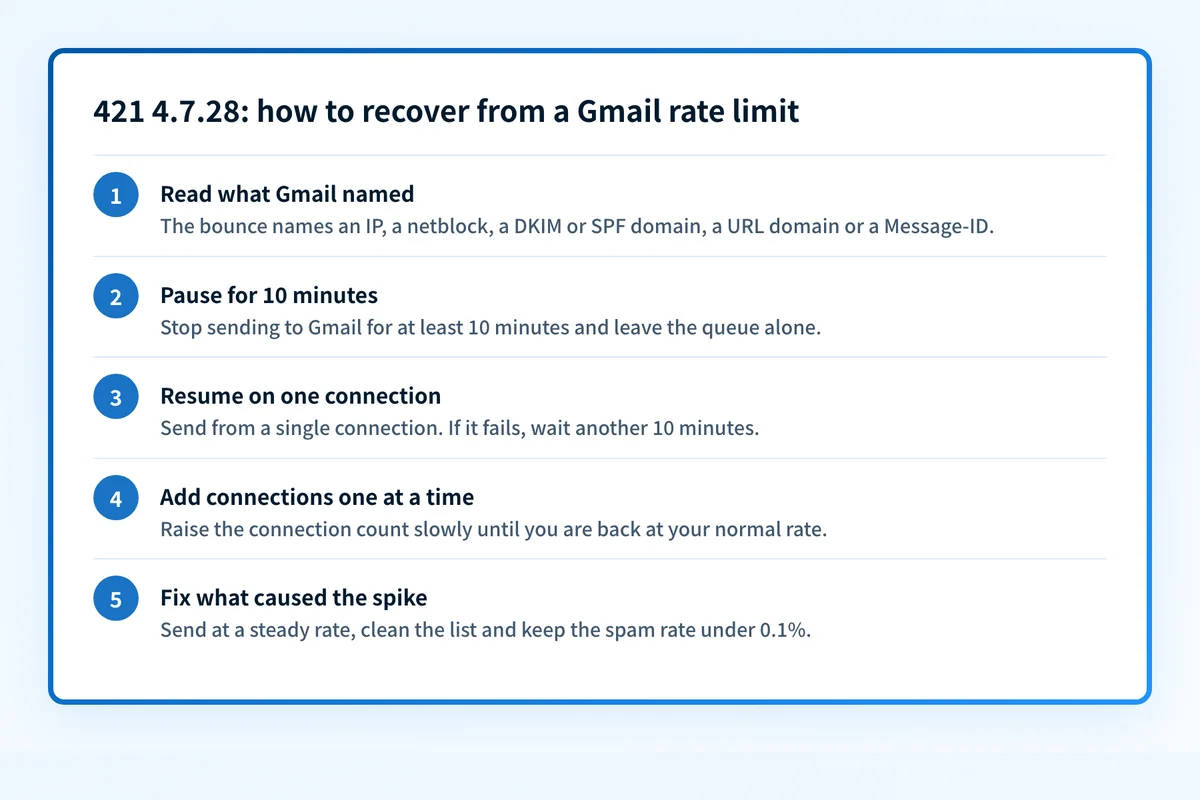
How to fix 421 4.7.28
Read which identifier Gmail named, then check its reputation
Open the full bounce or your MTA log and find the wording. If it names your IP address or IP netblock, run that IP through the free reputation checker below. If it names your DKIM domain, SPF domain, or a URL domain, enter that domain instead: the same box takes either, or go straight to the domain reputation checker. Google's guidance for the generic wording is to assume your DKIM, SPF, and IP quotas are all affected.
Sources: Google: Gmail SMTP errors and codes · Google: Email sender guidelines · RFC 3463, enhanced mail system status codes · IANA SMTP enhanced status codes registry (X.7.28)
Run the check now
Enter the sending IP from the bounce, or your sending domain, and the check runs instantly on the next page. Free, no signup.
Stop sending to Gmail for at least 10 minutes
This is Google's own instruction for
4.7.28: do not send email for at least 10 minutes. Pause the campaign or hold the Gmail and Google Workspace queue, and do not flush or manually resend deferred mail. Your server already retries on its own, and RFC 5321 expects senders to keep retrying for at least 4 to 5 days before giving up.Sources: Google: Email sender guidelines · RFC 5321 section 4.5.4.1, sending strategy
Resume on a single connection and add connections one at a time
After 10 minutes, Google says to send from a single connection. If that fails, wait another 10 minutes. If it works, raise the number of connections one at a time until you are back at your normal count. Set this as a per-destination limit in your MTA or ESP, and key it on the recipient's MX host so Google Workspace domains are covered along with gmail.com.
Sources: Google: Email sender guidelines
Lower the volume and rebuild it gradually
Google's guidance is to send at a consistent rate, avoid bursts, and when mail is deferred, reduce volume until the SMTP error rate drops and then increase slowly. Split large sends across hours or days. For a new IP or domain, plan the ramp with the free warmup calculator and start with your most engaged recipients.
Sources: Google: Email sender guidelines
Bring the spam rate down
For any of the "unsolicited" wordings, slowing down is only half the fix. Check the domain's spam rate in Google Postmaster Tools and get it under 0.10%. Remove addresses that never opted in or have not engaged in months, make unsubscribing one click, and stop any cold outreach that shares an IP, DKIM domain, or link domain with your transactional mail.
Sources: Google: Email sender guidelines · Google: Email sender guidelines FAQ · Google Postmaster Tools
If you did not change anything, find the traffic that did
Compare your outbound logs for the named IP or domain against what you expected to send. Look for one mailbox sending thousands of messages, a web form being abused, or an application reusing a single Message-ID. Reset credentials for anything compromised and check the IP against public blocklists with the blocklist checker. On a shared pool, send the bounce text to your ESP, since the netblock and URL limits are theirs to resolve.
Related free tools: Domain reputation · Warmup calculator · Blocklist checker · URL reputation
Why it matters for MSPs
For an MSP, 421 4.7.28 is usually a shared-infrastructure problem. When many clients relay through one smart host, one firewall egress IP, or one ESP sub-account, Gmail counts all of their mail against the same IP or netblock, so one client's newsletter or one hijacked mailbox delays Gmail delivery for everyone behind it. Set per-client rate limits on the relay and give bulk senders their own IP or subdomain, separate from day-to-day mail. Palisade does not lift a Gmail rate limit and no DMARC product can. What it does help with is the search: it reads each client domain's DMARC aggregate reports and identifies every source sending as that domain, with volumes, so an unexpected sender or a sudden jump shows up per client instead of as one anonymous spike on a shared IP.
Questions readers ask