SMTP error code · permanent failure (5xx)
550 permanent failure for one or more recipients: the fix

By Dominic Landry · Deliverability & DNS · Reviewed September 20, 2026
550 permanent failure for one or more recipients is a rejection from the recipient's email security gateway, typically a Barracuda one. It means the gateway refused your message for the addresses listed in parentheses, usually written as (user@example.com:blocked). The refusal is permanent for that message: find the block reason, fix it, then send again.
550 permanent failure for one or more recipients at a glance | |
|---|---|
| Code | 550 |
| Class | Permanent (5xx): the message was refused and will not retry |
| Category | Policy |
| Side at fault | Either side |
| Auth-related | Conditional: only when the recipient's gateway log gives SPF, DKIM, or DMARC as the reason |
What the bounce actually says
The exact wording varies by provider. These are the documented strings, verbatim. Match yours to pin down which variant you hit.
The wrapper as Broadcom documents it (Symantec Messaging Gateway KB, written from the sender's side)
550 permanent failure for one or more recipients blocked.Source: knowledge.broadcom.com
Barracuda Email Security Gateway (appliance): its documented reply for a blocked sender address. Different wording, same kind of verdict
550 Sender email address rejected.Barracuda Email Security Gateway (appliance): its documented reply for an SPF failure
550 Rejecting for Sender Policy Framework (SPF).Generic MTAs: the RFC 5321 standard text for 550
550 Requested action not taken: mailbox unavailableSource: www.rfc-editor.org
Why you're seeing 550 permanent failure for one or more recipients
This line has no enhanced status code such as 5.7.1, so the only standard part is the 550. RFC 5321 defines 550 as "mailbox unavailable" and lists three examples: mailbox not found, no access, or a command rejected for policy reasons. So the reply says a policy stopped the message. It does not say which policy. The words after the number are one vendor's own text. Bounces that carry them usually name a replying host under ess.barracudanetworks.com, which is where Barracuda tells its Email Gateway Defense customers to point their MX records. Gmail users often assume Google wrote the line. It did not: Gmail's bounce quotes the remote server, and Google's own errors all end in gsmtp. Barracuda does not document the wrapper text itself, but the structure is readable. The parentheses hold each refused address, a colon, and the gateway's verdict. Barracuda describes Email Gateway Defense as a pass-through service: it takes the RCPT TO line, connects to the destination mail server, then scans the data stream and applies policy. SMTP allows a single reply once the message data has arrived, and that reply covers the whole transaction, so the text speaks for "one or more recipients" and then names them. The word after the colon, almost always blocked, is the gateway's verdict for that address and nothing more: the reason behind the verdict is written in the recipient organization's message log, and only their administrator can read it.
Likely causes, ranked
| Likely cause | What's happening |
|---|---|
| Your sending IP is on a reputation list the gateway checks | Barracuda's Message Log has two reasons for this. "Barracuda Reputation" means the message came from an IP on the Barracuda Reputation Block List, and "Realtime Block List" means the IP is on another RBL or DNSBL the gateway consults. When this is the cause, the refusals come from many unrelated Barracuda-protected domains at once, not from one customer. For most senders the listed IP belongs to their email platform or a shared relay. |
| Your domain fails the recipient's SPF, DKIM, or DMARC setting | The recipient's admin can set the gateway to block on sender authentication. Barracuda documents a "Sender Policy Framework (SPF)" reason for an IP that is not an allowed sender for the domain, a "DKIM" reason for a domain that fails DKIM verification, and a "DMARC" reason for a domain that fails DMARC verification. These depend on DNS records you publish, so this is the cause you can fix without anyone's help. |
| The recipient's admin has blocked your address, domain, or IP | The gateway has local lists. "Sender Policies" and "IP Address Policies" are reasons the log shows when an administrator's own block entry matched you, and "Sender Email Address" means the sender is on a Barracuda email block list. Nothing about a local entry is visible from outside, and no public delisting form reaches it. |
| The message content scored as spam, bulk, or a threat | Documented reasons include "Score" (the spam score passed the threshold the admin set), "Bulk Email", "Intent Analysis", and content filters on the subject, body, headers, or attachments. This fits when plain messages to the same person arrive and one newsletter or one attachment type does not. |
| A rule on the recipient's address or your country of origin | The "Recipient" reason means a rule for the To address took the action, and "GeoIP Policies" means the organization blocks mail by country of origin. Both are choices the recipient organization made, and only that organization can change them. |
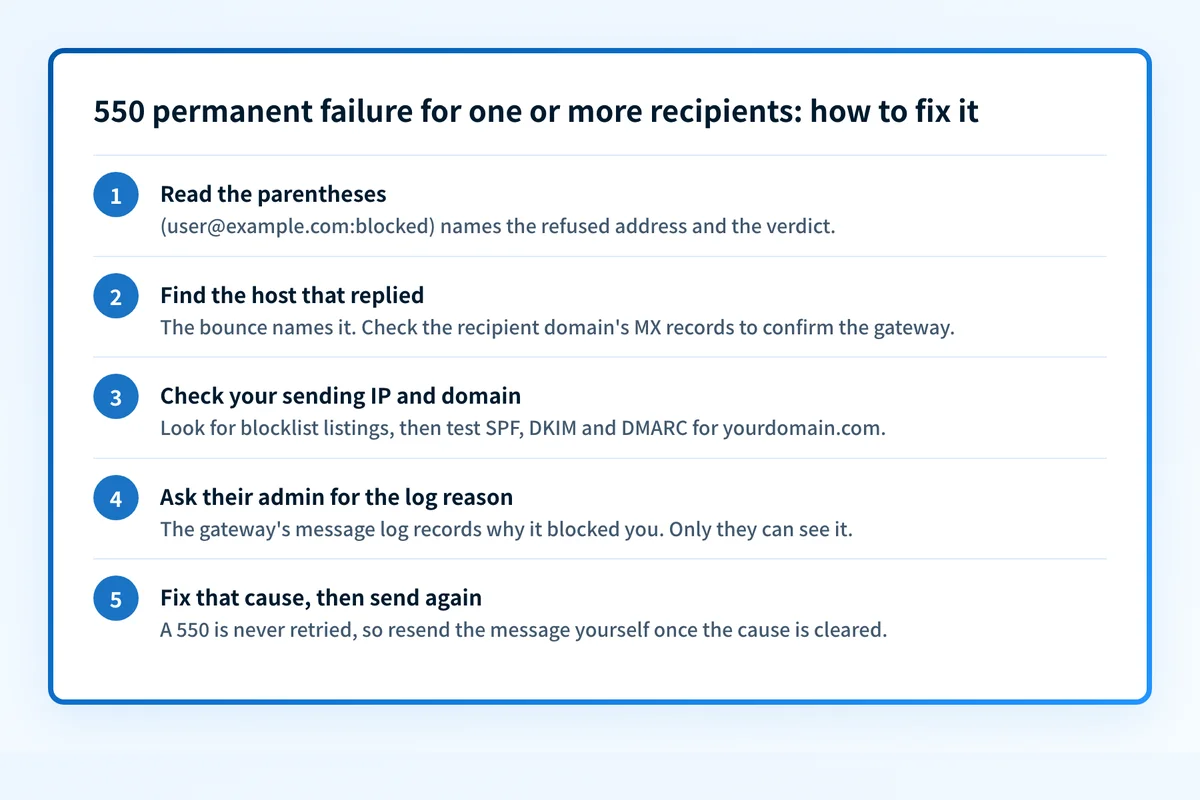
How to fix 550 permanent failure for one or more recipients
Check the recipient domain's MX records to see who replied
Enter the recipient's domain, the part after the @ in the address inside the parentheses, in the MX checker below. Barracuda tells Email Gateway Defense customers to point their MX records at
ess.barracudanetworks.com, so MX hosts under that name confirm a Barracuda gateway issued the refusal. Your bounce also names the host that replied. If the text ends ingsmtp, it is a Google error and this page does not apply.Sources: Barracuda: domain states and MX records · Google: Gmail SMTP errors and codes
Run the check now
Enter the domain from the step above and the check runs instantly on the next page. Free, no signup.
Read the parentheses and list which addresses bounced
Each entry reads
address:verdict. Write down every refused address across your recent sends and group them by domain. Bounces from many unrelated domains point at your sending IP's reputation. Bounces from one organization point at that organization's policy. One address refused while colleagues at the same domain receive your mail points at a rule on that recipient. Postmark's SMTP Field Manual reads theblockedverdict as a content or domain block on that specific message.Sources: Barracuda: how Email Gateway Defense works · Postmark SMTP Field Manual: Barracuda 550
Check your sending IP and domain reputation
Find the IP your mail leaves from in the bounce or in a delivered copy's headers, then run it through the IP reputation check and the blocklist checker, and your domain through the domain reputation check. Reputation is checked before authentication in Barracuda's inbound order, so clear a listing first. The Barracuda Reputation Block List guide covers the listing and its removal request.
Sources: Barracuda: Message Log reasons · Barracuda: connection management layers
Test SPF, DKIM, and DMARC for the domain in your From address
Use the SPF checker, DKIM checker, and DMARC checker. Every service that sends as your domain needs to be in your SPF record and needs to sign with DKIM using your domain. Barracuda's Message Log documents a separate reason for each: an SPF reason for a sender IP that is not an allowed sender for the domain, and DKIM and DMARC reasons it ties to the Inbound Settings, Sender Authorization page. All three read records your domain publishes, so they are the part of this bounce you control. The full breakdown of Barracuda's authentication settings is in why Barracuda is blocking your emails.
Sources: Barracuda: Message Log reasons for SPF, DKIM, and DMARC
Ask the recipient's administrator for the reason in their message log
Reach the recipient another way and ask them to forward your bounce to their IT team with the time you sent it. Email Gateway Defense records an Action and a Reason for every message, and the administrator can deliver yours from the log or mark it "Report as Incorrectly Blocked". Ask for the reason before you ask for an allow-list entry. The reason tells you what to fix. An exemption helps with one organization only.
Fix the named cause, then send the message again yourself
RFC 5321 classes every 5yz reply as a permanent negative completion, and section 4.2.5 says the sending server should not try that server again without a person reviewing the message and the response. Nothing retries on its own. The verdict applies to that one message, so a new send after the fix is judged fresh.
Sources: RFC 5321 (SMTP)
Related free tools: IP reputation · Blocklist checker · Domain reputation · SPF checker
Why it matters for MSPs
This bounce reaches an MSP from two directions. A client forwards it because a customer of theirs sits behind a Barracuda gateway, or your own Barracuda tenant issued it and an outside sender is asking why. Keep the complete bounce in the ticket, with the address in the parentheses and the replying host, because the reason is only visible in the recipient side's message log. When that log names SPF, DKIM, or DMARC, the fix is on the sending domain. For that branch, Palisade reads the client's DMARC reports, identifies the sender that fails, and drafts the record change for your team to review and apply, with the work routed through ConnectWise, HaloPSA, or Autotask. A reputation listing, a local block entry, or a content rule needs its own evidence and its own owner.
Questions readers ask