Email blocklist · Barracuda Networks
Barracuda blacklist removal: why your IP is on the BRBL, and how to get off

By Samuel Chenard · CEO & Co-Founder, Palisade · Reviewed July 19, 2026
The Barracuda Reputation Block List (BRBL) lists sending IP addresses seen emitting spam, and Barracuda appliances plus many mail servers query the b.barracudacentral.org zone to reject them. Check the IP your mail leaves from, stop whatever caused the listing, then submit Barracuda's removal-request form. Barracuda says a valid request is typically processed within 12 hours.
| Barracuda Reputation Block List at a glance | |
|---|---|
| Operator | Barracuda Networks |
| Type | IP blocklist (DNSBL) |
| IP lookup zone | b.barracudacentral.org |
| Query method | A-record DNSBL. Free to use, but Barracuda only answers queries from name-server IPs you register with it first, so it is not usable from arbitrary public resolvers. |
| Who uses it | Barracuda's own email security appliances query the BRBL, along with any mail server or antispam tool that adds the b.barracudacentral.org zone. Barracuda lists Exchange, Domino, sendmail, Postfix, and qmail among the systems it works with, so a listing bites wherever that zone is enforced. |
| Reach | Moderate to high. A BRBL listing blocks or filters mail at every receiver that enforces the b.barracudacentral.org zone, a large installed base, though the reach is narrower than Spamhaus. |
| Removal cost | Free on every list (paid delisting offers are scams) |
Check if you're on Barracuda Reputation Block List
The BRBL is a single IP-only list, so there is just one thing to establish: is the IP your mail actually leaves from listed? Check that sending IP (not your website's IP) below. Because Barracuda only answers lookups from resolvers it has registered, a shared checker may report "Can't check" for Barracuda instead of a real result; when it does, confirm on Barracuda's own lookup at barracudacentral.org/lookups.
Is your IP or domain on Barracuda Reputation Block List?
Enter your sending IP or domain and the check runs instantly on the next page. Free, no signup.
Related free tools: Full blocklist checker · DNS lookup · Email security score
What is Barracuda Reputation Block List?
The Barracuda Reputation Block List, or BRBL, is a free DNS-based blocklist that Barracuda Networks launched in September 2008. It does not filter your mail itself. It publishes a real-time list of IP addresses with a poor reputation for sending valid email, and the mail servers and Barracuda appliances that receive your messages query the b.barracudacentral.org zone in real time to decide whether to accept, defer, or reject you. Barracuda Central says it manually verifies every IP it marks "poor" on the underlying Barracuda Reputation System, so a listing is a considered judgement about the sending IP rather than a random flag.
Two things make the BRBL behave differently from most lists. First, it is a single IP-only list: there are no sub-zones to untangle, so if you are listed the fix is always about the sending IP, never a domain. Second, in Barracuda's own words it "does require free registration to gain access to the DNSBL," meaning it only answers DNS queries from name-server IPs it has approved. That is why a shared blocklist checker often reports "Can't check" for Barracuda rather than a clean result, and why Barracuda's own lookup at barracudacentral.org/lookups is the authoritative place to confirm a listing.
The Barracuda Reputation Block List lists, and what each one covers
Barracuda Reputation Block List is not one list. Identify the exact zone that flagged you: it decides what you fix and how you get removed.
| List | What it covers | Where it's queried | Getting off |
|---|---|---|---|
BRBL Barracuda Reputation Block List IP | IP addresses observed sending spam or viruses to Barracuda's detectors, plus IPs that look like an open proxy or a spam-generating botnet node at connection time. It lists IP addresses only, never domains. | b.barracudacentral.orgcode 127.0.0.2 | Removal web form Not an instant self-clear. You submit the removal-request form and Barracuda investigates it; the site says a request with a valid explanation is "typically investigated and processed within 12 hours." Requests without valid information, and duplicate requests, are ignored. |
Why your IP or domain got listed
A listing is a reputation verdict. These are the situations Barracuda Reputation Block List lists senders for:
Your IP sent spam or viruses to Barracuda's detectors. Its honeypots and spam traps are addresses that receive only spam, so any mail reaching them flags the sending IP.
At connection time your IP looked like an open proxy or a node in a spam-generating botnet, which Barracuda lists immediately.
A machine behind your NAT gateway was infected and sent spam out over port 25, which can list the shared public IP for your whole network.
Your IP turned up in data Barracuda derives from the Barracuda Blocklist (BBL) fed by its own email security appliances.
Most common reasons senders land here, ranked
| Likely cause | What's happening |
|---|---|
| A compromised host or app on your network started sending spam | The most common trigger. An infected machine, an open proxy, or a botnet node sends spam from your IP, and Barracuda lists it the moment its detectors see the traffic. The listing bites the sending IP, so shared infrastructure spreads the damage. |
| A hijacked mailbox or web form relayed spam through your server | A phished account or a vulnerable contact form pushes spam out as you. Without DMARC reports flowing, you often do not see it until the IP is already listed and mail starts bouncing. Visibility into who is sending is what catches this early. |
| SPF, DKIM, or DMARC is missing or stuck at `p=none` | Unauthenticated mail looks like spam to receivers and to automated detection, and a domain nobody enforces lets a spoofer generate spam and complaints that get sending IPs listed. Moving to `p=reject` closes that seam. This is the gap Palisade exists to shut. |
| One infected machine behind your NAT poisoned the shared IP | Barracuda warns that a single infected device sending out over port 25 can list the public IP for the whole LAN. Block outbound port 25 from every host that is not a maintained mail server so one compromise cannot list everyone. |
| A shared or recycled sending IP arrived with baggage | On shared sending platforms another tenant's spam can list an IP you also use, and a freshly allocated IP can inherit the reputation of whoever sent from it before you. The listing is real even when the spam was not yours. |
How to delist from Barracuda Reputation Block List
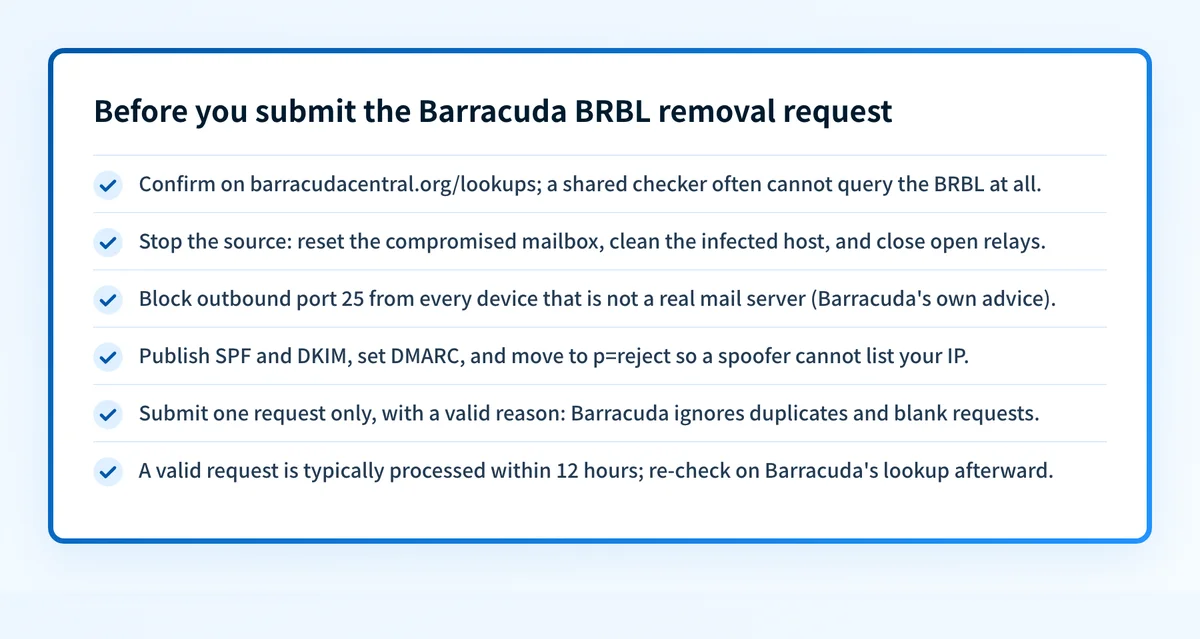
Removal only sticks if you fix the cause first: Barracuda's system relists automatically when spam keeps reaching its detectors, and it ignores requests that arrive without a valid explanation. Work the steps in order, send exactly one good request, and confirm on Barracuda's own lookup. The block reaches you as a receiver-side rejection in the bounce, so cross-check the related SMTP codes if you need to read the exact reason.
Confirm the listing on your sending IP
Run the IP your mail actually leaves from through the IP reputation check below. Because the BRBL only answers registered resolvers, also confirm on Barracuda's own lookup at barracudacentral.org/lookups, which returns a plain good or poor rating and is the authoritative source.
Find and stop the source of the spam
Before you ask for removal, end whatever caused it: reset the compromised mailbox, close the open relay or vulnerable form, clean the infected host, and block outbound port 25 from every device that is not a real mail server (Barracuda's own advice). Barracuda relists if spam keeps arriving.
Authenticate every sender so it cannot recur
Publish correct SPF, sign with DKIM for each service that sends as you, and set DMARC. Verify with the free SPF, DKIM, and DMARC checkers. Moving DMARC to
p=reject, plus watching the reports, surfaces a compromised or spoofed sender before it earns the next listing.Submit Barracuda's removal-request form
Enter your mail server IP, your email address, and your phone number, and add a valid reason for removal. Send one request only: Barracuda ignores requests without valid information and ignores duplicates, and says a valid explanation is typically processed within 12 hours.
Monitor so the next listing is caught early
Keep watching the sending IP and keep DMARC reports flowing, so a new compromise shows up as an alert instead of a fresh BRBL listing and a wave of bounces. Optionally register your domain at EmailReg.org, which Barracuda's Reputation System honors.
Removal is free
The BRBL is free to use and Barracuda charges nothing to submit a removal request. Unlike some operators, Barracuda does not publish a "removal is always free, paid offers are scams" statement, so we will not put words in its mouth; but the removal form is free and public at barracudacentral.org, and there is no reason to pay a third party to get you off it. Fix the cause, submit one valid request, and confirm on Barracuda's own lookup.
Open www.barracudacentral.orgWhen a Barracuda Reputation Block List listing isn't your fault
A BRBL listing is rarely random, but it is not always your own mail. On a shared sending platform another tenant's spam can list an IP you also use, and behind a NAT gateway one infected machine can list the public IP for your whole LAN, which Barracuda says outright. Separately, if a multi-blocklist checker reports "Can't check" for Barracuda rather than "not listed," that usually means the query came from a shared resolver Barracuda has not registered, not that you are listed. Confirm on barracudacentral.org/lookups before you act. Barracuda's Reputation System also honors domains registered at EmailReg.org, which can keep a legitimate domain and IP from being blocked inadvertently.
How to stay off Barracuda Reputation Block List
Authenticate everything: SPF that lists every real sender, DKIM signing on each service, and DMARC you actually move to enforcement.
Move DMARC to
p=rejectso a spoofer cannot generate spam in your name that drags your sending reputation down.Block outbound port 25 from every host that is not a maintained mail server, so one infected device cannot list your shared IP (Barracuda's own NAT advice).
Send from static IPs meant for mail, with correct PTR/reverse DNS and a matching HELO.
Watch your DMARC reports and your IP reputation continuously, so a compromise surfaces as an alert instead of a BRBL listing.
Optionally register your domain at EmailReg.org, the free registry Barracuda's Reputation System honors.
The real fix: enforce authentication, don't just monitor
Nearly every BRBL listing traces back to spam leaving your IP that you did not authorise: a compromised mailbox, an open relay, an infected host, or a domain anyone can spoof because it is not enforced. Checking a blocklist tells you that you are listed; it does nothing to stop the unauthenticated and spoofed sending that put you there. Enforcement does. Palisade hosts and manages correct SPF, DKIM, and DMARC, shows you every sender in the DMARC reports, and carries each domain to p=reject, with your approval at each step, so receivers drop forged mail instead of listing the IP behind it.
DMARC software that does the work
Palisade's AI agent takes domains all the way to enforcement: hosted SPF, DKIM, DMARC, and MTA-STS records on paid plans, DMARC reports monitored continuously, and every policy step drafted for your approval on the way to p=reject. The full product is open for a 15-day trial, and nothing is charged until it ends.
15-day full-product trial. Nothing is charged until it ends.
Watching Barracuda Reputation Block List across every client domain
One listed client IP is an afternoon; a book of clients each one compromise away from a BRBL listing is the job. Checking every tenant's sending IP against Barracuda by hand does not scale, especially since the BRBL only answers registered resolvers. Palisade hosts and manages SPF, DKIM, and DMARC for every client domain, surfaces unauthenticated senders in the DMARC reports before they turn into spam and a listing, and carries each domain to p=reject, with your team approving each step. It watches every domain from one console and opens tickets in ConnectWise, HaloPSA, and Autotask, and your own MSP domain is a free NFR domain to prove it on.
Questions readers ask
Frequently asked questions
How do I check if my IP is on the Barracuda blacklist?
How long does Barracuda blacklist removal take?
Is the Barracuda Reputation Block List free?
Why does my blocklist checker say it can't check Barracuda?
Why does my IP keep getting relisted on the BRBL?
What is EmailReg.org and does it help with Barracuda?
Does a Barracuda listing block all my email?
Sources and last verified
Every Barracuda Reputation Block List fact on this page is drawn from the operator's own documentation, last checked 2026-07-19. Blocklist policies change; if a detail looks off, the linked source is authoritative.
- Barracuda launched the BRBL in September 2008 as a free DNSBL of IP addresses known to send spam.“as a free DNSBL of IP addresses known to send spam.”www.barracudacentral.org · checked 2026-07-19
- Barracuda requires free registration of your querying DNS server before the BRBL answers lookups.“Barracuda Networks does require free registration to gain access to the DNSBL.”www.barracudacentral.org · checked 2026-07-19
- The BRBL is queried as a standard DNSBL by reversing the IP under the b.barracudacentral.org zone; the 127.0.0.2 test address returns 127.0.0.2.“to check that the general DNSBL test address of 127.0.0.2 is listed in BRBL, you can query 2.0.0.127.b.barracudacentral.org with any DNS lookup tool.”www.barracudacentral.org · checked 2026-07-19
- Access requires requesting approval for your name-server IPs before you configure your mail server.“The first step is to request access to the BRBL. Once your name server (DNS server) IP addresses have been approved for access, you will need to configure your mail server.”www.barracudacentral.org · checked 2026-07-19
- A DNSBL cannot stop sending; it only lets a receiver refuse delivery at its own instruction.“A DNSBL only prevents delivery at the receiving end at the receiver's instruction.”www.barracudacentral.org · checked 2026-07-19
- IPs that look like an open proxy or a spam-generating botnet node at connection time are listed immediately.“When email is received, the connection is automatically analyzed to determine if the connecting machine is either an open proxy or a node in a spam-generating botnet. If either is true, the IP address is immediately added to the Barracuda Reputation Block List (BRBL).”www.barracudacentral.org · checked 2026-07-19
- The BRBL lists IPs sending spam using automated collection, honeypots and spam traps, plus data derived from the Barracuda Blocklist (BBL).“The BRBL provides a list of IP addresses which are sending spam. The Barracuda Reputation system uses automated collection methods to add and delete IP addresses from the BRBL.”www.barracudacentral.org · checked 2026-07-19
- One infected machine behind a NAT gateway can list the shared public IP for the whole LAN; Barracuda advises blocking outbound port 25 from non-mail hosts.“A single infected machine sending spam out through a network utilizing NAT can result in blocked email from the whole LAN.”www.barracudacentral.org · checked 2026-07-19
- Removal is a request form (IP, email, phone, optional reason); invalid or duplicate requests are ignored.“Please note that the BRBL is generated by automated systems. Requests without valid information will be ignored. Multiple requests will also be ignored.”www.barracudacentral.org · checked 2026-07-19
- A removal request with a valid explanation is typically processed within 12 hours.“Removal requests are typically investigated and processed within 12 hours of submission if provided with a valid explanation.”www.barracudacentral.org · checked 2026-07-19
- Barracuda's Reputation System honors domains registered at EmailReg.org, which can prevent inadvertent blocking.“Barracuda Reputation System honors domains registered at EmailReg.org.”www.barracudacentral.org · checked 2026-07-19
- Barracuda Central manually verifies IP addresses marked "poor" on the Barracuda Reputation System.“Barracuda Central maintains and manually verifies all IP addresses marked as "poor" on the Barracuda Reputation System.”www.barracudacentral.org · checked 2026-07-19