Email blocklist · UCEPROTECT-Network
UCEPROTECT blacklist removal: Levels 1, 2 and 3 explained, and how to get delisted

By Samuel Chenard · CEO & Co-Founder, Palisade · Reviewed July 19, 2026
UCEPROTECT runs three IP blocklists: Level 1 (dnsbl-1.uceprotect.net) lists your individual sending IP, Level 2 lists that IP's whole netblock, and Level 3 lists your provider's entire ASN. Every listing expires free seven days after the last detected abuse, so stop the spam, authenticate your mail, and you clear without paying.
| UCEPROTECT at a glance | |
|---|---|
| Operator | UCEPROTECT-Network |
| Type | IP blocklist (DNSBL) |
| IP lookup zone | dnsbl-1.uceprotect.net |
| Query method | A-record DNSBL across three zones (dnsbl-1, dnsbl-2, dnsbl-3.uceprotect.net). Free for manual and low-volume lookups; UCEPROTECT locks out IPs that query the public database automatically or excessively, and directs high-volume users to download the zones over its free rsync/wget mirrors (donations requested). |
| Who uses it | UCEPROTECT publishes its three zones over DNS for any mail server or spam filter to query. It is not one of the large mailbox providers' own filters; in practice it is consulted mostly by self-hosted mail servers and spam-filter rulesets, frequently as a scoring signal rather than a hard block, and Levels 2 and 3 are often weighted lightly. |
| Reach | Uneven. A Level 1 listing reflects your own IP and can block or defer mail at any receiver that queries it. Levels 2 and 3 list by association and are weighted lightly or ignored by many receivers, so their real-world impact depends on who you send to. |
| Removal cost | Free on every list (paid delisting offers are scams) |
Check if you're on UCEPROTECT
First find out which level lists you, because the three are very different problems. Level 1 is about your own sending IP; Levels 2 and 3 are about the netblock and the provider network your IP happens to sit in. Check the IP your mail actually leaves from (not your website's IP) against UCEPROTECT below.
Is your IP or domain on UCEPROTECT?
Enter your sending IP or domain and the check runs instantly on the next page. Free, no signup.
Related free tools: Full blocklist checker · DNS lookup · Email security score
What is UCEPROTECT?
UCEPROTECT is a DNS blocklist operator run by the UCEPROTECT-Network. It does not filter your mail itself. It publishes lists of IP addresses over DNS, and the mail servers that receive your messages can query those lists in real time to decide whether to accept, defer, or reject you. What makes UCEPROTECT distinctive is that it runs three escalating zones rather than one, and they list very different things.
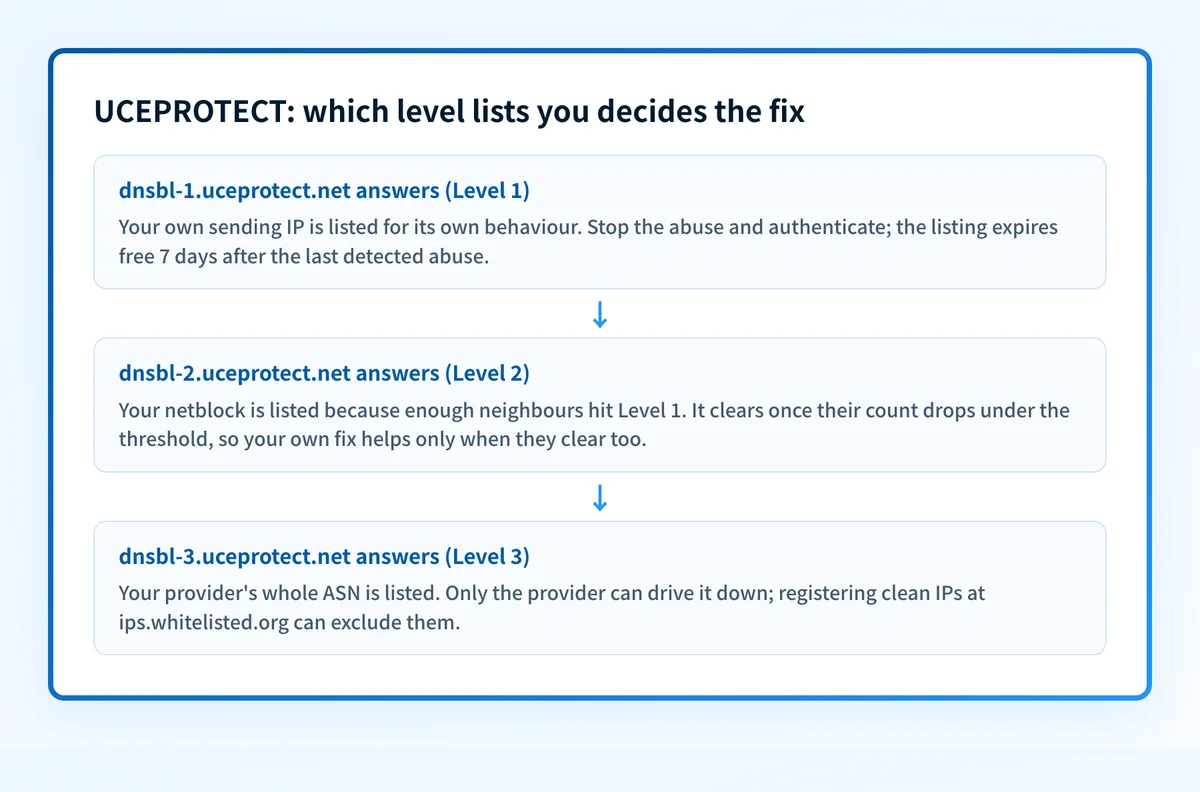
Level 1 (dnsbl-1.uceprotect.net) lists a single IP for its own behaviour. Level 2 (dnsbl-2.uceprotect.net) lists the netblock allocation around Level 1 offenders once enough of them pile up. Level 3 (dnsbl-3.uceprotect.net) lists the entire IP space of a provider's autonomous system when that provider ranks among the worst abuse sources. So the level that flagged you decides everything: Level 1 is your own IP to fix, while Levels 2 and 3 are mostly a statement about your neighbours and your provider.
The UCEPROTECT lists, and what each one covers
UCEPROTECT is not one list. Identify the exact zone that flagged you: it decides what you fix and how you get removed.
| List | What it covers | Where it's queried | Getting off |
|---|---|---|---|
L1 UCEPROTECT Level 1 IP | Single IP addresses only, listed for their own behaviour: hitting a UCEPROTECT spamtrap, forwarding mail forbidden by an SPF record, falsifying senders with SRS when the sender domain has no SPF, or attacking UCEPROTECT's servers. Members can also list an IP manually after confirmed spam. | dnsbl-1.uceprotect.net | Expires automatically Expires free 7 days after UCEPROTECT last detects abuse from the IP. There is no free on-demand removal button; the only way to clear it sooner is the paid express option. Fix the cause first, or it re-lists. |
L2 UCEPROTECT Level 2 IP | The netblock allocation surrounding Level 1 listings, not your specific IP. When enough IPs inside one allocation hit Level 1 within a rolling 7-day window, UCEPROTECT lists the whole allocation, so a clean sender in the same range is caught by association. The impact threshold scales with the size of the allocation. | dnsbl-2.uceprotect.net | Expires automatically Dynamic. The allocation de-lists once its Level 1 count drops back under UCEPROTECT's size-based threshold, which depends on every sender in the netblock, not just you. Clearing your own IP helps only when the noisy neighbours clear too. |
L3 UCEPROTECT Level 3 IP | The entire IP space of an autonomous system UCEPROTECT ranks among the worst abuse sources. UCEPROTECT calls Level 3 a tool for hardliners and warns it can cause collateral damage to innocent senders, because it lists whole provider networks rather than individual mistakes. | dnsbl-3.uceprotect.net | ISP requests removal No fixed period, and an individual sender cannot influence it directly. The ASN de-lists once its Level 1 impacts across the ASN fall enough to drop the SPAMSCORE below UCEPROTECT's threshold, which is the provider's job. Registering clean IPs at ips.whitelisted.org can exclude them from Level 3. |
Why your IP or domain got listed
A listing is a reputation verdict. These are the situations UCEPROTECT lists senders for:
Your IP tried to deliver mail to a UCEPROTECT spamtrap, which lists it on Level 1 automatically.
Your IP forwarded mail forbidden by an SPF record, or falsified senders with SRS while the sender domain had no SPF set: UCEPROTECT lists both on Level 1.
Your IP was involved in port scans, probes, or other attacks against UCEPROTECT's own servers.
Enough IPs inside your netblock allocation hit Level 1 within 7 days, which escalates the whole allocation to Level 2.
Your provider's autonomous system is among the worst abuse sources, so Level 3 lists its entire IP space.
A UCEPROTECT-Orga member listed the IP manually after it delivered at least one spam message or was tied to a known spammer.
Most common reasons senders land here, ranked
| Likely cause | What's happening |
|---|---|
| A compromised mailbox, app, or host started sending spam | The direct Level 1 trigger. A phished account, a vulnerable web form, or a hijacked device sends mail that lands in a UCEPROTECT spamtrap, and your IP is listed automatically. Stopping the source is the only thing that makes the listing expire. |
| SPF is missing, and forwarding or SRS is breaking it | UCEPROTECT lists IPs on Level 1 for forwarding mail that an SPF record forbids, and for falsifying senders with SRS when no SPF is set for the sender domain. A missing or loose SPF record turns ordinary forwarding into a listable offence. This is the seam Palisade closes. |
| Your domain isn't enforced, so anyone can send as you | With DMARC stuck at p=none, spammers can spoof your domain and their spam can trip spamtraps under your name. Enforcement at p=reject is what stops forged mail from earning listings on your behalf. |
| A neighbour dragged you in through Level 2 or Level 3 | Your own IP can be clean while the netblock or the provider ASN around it is not. Once enough neighbours are on Level 1, UCEPROTECT lists the whole allocation on Level 2, and the worst ASNs land on Level 3. These are association listings, not a verdict on your sending. |
| A shared or recycled IP arrived with baggage | On shared sending infrastructure another tenant's spam can list a range you also use, and a freshly allocated IP can inherit an older listing from its previous owner. The traffic UCEPROTECT saw was real; it just was not always yours. |
How to delist from UCEPROTECT
UCEPROTECT removal is unusually simple once you know the model: stop the abuse and the listing expires on its own in 7 days, free. Paying is optional. What changes per level is who can act. You can clear your own Level 1 IP by fixing it and waiting; Level 2 and Level 3 clear only when the whole netblock or provider network settles down. Work the steps in order.
Confirm the listing and which level it is
Run your sending IP through the free IP reputation check below and note which zone answers: dnsbl-1 (your IP), dnsbl-2 (your netblock), or dnsbl-3 (your provider's ASN). The three have completely different fixes, so identify the level before you do anything else.
Stop the abuse at the source
Before the timer can start, end whatever caused it: reset the compromised mailbox, patch or close the vulnerable form, clean the infected host, and shut down any forwarding that breaks SPF. UCEPROTECT only starts the 7-day clock from the last abuse it detects.
Authenticate every sender so it cannot recur
Publish correct SPF, sign with DKIM on each service that sends as you, and set DMARC. Verify with the free SPF, DKIM, and DMARC checkers. Moving DMARC to
p=rejectis what stops spoofed and SPF-breaking mail from re-listing you.Let the free expiry clear it, or use the right lever
For Level 1, stopping the abuse clears the IP automatically 7 days after the last detection. For Level 2, the allocation de-lists when its Level 1 count drops under threshold. For Level 3, only the provider can act; registering clean IPs at ips.whitelisted.org can exclude them.
Re-check and keep monitoring
Re-run the checker to confirm you are clear, then keep watching the IP and your DMARC reports so the next compromise surfaces as an alert instead of a fresh listing and a wave of deferrals.
Removal is free
UCEPROTECT removal does not have to cost anything. The operator states that "Every IP listed will expire 7 days after the LAST abuse is detected, and FREE of charge," so the dependable path is to stop the abuse and let the listing lapse. UCEPROTECT also sells an optional express removal for listees who will not wait the week: the fee is charged per listed object and rises for a whole netblock or ASN, and the amount is shown only on the delisting page itself, rendered dynamically rather than as quotable text, so no fixed figure is cited here. Because the free expiry already exists, paying is a convenience and not a requirement, and UCEPROTECT withholds express delisting from its worst spam sources.
Open www.uceprotect.netWhen a UCEPROTECT listing isn't your fault
A UCEPROTECT listing is often not about your own mail at all. Levels 2 and 3 list by association: a Level 2 entry means enough IPs in your netblock hit Level 1, and a Level 3 entry lists your provider's entire ASN. UCEPROTECT itself frames Level 3 as a hardliner tool and warns it causes collateral damage to innocent senders, which is why many receivers weight Levels 2 and 3 lightly or ignore them. Check Level 1 first: if only Level 2 or Level 3 answers and your own IP is clean, your sending reputation is intact and the fix is mostly your provider's job.
How to stay off UCEPROTECT
Authenticate everything: SPF that lists every real sender, DKIM signing on each service, and DMARC you actually move to enforcement.
Enforce DMARC at
p=rejectso spoofed and SPF-breaking mail cannot trip a spamtrap under your name.Set correct PTR/reverse DNS with a matching HELO, and send from static IPs meant for mail, not from end-user or dynamic space.
Watch your DMARC reports and your IP reputation continuously, so a compromise shows up as an alert instead of a listing.
If you keep landing on Level 2 or Level 3, the real problem is the network you send from; a cleaner provider or a dedicated sending range fixes it.
The real fix: enforce authentication, don't just monitor
Nearly every UCEPROTECT Level 1 listing traces back to the same gap: mail that leaves your IP without being authenticated, or a domain anyone can spoof because it is not enforced. UCEPROTECT even lists SPF-breaking forwarding by name. Checking a blocklist tells you that you are listed; it does nothing to stop the unauthenticated sending that put you there. Enforcement does. Palisade hosts correct SPF, DKIM, and DMARC records, watches the reports for senders you missed, and carries every domain to p=reject, with your approval at each step, so receivers drop forged mail instead of listing yours.
DMARC software that does the work
Palisade's AI agent takes domains all the way to enforcement: hosted SPF, DKIM, DMARC, and MTA-STS records on paid plans, DMARC reports monitored continuously, and every policy step drafted for your approval on the way to p=reject. The full product is open for a 15-day trial, and nothing is charged until it ends.
15-day full-product trial. Nothing is charged until it ends.
Watching UCEPROTECT across every client domain
One client on Level 1 is an afternoon; a book of clients spread across shared hosting netblocks and provider ASNs is the job. UCEPROTECT's Level 2 and Level 3 list by association, so one noisy tenant in a range can pull a clean client's whole allocation into a listing, and checking every tenant IP by hand does not scale. Palisade hosts and manages SPF, DKIM, and DMARC for every client domain, surfaces unauthenticated senders in the DMARC reports before they turn into abuse, and carries each domain to p=reject, with your team approving each step. It watches every domain from one console and opens tickets in ConnectWise, HaloPSA, and Autotask, and your own MSP domain is a free NFR domain to prove it on.
Questions readers ask
Frequently asked questions
What's the difference between UCEPROTECT Level 1, 2, and 3?
Do I have to pay to get off UCEPROTECT?
How long does a UCEPROTECT listing last?
How do I get off UCEPROTECT Level 3?
Why is my IP on UCEPROTECT when I never sent spam?
Should I worry about a UCEPROTECT Level 2 or Level 3 listing?
Sources and last verified
Every UCEPROTECT fact on this page is drawn from the operator's own documentation, last checked 2026-07-20. Blocklist policies change; if a detail looks off, the linked source is authoritative.
- Level 1 lists single IP addresses only, at dnsbl-1.uceprotect.net.“Level 1 lists single IP's only.”www.uceprotect.net · checked 2026-07-19
- Level 1 auto-lists IPs that hit spamtraps, forward mail forbidden by an SPF record, falsify senders with SRS when no SPF is set, or attack UCEPROTECT's servers; Orga members can also list manually after confirmed spam.www.uceprotect.net · checked 2026-07-19
- Every listed IP expires 7 days after the last detected abuse, free of charge.“Every IP listed will expire 7 days after the LAST abuse is detected, and FREE of charge.”www.uceprotect.net · checked 2026-07-19
- Level 2 (dnsbl-2.uceprotect.net) escalates dynamically and lists the surrounding netblock allocation once Level 1 impacts inside it cross a size-based threshold within a 7-day window.www.uceprotect.net · checked 2026-07-19
- Level 3 lists the IP space of the worst ASNs, at dnsbl-3.uceprotect.net.“Level 3 lists IP Space of the worst ASN's.”www.uceprotect.net · checked 2026-07-19
- UCEPROTECT positions Level 3 as a hardliner tool and warns it causes collateral damage to innocent users when used to block email.“This blacklist has been created for HARDLINERS. It can, and probably will cause collateral damage to innocent users when used to block email.”www.uceprotect.net · checked 2026-07-19
- UCEPROTECT offers an optional paid express removal for listees who will not wait 7 days, and withholds it from the worst offenders; clean IPs registered at ips.whitelisted.org are generally excluded from Level 3.www.uceprotect.net · checked 2026-07-19
- The public database checker takes an IP for users and an AS number for providers, and only manual queries are allowed.“Users please test your IP adresses. Providers please test your AS number instead.”www.uceprotect.net · checked 2026-07-19
- UCEPROTECT distributes all three zones free over rsync/wget mirrors and recommends high-volume operators download the lists rather than query by DNS, and asks only for donations; its only paid product is express delisting.“RSYNC is our preferred distribution method, therefore operators of big Mailservers or Providers are recommendet to download the lists instead of using them by dns requests.”www.uceprotect.net · checked 2026-07-20
- Level 3 lists an ASN when its SPAMSCORE (Level 1 impacts from the ASN / total IPs in the ASN * 100000) is 50 or higher and at least 50 Level 1 impacts from the ASN were listed in the last 7 days, so it de-lists as those Level 1 impacts fall and the SPAMSCORE drops back under threshold.“at least 50 impacts of IPs which are assigned to the AS number have been listed in level 1 in the last 7 days”www.uceprotect.net · checked 2026-07-20