SMTP error code · permanent failure (5xx)
SMTP error 5.7.520: your organization does not allow external forwarding

By Samuel Chenard · CEO & Co-Founder, Palisade · Reviewed November 10, 2026
5.7.520 means a Microsoft 365 mailbox tried to automatically forward a message to an outside address, and the organization's outbound spam filter policy blocks external forwarding. The original sender gets the bounce. The fix belongs to that organization's admin: remove the forwarding rule, or allow forwarding deliberately for the people who need it.
5.7.520 at a glance | |
|---|---|
| Code | 5.7.520 |
| Class | Permanent (5xx): the message was refused and will not retry |
| Category | Policy |
| Side at fault | Recipient |
| Auth-related | None for the block itself, which is a forwarding policy; forwarded mail can still fail SPF at its final destination |
What the bounce actually says
The exact wording varies by provider. These are the documented strings, verbatim. Match yours to pin down which variant you hit.
Microsoft 365 (Exchange Online)
5.7.520 Access denied, Your organization does not allow external forwarding. Please contact your administrator for further assistance. AS(7555)Source: learn.microsoft.com
Why you're seeing 5.7.520
This bounce isn't about the message you wrote. It's about what happened after it arrived. Microsoft's NDR reference says that when Exchange Online detects a message is being forwarded automatically, and an outbound spam filter policy blocks that forwarding, the message is restricted and this NDR goes to the sender. Microsoft lets users forward automatically with Inbox rules and lets admins set mailbox forwarding, and both are controlled by the Automatic forwarding rules setting in outbound spam filter policies. Its default, Automatic - System-controlled, changed in 2021 to behave as Off for new organizations and for existing ones that weren't actively using it. So a lot of tenants block external forwarding without anyone having chosen to. Microsoft generates the NDR for messages from external senders under every forwarding method, and for internal senders when the forward is mailbox forwarding rather than an Inbox rule.
Likely causes, ranked
| Likely cause | What's happening |
|---|---|
| The recipient auto-forwards to an outside address and the tenant blocks it | The person you emailed has an Inbox rule or mailbox forwarding that sends copies to an external address, perhaps a personal mailbox, and their organization's outbound spam filter policy blocks external forwarding. Microsoft's forwarding page says turning forwarding off disables Inbox rules and mailbox forwarding to external addresses and results in an NDR to the sender. |
| The policy default switched to Off without anyone choosing it | Microsoft says the default value, Automatic - System-controlled, changed in 2021 to Off for new organizations and for existing ones that weren't actively using it. Because the behavior differs by organization, Microsoft recommends setting the policy to On or Off explicitly instead of leaving it on Automatic. |
| A remote domain or mail flow rule blocks the forward | Admins can also allow or block automatic forwarding with remote domain settings and mail flow rules. Microsoft says that when one setting allows external forwarding and another blocks it, the block typically wins. |
| An attacker created the forwarding rule on a compromised mailbox | Microsoft notes that users can set up automatic forwarding to external recipients deliberately or as a result of a compromised account. A forwarding rule nobody remembers creating is the reason many organizations block external forwarding in the first place. |
How to fix 5.7.520
If you only sent the message, tell the recipient
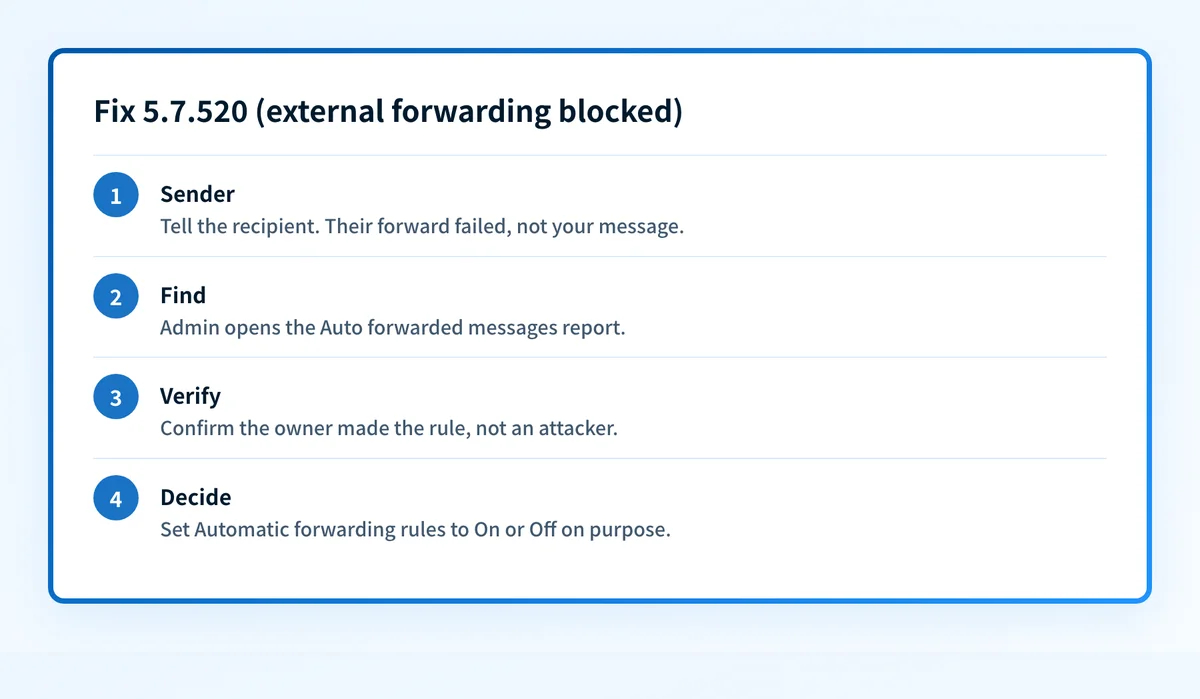
Your mail reached the recipient's organization. What failed was their forward to somewhere else. Let them know by another channel, include the NDR, and resend later if they move the forward or ask you to use a different address. Nothing in your own setup changes this.
Recipient's admin: find who is forwarding
Microsoft points admins to the Auto forwarded messages report for cloud mailboxes. For on-premises users forwarding through Microsoft 365, it describes a mail flow rule matching the
X-MS-Exchange-Inbox-Rules-Loopheader to track them.Check the forwarding rule isn't an attacker's
Before allowing anything, confirm the mailbox owner created the rule. An unexplained forward to an external address is a common sign of a compromised account: reset the password, revoke sessions, and remove the rule if the owner doesn't recognize it.
Set Automatic forwarding rules to On or Off on purpose
In the Microsoft Defender portal, go to Email & collaboration > Policies & rules > Threat policies > Anti-spam and open the outbound spam filter policy. Under Forwarding rules, choose On - Forwarding is enabled or Off - Forwarding is disabled rather than Automatic - System-controlled. To allow forwarding for only some people, create a custom outbound policy that applies to them, and keep the default at Off.
Sources: Microsoft: configure outbound spam policies · Microsoft: control external email forwarding
Use remote domains to limit where forwarding can go
Microsoft describes allowing forwarding in the outbound spam policy while using remote domains or mail flow rules to restrict which external domains users can forward to. Since a block typically wins, check those settings too if the bounce continues after the policy change.
Related free tools: Email header analyzer · DMARC checker
Why it matters for MSPs
Across client tenants, 5.7.520 usually means one of two things: a staff member forwarding work mail to a personal address, or a compromised mailbox with a rule an attacker set up. Set Automatic forwarding rules to Off in every client's default outbound policy instead of leaving it on Automatic, create a named custom policy for the few people who genuinely need external forwarding, and review the Auto forwarded messages report as part of regular client reviews. Palisade doesn't manage Defender policies. What it does is read each client domain's DMARC reports, identify every source sending as that domain, and file authentication problems as tickets in ConnectWise, HaloPSA, or Autotask. Your own MSP domain is a free NFR domain.
Questions readers ask