SMTP error code · permanent failure (5xx)
SMTP error 535 5.7.3: authentication unsuccessful in Microsoft 365

By Samuel Chenard · CEO & Co-Founder, Palisade · Reviewed November 10, 2026
535 5.7.3 Authentication unsuccessful means Exchange Online refused the username and password a printer, scanner, or application used to sign in to smtp.office365.com. The message was never accepted. Usually SMTP AUTH is off for that mailbox, or MFA, security defaults, or a Conditional Access policy blocks the legacy sign-in.
535 5.7.3 at a glance | |
|---|---|
| Code | 535 5.7.3 |
| Class | Permanent (5xx): the message was refused and will not retry |
| Category | Authentication |
| Side at fault | Sender |
| Auth-related | Sign-in only: this is SMTP AUTH refusing a mailbox login, not SPF, DKIM, or DMARC failing on a message |
What the bounce actually says
The exact wording varies by provider. These are the documented strings, verbatim. Match yours to pin down which variant you hit.
Why you're seeing 535 5.7.3
535 is the SMTP reply for rejected credentials: RFC 4954, the SMTP AUTH standard, defines 535 5.7.8 as authentication credentials invalid. Microsoft returns 535 5.7.3 when a device or application tries client SMTP submission, which means signing in to smtp.office365.com on port 587 with a licensed mailbox's credentials. Unlike most bounce codes, this one has nothing to do with the recipient or the message. Exchange Online never got as far as accepting mail, because it refused the sign-in itself. Microsoft's checklist for this error points at four switches that each block the sign-in on their own: SMTP AUTH turned off for the mailbox or the whole tenant, multifactor authentication on the mailbox, Microsoft Entra security defaults, and a Conditional Access policy that blocks legacy authentication. A wrong password and a device that can't do TLS 1.2 fail the same way.
Likely causes, ranked
| Likely cause | What's happening |
|---|---|
| SMTP AUTH is turned off for the mailbox or the tenant | Microsoft says SMTP AUTH is disabled for organizations created after January 2020, and can be enabled per mailbox. It can also be switched off for the whole organization with Set-TransportConfig -SmtpClientAuthenticationDisabled $true. A printer configured correctly in every other way still gets 535 5.7.3 until SMTP AUTH is allowed on the mailbox it signs in with. |
| Basic authentication for SMTP AUTH is off, by policy or by Microsoft's default | Microsoft's SMTP AUTH page says that if an authentication policy disables Basic authentication for SMTP, clients can't use SMTP AUTH even with the settings above enabled. Microsoft's deprecation timeline adds a deadline: at the end of December 2026, SMTP AUTH Basic authentication will be disabled by default for existing tenants, though admins can still turn it back on, and tenants created after December 2026 won't have it by default. Microsoft doesn't document which code that default-off returns. Its retirement post says that once Basic auth is permanently removed, clients get 550 5.7.30 Basic authentication is not supported for Client Submission. Microsoft recommends OAuth for applications that support it. |
| Security defaults or a Conditional Access policy blocks legacy sign-ins | Microsoft's SMTP AUTH page says that if security defaults is enabled, SMTP AUTH is already disabled in Exchange Online. A Conditional Access policy that blocks legacy authentication has the same effect on the mailbox the device uses. This is the usual cause when a scanner that worked for years stops after a security review. |
| Multifactor authentication is on for the mailbox | A printer can't answer an MFA prompt. Microsoft's checklist for this error includes turning off MFA on the licensed mailbox the device uses, which is also why that mailbox should do nothing else. |
| Wrong credentials, or a device that can't negotiate TLS 1.2 | Microsoft tells admins to confirm the username and password by signing in to Outlook on the web with them, and says the device must support TLS 1.2 or later. An expired password on a service mailbox is a common cause months after setup. |
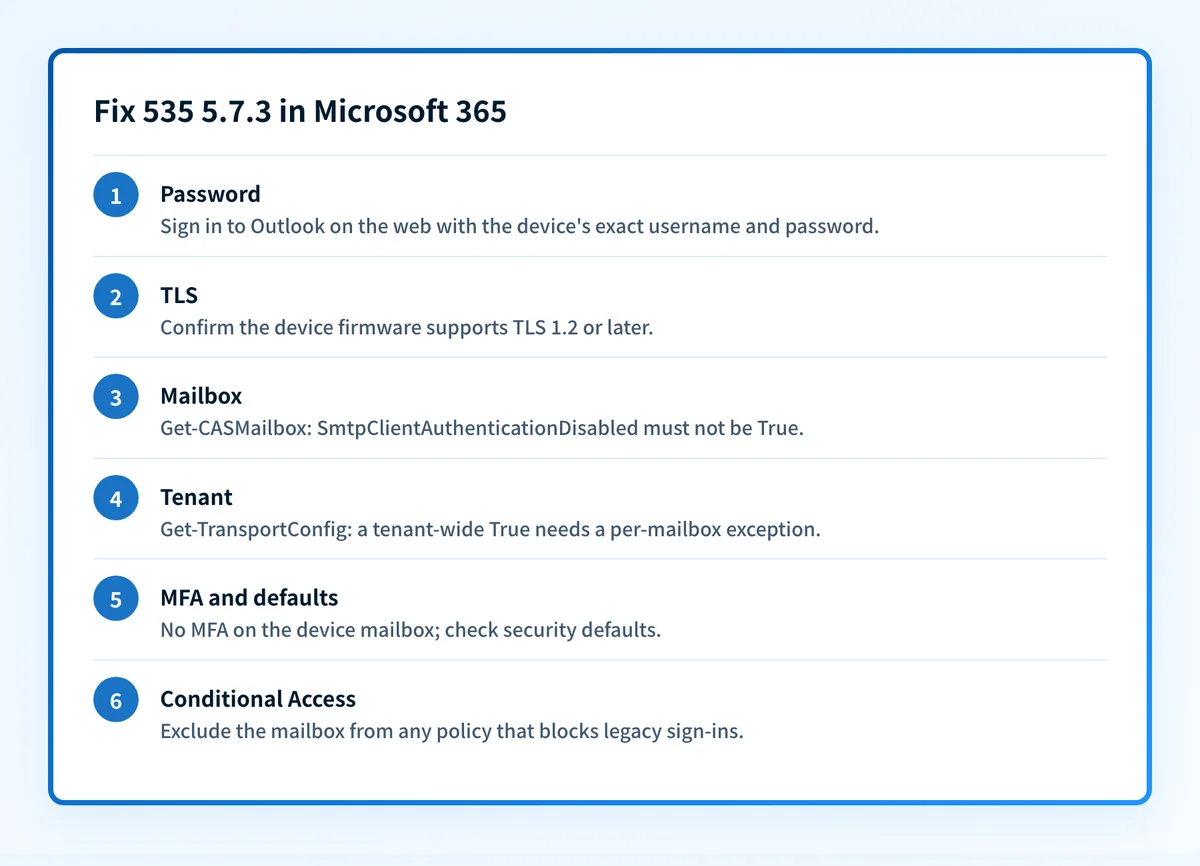
How to fix 535 5.7.3
Confirm the credentials and the TLS version first
Sign in to Outlook on the web with the exact username and password stored in the device, and send a test message. If that fails, fix the password before anything else. Then confirm the device firmware supports TLS 1.2 or later; Microsoft says client SMTP submission doesn't work without it. As a stopgap for a device stuck on TLS 1.0 or 1.1, Microsoft documents an opt-in:
Set-TransportConfig -AllowLegacyTLSClients $trueand the endpointsmtp-legacy.office365.com. It's less safe, so treat it as temporary while you replace or reconfigure the device.Sources: Microsoft: printers, scanners and LOB apps · Microsoft: set up a device to send email
Check SMTP AUTH on the mailbox
In Exchange Online PowerShell, run
Get-CASMailbox -Identity <EmailAddress> | Format-List SmtpClientAuthenticationDisabled. If it returns True, runSet-CASMailbox -Identity <EmailAddress> -SmtpClientAuthenticationDisabled $false. A blank value means the mailbox follows the organization setting. In the Microsoft 365 admin center the same switch is under Users > Active users > the user > Mail > Manage email apps > Authenticated SMTP.Check the organization-wide SMTP AUTH setting
Run
Get-TransportConfig | Format-List SmtpClientAuthenticationDisabled. True means SMTP AUTH is off for the tenant, and a per-mailbox setting of False overrides it for just that mailbox. That per-mailbox exception is the safer choice than turning SMTP AUTH back on for everyone.Check MFA, security defaults and Conditional Access
Microsoft's checklist for this error: turn off MFA on the licensed mailbox the device uses, check whether security defaults is enabled under Microsoft Entra ID > Properties > Manage security defaults, and exclude the mailbox from any Conditional Access policy that blocks legacy authentication under Microsoft Entra ID > Security > Conditional Access. Security defaults can't exempt one mailbox: Microsoft says that if it's enabled, SMTP AUTH is already disabled, and you need to turn security defaults off to use SMTP AUTH. Microsoft warns not to do that unless you understand the risks, so if security defaults is on, moving the device to SMTP relay is usually the better fix. A narrow exclusion for one dedicated mailbox is only possible with Conditional Access.
If the device can't meet these requirements, switch methods
Microsoft documents two methods that need no mailbox sign-in. SMTP relay through a connector reaches internal and external recipients. Direct send to your tenant's MX endpoint reaches internal recipients only, and Microsoft recommends it only as a last resort for legacy devices that can't use the other methods, requires SPF, DKIM and DMARC to be set up correctly for it, and says it's working on turning it off by default. Both are covered in Office 365 SMTP settings. Whichever path you choose, add its sending IP or service to your SPF record so the mail it sends passes authentication. The SPF checker shows what the record currently allows.
Sources: Microsoft: set up a device to send email · Microsoft: disable Basic authentication · Microsoft: SMTP AUTH Basic auth deprecation timeline · Microsoft: Basic auth retirement for SMTP AUTH · RFC 4954, section 6
Related free tools: SPF checker · Microsoft compliance checker · Email header analyzer
Why it matters for MSPs
For MSPs, 535 5.7.3 usually lands as a ticket that says the scanner stopped emailing, often the week after a client tenant got security defaults or a new Conditional Access baseline. Keep one dedicated, licensed mailbox per client for devices, give it a per-mailbox SMTP AUTH exception and a narrow Conditional Access exclusion, and record both in the client's documentation so the next baseline rollout doesn't break it again. In tenants on security defaults, which can't exempt a mailbox, move the device to SMTP relay instead. Where a device can move to SMTP relay through a connector, that removes the stored password entirely. Plan for the end of December 2026, when Microsoft turns SMTP AUTH Basic authentication off by default for existing tenants: list every client device that still signs in with a password before then. Palisade doesn't fix SMTP AUTH settings. What it does is read each client domain's DMARC reports, identify every source sending as that domain, and file the authentication problems it finds as tickets in ConnectWise, HaloPSA, or Autotask. Your own MSP domain is a free NFR domain.
Questions readers ask