Email deliverability Q&A
What is Microsoft SNDS?

By Samuel Chenard · CEO & Co-Founder, Palisade · Reviewed July 20, 2026
Microsoft SNDS (Smart Network Data Services) is Microsoft's free portal showing how Outlook.com rates mail from IP addresses you own. Per IP, per day, it reports filter results, complaint rates, and message volume. Its companion program JMRP forwards you a copy of every message an Outlook.com user marks as junk. Both are IP-based, not domain-based.
| At a glance | |
|---|---|
| What it is | Free Microsoft portal reporting Outlook.com's view of your sending IPs |
| Granularity | Per IP address, per day; no domain-level view |
| Data shown | Filter results (green, yellow, red), complaint rate, message volume for the IP |
| Minimum traffic | Data may be absent for IPs sending fewer than 100 messages that day |
| Retention | 90 days of daily data; aggregated around midnight PST |
| Companion program | JMRP: forwards the full message, with headers, of every user junk report |
| Cost | Free. Requires a Microsoft account and proof you control the IPs. |
SNDS is Microsoft's rough equivalent of Google Postmaster Tools, built years earlier and shaped very differently. You register the IP addresses, IP ranges, or ASNs you own, prove control of them, and Microsoft shows you how Outlook.com's filters rated the mail those IPs sent each day. Microsoft describes it as insight into "the health of your IP space as viewed by the Outlook.com system".
The defining design choice is that SNDS is IP-based, not domain-based. If you send through a shared ESP pool (Mailchimp, Klaviyo, most marketing platforms on standard plans), you cannot register those IPs because you do not control them; the platform does. SNDS is most useful when you run your own MTA, a dedicated IP, or you are an MSP or ISP responsible for a block of address space.
The portal itself moved in mid-2026. The long-standing sendersupport.olc.protection.outlook.com address now permanently redirects to Microsoft's new SNDS home on substrate.office.com, and JMRP enrollment now lives inside the new SNDS site. Old bookmarks still resolve; new documentation lives at the new address.
What SNDS shows for each registered IP
| Data point | What Microsoft reports | How to read it |
|---|---|---|
| Filter result | Green (spam under 10%), yellow (10% to 90%), red (over 90%), per IP per day | The single most important column; red means Outlook.com is junking most of your mail |
| Complaint rate | Share of delivered mail that Outlook.com users reported as junk | Microsoft notes more than 30% of IPs mailing Outlook.com stay under 0.3%; treat that as the bar |
| Message volume | Messages the IP sent to Outlook.com that day | A volume spike you did not send is the classic compromised-server tell |
| Trap hits | Count of messages sent to Microsoft-maintained accounts that never solicit mail | Removed from the Data Report as of July 22, 2026; Microsoft cautioned that transition-period counts should not be read as exact values |
| Sample messages | Excerpts of mail the filters flagged, for diagnosis | Useful for spotting which stream or campaign is triggering the filter |
Data is aggregated once a day at approximately midnight PST and kept for 90 days. Microsoft states that mail traffic and spam data may not be present for IPs that sent fewer than 100 messages on a given day, so low-volume senders often see empty days. All figures checked against Microsoft's SNDS FAQ on 2026-07-20; links in Sources.
Signing up: prove you control the IPs
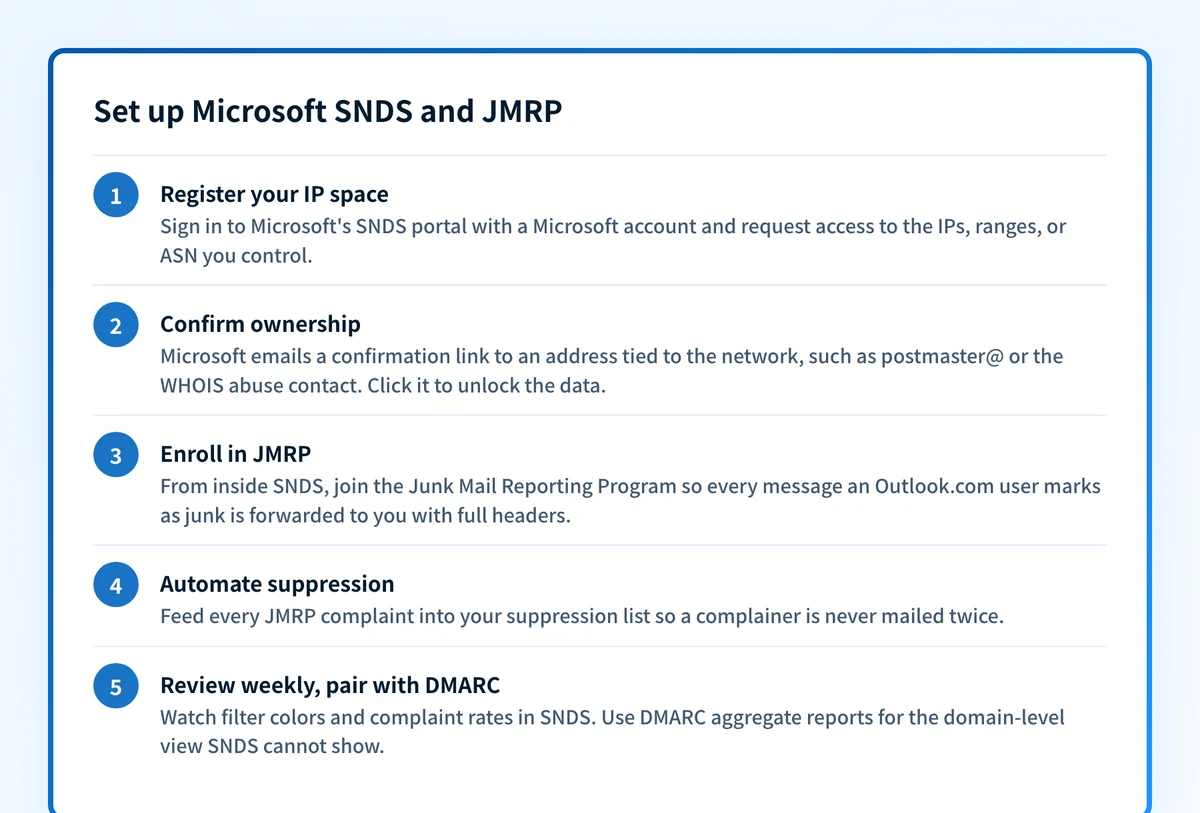
Registration is free but gated on ownership. You sign in with a Microsoft account and request access to "an IP, IP range, or Autonomous System Number (ASN) that you own". Microsoft then looks up who is responsible for that address space and offers a short list of authorization email addresses derived from it (WHOIS and abuse contacts, postmaster@, and similar). You pick one you can read, Microsoft mails it a confirmation link, and clicking the link completes access.
This is the step that stops most marketing teams cold: if your mail leaves from your ESP's shared pool, the authorization addresses belong to the ESP, not to you. That is not a bug. SNDS answers the question "how does Outlook.com rate this network?", and the network owner is the party who can act on it. If you are on shared IPs, your lever is authentication and list quality, and the reputation view that follows your domain across any IP is your DMARC aggregate data, not SNDS.
JMRP: the complaint feedback loop
JMRP (Junk Mail Reporting Program) is the second half of the package, and you enroll in it from inside SNDS. Microsoft describes it as "a free service to provide reports on junk email issues reported by Outlook.com users" which "returns the full message with headers of any email marked as 'junk' or 'phishing'". In practice: an Outlook.com user clicks Report junk, and a copy of that exact message lands at the reporting address you configured, typically within as little as 72 hours.
That per-message detail is something Google Postmaster Tools does not give you; Google shows an aggregate spam-rate line, while JMRP hands you the actual complained-about email. Wire the JMRP address into your suppression pipeline so every complainer is unsubscribed automatically. Continuing to mail someone who reported you as junk is how a yellow filter result turns red.
The limits: what SNDS will not tell you
SNDS has real blind spots, and knowing them saves you from staring at the wrong dashboard. It covers the consumer Outlook.com filter, not Microsoft 365 business tenants, whose Defender-based filtering makes its own decisions; a green SNDS day does not guarantee delivery to corporate Exchange Online mailboxes. It is daily-batch, so today's incident shows up tomorrow. It says nothing about your domain reputation, DKIM alignment, or which sending service produced the failing mail.
It is also observational only. SNDS shows you the score; it does not change it. If Outlook.com is actively rejecting or junking your mail right now, start with the dedicated walkthrough at /email-deliverability/why-is-outlook-blocking-my-emails, which covers Microsoft's requirements for senders (including the May 5, 2025 rule directing mail from 5,000-plus-message-per-day senders without SPF, DKIM, and DMARC to junk, with rejection to follow) and the fix order.
Reading SNDS signals
| What you see in SNDS | What it usually means | What to do |
|---|---|---|
| Filter result flips green to yellow or red | Content, list quality, or authentication degraded on that IP | Check JMRP complaints and DMARC reports from the same date range |
| Complaint rate above roughly 0.3% | Recipients did not expect the mail; list or consent problem | Tighten opt-in, suppress every JMRP complainer, slow the ramp |
| Volume spike you did not send | Compromised server, open relay, or abused web form on your network | Lock the host down first; reputation repair is pointless while it leaks |
| No data at all for an IP | Under 100 messages to Outlook.com that day, or the IP is not actually sending | Confirm the IP is your real egress; low-volume senders should not expect daily data |
| Green in SNDS but Outlook still rejects mail | Domain-level problem: authentication or Microsoft's sender requirements, not IP reputation | Run the Microsoft compliance check and read the bounce code against the SMTP reference |
If Microsoft's rejection notice includes a code such as 550 5.7.509 (unauthenticated) or 550 5.7.1 (policy block), match it in the SMTP error-code reference at /learning/smtp-error-codes for the verbatim string and the per-code fix. This page stays on the dashboards.
How to fix it
Check your Microsoft-specific compliance first
Run your sending domain through the free Microsoft compliance checker below. It tests your SPF, DKIM, and DMARC against Microsoft's published sender requirements in one pass, which covers the domain-side failures SNDS cannot see.
Run the check now
Enter your sending domain and the check runs instantly on the next page. Free, no signup.
Register your sending IPs in SNDS
Sign in at Microsoft's SNDS portal with a Microsoft account, request access to the IPs, ranges, or ASN you control, and confirm via the authorization email. If you cannot receive any of the offered addresses, the IPs are not yours to register; skip to DMARC data instead.
Enroll in JMRP and automate suppression
From inside SNDS, enroll the same IPs in the Junk Mail Reporting Program and point it at a monitored address. Feed every returned complaint into your suppression list automatically; a complainer mailed twice is a reputation problem you chose.
Set a weekly SNDS review, not a daily vigil
Data lands once a day and persists for 90 days, so a weekly pass catches trends without noise. Watch for filter-color changes, complaint rates drifting toward 0.3%, and any volume you cannot account for.
Pair SNDS with DMARC aggregate reports
SNDS shows one receiver's view of IPs you own; DMARC reports show every receiver's view of every IP sending as your domain, including the ones you cannot register. Together they cover both halves of the reputation picture.
Related free tools: IP reputation checker · Domain reputation checker · DMARC checker
SNDS is a window; enforcement is the fix
SNDS and JMRP are pure monitoring: they tell you, a day later, how one provider judged mail from IPs you happen to own. They do nothing about the spammer using your domain from an IP you have never seen, and that spoofed traffic drags down the domain reputation that follows you across every pool and provider.
The durable fix is DMARC at p=reject with every legitimate sender authenticated: receivers drop the spoofed mail outright, your SNDS complaint rate stops absorbing blame for mail you never sent, and the dashboards go back to measuring what you actually send.
DMARC software that does the work
Palisade's AI agent carries every domain to p=reject, with you approving each step. The agent's fixes and hosted SPF, DKIM and DMARC records are part of the full product, which you can try before any charge.
Audit any domain free, no card needed. A card starts the 15-day trial.
Why it matters for MSPs
For an MSP, SNDS is a per-network tool, so it maps cleanly onto clients who run their own mail infrastructure and not at all onto clients on shared ESP pools. Register the ranges you actually manage (you can register a whole ASN once, rather than per-client IPs), route JMRP complaints into your ticketing so a complaint spike opens a ticket against the right tenant, and treat SNDS as the Outlook-side early warning next to each client's DMARC data. Palisade covers the domain half across the whole book: hosted SPF, DKIM, and DMARC records per client domain, continuous report monitoring, automatic progression to p=reject, and native ConnectWise, HaloPSA, and Autotask integrations so the alert lands in your PSA. Your own MSP domain runs free as an NFR domain.
Questions readers ask
Frequently asked questions
Is Microsoft SNDS free?
What is the difference between SNDS and JMRP?
Is SNDS the same as Google Postmaster Tools?
Why does SNDS show no data for my IP?
What complaint rate is acceptable in SNDS?
Did Microsoft remove spam trap data from SNDS?
Does SNDS cover Microsoft 365 business mailboxes?
Sources
Every benchmark above was verified against the vendor's own documentation on the date shown.
- SNDS provides detailed data about individual IPs; trap hit counts left the Data Report starting July 22, 2026, and automated access URLs beginning with https://sendersupport.olc.protection.outlook.com/snds/ are deprecated by June 22, 2026 (the path now 308-redirects to substrate.office.com, verified live 2026-07-20). Microsoft SNDS (new portal home) (checked 2026-07-20)
- Filter-result colors map to spam under 10% (green), 10% to 90% (yellow), over 90% (red); data may be absent below 100 messages per day; daily aggregation at approximately midnight PST with 90-day retention; registration covers an IP, IP range, or ASN you own via email authorization; more than 30% of IPs sending to Outlook.com keep complaint rates under 0.3%. Microsoft SNDS FAQ (checked 2026-07-20)
- SNDS shows the health of your IP space as viewed by the Outlook.com system; JMRP is a free service that returns the full message with headers of any email marked as 'junk' or 'phishing', with feedback typically within as little as 72 hours; enrollment is through SNDS. Microsoft Postmaster: Services for Senders and ISPs (checked 2026-07-20)
- Since May 5, 2025, Outlook.com directs mail from senders of more than 5,000 messages per day without SPF, DKIM, and DMARC to junk, with rejection to follow. Microsoft Postmaster (Outlook.com sender requirements) (checked 2026-07-20)
- Google's sender guidelines require keeping spam rates reported in Postmaster Tools below 0.3%, recommending senders stay below 0.10% and avoid ever reaching 0.30%. Google: Email sender guidelines (checked 2026-07-20)