Email blocklist · MxToolbox
MxToolbox blacklist check: how serious is a listing?

By Samuel Chenard · CEO & Co-Founder, Palisade · Reviewed July 19, 2026
An MxToolbox blacklist check scans your sending IP or domain against 100+ DNS blocklists and marks each one pass or listed. Most of those lists barely affect delivery: only a few, chiefly Spamhaus, Cloudmark CSI, and Barracuda, are widely enforced. Read the result by that lens, then fix the cause with authentication instead of chasing every red row.
| MxToolbox at a glance | |
|---|---|
| Operator | MxToolbox |
| Type | IP blocklist (DNSBL) |
| IP lookup zone | None of its own: queries 100+ third-party DNSBLs |
| Query method | Free web tool: enter a server IP or a domain; it queries 100+ DNSBLs in one pass and returns pass or listed for each. MxToolbox also sells a paid Delivery Center that adds ongoing monitoring. |
| Who uses it | Nobody enforces MxToolbox itself. It is a diagnostic aggregator that admins and MSPs run to see which real blocklists hold an IP or domain; receivers query those underlying lists, not MxToolbox. |
| Reach | Depends entirely on which list is red. A Spamhaus, Cloudmark CSI, or Barracuda listing can hurt delivery widely; most of the other 100+ lists on the scan are barely queried and change little. |
| Removal cost | Free on every list (paid delisting offers are scams) |
Check if you're on MxToolbox
MxToolbox does not list anyone. Its blacklist check queries 100+ DNS blocklists and reports which ones flag your mail server. You can run the same multi-list scan free below: enter the IP your mail actually leaves from, or a domain, which resolves to that IP. The list that matters is the one a real receiver enforces, so note which lists come back red, not just how many.
Is your IP or domain on MxToolbox?
Enter your sending IP or domain and the check runs instantly on the next page. Free, no signup.
Related free tools: IP reputation · Domain reputation · DNS lookup · Email security score
What is MxToolbox?
MxToolbox is a mail diagnostics company, and its Blacklist Check is one of the most-used free tools in email operations. It runs no blocklist of its own and it does not decide whether your mail is delivered. You give it a sending IP or a domain, it queries a large set of third-party DNS blocklists (DNSBLs) in a single pass, and it shows a pass or listed result for each. In MxToolbox's own words, the tool tests your server "against over 100 DNS based email blacklists."
The number is the catch. Reporting against 100+ lists looks thorough, but those lists are nowhere near equal. A handful are queried by a large share of the world's receivers and can genuinely block your mail; most are small, regional, single-operator, or effectively dormant feeds that almost no mail server consults. A red mark tells you a list holds your IP. It does not tell you whether anyone acts on that list. The skill is reading which rows matter, which is what the rest of this page walks through.
The MxToolbox lists, and what each one covers
MxToolbox is not one list. Identify the exact zone that flagged you: it decides what you fix and how you get removed.
| List | What it covers | Where it's queried | Getting off |
|---|---|---|---|
Spamhaus Spamhaus: ZEN and DBL IP | The most widely enforced lists on the scan. ZEN bundles Spamhaus's IP lists; the DBL lists domains. A Spamhaus hit is the red row you never ignore. | zen.spamhaus.org (IPs), dbl.spamhaus.org (domains) | Self-service removal Self-service and free at check.spamhaus.org once you stop the cause. See the Spamhaus guide for the exact per-list path. |
Cloudmark CSI Cloudmark Sender Intelligence IP | An IP reputation system that overlaps with IP blacklists but weighs a wider range of signals: spam-trap hits, complaint volume, reverse-DNS and IP-block reputation, and traffic over time. It feeds major mailbox providers, so a listing reaches real inboxes. | No public zone: a reputation feed licensed to providers | Removal web form Self-service reputation reset at csi.cloudmark.com/en/reset once the sending problem is fixed. |
Barracuda BRBL Barracuda Reputation Block List IP | A standard IP DNSBL run by Barracuda Central, listing IPs seen sending spam. It is enforced by Barracuda's own gateways and other mail systems, so it carries real weight. | b.barracudacentral.org | Removal web form Self-service removal form (IP, email, phone). Barracuda says requests are typically processed within about 12 hours with a valid explanation. |
SpamCop SCBL SpamCop Blocking List IP | Lists IPs reported by SpamCop users and spam traps. Used by some receivers and filters, more volatile than Spamhaus, and a listing usually clears on its own. | bl.spamcop.net | Expires automatically Time-based: SpamCop says listings result in quick, automatic delisting once reports stop. No fixed period is published on the SCBL page. |
Why your IP or domain got listed
A listing is a reputation verdict. These are the situations MxToolbox lists senders for:
Real spam left your sending IP, whether you sent it or a compromised account, script, or device did. This is what puts an IP on Spamhaus, Cloudmark CSI, or Barracuda.
Your domain can be spoofed because DMARC is not at enforcement, so forged mail carries your name and can land your domain on a domain list.
SPF, DKIM, or DMARC is missing or misaligned, so receivers and the lists' automated detection read your mail as suspicious.
You share or recently inherited a sending IP that arrived with another sender's baggage.
You show up only on a low-impact list (a small regional feed, or UCEPROTECT Level 2 or 3), which flags whole allocations or networks rather than your own behaviour.
Most common reasons senders land here, ranked
| Likely cause | What's happening |
|---|---|
| A real spam incident put you on a major list | The listing you should worry about. A phished mailbox, a vulnerable web form, or a hijacked host sends spam from your IP, and a widely enforced list like Spamhaus, Cloudmark CSI, or Barracuda picks it up. |
| Your domain is not enforced, so anyone can send as you | If your domain has no DMARC policy at enforcement, spammers can spoof it. Their spam carries your domain and can list it, which drags your real mail down. This is the seam Palisade closes. |
| SPF, DKIM, or DMARC is missing or misaligned | Unauthenticated mail looks like spam to receivers and to the lists' automated detection. Gaps in SPF and DKIM, or DMARC stuck at p=none, make a listing easy to earn and easy for abuse to hide behind. |
| A shared or recycled IP arrived with baggage | On shared sending infrastructure, another tenant's spam can list the IP you also use. A freshly allocated IP can inherit an older listing from its previous owner. |
| It is a cosmetic listing on a list nobody enforces | UCEPROTECT Level 2 lists whole allocations and Level 3 whole ASNs, so a clean IP can appear listed because a neighbour on the same provider network misbehaved. Delivery is usually untouched. |
How to delist from MxToolbox
You do not delist from MxToolbox: it only reports what other blocklists say, and its help pages send you to each list's own steps. Removal happens on the list that flagged you, and only the handful receivers actually enforce are worth the effort. Fix the cause first or the listing returns; MxToolbox's own guidance is to document the remediation you did before you ask any operator for removal.
Run the scan and note which lists are red
Use the free multi-list blocklist check below on your sending IP (or a domain). Write down the exact lists that flag you, not just the count. Only some of them matter.
Separate the lists that matter from the noise
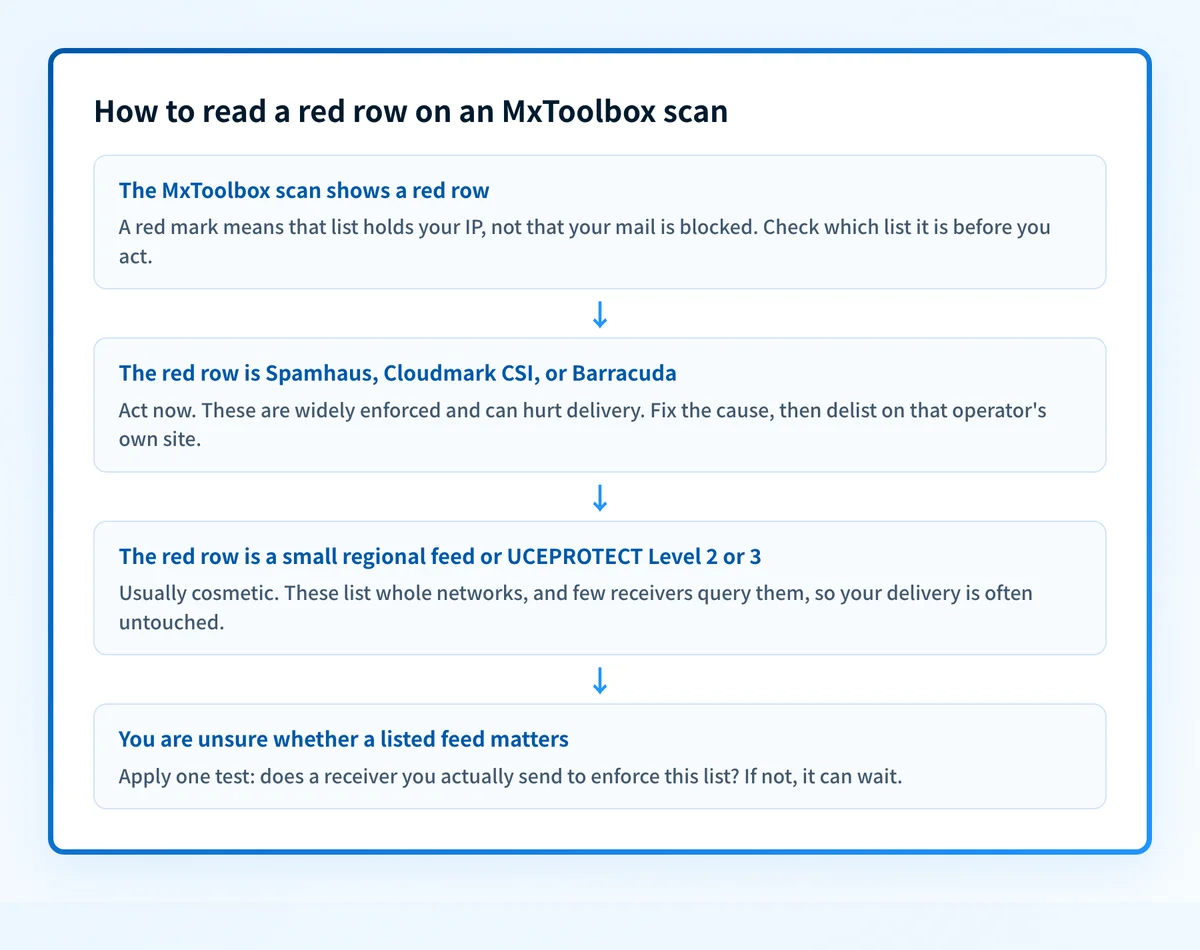
Group the red rows. Spamhaus, Cloudmark CSI, and Barracuda are widely enforced and worth acting on. Small regional feeds and UCEPROTECT Level 2 or 3 usually change nothing about your delivery.
Stop whatever caused the listing
Reset a compromised mailbox, patch or close an open relay or vulnerable form, and clean any infected host. Operators re-list the moment the abuse resumes, so fix the source before requesting removal.
Authenticate every sender so it cannot recur
Publish correct SPF, sign with DKIM on each service that sends as you, and set DMARC. Verify with the free SPF, DKIM, and DMARC checkers, then move DMARC to
p=rejectso spoofed mail stops earning listings in your name.Remove the listing on each list that matters
Work each operator's own path: Spamhaus and Barracuda are self-service, Cloudmark CSI is a reputation reset, and SpamCop clears on its own once reports stop. Removal is free everywhere; anyone charging a fee to delist you is running a scam.
Monitor so the next listing is an alert, not a surprise
Keep watching the IP and the domain, and keep DMARC reports flowing, so a new compromise shows up early instead of as a wave of bounces and a fresh red row.
Removal is free
Every legitimate blocklist removes you for free. Spamhaus puts it plainly: "There is never any charge or fee associated with removing any Spamhaus listing. Any offer from anyone to remove any Spamhaus listing for a fee is a scam." Even UCEPROTECT, the list people most often pay to escape, expires on its own: it states that "Every IP listed will expire 7 days after the LAST abuse is detected, and FREE of charge," and its paid option only skips that wait. If a service asks you to pay to clear an MxToolbox result, walk away and use the operator's free path.
Open check.spamhaus.orgWhen a MxToolbox listing isn't your fault
A red row on the scan is not proof your mail is in trouble, and it is not always about your own sending. MxToolbox reports 100+ lists, and most are small or single-operator feeds that few receivers query. UCEPROTECT is the clearest example: Level 1 lists single IPs, but Level 2 lists whole allocations and Level 3 whole ASNs, so a spotless IP can show as listed because another sender on the same provider network misbehaved. On shared sending infrastructure the flagged IP may belong to a neighbour, not you. Read every red row by one test: does a receiver you actually send to enforce this list? For Spamhaus, Cloudmark CSI, and Barracuda the answer is usually yes; for most of the long tail it is effectively no.
How to stay off MxToolbox
Authenticate everything: SPF that lists every real sender, DKIM signing on each service, and DMARC that you actually move to enforcement.
Enforce DMARC at
p=rejectso nobody can spoof your domain onto a domain list in the first place.Send from static IPs meant for mail, with correct reverse DNS and a matching HELO, not from end-user or dynamic space.
Watch your DMARC reports and your IP and domain reputation continuously, so a compromise surfaces as an alert, not a listing.
Keep complaint rates and list hygiene tight, and warm or retire sending IPs deliberately.
The real fix: enforce authentication, don't just monitor
A blacklist check is a snapshot. It can tell you an IP is listed on Spamhaus this morning; it cannot stop the spoofing and unauthenticated sending that put you there, and it will show the same red row next week if the cause is still open. The lists that matter list you for the same reason almost every time: mail leaves your domain without being authenticated, or your domain is easy to spoof because it is not enforced. Enforcement closes that gap. Host correct SPF, DKIM, and DMARC, watch the reports for senders you missed, and move every domain to p=reject so receivers drop forged mail instead of listing yours.
DMARC software that does the work
Palisade's AI agent takes domains all the way to enforcement: hosted SPF, DKIM, DMARC, and MTA-STS records on paid plans, DMARC reports monitored continuously, and every policy step drafted for your approval on the way to p=reject. The full product is open for a 15-day trial, and nothing is charged until it ends.
15-day full-product trial. Nothing is charged until it ends.
Watching MxToolbox across every client domain
MSPs live in MxToolbox's blacklist check, one client at a time, and a single scan only covers one IP or domain at that moment. A book of clients, each one compromise away from a Spamhaus or Barracuda listing, does not fit that workflow. Palisade hosts and manages SPF, DKIM, and DMARC for every client domain, surfaces unauthenticated senders in the reports before they turn into abuse, and carries each domain to p=reject, with your team approving each step. It watches every domain from one console and opens tickets in ConnectWise, HaloPSA, and Autotask, and your own MSP domain is a free NFR domain to prove it on.
Questions readers ask
Frequently asked questions
Is an MxToolbox blacklist listing serious?
How many blacklists does MxToolbox check?
Is the MxToolbox blacklist check free?
How do I get removed from a blacklist MxToolbox found?
Why does MxToolbox show me listed when my mail still delivers?
Should I pay a service to clear my MxToolbox blacklist result?
What is the difference between MxToolbox and a real blacklist?
Sources and last verified
Every MxToolbox fact on this page is drawn from the operator's own documentation, last checked 2026-07-19. Blocklist policies change; if a detail looks off, the linked source is authoritative.
- MxToolbox's Blacklist Check tests a server against more than 100 DNS-based blocklists and accepts a server IP or a domain.“The blacklist check will test a mail server IP address against over 100 DNS based email blacklists.”mxtoolbox.com · checked 2026-07-19
- MxToolbox does not remove listings itself; each blocklist has its own detail page with its own steps.“Click on the gray 'Details' button for any blocklists you are found on. This will take you to a custom Problem Details page for that specific blocklist.”knowledgebase.mxtoolbox.com · checked 2026-07-19
- MxToolbox tells senders to document the remediation they performed before requesting delisting.“You must explain the actions you have taken to check your system.”knowledgebase.mxtoolbox.com · checked 2026-07-19
- Spamhaus's ZEN zone lists IP addresses only, so domains are checked on the separate DBL.“Due to its IP nature, ZEN does not provide any protection against malicious or suspicious domains.”www.spamhaus.org · checked 2026-07-19
- Spamhaus removal is always free and any paid-delisting offer is a scam.“There is never any charge or fee associated with removing any Spamhaus listing. Any offer from anyone to remove any Spamhaus listing for a fee is a scam.”www.spamhaus.org · checked 2026-07-19
- Cloudmark Sender Intelligence (CSI) is an IP reputation system that overlaps with IP blacklists but weighs a wider range of reputation signals.“Cloudmark Sender Intelligence (CSI), which has functionality that overlaps with email IP Blacklists, but also includes a wider range of reputation information about the senders and IPs from which messages are originating.”www.cloudmark.com · checked 2026-07-19
- A sender can request a self-service reputation reset for an IP address in CSI at the Cloudmark reset portal.csi.cloudmark.com · checked 2026-07-19
- The Barracuda Reputation Block List is a standard IP DNSBL queried under b.barracudacentral.org after registering the querying resolver.www.barracudacentral.org · checked 2026-07-19
- Barracuda BRBL removal is a self-service form (IP, email, phone) processed within about 12 hours with a valid explanation.“Removal requests are typically investigated and processed within 12 hours of submission if provided with a valid explanation.”www.barracudacentral.org · checked 2026-07-19
- The SpamCop Blocking List lists IPs reported by SpamCop users and delists automatically once reports stop; no fixed period is published on the SCBL page.“The SCBL is time-based, resulting in quick and automatic delisting of these sites when reports stop.”www.spamcop.net · checked 2026-07-19
- UCEPROTECT Level 1 lists single IPs, Level 2 lists allocations, and Level 3 lists whole ASNs; listings expire free after seven abuse-free days, with a paid option only to skip the wait.“Every IP listed will expire 7 days after the LAST abuse is detected, and FREE of charge.”www.uceprotect.net · checked 2026-07-19