Should you DIY DMARC or use an automated service?
 ChatGPT
 Claude
 Gemini
 Perplexity
 Grok
GrokIn brief
DIY DMARC or an automated service? Compare the real effort, hidden costs, and risks of each so you can pick the right path to p=reject enforcement.
DMARC is an email authentication protocol that builds on SPF and DKIM, letting domain owners set policies for how unauthenticated mail should be handled. The question most teams face is not whether to deploy it, but how: do it by hand, or use a service that automates the work. The short answer is that automation wins in most cases because it saves time, reduces errors, and provides the continuous monitoring that keeps a domain at enforcement, but the DIY path is a legitimate choice when the setup is small and static.
What DIY DMARC actually involves
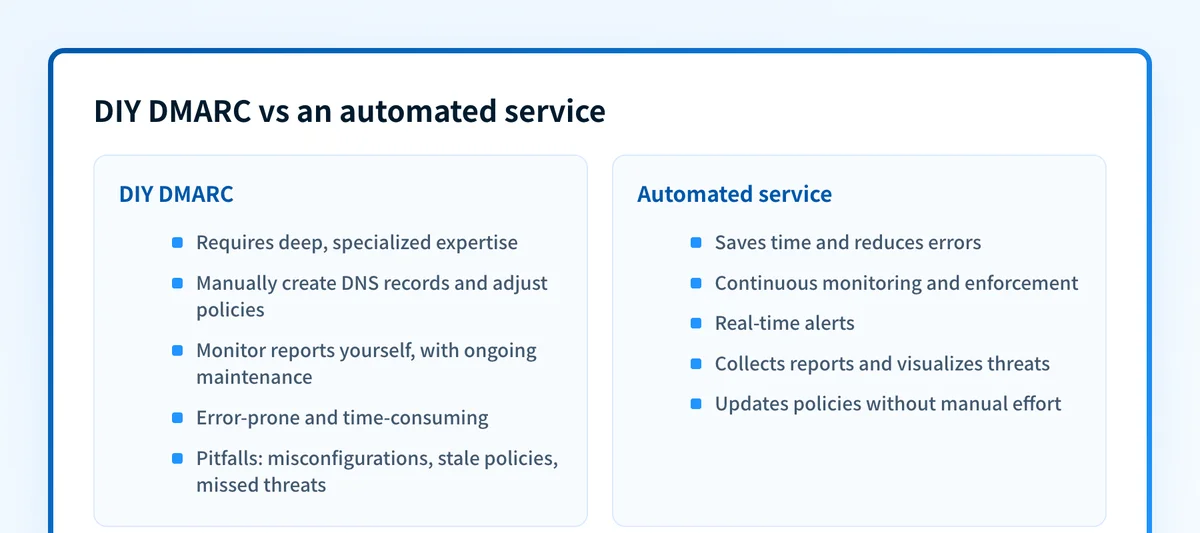
Doing DMARC yourself is not a single task. To reach and hold a p=reject policy manually, you take on an ongoing cycle:
- Publish the records. Add DMARC, SPF, and DKIM to DNS, and get the syntax exactly right. You can generate a valid record with the DMARC generator and confirm it with the DMARC checker.
- Collect and read reports. Aggregate reports arrive as compressed XML from dozens of receivers. Someone has to aggregate, parse, and interpret them, see how to understand DMARC reports for what that entails.
- Authenticate every sender. Each legitimate service (mailbox provider, marketing platform, help desk, invoicing tool) must be brought into SPF and DKIM alignment before you can safely tighten policy.
- Maintain it forever. New vendors, rotated DKIM keys, and expired records all break authentication silently. Enforcement is a state you maintain, not a project you finish.
When DIY makes sense
DIY is reasonable when you own a single domain, know every service that sends mail from it, and rarely change that list. If you can name your senders from memory and you are comfortable reading XML reports, manual DMARC can work, and it costs nothing but your time.
The trouble is that most environments are not static. Marketing adds a new platform, a subsidiary spins up a subdomain, or a DKIM key rotates, and the person who understood the setup has moved on. Manual DMARC tends to drift back toward p=none, or worse, silently blocks legitimate mail after a change no one connected to authentication.
What an automated service adds
An automated DMARC service turns that ongoing cycle into a managed workflow. Instead of parsing XML by hand, you get readable reporting, sender identification, and guidance toward enforcement. The strongest tools go further and carry the remediation work forward rather than just visualizing the problem. Palisade's AI DMARC Agent, for example, turns report evidence into prioritized tasks with the recommended fix attached, while a human approves every change before it ships. That ongoing work is what keeps business email compromise and spoofing risk down over time rather than at a single point.
Automation is most valuable exactly where DIY is weakest: many domains, many senders, and frequent change. It removes the single-person dependency and the "we set it and forgot it" failure mode.
How to evaluate a specific platform
Once you know you want a service, evaluate how it turns reports into action, what it requires from your DNS workflow, and which limits affect your domains. Our dmarcian review examines one platform's documented modules, tiers, and publishing model, and our roundup of the best DMARC tools for MSPs compares several options side by side so you can decide whether one fits before starting a trial.
At a glance
Quick Takeaways
- DMARC builds on SPF and DKIM to protect your domain from spoofing.
- DIY DMARC requires specialized knowledge and ongoing effort, and works best for a single domain with a fixed sender list.
- Automated services provide continuous monitoring, sender identification, and guidance to enforcement.
- Common DIY pitfalls: misconfigurations, stale policies, silent breakage after a change, and missed threats.
- Palisade's platform simplifies setup, monitoring, and remediation across one domain or thousands.
Additional Resources
If your DNS is already on Cloudflare, our Cloudflare DMARC comparison covers its reporting workflow and when a dedicated DMARC operations platform is the better fit, and adding the record in Cloudflare covers the setup itself.
Compare DMARC tools and providers, or get started with Palisade to move your domains toward enforcement.
Related reading
Questions readers ask
Frequently Asked Questions
What is DMARC and why does it matter?
DMARC lets you define how receiving servers should treat email that fails SPF or DKIM checks, protecting your brand from phishing and spoofing while giving you visibility into who sends as your domain.
Can I set up DMARC without any tools?
Technically yes, but you will manually create DNS records, aggregate and read compressed XML reports, and adjust policies as senders change. Tasks that are error-prone and time-consuming at any real scale.
How does an automated DMARC service help?
It continuously collects and interprets reports, identifies your sending sources, and guides policy changes, so you reach and hold enforcement without parsing reports by hand.
What resources does Palisade provide?
Palisade offers a free DMARC health check, continuous monitoring, and step-by-step guidance to full enforcement. Check your DMARC health with the Email Security Score.
Is there a cost to using Palisade?
Yes. IT-team plans are flat monthly prices based on email volume with 2–20 set-up domains by tier; adding domains to monitor is free and unlimited. MSPs receive quoted, portfolio-based per-client-domain pricing with a monthly minimum and no client email metering; Enterprise pricing is custom.

Written by
Samuel ChenardCEO & Co-Founder, Palisade
Samuel Chenard is the CEO and co-founder of Palisade, agentic DMARC software for IT teams and MSPs, from one domain to thousands.
More from Samuel →