dmarcian review: what it does and who it fits
 ChatGPT
 Claude
 Gemini
 Perplexity
 Grok
GrokIn brief
An evidence-based dmarcian review: the platform modules, what each tier includes, which features are gated to Enterprise, and the sender profiles it fits.

dmarcian is a DMARC monitoring platform that turns aggregate reports into a per-source view of who sends as your domains, then recommends the SPF and DKIM changes needed to reach enforcement. Its own publishing guide directs customers to create the DMARC record in their DNS hosting provider. Plans run from a free non-business tier to published tiers metered by both active domains and monthly message volume, with domain discovery, API access, and single sign-on reserved for Enterprise. Figures below were checked on 28 July 2026.
At a glance
Quick takeaways
- dmarcian's core value is report interpretation: Domain Overview, Detail Viewer, Source Viewer, and Alert Central turn raw aggregate XML into per-source authentication status and remediation guidance.
- dmarcian's publishing guide directs customers to add the DMARC TXT record at their DNS provider. That deployment model is worth checking against the DNS workflow you want.
- Pricing is metered on two axes at once, active domains and DMARC-capable messages per month, so a small domain count with heavy volume can cost the same as a large portfolio.
- Automatic Domain Discovery, the API, and single sign-on are documented as Enterprise features, so multi-domain automation arrives at the top tier rather than the middle.
- Report history is tiered too, from one month on the free plan to unlimited on Enterprise, which matters because DMARC problems often surface over weeks.
- A free 30-day trial of the paid plans requires no payment method up front, so the platform can be evaluated against your own report volume before committing.
Who this comparison is for
This review is for someone evaluating dmarcian on its own merits: an IT lead, a deliverability owner, or an MSP technician who has decided that reading raw DMARC XML by hand does not scale and now wants to know what this specific platform does, what it gates behind which tier, and where it stops.
It assumes you already know why you want DMARC reporting. If you are still deciding whether to interpret reports yourself or hand that to a service, start with whether to run DMARC yourself or use an automated service and come back once that is settled.
If you have already chosen to leave dmarcian and want to know how a switch works in practice, that is a different question with its own page: see how a migration to Palisade actually works.
What dmarcian does
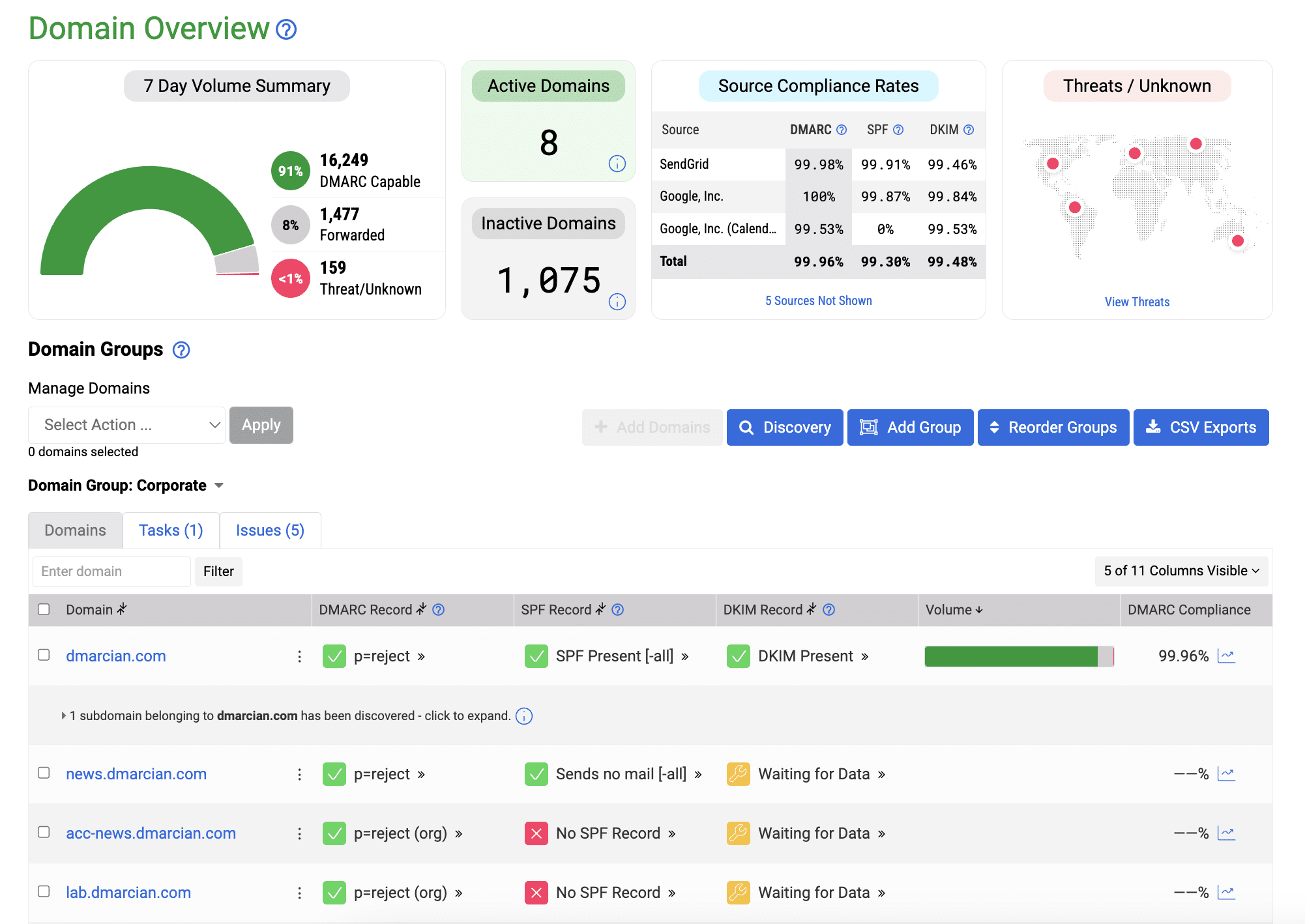
dmarcian's DMARC Management Platform documentation describes four named modules and what each one delivers.
Domain Overview is described as a centralized command center across a domain portfolio. It summarizes authentication status, shows where abuse attempts originate, and displays domain health and compliance status.
Detail Viewer is the granular layer: a source-by-source breakdown, analysis of authentication issues, detailed compliance reporting, and step-by-step remediation guidance.
Source Viewer consolidates DMARC-capable sending sources across domains and domain groups, automatically categorizes legitimate versus suspicious sources, and produces automated recommendations for SPF and DKIM configuration adjustments.
Alert Central delivers real-time customizable alerts for domain events, and can send them over email, Slack, Teams, or webhooks.
Alongside the platform, dmarcian publishes a set of free diagnostic tools, including a DMARC Domain Checker, DMARC Inspector, DMARC Record Wizard, SPF Surveyor, DKIM Inspector and Validator, BIMI tools, and an XML to Human Converter. The same page lists deployment, onboarding, support, and consultation services, and names individuals and small businesses, organizations and enterprises, and MSPs and IT agencies as its audiences.
One boundary is worth stating carefully because it shapes every comparison you will make. dmarcian's DMARC publishing guide tells the operator to access the domain's DNS hosting provider and publish the DMARC TXT record there. Its platform documentation also describes remediation guidance, automated recommendations, policy recommendations, and risk scoring. It does document more than pure reporting at the subdomain layer: Intelligent Subdomain Management detects new subdomains and offers "subdomain risk scoring, automated policy inheritance options and bulk configuration tools." The public page does not explain whether those options write DNS, so confirm that directly if hands-off subdomain policy matters to you.
What each tier includes
dmarcian's pricing page publishes the current structure below, checked on 28 July 2026. Prices change, so confirm current figures before you budget.
Plan         Monthly   Yearly    Domains   Messages/month   History     Users       Domain groups
Personal     $0        $0        2         1,250            1 month     1           1
Basic        $24       $19.99    2         100,000          3 months    1           1
Plus         $240      $199      8         1,000,000        1 year      3           3
Enterprise   $600      $499      15        5,000,000        unlimited   unlimited   unlimited
Custom       not publicly priced
Prices are USD, with stated parity for CAD and EUR. The yearly column is the effective monthly rate when billed annually, and dmarcian labels the domain-group allowances "standard" on every tier below Enterprise. Personal is restricted to non-business domains such as those hosting family photos or hobbies, so it is an evaluation and personal-use tier rather than a free business plan. All paid plans include a 30-day trial, which dmarcian states does not require a payment method unless you decide to continue.
The detail that catches people out is the double meter. Every tier caps both active domains and DMARC-capable messages per month, and you are held to whichever ceiling you hit first. A company with two domains sending a million messages a month is not a Basic customer despite the domain count. Overage pricing for message volume is referenced but not published, so model your own volume before committing.
How the options were evaluated
To keep this assessment checkable rather than impressionistic, dmarcian was read against five criteria, each answered only from its own current documentation.
Report interpretation. Does the product turn aggregate XML into a per-source view an operator can act on? Documented and strong: this is the core of Domain Overview, Detail Viewer, and Source Viewer.
Path to enforcement. Does it tell you what to change to reach a stricter policy safely? The policy values themselves are defined by RFC 9989, which sets out p=none, p=quarantine, and p=reject and the identifier alignment a message must satisfy. dmarcian documents remediation guidance, SPF and DKIM recommendations, subdomain policy recommendations, and a guide for publishing the DMARC record through the domain's DNS provider.
Portfolio scale. How well does it handle many domains? Documented, with a caveat: domain groups are published per tier, from one on the lower plans to unlimited on Enterprise, and Automatic Domain Discovery is one of the three features marked Enterprise-only, so the discovery step that helps large portfolios arrives at the top tier. Bulk configuration tools are described without a tier marker.
Integration and access control. API access and single sign-on are documented as Enterprise features. The pricing grid separately lists two-factor authentication on all four subscription tiers and User Access Controls on Plus and Enterprise, so access controls should be assessed by the specific control you need rather than treated as one Enterprise-only bundle.
Cost predictability. Documented and mixed: published tier prices are a real advantage, while the twin domain and volume meters plus unpublished overage rates make the top of a tier harder to forecast.
Two adjacent standards are worth separating from the platform page, because the pricing grid documents more than the platform page does. TLS Reporting is a published plan feature on all four subscription tiers, including the free Personal plan, and its own page states that every dmarcian account gets a unique SMTP TLS reporting address. BIMI Inspector and Builder is likewise published across all four tiers. Neither is a gap, even though the platform page does not describe them. MTA-STS is genuinely absent from both pages.
Three things are deliberately recorded as not publicly documented rather than as missing features: MTA-STS, the multi-tenant or per-client specifics for MSPs (although MSPs are named as an audience), and both Custom-tier pricing and volume overage rates. Absence from a web page is not evidence a product cannot do something, and this review does not treat it that way.
Where dmarcian fits well
It fits a team whose main problem is comprehension. If you have DMARC records published, reports arriving, and no clear picture of which of your senders are failing alignment, dmarcian's per-source view is squarely aimed at that and its published pricing lets you budget without a sales call.
It also fits an organisation that wants outside help rather than only software, given the separately sold deployment, onboarding, and consultation services.
Where it may not fit
Three profiles should look carefully before committing.
High volume on few domains. The message meter, not the domain count, will set your tier. Check your monthly DMARC-capable volume against the ceilings above before assuming a lower plan applies.
Teams that need API or SSO early. Both are documented as Enterprise features. If programmatic access or SAML is a requirement rather than a nice-to-have, that requirement sets your tier regardless of how many domains you run.
Long diagnostic windows on lower tiers. Three months of history on Basic is workable, but intermittent authentication failures from a quarterly campaign or a seasonal sender can fall outside that window.
How to choose
Decide on the two axes that actually move the cost and the outcome, in this order.
First, measure your real monthly DMARC-capable message volume and count your active sending domains. Whichever ceiling you reach first determines your tier on any volume-metered platform, dmarcian included, so this number decides your budget more than a feature list does.
Second, decide which DNS operating model you want. dmarcian's public guide directs the operator to publish a DMARC TXT record at the DNS provider. Palisade offers two documented paths: with Hosted DMARC, it publishes and maintains the DMARC record through CNAME delegation after the operator reviews and applies the update; with external DNS, the operator copies the generated record to the DNS provider. dmarcian's subdomain page lists automated policy inheritance options without explaining whether they write DNS, so verify that directly if hands-off subdomain policy is what you are shopping for.
Palisade can be assessed against the same operational criteria only where public evidence is available. Its DMARC Agent guide documents report-based authentication tickets with affected-source details and recommended actions, while Hosted DMARC documents a delegated-record path. This review does not make a portfolio-scale, access-control, or plan-price comparison for Palisade because those terms are outside the evidence collected here. The useful comparison is which product gives your team a clear next action and a DNS workflow you can operate safely.
If your answer is that you want published pricing, strong report visualisation, and optional professional services, dmarcian is a well-documented fit. If your answer is that you want the report-to-action step to be shorter and you do not want domain discovery or API access gated to a top tier, it is worth checking alternatives against the same five criteria above rather than against a feature grid.
Check your own domain before you shortlist any platform
Whichever platform you evaluate, the useful first step is knowing what your domain publishes right now, because that determines whether reports will even arrive and whether a trial will show you anything. Run your sending domain through Palisade's DMARC record checker to read your published policy, alignment tags, and report addresses exactly as a receiver resolves them. That check reads public DNS; it does not send mail, prove how any message was handled, or change your configuration.
Once reports are arriving, the remaining question is how a platform turns the evidence into work. Palisade's DMARC Agent guide describes report-based authentication tickets with affected-source details and recommended actions. If you use Hosted DMARC, the reviewed update can be published through its CNAME delegation; with external DNS, your team applies the generated record at its DNS provider. Stronger authentication supports better deliverability; it does not guarantee placement.
You can also see the full set of DMARC platform comparisons if you are shortlisting more than one.
Evidence
Sources and further reading
Questions readers ask
Frequently asked questions
What does dmarcian actually do?
It collects the DMARC aggregate reports receivers send about your domains and turns them into a readable per-source view. Its modules summarize authentication status across your domain portfolio, break down results source by source, categorize legitimate versus suspicious senders, and alert you to domain events. It then recommends the SPF and DKIM changes needed to reach a stricter policy.
How much does dmarcian cost?
Published rates as of 28 July 2026 are $0 for the non-business Personal tier, $24 per month for Basic, $240 per month for Plus, and $600 per month for Enterprise, with lower effective rates when billed yearly and a Custom tier that is not publicly priced. Each tier caps both active domains and monthly DMARC-capable messages, and you are held to whichever limit you reach first.
Does dmarcian tell me to publish DNS records?
Yes. Its publishing guide tells customers to access the domain's DNS hosting provider and add the DMARC TXT record there. The platform page separately describes remediation guidance and subdomain policy tools, but it does not explain whether its automated policy inheritance options write DNS. Confirm that behaviour directly if it is a requirement.
Is dmarcian suitable for MSPs?
Yes, at least as a stated audience: it names MSPs and IT agencies among the groups it serves and sells deployment and onboarding services aimed at that market. The specifics of multi-tenant or per-client management are not detailed publicly, so treat those as unconfirmed rather than absent and ask directly if per-client separation is a requirement for you.
What is the difference between dmarcian's free tools and its paid platform?
The free tools are one-off diagnostics you run against a domain, such as the DMARC Inspector, SPF Surveyor, and DKIM Validator. They check what is published at a moment in time. The paid platform is continuous: it ingests the aggregate reports receivers send over time, so it can show which sources keep failing and whether a change actually worked. Some tooling appears in both places, since the pricing grid lists BIMI Inspector and Builder as a plan feature on every subscription tier as well as among the free tools.

Written by
Taylor TabusaCo-Founder & Head of Business Development, Palisade
Taylor Tabusa is the co-founder and Head of Business Development at Palisade, helping managed service providers turn email security into a practical, valuable service.
More from Taylor →