DMARC for Google Workspace
 ChatGPT
 Claude
 Gemini
 Perplexity
 Grok
GrokIn brief
Set up DMARC for Google Workspace: turn on DKIM in the Admin console, publish one TXT record at _dmarc in your DNS host, then verify before enforcing.

To set up DMARC for Google Workspace, turn on DKIM in the Admin console under Apps, Google Workspace, Gmail, Authenticate email, then publish one TXT record at _dmarc.yourdomain.com in your DNS host with a value such as v=DMARC1; p=none; rua=mailto:dmarc@yourdomain.com. The record does not live in the Admin console. Google's own wording is that a DMARC record is a line of text you add to your domain, following your domain provider's instructions.
At a glance
Quick takeaways
- The Admin console is where DKIM is turned on. The DMARC record itself goes wherever your domain's nameservers point, which may be a different company from your registrar.
- Google documents the sequence as four steps: set up a mailbox for reports, make sure third-party senders authenticate, decide the record, then add it to your domain.
- Google requires SPF or DKIM before DMARC will do anything useful, because DMARC only evaluates their results.
- Since 1 February 2024, senders of close to 5,000 or more messages a day to personal Gmail accounts must publish a DMARC record. Google states the policy can be set to
noneto comply. - Google's own published example record still contains
pct=100, a tag RFC 9989 removed in May 2026. Leave it out of new records.
Inventory your senders first
DMARC is evaluated against the domain in the visible From header, not against Google Workspace. So the policy reaches every system that sends as your domain, and Workspace is usually only one of them. Before touching DNS, write down each one: ticketing systems, marketing platforms, transactional services like invoicing or password resets, outbound gateways, and anything a department signed up for on its own. A policy published without that list is how a p=reject takes down a billing system nobody remembered.
Alongside the list you need:
- Access to the authoritative DNS zone for the
Fromdomain. - A named owner for each sending system who can check its authentication settings and send a test message.
- The current SPF record, and the current DKIM status for each sender rather than for the domain as a whole.
- A mailbox or reporting service ready to receive aggregate reports before the record goes live.
- A rollback owner who can restore the previous DMARC value if enforcement exposes a sender the inventory missed.
From domain, SPF, DKIM, and policy is still unclear, what DMARC is covers it. The protocol is domain-wide even when the immediate task is Google Workspace.
Before you start: turn on DKIM
DMARC performs no authentication of its own. It reads the results of SPF and DKIM and asks whether the domain that passed matches the domain in the visible From header. Publishing a DMARC record before either is in place produces reports of your own mail failing, and nothing else.
Google Workspace signs outbound mail with DKIM once you generate a key and publish it, and setting up DKIM for Google Workspace covers that on its own. The documented path is:
- In the Google Admin console, go to Menu, then Apps, Google Workspace, Gmail. This requires the Gmail Settings administrator privilege.
- Click Authenticate email, then choose the domain in the Selected domain menu.
- Click Generate New Record. Google recommends a 2048-bit key where the domain provider supports it. Its sender guidelines add that sending to personal Gmail accounts requires a key of at least 1024 bits.
- Publish the generated TXT record at the host
google._domainkeyin your DNS, then return to Authenticate email and click Start authentication.
Google asks you to allow 48 hours after SPF or DKIM is in place before setting up DMARC, so that both are authenticating real mail first.
SPF is a separate record in the same DNS zone. If Google Workspace is your only sender, v=spf1 include:_spf.google.com ~all is the shape Google documents, but every other service that sends as your domain has to be represented too.
How to set up DMARC for Google Workspace
Google's Set up DMARC page breaks the work into four steps, and they are worth following in that order.
1. Set up a mailbox or group for reports
Aggregate reports arrive as XML, one file per receiver per day. Point the rua tag at a mailbox you control. Gmail does not support the ruf tag at all, so a forensic address on a Workspace domain collects nothing from Google. On a domain of any size, reading them by hand stops being practical almost immediately, which is why most people point the reporting address at a monitoring service rather than a person's inbox.
If you send reports to an address on a different domain, that domain has to publish an authorization record before receivers will send anything. This is the quietest failure in the whole setup: the record looks correct, and no reports ever arrive.
2. Make sure third-party senders authenticate
Authenticating third-party senders is the step that decides how long the rest takes. A CRM, a billing platform, a help desk, a marketing tool, and a form on the website can all use the same From domain while authenticating differently, or not at all.
Each one needs either an SPF authorization or a DKIM signature that aligns with your domain. Work through the inventory you built above, sender by sender.
3. Decide the record
Start at p=none. Receivers deliver everything exactly as before and send you reports naming every source using the domain, which is the evidence the later steps depend on.
v=DMARC1; p=none; rua=mailto:dmarc@yourdomain.comOne caveat about Google's own documentation. The example record on Google's Set up DMARC page includes pct=100, and RFC 9989 removed the pct tag in May 2026, along with rf and ri. A record carrying it is not broken, but new records should leave it out. Google's example also sets adkim=s; aspf=s, which is strict alignment on both. Relaxed alignment is the default and suits nearly every domain, because legitimate services routinely send from subdomains. Choose strict only when you know exactly which senders exist.
4. Add the record to your domain
Publish it as a TXT record in the DNS zone that answers for the domain. Google documents the fields as the record type TXT, the host _dmarc.yourdomain.com, and the value being the DMARC string itself.
Two details cause most of the confusion here. The first is that this is not an Admin console setting: there is no DMARC page in Google Workspace to switch on. The second is that your registrar may not be your DNS host. Running dig NS yourdomain.com settles it. Whichever nameservers come back is where the record belongs, and the provider guides for Cloudflare, GoDaddy, Namecheap and Amazon Route 53 cover the click paths.
For the provider-neutral version of this whole sequence, see how to set up DMARC.
What Gmail actually requires
Google's Email sender guidelines set two tiers, and the distinction matters because a lot of writing on this subject collapses them.
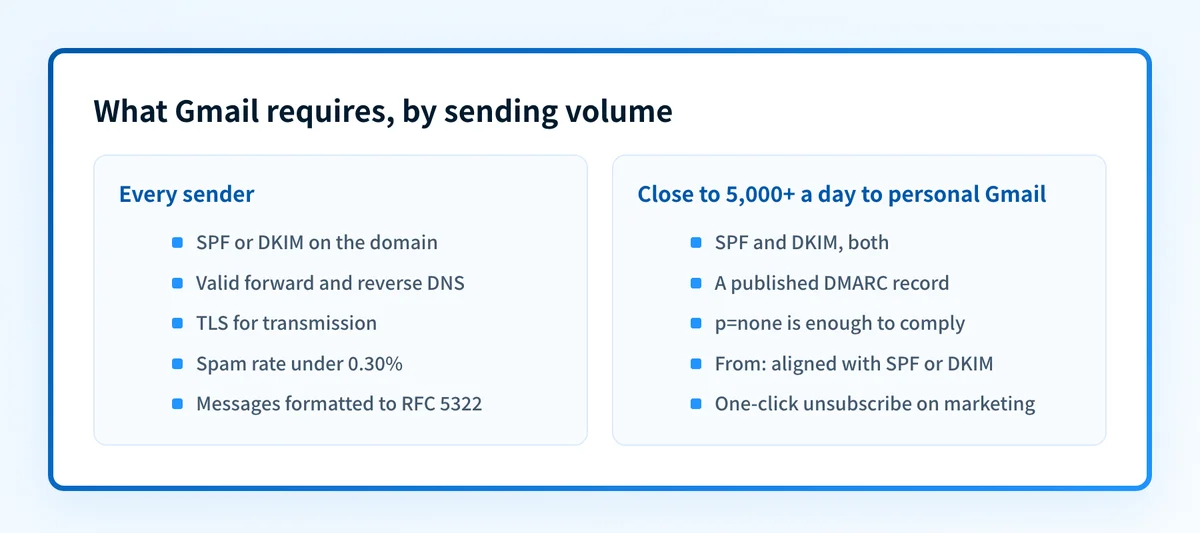
Every sender to Gmail, at any volume, must set up SPF or DKIM, have valid forward and reverse DNS records for sending domains or IPs, use TLS, keep the spam rate reported in Postmaster Tools below 0.30%, and format messages to RFC 5322.
Google's sender guidelines FAQ defines a bulk sender as one sending close to 5,000 messages or more to personal Gmail accounts within a 24-hour period, counted by primary domain, and says the status does not expire once assigned. "Close to" is doing real work there. Google publishes no lower bound, so treat a domain steady at 4,700 a day as inside the rule rather than outside it.
Bulk senders must, since 1 February 2024, additionally set up both SPF and DKIM, publish a DMARC record, align the From header domain with either the SPF domain or the DKIM domain, and support one-click unsubscribe on marketing and subscribed messages. Google states plainly that the DMARC enforcement policy can be set to none to meet this requirement.
That last sentence is the one worth internalizing. Publishing p=none satisfies the letter of Google's rule while leaving the domain fully spoofable, which is why so many domains stop there and report themselves as compliant.
How to validate the setup
Validation runs at four layers, and a pass at one says nothing about the others.
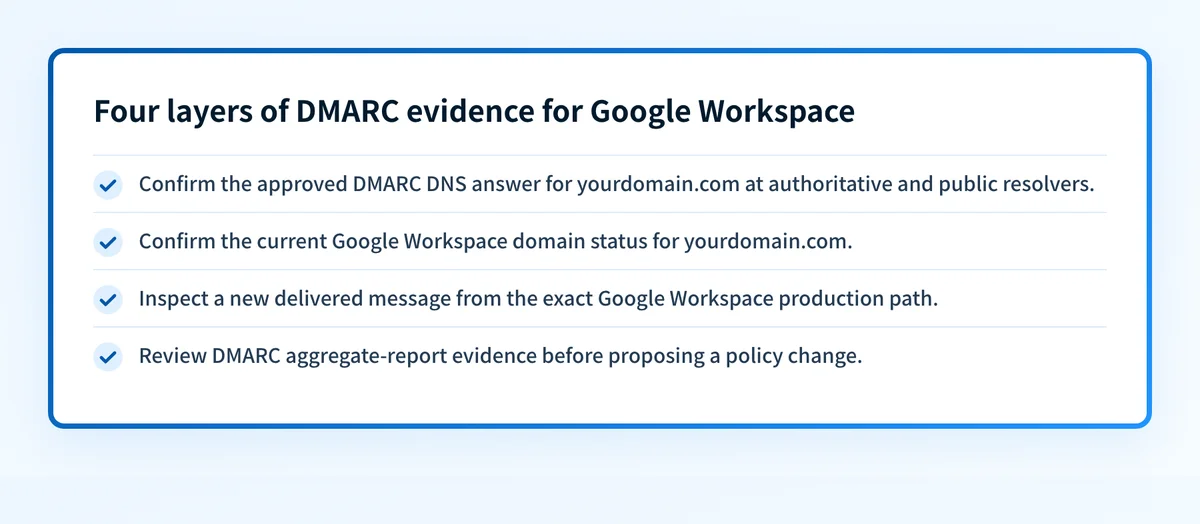
- Public DNS. Query
_dmarc.yourdomain.comas a TXT record at a public resolver withdig +short TXT _dmarc.yourdomain.com @8.8.8.8. Confirm exactly one policy record comes back and that its value is the one you intended. If two come back, multiple DMARC records is its own failure mode: receivers treat the domain as having no usable policy. - Google Workspace. Confirm the Authenticate email page shows "Authenticating email with DKIM" for the domain in scope.
- A delivered message. Send a message through each production sender and read the
Authentication-Resultsheader the receiving system added. This is the only layer that shows whether a sender actually authenticates. - Aggregate reports. Review reports across enough normal sending to cover every known source. This is what decides whether it is safe to tighten the policy.
Moving past monitoring
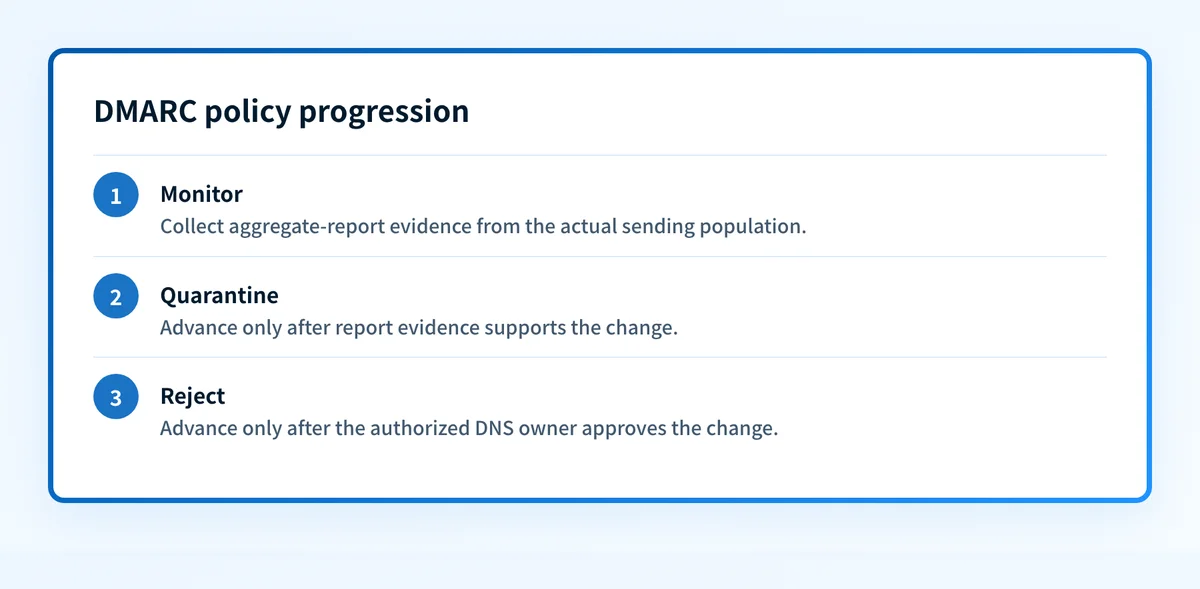
Move in stages and read the reports at each one. p=quarantine sends failing mail to spam, which is recoverable if you missed a sender. p=reject refuses it, which is not. If subdomains send mail and are not ready, the sp tag gives them their own policy so the parent domain can enforce without breaking them.
Troubleshooting
The record is missing from a public lookup
Query _dmarc.yourdomain.com rather than the root domain, and check for a duplicated zone suffix such as _dmarc.yourdomain.com.yourdomain.com, which happens when the DNS host appends the zone to a fully qualified name. If a different provider is authoritative for the domain, the record you added elsewhere will never resolve however correct it looks.
DKIM shows as not authenticating
Google notes that a newly created Google Workspace account may need to wait before a key can be generated, and that generating a key is not the same as turning authentication on. Publish the google._domainkey TXT record first, then return to Authenticate email and click Start authentication. Verify by sending to a different mailbox, since a message to yourself does not prove DKIM is working.
Mail from another application fails after enforcement
Compare the visible From domain against the SPF smtp.mailfrom domain and the DKIM d= domain for an affected message. An SPF or DKIM pass that does not align with the From domain is not a DMARC pass. Return the policy to the last known-good value while you fix that sender, rather than deleting the record, which also removes the reporting you need to diagnose it.
Gmail returns a 4.7.31 rate-limit error
Google's wording is that the message "has been rate limited because the sending domain doesn't have a DMARC record, or the DMARC record doesn't specify a DMARC policy". It is a throttle, not a bounce, and it names the two conditions that trigger it: no record at _dmarc, or a record without a usable p= tag. Publish a record with an explicit policy, starting at p=none, and confirm it resolves before retrying the send.
No aggregate reports are arriving
Check that the rua address is valid and accepts external mail, and that it matches the published record. If it is on a different domain, that domain has to authorize it. Some receivers never send reports at all, so silence from one receiver is not evidence of a broken record.
Where Palisade fits
Palisade is agentic DMARC software. It reads the aggregate reports the record generates, identifies every sending source and the authentication or alignment issues behind each one, and files prioritized remediation tickets. It proposes the next policy step when the evidence supports it, and a person reviews and applies every change.
Evidence
Sources and further reading
- Set up DMARC, Google Workspace Admin Help, checked 21 August 2026
- Turn on DKIM for your domain, Google Workspace Admin Help, checked 21 August 2026
- Email sender guidelines, Google Workspace Admin Help, checked 21 August 2026
- Email sender guidelines FAQ, Gmail Help, checked 24 August 2026, for the bulk-sender definition and the
4.7.31error - RFC 9989: Domain-based Message Authentication, Reporting, and Conformance
- How to set up DMARC and what a DMARC record is
Questions readers ask
Frequently asked questions
Does Google Workspace have DMARC?
Google Workspace supports DMARC, but it does not host the record for you. The Admin console is where you turn on DKIM signing, under Apps, Google Workspace, Gmail, Authenticate email. The DMARC record itself is a DNS TXT record you publish at your domain's DNS host. Google's own documentation describes it as a line of text you add to your domain following your domain provider's instructions.
How do I add DMARC to Google?
Publish a TXT record at _dmarc.yourdomain.com in the DNS zone that answers for your domain, with a value such as v=DMARC1; p=none; rua=mailto:dmarc@yourdomain.com. Do it after SPF or DKIM is working, because DMARC only evaluates their results. Bulk senders, meaning close to 5,000 or more messages a day to personal Gmail accounts, need both. There is no setting inside Google Workspace that publishes this record for you.
Why am I getting a DMARC report from Google?
Because your DMARC record asks for one. The rua tag names the address receivers send daily aggregate reports to, and Gmail is one of the receivers that sends them. The report is an XML summary of the messages Gmail saw claiming to be from your domain, and whether each one passed SPF, DKIM, and alignment. It is the evidence the whole rollout depends on, not a warning.
Does Gmail require DMARC now?
For bulk senders, yes, since 1 February 2024. Google defines those as senders of close to 5,000 or more messages to personal Gmail accounts in 24 hours, and its sender guidelines require them to set up SPF and DKIM, publish a DMARC record, and align the From domain with the SPF or DKIM domain. Google states the DMARC policy can be set to none to comply. Below that volume, SPF or DKIM is required but a DMARC record is not, though unauthenticated mail increasingly lands in spam regardless of volume.
Should I use the example record from Google's documentation?
Use its shape, not its contents. Google's published example includes pct=100, a tag RFC 9989 removed in May 2026, and sets strict alignment on both SPF and DKIM. Start with relaxed alignment, which is the default, and leave pct out. The reporting address in any example is someone else's, so replace it with a mailbox you control.
Can a DMARC checker prove Google Workspace is configured correctly?
No. A checker reads the public DNS record and parses it. It cannot tell you whether Google Workspace signed a particular message, whether another application sharing your domain authenticates, or how a receiver will treat future mail. Only a delivered message's Authentication-Results header and the aggregate reports answer those.

Written by
Samuel ChenardCEO & Co-Founder, Palisade
Samuel Chenard is the CEO and co-founder of Palisade, agentic DMARC software for IT teams and MSPs, from one domain to thousands.
More from Samuel →