How to Evaluate DMARC Software for Internal IT
 ChatGPT
 Claude
 Gemini
 Perplexity
 Grok
GrokIn brief
Evaluate DMARC software with a practical checklist for sender evidence, remediation, DNS approvals, integrations, and customer proof before choosing a vendor.
Evaluate DMARC software by asking the vendor to investigate a sending service, explain the evidence behind a proposed fix, and demonstrate how your team approves the change. Use the same scenario for each vendor so you can compare the work your administrators will need to do.
Use this checklist to select a vendor for a pilot. Once you have a shortlist, the companion DMARC proof-of-concept plan covers test execution and acceptance.
A useful evaluation ends with a decision record: which requirements the product demonstrated, what remains unverified, and who will own the work after purchase. Palisade publishes this guide as a DMARC vendor; the checklist is designed to be usable with any provider.
Start with the work your team needs to finish
Write down the decision that brought you to the evaluation. You might need to identify applications sending from several company domains, reduce the investigation work behind authentication failures, or prepare a domain for a stronger policy. Those are different tests.
For an internal IT team, choose a scenario involving an actual business application and its owner. A polished demonstration with a familiar sender will tell you less than a walkthrough of a service your team has not yet classified. Use sanitized examples if the evaluation environment is shared.
Microsoft's DMARC deployment guidance includes identifying mail sources and configuring authentication before progressing through deployment. Ask vendors to explain how their workflow helps your team do that work.
Buying because Microsoft 365 reports show an unknown sender?
If your team uses Microsoft 365 and a DMARC report shows a source nobody recognizes, use that unresolved source as your vendor-evaluation scenario. Ask the vendor to show how an administrator moves from an observed source to a supported decision about its business purpose and authentication.
Start with the unknown-sender investigation guide. It explains how to combine report data, a delivered message, business-owner confirmation, and the sending service's configuration. Keep the source unresolved until those checks support a decision; recognition of a vendor name alone is insufficient.
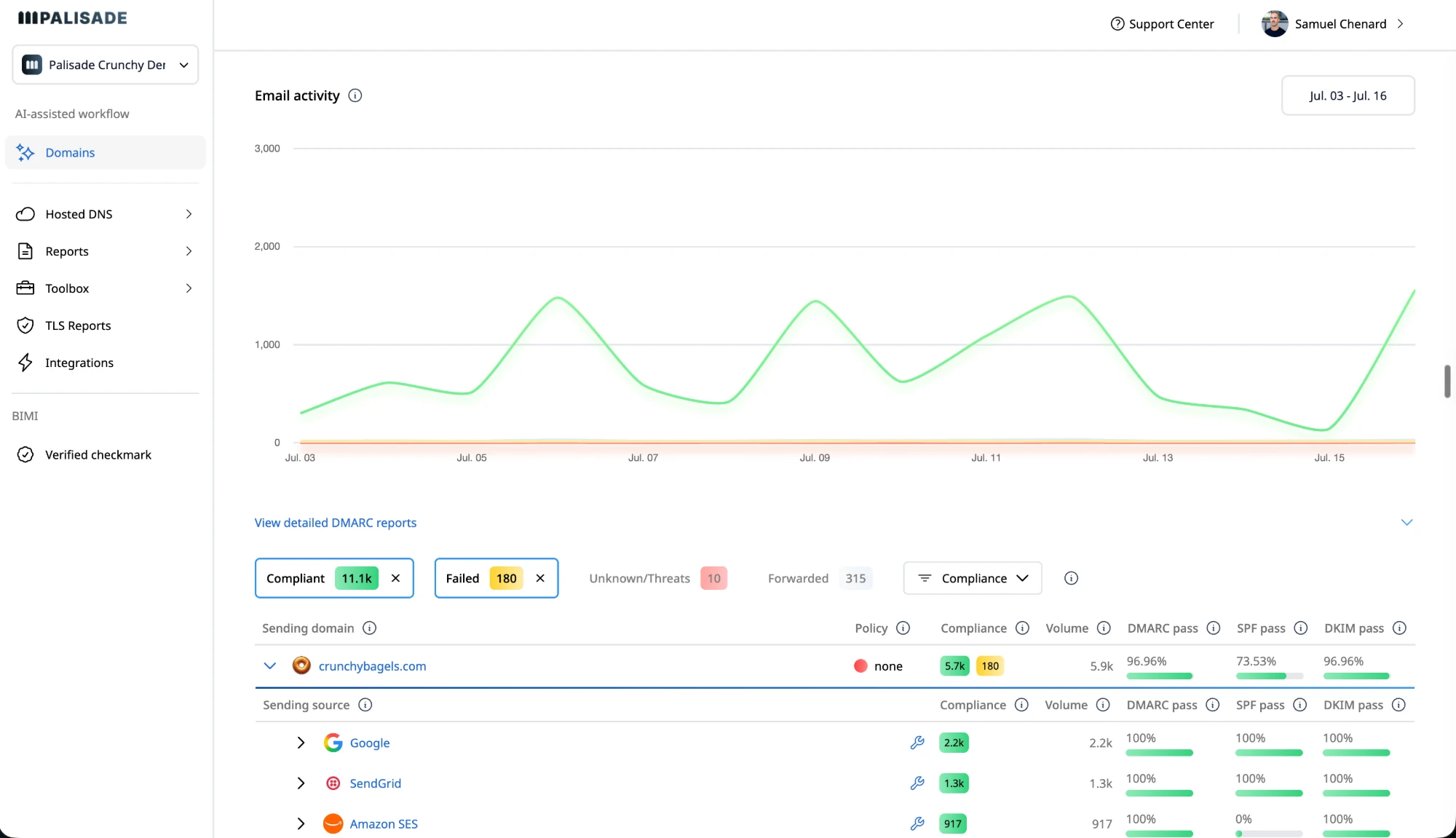
For product evidence, Palisade's Senders List documentation describes the pending, confirmed, and discarded states available when monitoring is receiving reports. The actual Domains overview below shows the source-level view. Business-owner confirmation is still work your team must supply.
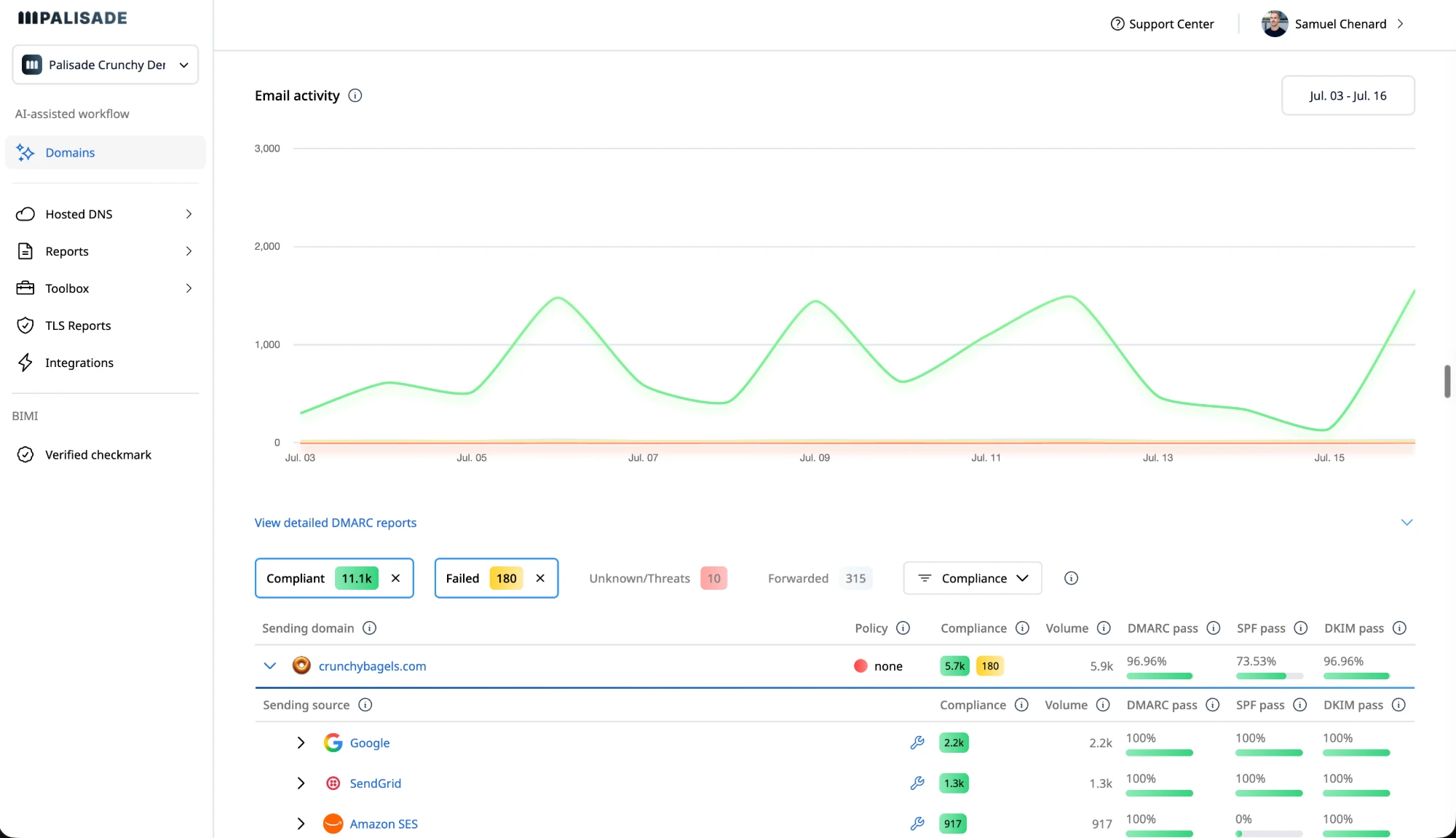
Real Palisade product capture from the demo environment, showing the July 3 through 16 period. The displayed figures are illustrative product data, not a customer's measured outcome.
What evidence should you request in a demonstration?
Use this checklist to record what the vendor shows. A documentation link supports a feature claim; a demonstration on your representative scenario supports a fit decision.
| Requirement | Ask the vendor to demonstrate | Record for your decision |
|---|---|---|
| Sender investigation | Open an observed source and explain what the report establishes and what remains unknown | Evidence used, missing information, next investigation step |
| Business ownership | Explain how your team records the service owner and authorization decision | Product workflow or the external ticket your team must maintain |
| Remediation | Show a proposed change and explain why it addresses the observed problem | Before/after values, assumptions, verification procedure |
| Change control | Show what an administrator approves and which permissions permit deployment | Approver, permission scope, change record, rollback procedure |
| DNS fit | Demonstrate the supported path for your provider and account structure | Native connection, delegated hosting, or manual publication |
| Ongoing operation | Investigate a later configuration change | Available history, alert behavior, escalation owner |
| Procurement | Answer your access, retention, support, and data-handling requirements in writing | Demonstrated capability, contractual commitment, or unresolved requirement |
Mark each row as demonstrated, documented only, or unverified. Do not convert a sales promise into a passing result. If a requirement is essential, keep it visible as a condition of purchase.
Check what “integration” means for your team
An integration label can describe several different workflows. Ask whether the connection reads data, opens tickets, or writes DNS records, and which account type enables it.
For example, Palisade's integration documentation distinguishes PSA integrations from DNS connections. Its PSA connectors require an MSP account. An internal IT evaluation should therefore test the DNS and operational workflows it will actually use, rather than assume an MSP connector is included.
Palisade documents DNS connections for Cloudflare, GoDaddy, and Amazon Route 53. Its DNS connection guide explains account authorization and zone selection. Ask for a walkthrough using your provider, including what happens when the connection lacks permission or the required zone is outside its scope.
Use customer stories to choose questions
Customer stories can explain why a team bought a product and what it reports achieving. Match the claim to the decision you need to make.
In Palisade's Devialet story, the team describes uncertainty about application configuration before enforcement. That supports a practical evaluation question: can this vendor help us establish which applications are ready for a policy change? The testimonial does not establish a rollout duration or a measured reduction in delivery failures.
The Politico story reports a BIMI outcome and an easier process. It is relevant when verified branding is part of the project. It does not establish an inbox-placement improvement for a different organization.
For a quantified case study, ask what was measured, over which dates, and against which baseline. Keep implementation results separate from business outcomes that other factors can affect.
Where does Palisade fit?
Palisade is worth evaluating when your team wants help investigating authentication issues and preparing fixes while retaining approval over changes. The DMARC Agent page describes report analysis, remediation tickets, and review before deployment.
Test that workflow yourself. Bring a representative sender and ask Palisade to show the evidence, proposed fix, approval step, and post-change verification. Check permissions and enterprise requirements against your own procurement checklist. The presence of a feature on a website should be the start of that evaluation.
How should you compare the final proposals?
Compare the unresolved work alongside the commercial proposal. Record who will investigate unknown senders, coordinate application owners, publish approved records, and respond to later failures. Ask each vendor to specify the support and services included in its proposal.
If your team still cannot explain how an important sender will be investigated, extend that part of the evaluation before making a purchase decision. If the workflow is demonstrated and the remaining responsibilities have owners, you have a clearer basis for comparing vendors.
See the unknown-sender workflow in a demo
Bring a source your Microsoft 365 team has not yet classified and the questions preventing a decision. We can walk through how Palisade presents sender evidence and prepares remediation for review. Use sanitized report details when discussing your environment.
Book a demo to evaluate the sender-investigation workflow. If you prefer to investigate first, follow the unknown-sender guide.
Sources
For MSPs evaluating Palisade
How Palisade meets common MSP requirements.
Match the requirements of your managed DMARC service to documented capabilities. Use the evidence links below to decide what to test in your own pilot.
What good MSP software needs to do
- Manage client domains together
Organize domains into client groups and filter the portfolio by group.
Domain groups- Give technicians actionable work
The agent turns authentication findings into remediation tickets and proposed fixes.
Remediation workflow- Keep control of changes
Review the proposed DNS change before approving publication through a connected provider.
DNS approval workflow- Work inside the service desk
Import client domains, create task tickets, and synchronize billing quantities through a native PSA connector.
PSA capabilities- Show clients the work
Create branded email-security assessments for client conversations and prospecting.
White-label reports- Control team access
Admin, Editor, and Viewer roles distinguish who can manage integrations and who can only view them.
Permissions
Connect the tools your team already uses
PSA connectors and DNS connections do different jobs. Each logo links to the corresponding workflow or setup documentation.
Service desk and billing
Native PSA connectors · MSP account required



DNS publication
Connected accounts · Every change needs your approval
 Cloudflare
 GoDaddy
 Amazon Route 53
For custom workflows, explore the REST API, webhooks, and MCP connection. These are developer interfaces, not additional native PSA connectors.
Test your client workflow with us
Bring your PSA, DNS provider, and one representative client scenario. Ask to see client mapping, a remediation ticket, an approved change, and the reporting handoff. Confirm service terms and any additional requirements during evaluation.
Book an MSP workflow demo
Written by
Samuel ChenardCEO & Co-Founder, Palisade
Samuel Chenard is the CEO and co-founder of Palisade, agentic DMARC software for IT teams and MSPs, from one domain to thousands.
More from Samuel →