Lemwarm email warmup
 ChatGPT
 Claude
 Gemini
 Perplexity
 Grok
GrokIn brief
Lemwarm email warmup exchanges emails through its network and reports a daily score. Learn what its score can indicate and what to verify separately.
Lemwarm email warmup is Lemwarm's service for warming an inbox through email exchanges in its network while showing a daily deliverability score. Lemwarm says it exchanges "safe, real emails" with a network of "20,000+ real users." That score may be a useful product signal, but it does not independently prove inbox placement, sender reputation at a particular receiver, or that your production messages authenticate correctly.
At a glance
Quick takeaways
- Lemwarm describes itself as an email warm-up and deliverability tool.
- Its homepage says the service exchanges warm-up emails through a network of real users.
- Lemwarm says it checks email setup and displays a daily score.
- Lemwarm's suggested timeline is about four weeks of warm-up, then two more weeks before real campaigns.
- A warm-up score does not prove how Gmail, Outlook, or another receiver will place a future campaign.
- Check SPF, DKIM, DMARC, and MX records separately before increasing send volume.
How Lemwarm email warmup works
According to the Lemwarm homepage, the service "Warms up your inbox by exchanging safe, real emails with a network of 20,000+ real users." Lemwarm also says it "Checks your email setup so Gmail and Outlook trust you as a sender" and "Shows you a daily score so you know your emails are safe to send."
Those statements describe Lemwarm's product and its intended use. They do not establish that a specific score predicts inbox placement at a given mailbox provider. Inbox placement is a receiver-controlled outcome. A receiver can consider authentication, sending reputation, content, recipient engagement, local policy, and other unpublished signals.
Lemwarm says it connects with Gmail and Outlook "in one click" and that providers such as Zoho, FastMail, and Proton work too. Treat that as the vendor's current compatibility statement. The exact connection method, permissions, and available controls can differ by provider or account configuration.
For the broader operational context, see email deliverability. Warm-up activity is one possible part of a sending practice, while sender authentication and the production message path need their own evidence.
When a Lemwarm score changes the next action
Use the score as a signal to decide what to inspect next, not as a final deliverability result.
If your domain has no confirmed authentication records, start with DNS. SPF, DKIM, and DMARC each answer different questions about authorized sending and domain alignment. The AI email warmup guide explains why warm-up activity cannot prove that a message will pass those protocol checks.
If DNS is present, verify the sender application itself. A published DKIM record does not prove the mail system is applying a matching DKIM signature to the messages you send. Likewise, an SPF record does not prove the production envelope sender uses an authorized path.
Then test a real message sent through the exact account and service you plan to use. Review its raw headers and the receiver's Authentication-Results fields. RFC 8601 defines that header field as the place where a receiving system can report its authentication assessment. A domain-level check cannot substitute for delivered-message evidence.
Do not increase campaign volume because a warm-up score looks favorable if SPF, DKIM, DMARC, or the production sending path remains unverified. A record that looks correct in DNS can still be unused by the sender.
Use this decision rule:
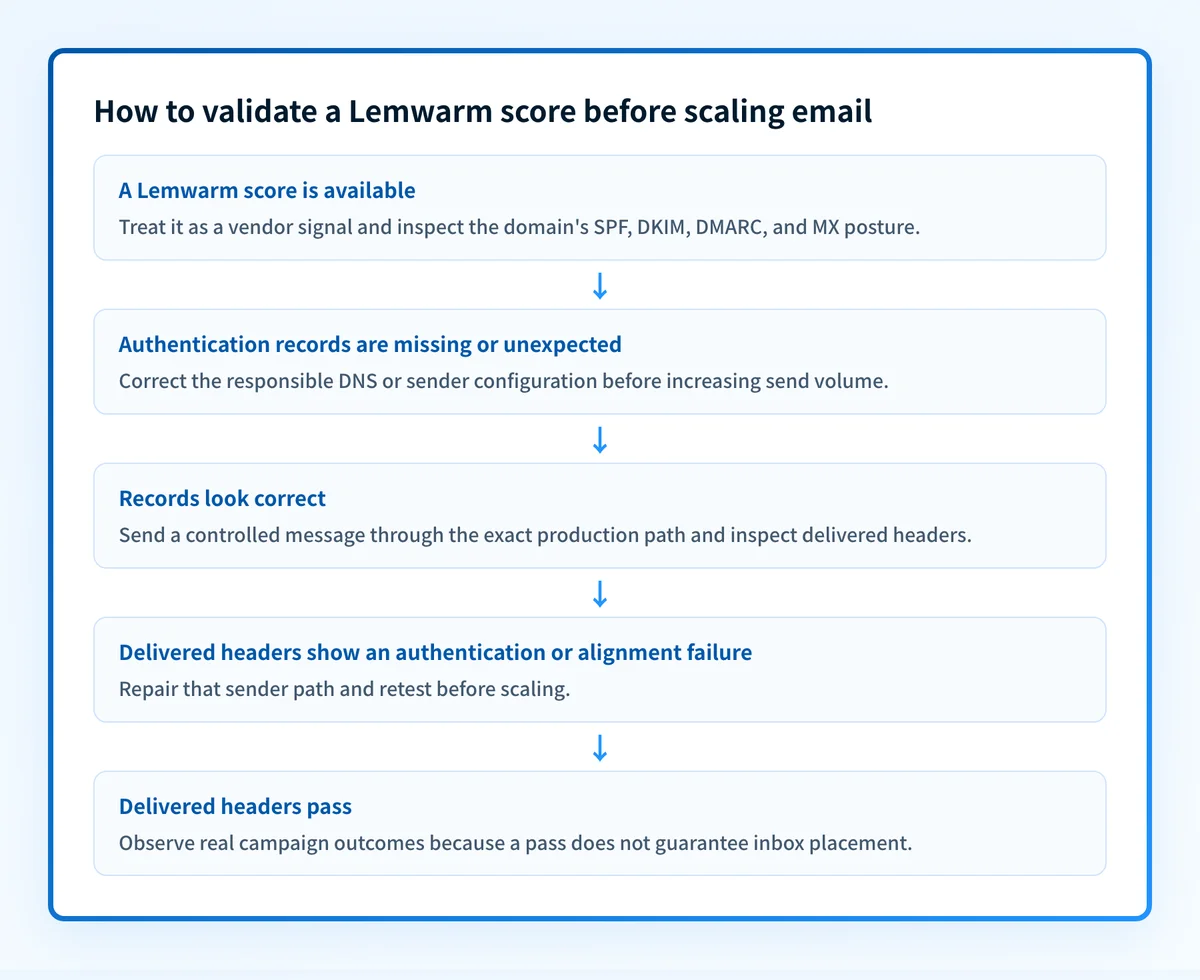
- A Lemwarm score is available: treat it as a Lemwarm product signal, then inspect the domain's email-security posture.
- SPF, DKIM, DMARC, or MX records are missing or unexpected: read the domain's published MX records, then correct the configuration through the responsible sender or DNS owner before scaling.
- Records look correct: send a controlled production-path test and inspect its delivered headers.
- Headers show an authentication or alignment failure: repair that specific sender path and retest.
- Headers pass: continue to observe actual campaign outcomes at the intended audience and sending volume.
Worked example: what to check outside Lemwarm
A public DNS result can confirm what the domain publishes. It cannot confirm that your email platform uses the corresponding credentials or that a recipient placed the message in the inbox.
For yourdomain.com, these are example lookup targets:
SPF record:      yourdomain.com
DKIM record:     selector1._domainkey.yourdomain.com
DMARC record:    _dmarc.yourdomain.com
MX records:      yourdomain.com
These are illustrative record locations only. Do not copy a selector, CNAME target, token, or value from another account. Your email provider generates the actual DKIM selector and any account-specific DNS values.
After DNS resolves, send a message from the exact production mailbox. Look for receiver-generated authentication results similar in structure to this example:
Authentication-Results: receiver.example;
  spf=pass smtp.mailfrom=yourdomain.com;
  dkim=pass header.d=yourdomain.com;
  dmarc=pass header.from=yourdomain.com
This example shows the type of evidence to inspect, not a guaranteed result or a universal header format. RFC 8601 specifies the Authentication-Results field format and its authentication methods, while each receiver determines its own assessments and final handling.
A passing result is meaningful only for that message path and receiver. It does not prove that every future message will authenticate or reach the inbox. For another vendor-oriented view of the same boundary, see Apollo email warmup.
What to do after connecting an inbox
Lemwarm's homepage recommends "About 4 weeks of warm-up, then 2 more weeks before you start real campaigns. After that, leave lemwarm running." This is Lemwarm's guidance, not a universal deliverability standard or a verified inbox-placement guarantee.
Use the period to establish independent evidence:
- Confirm DNS through the authoritative DNS provider and at least one public resolver.
- Confirm the email provider's own authentication or domain-verification status.
- Send a real message from the production path and inspect its delivered headers.
- Review DMARC aggregate reports after reporting data accumulates, especially before moving a domain toward a stricter DMARC policy.
Check the domain posture behind the warm-up score
If Lemwarm reports a score or flags setup concerns, inspect the public SPF, DKIM, DMARC, and MX posture for the sending domain. That gives you a separate DNS-based view before you change volume or investigate the sender platform.
Check the domain's email security score
A domain security score does not prove inbox placement, warm-up effectiveness, the production sending path, or a receiver's filtering decision.
For an ongoing program with several domains or senders, Start with Palisade. Palisade analyzes DMARC aggregate-report data, identifies sending sources and authentication or alignment issues, and creates prioritized remediation tickets. It can propose a next DMARC policy step for human review, but it does not control a mailbox provider's private reputation decision or guarantee delivery. Signup and trial do not require a credit card.
Evidence
Sources and further reading
Questions readers ask
Frequently asked questions
What is the best email warm up tool?
There is no best one, because no independent comparison of these products exists and none of them control a receiver's placement decision. Lemwarm describes its own network, setup checks, and daily score, which tells you what it does but not how it ranks. Compare the providers each tool supports, the access it asks for, and what your own delivered mail shows.
Is Lemwarm a good product?
That depends on whether what it documents matches how you send. Lemwarm says it warms an inbox by exchanging real emails across a network of more than 20,000 users, checks your email setup, shows a daily score, and connects to Gmail and Outlook in one click. Weigh that against your mailbox provider, your security review, and the results you can see from your own production sends.
How do I warm up an email address?
Check the domain's authentication first, then either connect the mailbox to a warm-up service or raise your own volume gradually. Lemwarm's own guidance is about four weeks of warm-up plus two more weeks before real campaigns, which is its recommendation rather than an industry standard. Confirm SPF, DKIM, and DMARC for the sending domain, then read the headers of a real delivered message.
Does email warmup guarantee inbox placement?
No, because mailbox providers make placement decisions with their own signals and policies, and no warm-up product has any control over those. A warm-up tool can report its own network activity or a score, and that score describes the tool, not the receiver. Verify SPF, DKIM, DMARC, and the authentication results on a real message sent through the path you actually use.
Can a DMARC record prove that Lemwarm is working?
No, because a DMARC record only shows the policy and reporting addresses your domain publishes. It says nothing about whether Lemwarm activity changed your delivery, whether the production sender is set up correctly, or where a receiver will place your next campaign. Use delivered-message headers for that, and DMARC aggregate reports once they accumulate.

Written by
Johanie DupontBrand & Ecommerce Email
Johanie Dupont works on brand and ecommerce email at Palisade: BIMI and verified marks, sender requirements, and getting marketing mail into the inbox.
More from Johanie →