Email warmup company: how to assess one
 ChatGPT
 Claude
 Gemini
 Perplexity
 Grok
GrokIn brief
Email warmup company services connect mailboxes for message exchanges or simulated activity. Assess their diagnostics, data handling, and claims.

An email warmup company is a vendor that connects to a sending mailbox and performs or simulates mailbox activity, such as exchanging messages, opens, and replies. Vendors present this activity as a way to build sender trust or support inbox placement, but the available provider and standards evidence does not verify that warmup improves deliverability. Assess the company's observable diagnostics, access model, and claims before relying on it.
At a glance
Quick takeaways
- An email warmup company is a vendor category, not a mailbox-provider standard or protocol.
- Vendors describe different mechanisms, including message exchanges and simulated human-like activity.
- No supplied primary provider or RFC source confirms that email warmup improves inbox placement.
- There is no verified universal warmup volume, duration, reply rate, or safe sending threshold.
- Authentication, DNS, and message evidence should be checked separately from a vendor's warmup activity.
- A placement test or blacklist check is diagnostic evidence, not proof of future inbox placement.
How an email warmup company works
Email warmup companies generally ask for access to a sending mailbox, then describe recurring activity intended to make that mailbox look active to receiving systems.
For example, Warmup Inbox describes its email warmup tool as connecting a sending inbox through Gmail, Outlook, or SMTP and exchanging messages within its network, including opens and replies. Warmforge says its product works by "mimicking human behaviour in your mailboxes to establish trust with ESPs." That is Warmforge's description of its mechanism, not a mailbox-provider-confirmed explanation of how Gmail, Microsoft, or another receiver makes placement decisions.
Other vendors describe different connection and reporting options. TrulyInbox says its product supports Google and Microsoft sign-in, as well as SMTP and IMAP connections, and presents ESP-level deliverability information. These are vendor-specific product claims. They do not establish that every email warmup company has the same capabilities or that a reported result will apply to later production mail.
The key distinction is between activity a warmup vendor says it performs and evidence you can inspect yourself. A warmup network's messages are not the same as business mail sent through your production application, CRM, transactional platform, or employee mailbox. Broader email deliverability also depends on the sending path, authentication, recipient behavior, and each receiver's local decisions.
When the answer changes
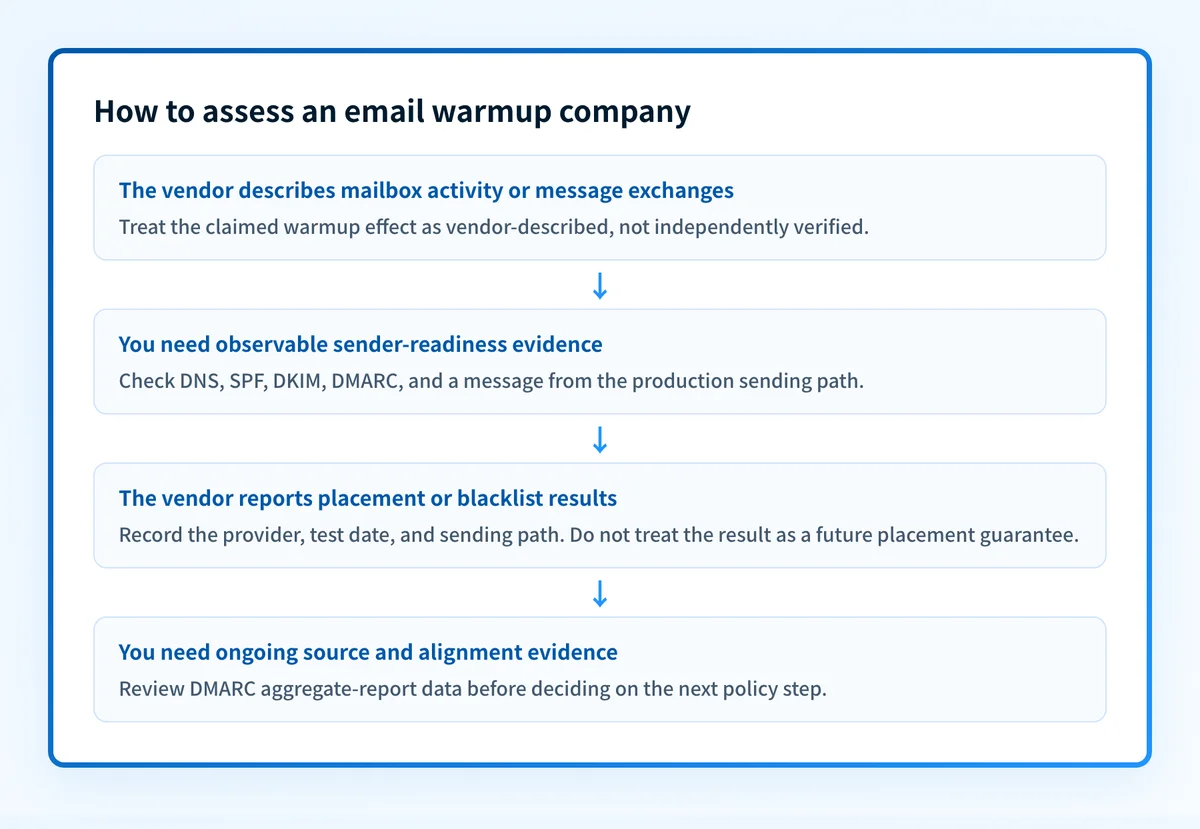
A company may be useful for a narrow internal experiment, but its claims should not replace a sender-readiness assessment. Use this decision rule:
- If the company can only describe warmup activity, treat it as an unverified service claim. Ask what mailbox access it needs, how access can be revoked, and what data it stores.
- If it provides DNS, authentication, blacklist, or placement diagnostics, separate those observable outputs from any claim that warmup caused an outcome.
- If it reports results by mailbox provider, compare the result with mail sent through the exact production path. A test inbox and a production recipient list can receive different treatment.
- If a provider's decision or inbox placement remains unclear, look for message headers, bounce evidence, and the receiver's own available diagnostics. A third-party score cannot reveal every private receiver signal.
Do not treat warmup as a replacement for domain authentication. SPF, DKIM, and DMARC address whether a message can authenticate with identifiers aligned to the visible From domain. Sender activity does not correct a missing DNS record, a broken DKIM signature, or an unaligned return path.
A worked evaluation example
Suppose a marketing team is considering a vendor that asks to connect sales@yourdomain.com and promises a warmup program. Record the vendor's claim separately from the evidence you need before changing any sending behavior.
Email warmup company evaluation for yourdomain.com
Vendor claim:
- Connects a mailbox and exchanges or simulates mailbox activity.
Authentication baseline:
- SPF record exists and covers the production sending service.
- DKIM passes on a delivered message from the production service.
- DMARC passes with an aligned SPF or DKIM identifier.
Observable diagnostics:
- DNS and MX status
- Placement test results, identified by receiving provider
- Blacklist-status result and lookup time
- Raw headers from a real delivered production message
Access and data questions:
- Connection method: OAuth, SMTP, or IMAP
- Permissions requested and revocation process
- Data retained from the connected mailbox
This is a decision record, not a validated warmup recipe. There is no supplied primary evidence that establishes a safe number of messages, replies, or days for the program.
Warmforge says its Health Checks monitor DNS, MX-record, and blacklist status, and it describes placement tests as a separate feature. TrulyInbox describes provider-level deliverability reporting. Those descriptions support a practical inference: diagnostics can be evaluated independently, while the claimed effect of warmup still needs evidence from the actual sending path and receiving systems.
A DNS or reputation result also has limits. It cannot prove that the production application is using the expected authentication setup, that a receiver will make the same decision for future messages, or that a connected mailbox's activity improved placement.
Check the baseline before attributing a problem to warmup
Start with the evidence you have.
- If you have a domain but no message sample, inspect the public DNS and email-authentication posture first.
- If you have a message that landed in spam or failed delivery, preserve the raw headers and compare SPF, DKIM, and DMARC results with the visible From domain.
- If you have a vendor placement report, record the tested provider, date, sending path, and recipient type. Do not assume it predicts every recipient's outcome.
- If you manage multiple domains or sources, keep an inventory of each source and its aligned authentication status. One warmed mailbox does not establish readiness for every source.
Check the email-authentication baseline behind the warmup claim
Run the sending domain through Palisade's Email Security Score before treating a warmup service as the explanation for an inboxing problem. Use the result to identify public DNS and authentication issues that should be investigated separately from mailbox activity.
Check the email security baseline
A public check cannot prove that a production message used the expected path, repair a sender configuration, monitor future changes, or guarantee inbox placement.
If your team needs to keep inventorying sending sources and reviewing DMARC aggregate-report evidence over time, Start with Palisade. Palisade autonomously analyzes DMARC aggregate-report data, identifies sending sources and authentication or alignment issues, and creates prioritized remediation tickets. A human reviews the evidence and applies any DNS or DMARC policy change.
Evidence
Sources and further reading
Questions readers ask
Frequently asked questions
Does email warm up actually work?
Warmup companies say it does, but no mailbox provider publishes a rule that rewards the activity, so nobody can show the practice itself causes better placement. Warmup Inbox describes exchanging messages inside its own network, and Warmforge describes mimicking human behaviour in mailboxes. Both describe what the product does, not what a receiver does next.
What is the best email warm up tool?
There is no best one, because nobody publishes a like-for-like comparison and no tool controls a receiver's placement decision. Judge each company on what you can check yourself: the mailbox access it asks for, how you revoke that access, what data it keeps, and which diagnostics it actually shows you. Then compare its reported result against mail sent through your real production path.
What is email warmup?
Email warmup is a vendor-run practice where a service connects to your sending mailbox and generates activity around it, usually by exchanging messages and engagement inside its own network. Warmup Inbox describes those network exchanges, while Warmforge describes simulating human-like mailbox behaviour. It is a product category rather than a mailbox-provider standard, so no receiver is obliged to read that activity as a positive signal.
Can a warmup company fix DMARC failures?
No, because a warmup company never touches your DNS or your signing setup. It cannot make an SPF or DKIM identifier align with your visible From domain, and it cannot publish a DMARC record for you. Check the DNS configuration and the authentication results on a real message before you blame a DMARC failure on reputation.

Written by
Johanie DupontBrand & Ecommerce Email
Johanie Dupont works on brand and ecommerce email at Palisade: BIMI and verified marks, sender requirements, and getting marketing mail into the inbox.
More from Johanie →