N8n email warmup: what n8n can and cannot do
 ChatGPT
 Claude
 Gemini
 Perplexity
 Grok
GrokIn brief
N8n email warmup can automate parts of an email workflow, but the available n8n documentation does not establish n8n itself as an email-warmup service or.
N8n can automate parts of an email-sending workflow, but the available n8n documentation does not establish n8n itself as an email-warmup service. It is a workflow-automation platform that can connect applications and APIs, run steps visually, and expose each step's inputs and outputs. Treat it as workflow infrastructure, then validate the domain's authentication and real sending path before treating automation as a deliverability solution.
At a glance
Quick takeaways
- N8n documents workflow automation, pre-built app nodes, and custom API connections.
- The available n8n product information does not document an email-warmup feature or a safe warmup configuration.
- An automated workflow can coordinate sending-related tasks without proving that a message will reach the inbox.
- A domain's DNS configuration and security posture are separate from the behavior of an n8n workflow.
- Test data and step-level outputs can help inspect a workflow, but they are not delivered-message authentication evidence.
- Email deliverability depends on the production sending path and the receiving system's own decisions.
How n8n fits into an email workflow
N8n describes its product as workflow automation with "pre-built nodes for common apps" and "Custom API connections for everything else." That supports a narrow, useful conclusion: n8n can connect systems and automate steps around an email process when the relevant application or API is available.
N8n also says, "Code when you need it, UI when you don't." A team could use that flexibility to coordinate work around a sending program, such as collecting inputs from another system, passing data to an approved sending service, or recording the result of a workflow step. Those are workflow functions. They do not establish that n8n controls mailbox-provider reputation, inbox placement, or a provider's final decision about a message.
This distinction matters when someone searches for "n8n email warmup." Email warmup is a deliverability-adjacent term, but the supplied n8n product information does not define that term, document a native warmup node, or provide a recommended sending cadence. Do not turn generic automation capability into a claim about a specific deliverability outcome.
For the broader factors that affect a message after it is sent, see email deliverability. The Palisade deliverability learning hub also separates sending practices from the domain authentication controls that support trustworthy mail.
When the answer changes
The answer changes only when you have official documentation for the exact integration and sending provider you intend to use.
Use this decision rule:
- If you have an n8n workflow but no verified provider configuration, you can say the workflow coordinates steps. You cannot say it sends mail correctly.
- If you have a provider's documented n8n node or API configuration, follow that provider's current documentation for authentication, permissions, and sending controls.
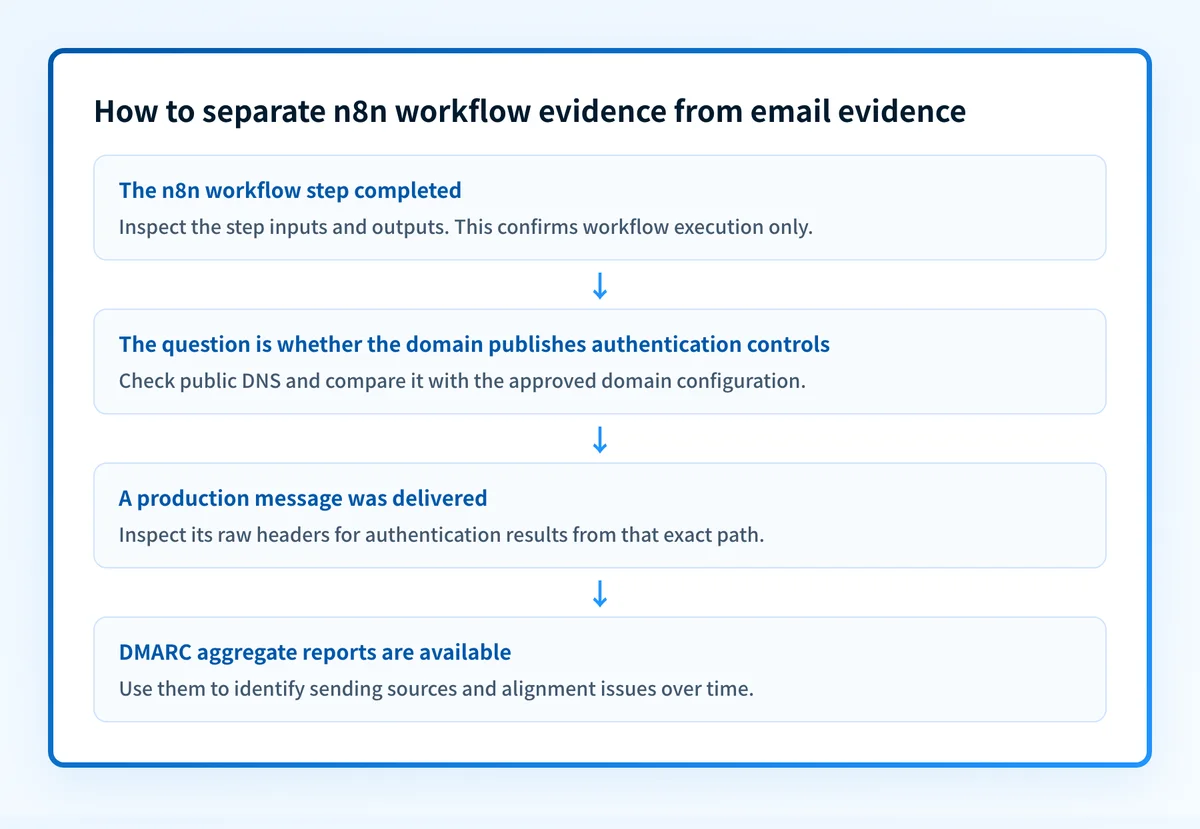
- If a test workflow runs successfully, inspect its inputs and outputs. N8n says users can see "the inputs and outputs right next to the settings of every step." That confirms workflow-level evidence, not a recipient's final disposition.
- If a real message has been delivered through the production path, inspect the message headers and the provider's own status. That is separate evidence from a successful n8n execution.
- If DMARC aggregate reports have accumulated, use them to identify the sources using the domain and whether SPF or DKIM align for those sources.
Do not use an unverified workflow as a reason to increase sending volume or change a domain's DMARC policy. A workflow run is not evidence that the exact production message authenticated, aligned, or reached the inbox.
N8n says workflows can be tested with real data and that users can rerun individual steps rather than the entire workflow. Those features can help isolate a workflow issue. They do not establish a safe ramp schedule, recipient policy, provider limit, or delivery result.
Worked example: separate the evidence before calling it warmup
A workflow may show that one application passed an instruction to another. That is useful operational evidence, but it answers a narrower question than deliverability.
Workflow result: sending-service step completed
What this can show:
- The workflow reached the configured step.
- The step received the expected non-sensitive input.
- The service returned the response exposed to the workflow.
What this does not show:
- The sending domain authenticated on the production message.
- SPF or DKIM aligned with the visible From domain.
- The receiver accepted, placed, or delivered the message.
- Future messages will receive the same treatment.
The next evidence object should match the question you need to answer.
If the question is "Did n8n execute the step?", inspect the workflow run and the individual step's inputs and outputs. N8n documents both capabilities on its workflow automation product page.
If the question is "Did our domain publish the expected authentication controls?", check the domain's public DNS posture. If the question is "Did this exact production message authenticate?", inspect its delivered headers. If the question is "Which systems are sending on behalf of the domain over time?", use DMARC aggregate-report data after it accumulates.
The distinction also applies to other products described as warmup tools. An AI email warmup workflow may automate activity, while evidence from the production message and the receiving system remains separate.
Take the next step based on the evidence you have
Start with the item you can actually inspect:
- If you only have an n8n run, review the workflow's step inputs and outputs and compare them with the intended provider action. Keep credentials, tokens, private keys, and unredacted recipient data out of shared logs.
- If you have control of the sending domain, assess its public email-authentication and security posture before attributing a delivery problem to workflow automation.
- If you have a delivered test message, inspect the raw headers from that exact sending path. A passing workflow run cannot replace message evidence.
- If you are considering a change to mail authentication policy, wait for DMARC aggregate reports and validate each legitimate sending source first.
Check the domain posture behind the workflow
Before treating an n8n automation as a deliverability fix, assess the sending domain's visible email-security controls. That separates a public DNS issue from a workflow issue and gives the team a concrete starting point for follow-up.
Check the email security score
A public score cannot prove that an n8n workflow sent a particular message, repair a provider configuration, monitor every future change, or guarantee delivery.
For teams that need to inventory sending sources and work toward a stronger DMARC policy over time, Palisade is agentic DMARC software. It analyzes DMARC aggregate-report data, identifies authentication or alignment issues, and creates prioritized remediation tickets. A human reviews the evidence and applies any DNS or policy change.
Palisade does not configure an unverified n8n workflow, control a receiver's private reputation decision, or guarantee inbox placement.
Evidence
Sources and further reading
Questions readers ask
Frequently asked questions
Is n8n an email-warmup service?
No, n8n is a workflow automation tool rather than an email-warmup service. Its own documentation covers workflow automation, pre-built nodes, custom API connections, visual workflows, and code steps. n8n does not document a native warmup feature or a warmup configuration, so you would be automating steps around warmup rather than getting warmup from n8n.
Can a successful n8n workflow prove email delivery?
No, a successful workflow only proves the step ran and returned data. It does not show that a recipient accepted the message, that the message passed DMARC, or that it reached an inbox.
Can n8n help inspect an email workflow?
Yes, n8n gives you several ways to look inside a run. It says you can see inputs and outputs next to each step's settings, test workflows with real data, and rerun individual steps. That shows how your workflow behaved, but not how the receiving system finally handled the mail.
Should I change DMARC after an n8n workflow test succeeds?
No, a workflow test is not a DMARC result and should not trigger a policy change. Before you touch DMARC, check the published DNS record, read the authentication results in a message delivered through the real production path, and review your DMARC aggregate reports.
Does a public email-security check show the full sending path?
No, a public check only inspects the controls a domain publishes openly. It cannot list every production sender, confirm that an application used the configuration you intended, or reveal how one mailbox provider handled a message.

Written by
Johanie DupontBrand & Ecommerce Email
Johanie Dupont works on brand and ecommerce email at Palisade: BIMI and verified marks, sender requirements, and getting marketing mail into the inbox.
More from Johanie →