Smartlead email warmup
 ChatGPT
 Claude
 Gemini
 Perplexity
 Grok
GrokIn brief
Smartlead email warmup simulates opens, reads, and replies, but it does not replace checking SPF, DKIM, DMARC, or real delivery results today.
Smartlead email warmup is a feature Smartlead describes as part of its built-in sending setup. Smartlead says its warm-up engine simulates opens, reads, and replies through a private, reward-based, limited-access network. That description does not prove that a mailbox will reach the inbox, replace SPF, DKIM, or DMARC checks, or show how a specific Smartlead account is configured.
At a glance
Quick takeaways
- Smartlead markets built-in setup warm-up alongside DNS and sender rotation.
- Smartlead says its warm-up engine simulates opens, reads, and replies.
- Smartlead describes the network as private, reward-based, and limited-access.
- Warm-up activity is separate from proving that a sending domain has valid SPF, DKIM, and DMARC.
- A public authentication check cannot validate Smartlead's mailbox settings or predict inbox placement.
- Real delivered messages and ongoing delivery results remain the evidence for a production sending path.
How Smartlead email warmup works
Smartlead's homepage describes "Built-in setup warm-up" as part of its platform. It says that Smartlead handles "DNS, warm-ups and sender rotation automatically" and that its warm-up engine simulates "real opens, reads and replies."
The public description establishes the feature's intended category: activity designed to make a mailbox behave more like an active sender. It does not document the current controls, the mailbox prerequisites, the number of warm-up messages, the ramp schedule, or how to turn the feature on or off. Treat those items as account-specific details to confirm in Smartlead's current product documentation or authenticated interface.
Smartlead also says users can access a "private, reward-based, limited-access network." That identifies the kind of network Smartlead promotes, but it does not establish a measurable result for any one domain or mailbox.
Warm-up is only one part of email deliverability. Email deliverability also depends on the receiving system's own filtering and local decisions. An open or reply simulated within a warm-up network does not prove how Google, Microsoft, or another receiver will handle a campaign message.
When warm-up does not answer the deliverability question
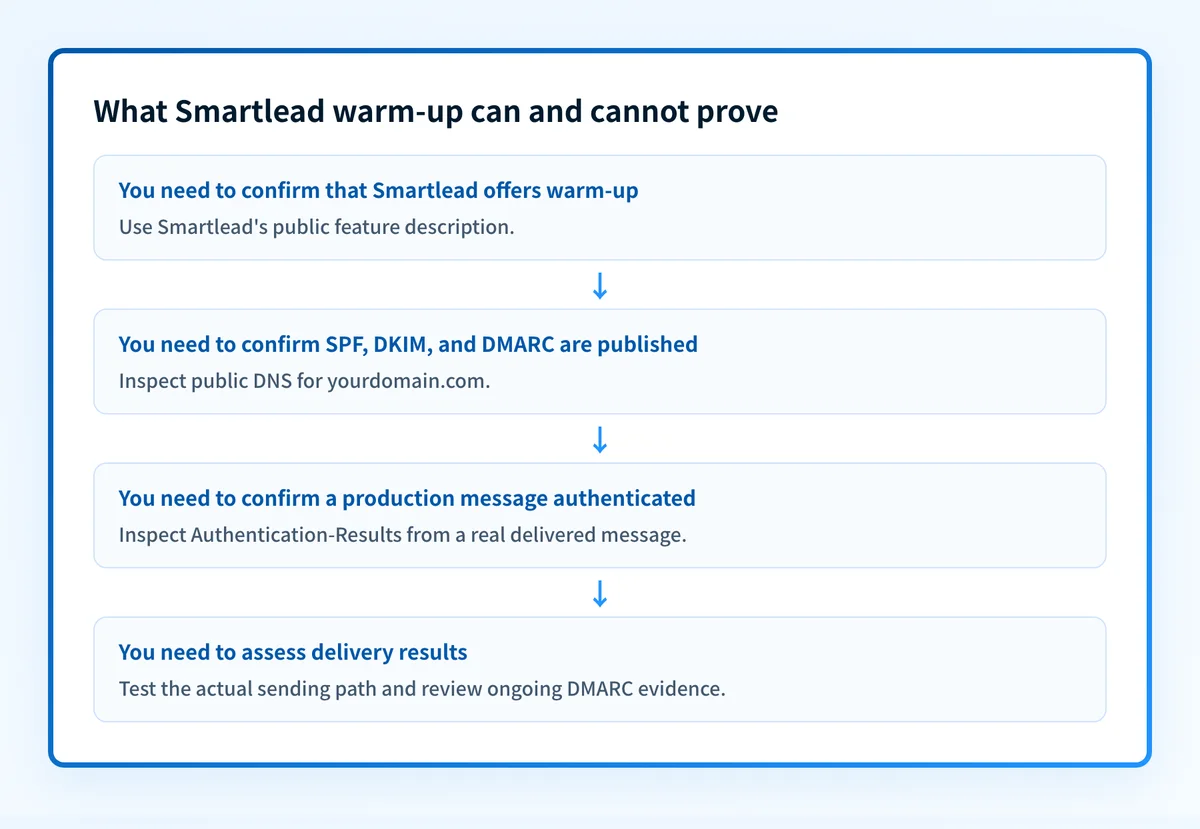
The answer changes when the question is about a production message rather than warm-up activity.
Use this decision rule:
- If you need to know whether Smartlead offers warm-up, its public site says yes.
- If you need to know whether a domain publishes SPF, DKIM, and DMARC, inspect the domain's public DNS records.
- If you need to know whether a real message authenticated, inspect headers from a delivered message sent through the exact production path.
- If you need to know whether recipients placed campaign mail in the inbox, spam folder, or another location, test and observe that recipient environment. Smartlead's public warm-up description does not provide that answer.
- If you need to know whether all legitimate senders using a domain align for DMARC, use DMARC aggregate-report data after it accumulates.
SPF authorizes sending infrastructure through DNS. DKIM adds a cryptographic signature to a message. DMARC evaluates whether SPF or DKIM passed with an identifier aligned to the visible From domain. These are distinct protocol checks. For a broader explanation of warm-up limits, see AI email warmup: what it is and what it cannot prove.
Do not increase sending volume based only on warm-up activity. First confirm that the production domain authenticates and that business-critical mail is sent through the intended mailbox and return path.
A worked evidence example
A Smartlead warm-up description and a production authentication result answer different questions.
Warm-up claim:
Smartlead warm-up engine simulates "real opens, reads and replies."
Production evidence to collect:
Visible From: campaigns@yourdomain.com
SPF result: pass or fail
DKIM result: pass or fail
DMARC result: pass or fail
Authentication-Results: copied from a real delivered message
The first item shows what Smartlead publicly says the feature does. The remaining items show what to collect from a real message. RFC 8601 defines the Authentication-Results header field, which can record an authentication service's evaluation of SPF, DKIM, DMARC, and related methods.
A useful production check starts with a message that recipients actually received from the same Smartlead mailbox, sending domain, and campaign configuration you intend to use. Review its raw headers, then compare the visible From domain with the domains that SPF and DKIM authenticated.
A passing result on one message is still narrow evidence. It does not prove every future message will authenticate, show every sending source using the domain, or guarantee inbox placement. It does provide more relevant evidence than a warm-up claim when the operational question is whether a particular production path authenticated.
What to check after enabling warm-up
Start with the evidence you already have.
- If you only have the sending domain, inspect its public authentication posture. Confirm that SPF, DKIM, and DMARC are present and readable before treating warm-up as a deliverability signal.
- If you have a delivered Smartlead message, inspect its raw headers. Compare the authentication results with the visible From domain and the actual sending path.
- If you have DMARC reports, inventory the sources using the domain and identify authentication or alignment failures before changing DMARC policy.
- If you are testing campaign delivery, use a controlled recipient test and document the sending mailbox, time, recipient environment, and observed placement. Do not generalize one test result to all recipients.
Check the sending domain's visible security posture
Before relying on Smartlead email warmup as part of a sending plan, check the sending domain's public SPF, DKIM, and DMARC posture. That check helps identify visible gaps that warm-up activity does not answer.
Check the email security score
A public security check does not validate Smartlead warm-up settings, prove the production mailbox is using the expected configuration, monitor future changes, or guarantee inbox placement. For ongoing DMARC work, Palisade is agentic DMARC software that analyzes aggregate-report data, identifies authentication and alignment issues, and proposes the next policy step for human review.
Evidence
Sources and further reading
Questions readers ask
Frequently asked questions
Does Smartlead have email warmup?
Yes. Smartlead's public homepage promotes built-in setup warm-up and says its warm-up engine simulates opens, reads, and replies. The public description does not document the current account setup steps, message volume, duration, or availability conditions.
Does Smartlead email warmup guarantee inbox placement?
No. Smartlead's public warm-up description does not publish a method or result that guarantees inbox placement. Receiving systems make their own filtering decisions based on factors that can include authentication, reputation, content, and local policy.
Does warm-up replace SPF, DKIM, and DMARC?
No. SPF, DKIM, and DMARC are email-authentication protocols with separate DNS and message-level evidence. Smartlead groups them with warm-ups in its deliverability positioning, but its public description does not state that warm-up proves or replaces authentication.
What should I check after starting Smartlead warmup?
Check the sending domain's public SPF, DKIM, and DMARC records, then inspect raw headers from a real message sent through the intended production path. If the domain uses DMARC, review aggregate reports after data accumulates to identify sources and alignment failures.
Can a public email security check verify Smartlead's settings?
No. A public check can inspect visible DNS-based email-authentication posture. It cannot access Smartlead account settings, confirm warm-up activity, prove the production sending path, or predict a receiver's final placement decision.

Written by
Dominic LandryDeliverability & DNS
Dominic Landry works on email deliverability and DNS configuration at Palisade, from SPF and DKIM records through to DMARC enforcement.
More from Dominic →