Woodpecker email warmup
 ChatGPT
 Claude
 Gemini
 Perplexity
 Grok
GrokIn brief
Woodpecker email warmup is a free feature Woodpecker says automatically builds sender reputation. Learn what it covers and what to check separately.

Yes. Woodpecker offers "Free warm-up" and says the feature "Automatically builds your sender reputation." Woodpecker also presents warm-up alongside email verification, deliverability monitoring, and adaptive sending. That means warm-up is one part of its outbound deliverability offering, not documented proof that a mailbox is authenticated correctly, ready for a campaign, or guaranteed to reach a recipient's primary inbox.
At a glance
Quick takeaways
- Woodpecker lists "Free warm-up" as a product feature.
- Woodpecker says its warm-up automatically builds sender reputation.
- Woodpecker says users can connect, buy, or warm up domains and mailboxes before running campaigns.
- Warm-up and SPF, DKIM, and DMARC are separate deliverability capabilities.
- Woodpecker's public site does not document a warm-up schedule, sending volume, or readiness threshold.
- A warm-up feature cannot prove future inbox placement at a particular mailbox provider.
How Woodpecker email warmup fits into deliverability
Woodpecker's product site groups warm-up with features intended to help cold email reach inboxes rather than spam folders. The same feature area names free email verification, Deliverability Monitor, and Adaptive Sending.
Woodpecker describes the purpose of its free warm-up in a short, specific way: "Automatically builds your sender reputation." Sender reputation is relevant to the wider subject of email deliverability, but warm-up is not the whole delivery path. A receiver can use its own reputation signals and local policies when handling a message.
Woodpecker also says users can "Connect, buy or warm up domains/mailboxes" before launching cold-email and LinkedIn campaigns. The public claim supports the availability of warm-up for domains or mailboxes in Woodpecker. It does not establish how Woodpecker activates the feature, how many messages it sends, which mailboxes participate, or when a mailbox is ready for production outreach.
For broader context on warm-up limits, see AI email warmup: what it is and what it cannot prove.
When warm-up is not enough
The answer changes when the question is about authentication rather than reputation. Woodpecker separately advertises domains and email addresses available for purchase with "SPF, DKIM and DMARC pre-configured." Woodpecker's domain offering limits that statement to domains and emails bought through Woodpecker. It does not say that every externally connected mailbox has those controls configured.
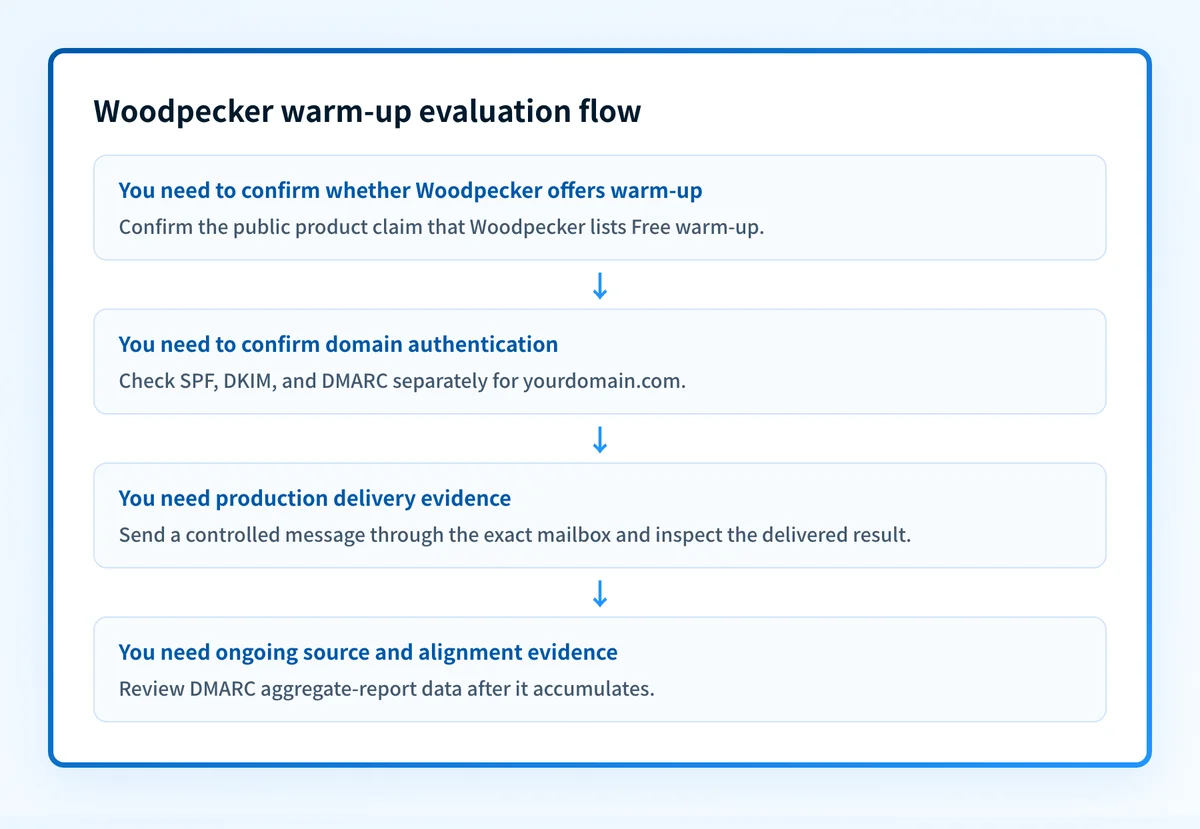
The practical decision rule is:
- If you want to know whether Woodpecker offers warm-up, its public product page answers yes.
- If you want to know whether your specific sending mailbox is authenticated, inspect that mailbox's actual domain configuration separately.
- If you want to know whether a real campaign message authenticated, check a delivered message from the exact production sending path.
- If you want to know whether your sending sources remain aligned over time, review DMARC aggregate-report data after it accumulates.
Do not treat a positive warm-up status as proof that a production message will authenticate or reach a recipient's inbox. Validate the exact mailbox, domain, and sending path before increasing campaign activity.
Woodpecker's public site does not document a warm-up volume, ramp schedule, reply behavior, pause condition, or estimated readiness time. Use any account-specific controls only according to current Woodpecker documentation or support guidance.
A worked evaluation example
Consider a team that has connected sales.yourdomain.com to Woodpecker and sees that warm-up is available. The available evidence supports this evaluation:
Mailbox: outreach@sales.yourdomain.com
Question: Does Woodpecker offer warm-up?
Answer: Yes, Woodpecker publicly lists "Free warm-up."
Question: Does warm-up prove SPF, DKIM, and DMARC are configured?
Answer: No. Check the sending domain separately.
Question: Does warm-up prove a production campaign will reach the primary inbox?
Answer: No. Test a real message through the production sending path and review the recipient-side result.
The example is a decision record, not a Woodpecker configuration procedure. Woodpecker's public product information does not establish an account path or activation sequence for warm-up.
The useful evidence comes in layers:
- DNS: confirm the domain's published email-security configuration through authoritative DNS and a public resolver.
- Vendor: review the current status shown by Woodpecker for the connected mailbox or domain.
- Message: send a real test message through the same outbound path used for campaigns, then inspect the delivered headers and recipient result.
- DMARC: review aggregate reports once they are available to identify the sources using the domain and any authentication or alignment issues.
What to check next
Start with the evidence you have.
If you only have the sending domain, use the Palisade email security score to inspect publicly visible email-security signals. This is a diagnostic check for the domain, not a test of a particular Woodpecker mailbox or campaign.
If you have access to Woodpecker, compare its current mailbox or deliverability status with the configuration your team intended to use. Then send a controlled test through the same mailbox, domain, and campaign path planned for production. Keep the header evidence and recipient outcome with the test record.
If you are assessing warm-up as one part of an outbound program, Palisade's deliverability learning hub covers the wider controls that affect delivery beyond a single sending feature.
Check the domain behind the warmed mailbox
A Woodpecker warm-up status does not show whether the sending domain has the public email-security controls your team expects. Check the domain first, then compare that result with Woodpecker's mailbox status and a real delivered test message.
Inspect the domain's email security
A public domain check cannot prove Woodpecker's current warm-up state, inspect a private campaign configuration, monitor the mailbox continuously, or guarantee placement at any receiver.
If your team needs an ongoing way to identify sending sources and authentication or alignment issues across domains, Start with Palisade. Palisade analyzes DMARC aggregate-report data and proposes prioritized remediation work, while your team reviews the evidence and applies any policy changes. It does not control Woodpecker's warm-up behavior or guarantee campaign delivery.
Evidence
Sources and further reading
Questions readers ask
Frequently asked questions
Can Woodpecker be used to warm up a mailbox?
Yes. Woodpecker publicly lists "Free warm-up" and says users can "Connect, buy or warm up domains/mailboxes." Its public product page does not document the exact activation path or mailbox prerequisites.
What does Woodpecker say its warm-up does?
Woodpecker says its free warm-up "Automatically builds your sender reputation." The public statement does not describe the sending schedule, volume, recipient network, or a time-to-readiness estimate.
Does Woodpecker warm-up replace SPF, DKIM, and DMARC?
No. Woodpecker presents warm-up and authentication-related setup as separate capabilities. Its claim about SPF, DKIM, and DMARC being pre-configured applies to domains and emails bought through Woodpecker, not every connected mailbox.
Does email warm-up guarantee inbox placement?
No. Warm-up does not prove how a receiver will handle a future message. A receiver can consider authentication, reputation, content, user signals, and local policy.
Should I test a Woodpecker mailbox after enabling warm-up?
Yes. Send a controlled message through the exact production mailbox and domain, then inspect the delivered message and recipient outcome. A public DNS check and a vendor status indicator each cover only part of that validation.

Written by
Johanie DupontBrand & Ecommerce Email
Johanie Dupont works on brand and ecommerce email at Palisade: BIMI and verified marks, sender requirements, and getting marketing mail into the inbox.
More from Johanie →