Email deliverability Q&A
Why did my email get clipped in Gmail?
By Samuel Chenard · CEO & Co-Founder, Palisade · Reviewed July 20, 2026
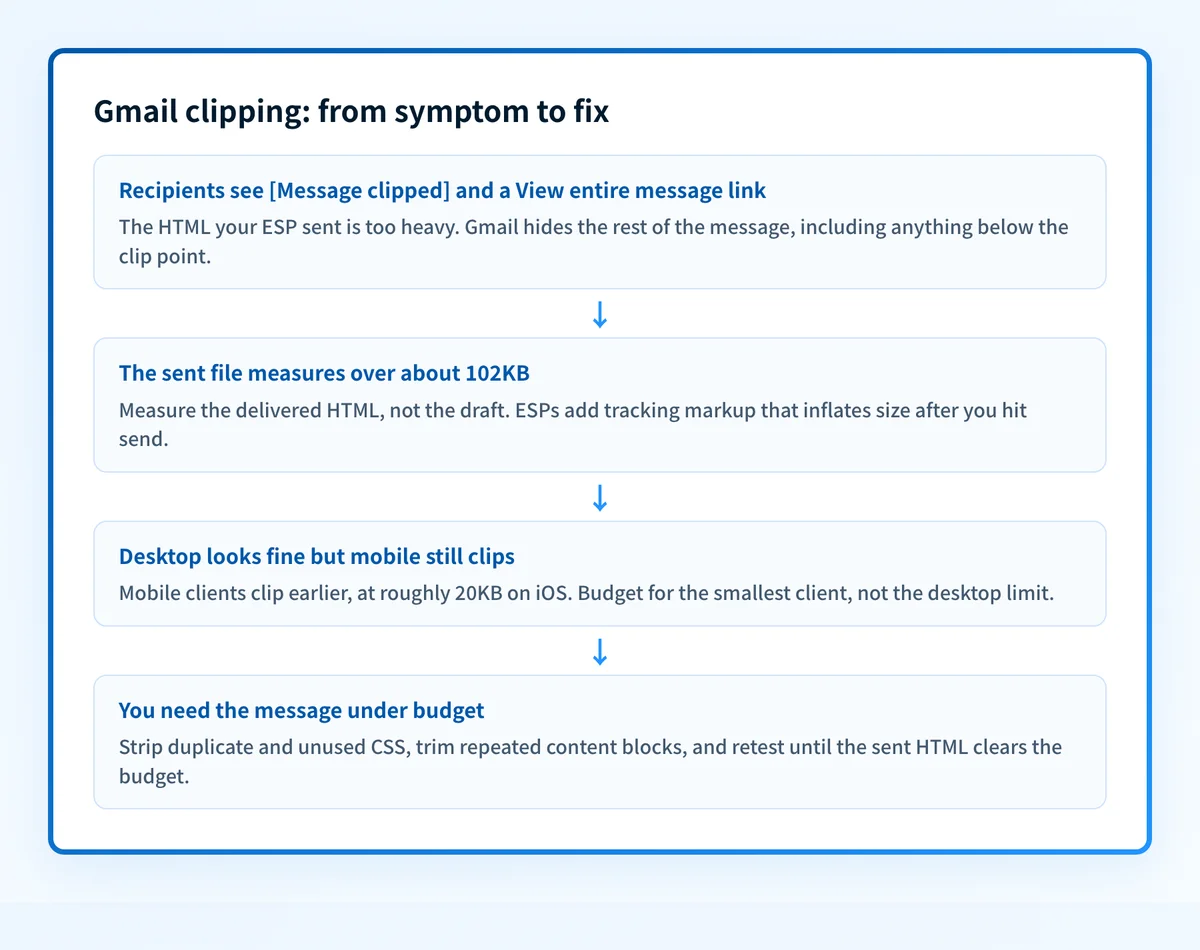
Gmail clipped your email because its HTML weighed more than roughly 102KB. Everything past that point hides behind [Message clipped] and a View entire message link. Only the code counts, not image file sizes. Google does not publish the threshold; Mailchimp, Litmus, and Klaviyo all document it at about 102KB. Trim the HTML and the clip disappears.
| At a glance | |
|---|---|
| The threshold | About 102KB of HTML, per Mailchimp, Litmus, and Klaviyo docs |
| Google's own number | Not published anywhere in Gmail Help (checked 2026-07-20) |
| What counts | HTML and CSS markup only; image file sizes do not count |
| Mobile is stricter | Klaviyo documents roughly 20KB on iOS and roughly 75KB on other mobile devices |
| What it is not | Not a spam filter, not a block, and not an authentication failure |
| Who fixes it | The sender. The fix is a lighter template, nothing else. |
Clipping is Gmail truncating the rendered message. When the HTML of an email crosses a size threshold, Gmail shows the first chunk, then replaces the rest with [Message clipped] and a View entire message link that opens the full email in a browser tab. The message was delivered and it landed in the inbox; Gmail simply declined to render all of it.
The threshold is the part everyone gets wrong. Google does not document a clipping limit anywhere in Gmail Help; the only Gmail size limit Google publishes is the 25MB attachment cap, which is a different thing entirely. The ~102KB figure comes from ESP documentation: Mailchimp states Gmail clips messages larger than 102KB, and Litmus and Klaviyo document the same number. Klaviyo adds that mobile clients clip earlier, at roughly 20KB on iOS and 75KB on other mobile devices.
What counts toward the limit is the raw HTML: text, inline styles, <style> blocks, tracking parameters, and every URL. Litmus is explicit that image file sizes do not count, only the code. That is why an email with three huge photos can render fine while a text-heavy newsletter with a bloated template gets cut in half.
What the documentation actually says
| Source | Documented behavior | Notes |
|---|---|---|
| Mailchimp (Help) | Gmail clips emails with a message size larger than 102KB; hidden content sits behind a View entire message link | Also warns that open tracking breaks, since the tracking code is in the clipped portion |
| Litmus (guide) | Clips over 102kb of code; the limit excludes images and counts only the markup itself | Notes clipping can cut mid-tag and break the layout of what still renders |
| Klaviyo (Help Center) | About 102KB on desktop; roughly 20KB on iOS and 75KB on other mobile devices | Documents that the clipped tracking pixel stops opens from recording |
| Google (Gmail Help) | Publishes no clipping threshold; documented size limits cover attachments (25MB), not rendering | The ~102KB figure is ESP-observed, not Google-stated |
Treat 102KB as a reliable working number, not an official one. Three major ESPs independently document it and it has held for years, but since Google has never published it, build in margin: aim for well under 100KB rather than engineering to the line. All four sources checked 2026-07-20; links in Sources below.
Why clipping costs more than a truncated footer
The direct damage lands on the two things senders keep at the bottom of an email. The unsubscribe link lives in the footer, so a clipped message hides it unless the reader clicks through to the web view; frustrated readers who cannot find unsubscribe reach for the spam button instead, and spam complaints hurt where clipping itself does not. The open-tracking pixel also usually sits at the bottom, and Klaviyo and Mailchimp both document the consequence: the pixel is in the clipped portion, it never loads, and the open never records. Your open rate under-reports on exactly the sends that are heaviest.
Under-reported opens then cascade. Campaigns look weaker than they are, engagement-based segments (people who opened in the last 90 days) silently shed subscribers who did open, and any automation keyed on opens misfires. If your open rate stepped down right after a template redesign, check a test send in Gmail for the clip before you blame the content.
There is also a rendering hazard: Litmus notes the cut can land mid-tag, so an unclosed table or div can break the layout of the part of the email that did render. A clipped email can arrive looking broken, on top of being shorter.
Clipping is a size problem, not an authentication problem
Worth saying plainly: SPF, DKIM, and DMARC have nothing to do with clipping. An email can pass every authentication check and still get clipped, and fixing your DNS will not shave a single kilobyte off your template. If your problem is [Message clipped], the fix is in your HTML, full stop.
The two problems just share a failure mode, which is why they get confused: both quietly suppress engagement metrics. Authentication failures keep mail from reaching the inbox normally: Google's sender guidelines state that unauthenticated messages might be marked as spam or rejected with a 5.7.26 error (rejection codes are covered in the SMTP error-code reference at /learning/smtp-error-codes). Clipping lets the mail in and then hides part of it. If opens dropped, it is worth ruling out both, but they are separate diagnoses with separate fixes, and this page only solves the second one.
What made the HTML heavy: cause and fix
| Symptom | Likely cause | The fix |
|---|---|---|
| Every campaign clips, even short ones | Template bloat: deep nested tables, per-block repeated styles, old client hacks | Rebuild or minify the base template; audit what your editor generates per block |
| Clipping started after switching editors or ESPs | The new tool injects duplicate CSS or extra wrapper markup on every element | Compare sent-message source before and after; enable embedded styles or a cleaner output mode |
| Only test sends clip | Gmail threads same-subject tests into one conversation and counts the combined size | Change the subject line on each test send, or delete the earlier tests from the thread |
| Long newsletters clip near the end | Genuinely too much content in one send: every article in full, plus footer blocks | Excerpt each story with a read-more link to the site; keep the email a table of contents |
| Sent size is far larger than your draft | Link tracking rewrites every URL into a long redirect, inflating the markup | Shorten heavily linked sections and drop decorative links; retest the sent size |
| Clips on phones but not desktop | Mobile thresholds are lower (Klaviyo: roughly 20KB on iOS, 75KB on other devices) | Design to the mobile budget, not the 102KB desktop one |
In every row the lever is the same: less markup in the sent message. Measure the sent version, not your draft; the ESP's wrapper, injected styles, and rewritten tracking links are all added after you hit send.
How to fix it
Reproduce the clip and rule out a delivery problem
Send the campaign to a Gmail address you control and look for [Message clipped] at the bottom. While you are testing, run your sending domain through the free check below: it will not fix clipping (nothing DNS-side will), but it checks your authentication records and common blocklists so you can rule those out as the cause, leaving size as the remaining suspect.
Run the check now
Enter your sending domain and the check runs instantly on the next page. Free, no signup.
Measure the sent HTML, not the draft
Open the delivered message's source in Gmail (Show original) and check its size. ESPs add wrapper markup, inject styles, and rewrite every link for tracking after you hit send, so the delivered file is always heavier than the one in your editor.
Strip duplicate and dead CSS
Drag-and-drop editors repeat the same inline styles on every block, and old templates carry fixes for email clients that no longer need them. Remove HTML comments, collapse repeated styles, and run the result through a minifier; Litmus's guidance is to keep exactly as much markup as you need and no more.
Cut content, not quality
If the template is clean and it still clips, the email is carrying too much. Excerpt long articles with a link to the full piece, drop decorative sections, and remember only the code counts: one good image costs less markup than four paragraphs of styled text.
Retest against the mobile budget and make it routine
Confirm the fix on a phone as well as desktop, since mobile clients clip far earlier than 102KB. Then add a sent-size check to your pre-send checklist with margin built in; a template that ships at 95KB will clip the week someone adds a banner.
Related free tools: Email header analyzer · DMARC checker
Questions readers ask
Frequently asked questions
How do I stop Gmail from clipping my emails?
Does Gmail clipping affect my open rate?
Do images count toward Gmail's 102KB limit?
Is Gmail clipping a sign my email went to spam?
Does clipping mean my SPF, DKIM, or DMARC is failing?
Why do my test emails get clipped when the real campaign is not?
What is the exact size limit before Gmail clips a message?
Sources
Every benchmark above was verified against the vendor's own documentation on the date shown.
- Gmail clips emails with a message size larger than 102KB and hides the rest behind a View entire message link. Mailchimp Help (checked 2026-07-20)
- The 102kb limit does not include images, only the data size of the code itself; clipping can cut mid-tag and break layouts. Litmus (checked 2026-07-20)
- Desktop clips at about 102KB, mobile at roughly 20KB (iOS) to 75KB (other devices); a clipped tracking pixel stops opens from being tracked. Klaviyo Help Center (checked 2026-07-20)
- Gmail Help documents a 25MB attachment limit but publishes no message-clipping threshold. Google Gmail Help (checked 2026-07-20)
- Messages that aren't authenticated with SPF, DKIM, and DMARC might be marked as spam or rejected with a 5.7.26 error. Google Email sender guidelines (checked 2026-07-20)
Related reading
Not sure this is your only problem?
Run a free email security score: every authentication and deliverability gap for your domain, in one pass.