DMARC report analyzer self hosted
 ChatGPT
 Claude
 Gemini
 Perplexity
 Grok
GrokIn brief
DMARC report analyzer self hosted workflow: validate a parser with a redacted aggregate report, interpret its evidence, and retest safely in stages.
A self-hosted DMARC report analyzer should be validated with a redacted aggregate-report fixture before it receives production reports. Confirm that the analyzer can produce a documented parser result or a reproducible configuration error, then compare its findings with the published DMARC record and later with real aggregate reports. A public record check helps inspect DNS, but it cannot prove the analyzer parsed a report or that a production sender authenticated.
At a glance
Quick takeaways
- Validate a self-hosted analyzer with a redacted aggregate-report fixture before changing DNS, mailbox, or infrastructure settings.
- Keep parser output, configuration errors, published DNS, and delivered-message evidence as separate observations.
- A public DMARC record check can inspect the published record, but it cannot inspect a local parser, mailbox ingestion path, or stored report data.
- Do not treat illustrative fields shown on vendor pages as a complete report schema or as evidence of a particular analyzer's behavior.
- Stop the investigation when the selected analyzer returns a documented parsed result or a reproducible configuration error.
- Hold deployment, DNS, mailbox, and infrastructure changes for human approval.
What this tool checks
A self-hosted DMARC report analyzer is separate from a public DNS checker. Its immediate job in this workflow is to accept a selected, redacted aggregate-report fixture and return either a parser output that its own documentation explains or an error that can be reproduced.
Use the Palisade DMARC checker alongside that local test to inspect the published DMARC record for the domain under review. This is useful DNS evidence when you need to compare a record change with report evidence. It does not show whether a self-hosted analyzer received, parsed, stored, or redacted an aggregate report. It also cannot prove the production sending path, message signing, continuous state, a receiver's private decision, or future delivery.
If you need background before reviewing analyzer output, start with the DMARC learning hub. For report terminology, use What are DMARC aggregate reports?. Keep those explanations separate from the selected analyzer's own documented input and output contract.
How to run the check
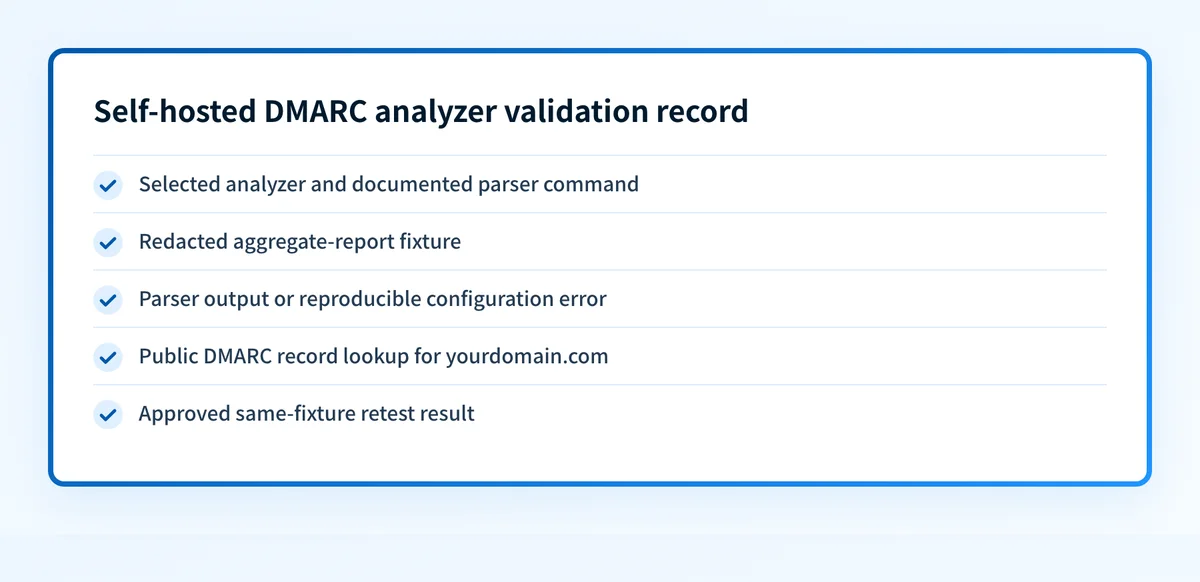
1. Select one analyzer and its documented test path
Choose one self-hosted analyzer before collecting evidence. Use its official documentation or repository to identify the documented parser command, fixture format, required configuration, and expected output location.
Do not combine setup instructions from several analyzers. A parser command, storage setting, mailbox ingestion method, or retention option only applies when the selected project's documentation supports it.
2. Prepare a redacted aggregate-report fixture
Use a fixture that contains no credentials, private keys, tokens, customer data, or unredacted message headers. Preserve the structure required for the selected analyzer's documented parser test.
Record the fixture's source, redaction method, command, configuration version, and timestamp in your internal change record. This makes a later failure reproducible without exposing report contents.
Do not point a new parser at a production mailbox or change a DMARC reporting address until the local fixture test has a documented result and the owner approves the change.
3. Run the analyzer's documented parser test
Run the exact parser command or test procedure supplied by the selected analyzer. Save the complete redacted output, including exit status and any error text. Do not paraphrase errors when escalating them. The exact message can distinguish a parser failure from a missing configuration value or an inaccessible dependency.
A public DNS lookup is a separate repeatable check. Replace the example domain with the domain you are investigating:
dig +short TXT _dmarc.yourdomain.comThis command returns a public DNS answer only. It does not test local report ingestion, parsing, storage, or notification behavior.
4. Check the published DMARC record separately
Open the Palisade DMARC checker and inspect the sending domain's published record before associating a parser result with a policy change. Preserve the time of the DNS check beside the local parser output.
A record check answers a narrower question than the fixture test: whether a public DMARC record is visible at the time of the lookup. It cannot establish why an analyzer rejected a fixture or whether a report reflects the intended production path.
How to interpret the results
The analyzer returns a documented parsed result
Treat a documented parsed result as evidence that the selected fixture passed through the analyzer's documented test path. Compare the returned fields and disposition labels with the selected analyzer's documentation. Do not assume that a field shown by one vendor or parser must appear in every implementation.
For example, some vendor marketing pages show fields such as source_ip, count, SPF, DKIM, and disposition. Those examples are not a complete universal schema, and they do not prove that your selected analyzer should display the same labels.
Next, determine whether the output identifies the report source, the observed sending source, authentication evidence, and the policy disposition in the way the selected analyzer documents. If it does not, keep the result as a parser-specific issue rather than diagnosing a DMARC policy problem.
The analyzer returns a reproducible configuration error
A reproducible configuration error means the selected documented test cannot complete with the supplied configuration. Preserve the command, redacted fixture identifier, error text, and the relevant configuration location. Compare them with the analyzer's official documentation before changing any infrastructure.
Do not use a passing public DMARC lookup to dismiss this result. DNS can be correct while a local parser still lacks a required dependency, permission, configuration value, or supported fixture format.
The published DMARC record differs from your expected record
A record difference is DNS evidence. First confirm the exact domain and the lookup time. Then compare the public answer with the record your organization intended to publish. Keep this finding separate from analyzer output until a real report or delivered-message result establishes a connection.
The open-source DMARC report analyzer selection guide can help when the issue is tool fit rather than a single parser failure.
The evidence does not connect to production mail
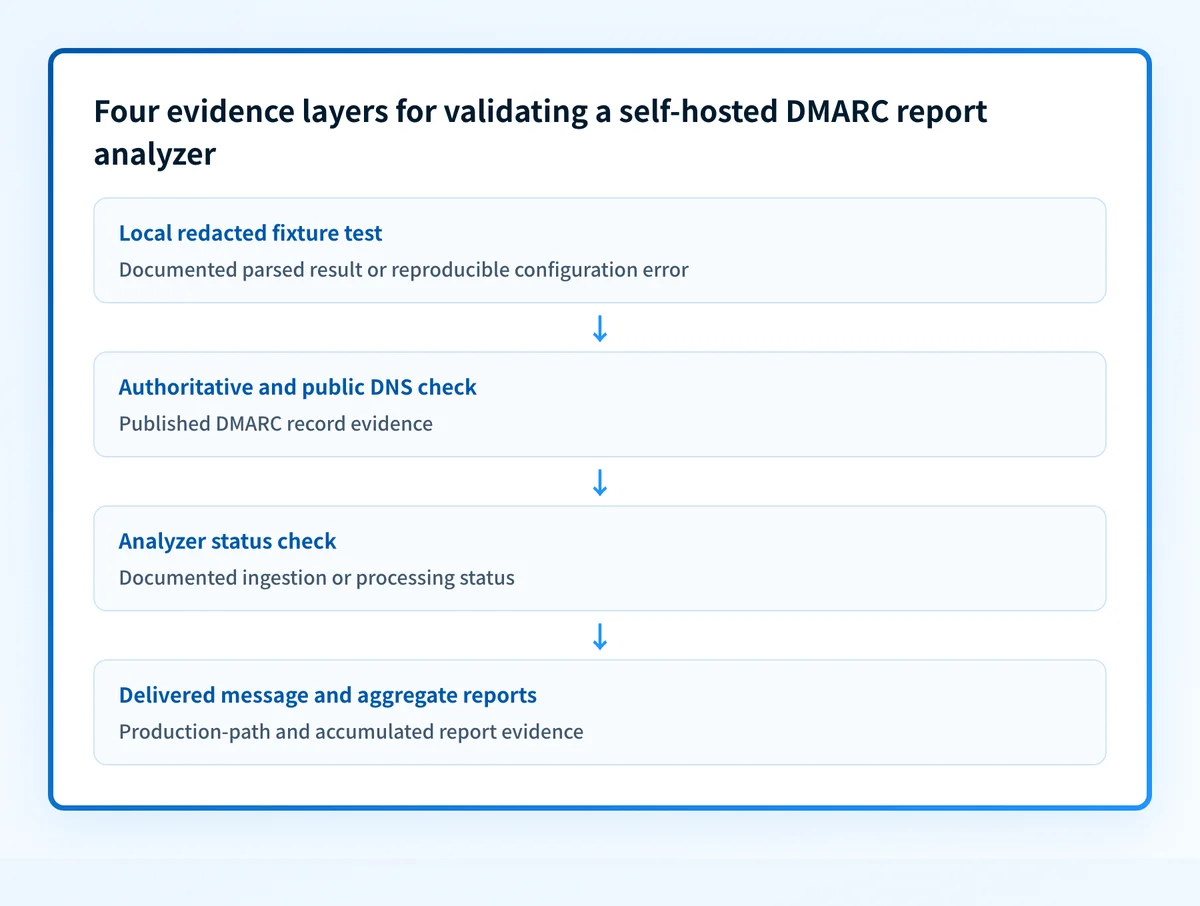
A successful fixture test and a visible public record do not prove that production reports are arriving or that a specific production sender is represented correctly. Move to the next evidence layer only after the local test is stable:
- Check authoritative DNS and at least one public resolver for the intended record.
- Verify the selected analyzer's own ingestion or processing status using its documented operator path.
- Inspect a real delivered message from the exact production path when message authentication is in question.
- Review aggregate-report data after it accumulates.
How to act on the result
When the fixture produces documented output, retain the redacted output as a baseline. Then prepare the selected analyzer's deployment or ingestion change for review. Keep any mailbox, DNS, database, storage, retention, or infrastructure mutation outside the test until the responsible owner approves it.
When the fixture produces a reproducible error, narrow the change to the selected analyzer's documented requirement. Inspect the configuration and repository first. Propose one minimal correction, identify how to roll it back, and rerun the same fixture test before expanding scope.
When the public record differs from the expected record, correct only the intended DNS owner after comparing it with the organization-approved value. Do not copy report addresses, record values, or configuration from another tenant or domain.
If your goal is to choose an approach rather than repair one configured parser, compare the operational requirements in Best DMARC report analyzers. A selection decision is not evidence that a deployment is working.
Investigate this with your coding agent
Use this after you have a selected analyzer, its documented test procedure, and a redacted fixture result. Prepare only redacted output and configuration locations that the agent can inspect without credentials or production access.
Agent handoff
Copy the prepared prompt
Give this to a coding agent that can inspect the relevant repository or configuration source of truth.
Problem: The selected self-hosted DMARC report analyzer does not yet have a documented parsed result for a redacted aggregate-report fixture, or it returns a reproducible configuration error.
Evidence: Selected analyzer name and version, redacted fixture path, documented parser command, redacted command output and exit status, and relevant redacted configuration paths.
Repository scope: The selected analyzer repository, its documented test fixtures, parser configuration, and local test files only.
Constraints: Inspect before editing. Do not apply changes until I approve the proposed diff. Do not access credentials, private keys, tokens, unredacted headers, customer data, production mailboxes, DNS, or infrastructure.
Requested output: Diagnosis, minimal proposed change, rollback, and unknowns.
Verification: Run the selected analyzer's documented parser test again against the same redacted fixture and record its output or reproducible error.
Stop if: Credentials, private data, production mutation, DNS or mailbox changes, or missing analyzer documentation or fixture evidence is required.
Human approval required: Review the proposed diff and verification plan before allowing changes. Do not paste secrets, private keys, API tokens, unredacted headers, or customer data.
How to retest
Repeat the exact documented parser test against the same redacted fixture after an approved local change. A successful retest should produce the analyzer's documented parsed result. If it returns an error again, preserve the new output and compare it with the first run before making another change.
Then repeat the public DNS lookup and the Palisade DMARC checker only when the published record is relevant to the change. Expect a record check to reflect the public DNS state, not the local parser state.
After deployment is approved and report data accumulates, validate the four layers again: authoritative and public DNS, the analyzer's documented status, a real delivered message from the production path when applicable, and aggregate-report evidence. This avoids promoting a local parser result into a claim about all production mail.
Check the published DMARC record beside the parser evidence
Once the local fixture test has a documented outcome, inspect the sending domain's public DMARC record and compare its timing with the parser run. This helps separate a DNS mismatch from a local analyzer configuration issue.
Check the published DMARC record
A public record check cannot parse a local fixture, repair an analyzer, monitor report ingestion, prove a production sending path, or guarantee delivery.
Evidence
Sources and further reading
Questions readers ask
Frequently asked questions
Can a public DMARC checker validate a self-hosted report analyzer?
No. A public DMARC checker can inspect the published DMARC record. It cannot access a local fixture, parser configuration, report storage, mailbox ingestion path, or the analyzer's error output.
Should I connect a production reporting mailbox before testing a fixture?
No. First run the selected analyzer's documented parser test against a redacted fixture. Hold mailbox, DNS, and infrastructure changes until the test has a documented parsed result or a reproducible error and an owner approves the next change.
Does a parsed fixture prove that production mail is correctly represented?
No. It proves only that the selected fixture completed the selected analyzer's documented test path. Production validation still needs DNS, analyzer-status, delivered-message, and accumulated aggregate-report evidence where applicable.
What should I save when the parser fails?
Save the selected analyzer version, documented command, redacted fixture identifier, redacted configuration location, complete error output, exit status, and timestamp. This is the minimum evidence needed to reproduce the failure without sharing secrets or customer data.
Can I use example report fields from another analyzer as a validation checklist?
No. Vendor examples are illustrative unless the selected analyzer's own documentation defines the same fields and meanings. Validate output against the documentation for the analyzer you are actually operating.

Written by
Samuel ChenardCEO & Co-Founder, Palisade
Samuel Chenard is the CEO and co-founder of Palisade, agentic DMARC software for IT teams and MSPs, from one domain to thousands.
More from Samuel →