Mastering DMARC: Safeguarding Your Domain with Email Authentication

Defining DMARC
DMARC, which stands for Domain-based Message Authentication, Reporting, and Conformance, is an essential email authentication protocol that helps protect your domain from email spoofing, phishing, and other fraudulent activities. By implementing DMARC, you can enhance the security of your email communications and establish trust with your recipients.
Importance of DMARC in Email Security
Email security is a crucial aspect of maintaining the integrity of your organization's communication channels. With the rise in email-based threats, it has become imperative for businesses to adopt robust security measures. DMARC plays a pivotal role in this regard by providing an additional layer of protection against unauthorized senders, ensuring the authenticity of emails sent from your domain.
Overview of DMARC's Purpose and Benefits
The primary purpose of DMARC is to combat email impersonation attacks and domain spoofing. It accomplishes this by allowing domain owners to specify policies that instruct email receivers on how to handle emails that fail authentication checks. By implementing DMARC, you can:
- Protect your brand: DMARC enables you to safeguard your domain's reputation and prevent malicious actors from leveraging your brand for fraudulent activities. - Increase email deliverability: By ensuring that your legitimate emails pass authentication checks, DMARC helps improve your email deliverability rates and reduces the likelihood of your messages being flagged as spam. - Enhance recipient trust: With DMARC in place, your recipients can have increased confidence that emails originating from your domain are genuine and can be trusted, fostering stronger relationships and reducing the risk of phishing attacks.
Understanding Email Authentication
Basics of Email Authentication
Email authentication is the process of verifying the identity and integrity of email messages. It involves a combination of protocols and techniques that enable email receivers to determine whether an incoming email is legitimate or potentially fraudulent.
SPF (Sender Policy Framework) Explained
Sender Policy Framework (SPF) is one of the foundational components of email authentication. It allows domain owners to specify authorized sending sources for their domain by publishing SPF records in the Domain Name System (DNS). SPF records contain information about the IP addresses or hostnames authorized to send emails on behalf of a specific domain.
DKIM (DomainKeys Identified Mail) Explained
DomainKeys Identified Mail (DKIM) is another crucial email authentication mechanism. It uses cryptographic signatures to verify the authenticity of an email's content and the domain from which it originates. By adding a digital signature to outgoing emails, domain owners can provide recipients with a means to validate the message's integrity and confirm that it hasn't been tampered with during transit.
How DMARC Works
DMARC's Role in Email Authentication
DMARC builds upon SPF and DKIM to provide a comprehensive email authentication framework. It enables domain owners to specify their preferred authentication methods and policies, allowing email receivers to make informed decisions on how to handle incoming emails.
Components of a DMARC Record
A DMARC record contains crucial information that guides email receivers in applying the appropriate authentication and handling policies. It typically includes the following components:
- Policy: Specifies the desired actions for emails that fail DMARC authentication checks, such as "none," "quarantine," or "reject." - Percentage: Determines the proportion of messages that should be subjected to DMARC policy enforcement. This allows domain owners to gradually implement DMARC without disrupting email delivery. - Alignment: Specifies the alignment requirements for SPF and DKIM authentication. It ensures that the domain used in the "From" header aligns with the domain in the SPF and DKIM signatures.
DMARC Policies and Their Effects
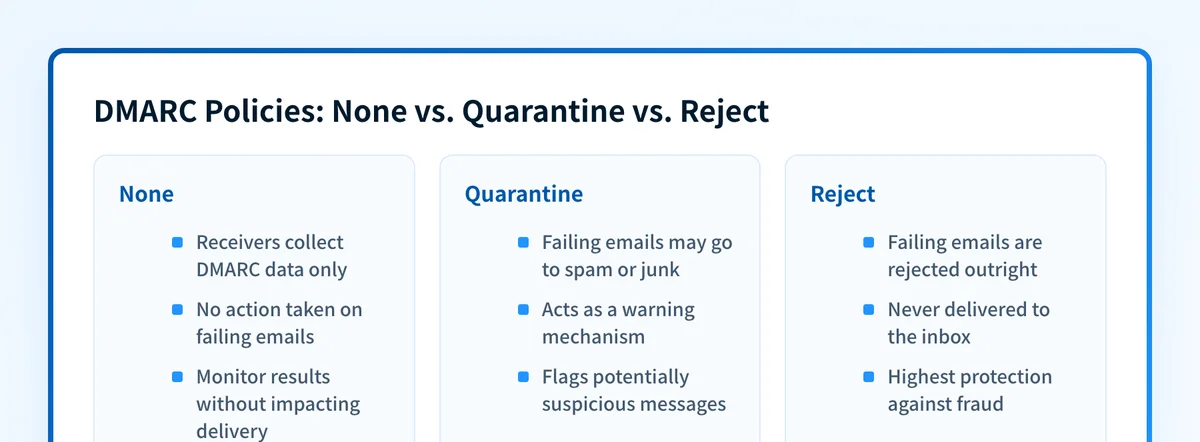
DMARC policies define how email receivers should handle messages that fail authentication. There are three primary policies:
- None: In this policy mode, email receivers simply collect DMARC data without taking any specific action. It allows domain owners to monitor and analyze authentication results without impacting email delivery. - Quarantine: With this policy, email receivers may choose to deliver the email to the recipient's spam or junk folder. It acts as a warning mechanism for potentially suspicious messages. - Reject: The reject policy instructs email receivers to outright reject emails that fail DMARC authentication. These messages are not delivered to the recipient's inbox, providing the highest level of protection against fraudulent activities.
Creating a DMARC Record
Step-by-Step Guide to Creating a DMARC Record
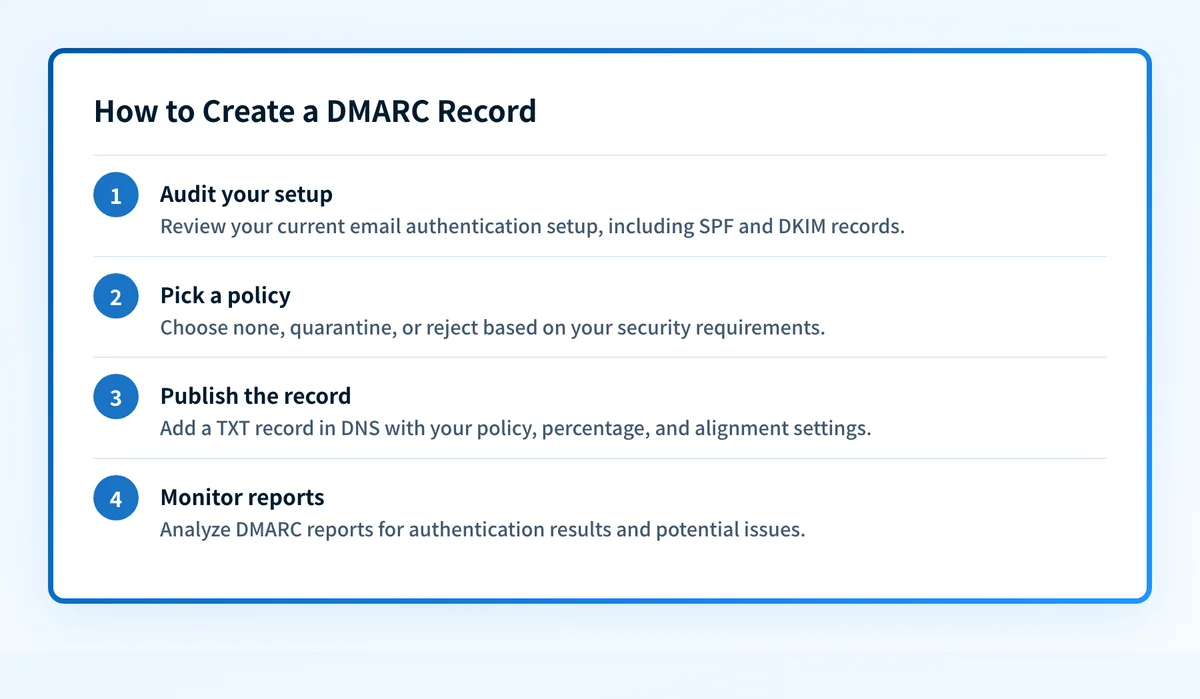
To create a DMARC record for your domain, follow these steps:
- Understand your current email authentication setup, including SPF and DKIM records. - Determine your desired DMARC policy (none, quarantine, or reject) based on your organization's security requirements. - Configure your DNS settings to publish the DMARC record by adding a TXT record with the specified DMARC policy, percentage, and alignment settings. - Monitor and analyze DMARC reports to gain insights into email authentication results and potential issues.
Configuring DMARC Parameters: Policy, Percentage, and Alignment
When configuring your DMARC record, it's essential to consider the following parameters:
- Policy: Choose the appropriate policy based on your organization's security stance and risk tolerance. - Percentage: Start with a lower percentage (e.g., 10%) to gradually increase the volume of email subjected to DMARC policy enforcement. - Alignment: Specify strict alignment requirements to ensure maximum protection against domain spoofing and impersonation.
Understanding DMARC Tags and Their Functions
DMARC records consist of various tags that provide specific instructions and settings for email receivers. Some common DMARC tags include:
- p: Specifies the policy to be applied for failed DMARC authentication. - pct: Determines the percentage of messages to which the policy should be applied. - adkim: Sets the alignment requirement for the DKIM signature. - aspf: Sets the alignment requirement for the SPF check. - ruf: Specifies the address where aggregate DMARC reports should be sent. - rua: Specifies the address where forensic DMARC reports should be sent.
Implementing DMARC for Domain Protection
Benefits of Implementing DMARC for Domain Owners
Implementing DMARC offers several advantages for domain owners:
- Enhanced Security: DMARC significantly reduces the risk of domain spoofing and phishing attacks, safeguarding your brand reputation and protecting your customers. - Improved Deliverability: By ensuring that your legitimate emails pass authentication checks, DMARC increases the chances of your messages reaching the recipients' inbox, ultimately improving email deliverability rates. - Visibility and Control: DMARC provides valuable insights through aggregate and forensic reports, enabling you to analyze authentication results, identify vulnerabilities, and take proactive measures to enhance your domain's security posture.
Common Challenges in DMARC Implementation
While implementing DMARC is beneficial, it can come with some challenges. Some common hurdles include:
- Lack of Awareness: Many organizations are unaware of DMARC and its benefits, resulting in a lack of adoption and implementation. - Complex Configuration: Configuring DMARC records and aligning them with existing SPF and DKIM settings can be complex, requiring technical expertise and careful planning. - False Positives and False Negatives: Improperly configured DMARC policies can lead to false positives (legitimate emails being flagged as spam) or false negatives (malicious emails bypassing DMARC checks).
Best Practices for a Successful DMARC Deployment
To ensure a successful DMARC deployment, consider the following best practices:
- Start with Monitoring: Begin with a "none" policy to monitor and analyze DMARC reports without impacting email delivery. This allows you to identify authentication issues and fine-tune your configuration before enforcing stricter policies. - Gradual Policy Enforcement: Implement DMARC gradually by starting with a low percentage of enforcement (e.g., 10%) and progressively increase it over time. This approach minimizes the risk of false positives and allows you to address any configuration issues. - Regularly Review Reports: Monitor and analyze DMARC reports regularly to gain insights into authentication failures, SPF/DKIM alignment issues, and unauthorized senders attempting to use your domain. - Collaborate with Third-Party Providers: Work closely with your email service provider (ESP) or other third-party vendors to ensure proper configuration and alignment of DMARC records with your existing email infrastructure.
Analyzing DMARC Reports
Interpreting DMARC Aggregate Reports
DMARC aggregate reports provide valuable information about authentication results, including SPF and DKIM pass/fail rates, alignment issues, and sources of unauthorized email sending. By carefully analyzing these reports, you can identify patterns, detect anomalies, and take appropriate actions to improve your email security.
DMARC Reporting Formats and Tools
DMARC reports can be generated in different formats, such as XML or CSV. Several tools and services are available to help parse and analyze these reports, providing visualizations and insights into authentication data. Some popular DMARC reporting tools include Agari, dmarcian, and DMARC Analyzer.
Using DMARC Reports for Enhanced Email Security
By leveraging DMARC reports, you can:
- Identify Unauthorized Senders: DMARC reports reveal sources of unauthorized email sending, allowing you to identify and block malicious actors attempting to impersonate your domain. - Monitor SPF and DKIM Alignment: Analyzing alignment statistics helps ensure that your SPF and DKIM settings are correctly configured, minimizing the risk of domain spoofing and impersonation. - Take Corrective Actions: DMARC reports enable you to proactively address authentication failures, adjust DMARC policies, and strengthen your email security measures.
DMARC and Email Deliverability
Impact of DMARC on Email Deliverability
Implementing DMARC correctly has a positive impact on email deliverability. By ensuring that your legitimate emails pass authentication checks, DMARC increases the chances of your messages reaching the recipients' inbox, while reducing the risk of false positives and spam filtering.
Addressing False Positives and False Negatives
False positives occur when legitimate emails are mistakenly flagged as spam or rejected due to DMARC policies. To address false positives, carefully review DMARC reports, fine-tune policy settings, and maintain a good sending reputation.
False negatives, on the other hand, refer to malicious emails that manage to bypass DMARC checks. To minimize false negatives, regularly review and update your DMARC configuration, ensure proper SPF and DKIM alignment, and monitor for unauthorized senders.
Balancing Security and Deliverability with DMARC
Achieving a balance between email security and deliverability is essential when implementing DMARC. While enforcing stricter DMARC policies enhances security, it may increase the likelihood of legitimate emails being flagged as spam or rejected. To maintain a balance:
- Gradual Enforcement: Gradually increase the percentage of messages subjected to DMARC enforcement, allowing email receivers to adjust and adapt to the new policies. This approach minimizes the risk of false positives and ensures a smooth transition. - Collaboration with ESPs: Work closely with your email service providers (ESPs) to ensure proper configuration and alignment of DMARC records with their infrastructure. This collaboration helps maintain deliverability while strengthening email security. - Regular Monitoring and Adjustment: Continuously monitor DMARC reports, analyze authentication results, and make adjustments as needed. Fine-tuning policies, alignment settings, and SPF/DKIM configurations can improve both security and deliverability.
Troubleshooting DMARC Issues
Common DMARC Configuration Errors
During DMARC implementation, some common configuration errors may arise:
- Missing or Misconfigured SPF/DKIM Records: Ensure that your SPF and DKIM records are correctly published in the DNS and align with your DMARC policies. - Inconsistent Domain Alignment: Verify that your "From" domain aligns with the domains used in SPF and DKIM signatures. Misalignment can result in authentication failures. - Improper Syntax in DMARC Records: Check for any syntax errors, missing tags, or incorrect values in your DMARC record. Even a minor mistake can disrupt the authentication process.
Analyzing DMARC Failure Reports
When authentication failures occur, DMARC failure reports provide insights into the reasons behind the failures. Review these reports to identify the sources of failed authentication, such as unauthorized senders or configuration issues. Take corrective actions based on the information gathered to improve email security.
Debugging DMARC Problems
If you encounter persistent DMARC issues, consider the following debugging steps:
- Review DNS Settings: Double-check your DNS records for proper SPF, DKIM, and DMARC configurations. - Validate Email Sources: Verify that all authorized email sources are correctly listed in your SPF records. - Check Alignment: Ensure that the domains used in the "From" header align with the SPF and DKIM signatures. - Analyze Authentication Results: Thoroughly analyze DMARC reports to identify patterns and potential sources of authentication failures. - Seek Expert Assistance: If the issues persist, consult with experts or seek assistance from DMARC implementation specialists who can provide in-depth guidance and troubleshooting.
Advanced DMARC Techniques
Customizing DMARC Policies for Specific Use Cases
DMARC allows customization of policies based on specific use cases or requirements. For example, you can implement different policies for internal communication, third-party vendors, or marketing campaigns. This customization ensures flexibility while maintaining robust email security.
Leveraging DMARC for Brand Protection
DMARC plays a vital role in brand protection by preventing domain spoofing and impersonation. By enforcing DMARC policies and monitoring authentication results, you can protect your brand's reputation, maintain customer trust, and reduce the risk of phishing attacks that exploit your brand.
Enhancing DMARC with External Threat Intelligence
Integrating DMARC with external threat intelligence sources enhances your email security. By leveraging threat intelligence feeds, you can identify emerging threats, suspicious domains, or known malicious actors attempting to exploit your domain. This proactive approach strengthens your defenses and reduces the risk of email-based attacks.
Future of DMARC and Email Security
Evolving Trends in Email Security
Email security will continue to evolve to address emerging threats and advancements in technology. Some notable trends include:
- AI-Powered Threat Detection: Artificial intelligence (AI) and machine learning (ML) technologies will play a crucial role in detecting and mitigating sophisticated email threats, such as targeted spear-phishing attacks. - Behavioral Analysis: Email security solutions will increasingly utilize behavioral analysis techniques to identify anomalies and detect suspicious email patterns, allowing for more accurate threat detection. - Integration of DMARC with Security Ecosystem: DMARC will continue to be integrated with other security measures, such as endpoint protection, network security, and threat intelligence, to provide a comprehensive defense against email-based threats.
Potential Developments in DMARC
DMARC is expected to evolve to address the evolving threat landscape and industry requirements. Some potential developments include:
- Standardization and Simplification: Efforts will be made to simplify the implementation and configuration process of DMARC, making it more accessible to organizations of all sizes. - Enhanced Reporting Capabilities: DMARC reporting will likely become more comprehensive, providing deeper insights into authentication results, threat intelligence, and actionable recommendations for improving email security. - Expanded DMARC Adoption: As awareness about email security grows, more organizations will adopt DMARC as a standard practice to protect their domains and customers from phishing attacks.
Importance of DMARC in a Changing Threat Landscape
As the threat landscape continues to evolve, DMARC remains a critical defense mechanism against email-based attacks. Its ability to verify email authenticity, prevent domain spoofing, and enhance brand protection is essential in combating phishing, malware, and other fraudulent activities. Implementing and mastering DMARC is crucial for organizations to maintain a secure and trustworthy email environment.
In conclusion, mastering DMARC is vital for safeguarding your domain and protecting against email-based threats. By understanding email authentication, implementing DMARC policies, and analyzing authentication reports, you can enhance the security of your email communications, improve deliverability, and establish trust with your recipients. With the future of email security evolving, DMARC will continue to play a pivotal role in protecting organizations from the ever-growing threat landscape.
At GetVerified.Email, we understand that navigating the technical aspects of DMARC implementation can be complex and overwhelming. Are you unsure about your current DMARC setup or how to create a DMARC record? Do you need assistance in configuring SPF and DKIM records? Or perhaps you want to optimize your DMARC policies for better deliverability and security? We are here to help!
It’s easy for you to get started. Fill out our quick 2-minute questionnaire to receive a personalized assessment of your DMARC implementation status and recommended actions:
Start the 2-Minute Questionnaire
By leveraging our expertise and the power of our DMARC solutions, you can simplify the implementation process, overcome challenges, and enhance your email security posture. Take the first step towards mastering DMARC and protecting your domain with GetVerified.Email today!