Yahoo Postmaster Tools: what sender data you actually get
 ChatGPT
 Claude
 Gemini
 Perplexity
 Grok
GrokIn brief
Yahoo Postmaster Tools is now Yahoo Sender Hub. Insights shows delivered volume and spam complaint rate for verified DKIM domains, and what it omits.
Yahoo's current postmaster service is Yahoo Sender Hub. Its standard Insights view provides aggregate delivered volume and spam complaint rate for a verified DKIM signing domain. Yahoo also offers a separate Complaint Feedback Loop that sends Abuse Reporting Format complaint events for enrolled DKIM domains. These are useful Yahoo-specific signals, but they are not a universal sender-reputation score or proof of placement for an individual message.
At a glance
Quick takeaways
- Yahoo Sender Hub Insights shows delivered volume and spam complaint rate for verified DKIM domains.
- Yahoo calculates its displayed complaint rate from messages delivered to the inbox.
- Insights data is grouped by the selected DKIM signing domain, so several From domains can contribute to one view.
- The Complaint Feedback Loop provides individual ARF complaint reports for enrolled DKIM domains.
- SMTP replies are evidence for one delivery attempt, while Insights shows aggregate trends.
- Yahoo's placement and campaign performance feeds are separate documented services, not the standard Insights dashboard.
How Yahoo Sender Hub data works
Yahoo's Sender Hub FAQ identifies two standard Insights signals for a verified DKIM domain: Delivered and Spam Complaint Rate.
Delivered is the number of messages Yahoo reports as delivered during the selected period. It can help an operator spot volume changes for that DKIM identity. It does not show every attempted message, prove inbox placement for every delivered message, or describe delivery at Gmail, Microsoft, or another recipient network. For Outlook.com consumer-mail telemetry, use Microsoft's closest equivalent to Google Postmaster Tools, which covers different IP-focused data and complaint evidence.
Spam Complaint Rate is an average for the selected period. Yahoo says this rate uses messages delivered to the inbox as its denominator. That can differ from an ESP's internal calculation, which may use accepted, delivered, or attempted messages. Compare trends within each system before treating two differently calculated rates as contradictory.
Yahoo groups Insights under the verified DKIM signing domain. If multiple visible From domains sign with the same DKIM d= domain, their traffic can appear in the same aggregate view. A complaint-rate increase may therefore require further segmentation in the sender's own data by campaign, From domain, source IP, audience, and send time.
Yahoo documents this data in UTC and includes Yahoo-managed domains in its reporting scope. For wider provider-specific guidance, see the vendor email authentication learning hub.
When the answer changes
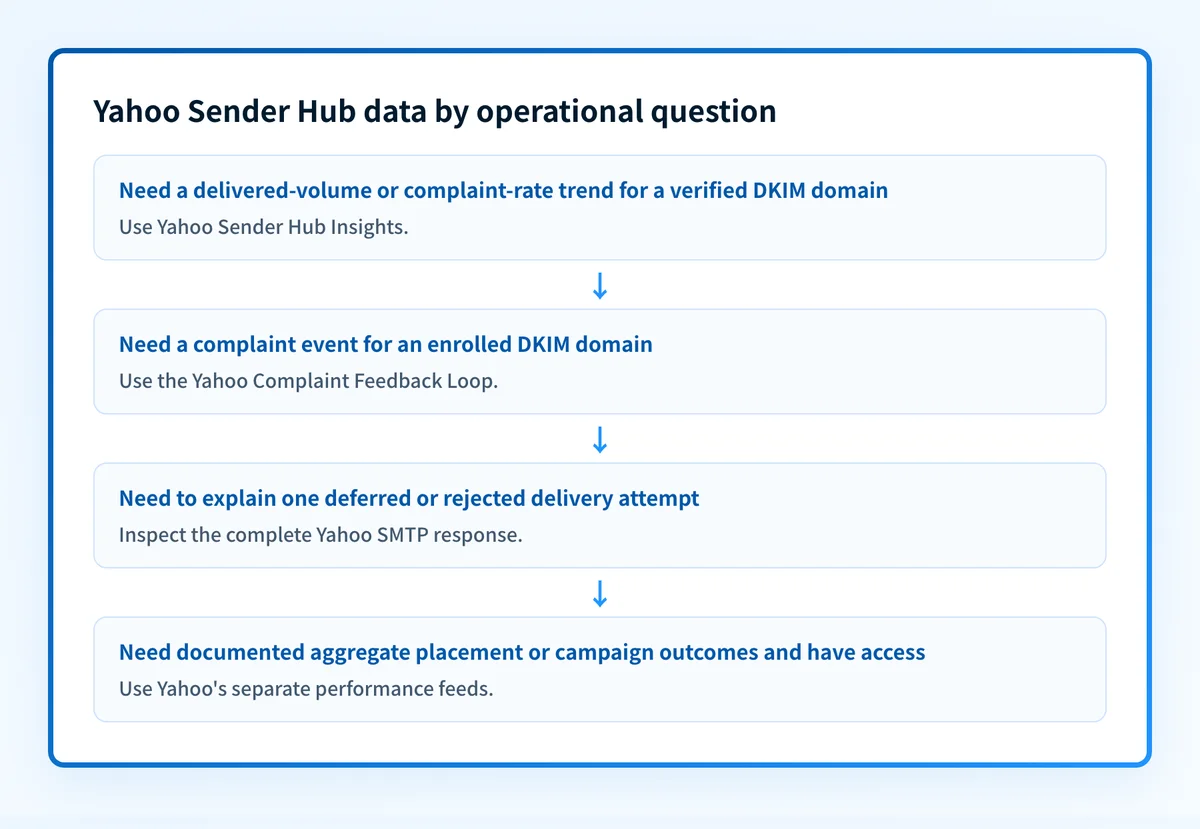
The right Yahoo data source depends on the evidence you need.
- Use Insights when you need an aggregate trend for a verified DKIM domain, such as whether Yahoo-reported delivered volume or complaint rate changed over time.
- Use the Complaint Feedback Loop, or CFL, when a recipient-level complaint event is needed for suppression or investigation. Yahoo's Complaint Feedback Loop documentation describes it as a DKIM-domain-based service for DKIM-signed mail.
- Use the complete SMTP response when a particular delivery attempt deferred or failed. Yahoo's SMTP error-code reference distinguishes temporary 4xx responses from permanent 5xx failures and documents possible causes.
- Use Yahoo's separately documented Email Deliverability and Performance Feeds only when your organization has access to those feeds and needs their documented aggregate outcome or campaign dimensions.
Yahoo's standard Insights view does not answer every sender question. Yahoo says it does not currently provide an Insights API, and it no longer offers an IP- or CIDR-based complaint feedback loop in the Sender Hub FAQ. Do not substitute an external IP score for Yahoo's own telemetry.
Worked example: matching Yahoo data to the sending identity
Start with a real delivered production message and record the identities that determine where evidence may appear.
Visible From domain: news.yourdomain.com
DKIM signing domain: yourdomain.com
Sending IP: 192.0.2.25
Recipient domain: yahoo.com
Campaign identifier: august-product-update
Evidence needed: Yahoo complaint trend for the DKIM signing domain
In this illustrative example, Sender Hub Insights would be selected for yourdomain.com, the DKIM d= domain. It would not automatically isolate news.yourdomain.com or the named campaign if other streams use the same signing domain.
If a Yahoo-hosted recipient marks a covered message as spam and the DKIM domain is enrolled in CFL, the feedback report can provide an event for the sender's complaint-processing workflow. Yahoo's FAQ says ARF reports include a human-readable part, machine-readable feedback metadata, and original message headers. Handle those reports as sensitive operational data and use them to suppress the complaining recipient where appropriate.
The Yahoo bulk sender requirements explain the authentication and complaint expectations that make these signals operationally relevant. If your investigation spans Gmail as well, compare the provider's own data with what Google's DMARC reports say about sender failures, rather than assuming the dashboards measure the same things.
What to check next
When you have only a sending domain, first inspect the published DKIM record and identify the selector and signing domain used by the production mail stream. The record lookup is a DNS check, not proof that an application is currently signing mail with that identity.
When you have a Yahoo Sender Hub trend, compare its time window with your ESP or application logs. Split the traffic by DKIM d= domain, visible From domain, sending IP, and campaign. Look for the smallest segment that changed during the same period.
When you have a complaint event, use the CFL evidence to locate the relevant message and apply the sender's suppression process. When you have a bounce or deferral, preserve the complete SMTP response, timestamp, recipient domain, queue ID, and source IP before interpreting an aggregate graph.
After a configuration change, validate at four layers:
- Confirm the published DNS record through the authoritative DNS provider and at least one public resolver.
- Confirm the vendor's current DKIM verification or Sender Hub status.
- Send a real message through the production path and inspect its delivered headers for the actual DKIM result.
- Review DMARC aggregate reports after data accumulates to identify sources and alignment issues across the domain.
Track the sending sources behind Yahoo's aggregate trend
Yahoo Insights can show that a verified DKIM domain's delivered volume or complaint rate changed. It does not inventory every production sender sharing that domain, prove future delivery, or control Yahoo's private receiver decisions.
Palisade is agentic DMARC software that analyzes DMARC aggregate-report data, identifies sending sources and authentication or alignment issues, and creates prioritized remediation tickets. It can propose the next DMARC policy step when the evidence supports it, while your team reviews the evidence and applies any DNS change.
Evidence
Sources and further reading
Questions readers ask
Frequently asked questions
Does Yahoo Sender Hub provide a sender reputation score?
No. Yahoo's standard Sender Hub Insights documentation identifies delivered volume and spam complaint rate for verified DKIM domains. Those signals can support investigation, but Yahoo does not document a universal reputation grade in Insights.
Does Yahoo Insights show inbox placement?
Not for each individual message. Yahoo says its spam complaint-rate calculation uses inbox-delivered messages, but the standard Insights view is an aggregate trend. It does not prove the folder placement of a specific message.
Does Yahoo's Complaint Feedback Loop work by IP address?
No. Yahoo's current documentation says CFL enrollment is based on the DKIM signing domain. Yahoo no longer offers an IP- or CIDR-based complaint feedback loop.
Do I need to enroll in the Complaint Feedback Loop to use Insights?
No. Yahoo's Sender Hub FAQ says CFL enrollment is not required to view Insights. They are separate services with different evidence: aggregate trends in Insights and complaint events through CFL.
Can several brands appear in one Yahoo Insights view?
Yes. If several sending programs use the same verified DKIM signing domain, Yahoo groups their data under that selected DKIM domain. Use first-party campaign and From-domain data to isolate the stream behind a change.

Written by
Johanie DupontBrand & Ecommerce Email
Johanie Dupont works on brand and ecommerce email at Palisade: BIMI and verified marks, sender requirements, and getting marketing mail into the inbox.
More from Johanie →