Can Amazon SES and Palisade be used together for bulk sender compliance?
 ChatGPT
 Claude
 Gemini
 Perplexity
 Grok
GrokIn brief
Amazon SES and Palisade for bulk-sender compliance: authenticate SES mail, validate real messages, then use DMARC evidence for safe remediation.
Amazon SES and Palisade can support the same bulk-sender compliance workflow, but they are separate products. Amazon SES provides the sending service and documents how to authenticate its mail. Palisade can then analyze DMARC aggregate-report data, identify sources and alignment issues, and propose prioritized remediation work. The public sources for this article do not establish a partnership, bundle, shared dashboard, integration, or Amazon quote involving the two products.
At a glance
Quick takeaways
- Amazon SES authentication starts with verifying the identity that sends mail and configuring DKIM for that identity.
- Amazon SES documentation recommends using a custom MAIL FROM domain when SPF alignment is required.
- A DNS record or an SES verification status does not prove that production mail is using the intended authentication path.
- A delivered message's
Authentication-Resultsheader provides message-level evidence for SPF, DKIM, and DMARC evaluation. - DMARC aggregate reports can reveal sources and alignment failures after mail has been sent.
- Palisade is a separate DMARC-monitoring and remediation workflow, not an Amazon SES feature or integration.
How the SES and DMARC workflow works
Amazon SES guidance for bulk-sender requirements describes authentication as part of preparing SES mail for mailbox-provider requirements. For an SES identity, DKIM is configured through the identity's authentication settings. Amazon SES can use Easy DKIM, which generates the DNS records needed for SES to sign mail with DKIM, as described in the Amazon SES DKIM documentation.
DMARC evaluates the visible From domain. A message can pass DMARC when SPF passes with an aligned authenticated domain, or when DKIM passes with an aligned d= domain. The vendor email-authentication hub has broader guidance for provider-specific authentication work.
The practical split is straightforward:
- Amazon SES sends the message and supplies the SES identity and DKIM configuration.
- DNS publishes the authentication records that SES and receivers use.
- The receiving mailbox provider evaluates the message and makes its own delivery decision.
- DMARC reports provide later aggregate evidence about authentication outcomes.
- Palisade can analyze those reports, identify sources and authentication or alignment issues, and create prioritized remediation tickets for human review.
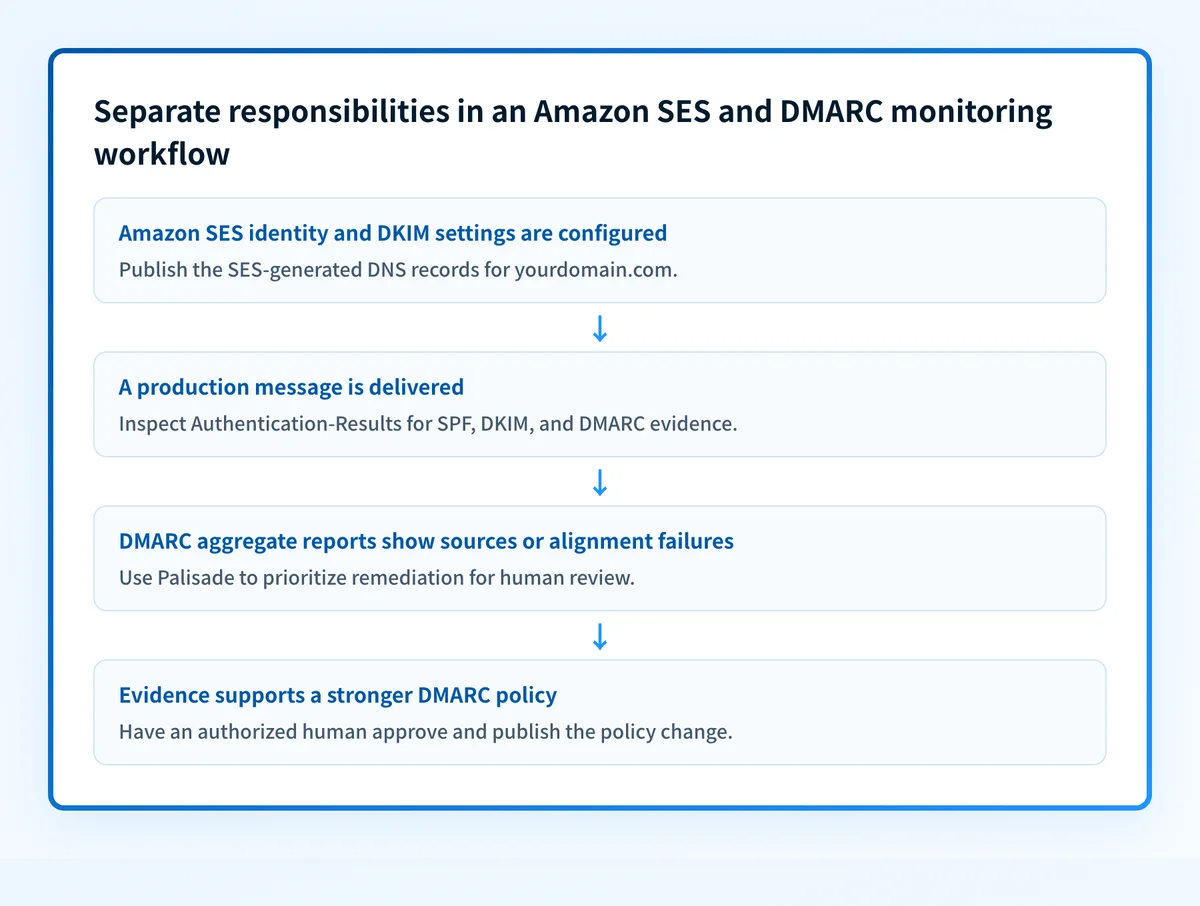
This division matters because an SES configuration result is not a receiver decision, and a DMARC report does not prove future inbox placement. Strong authentication supports better deliverability, but mailbox providers retain their own filtering and delivery policies.
When the answer changes
The workflow changes according to the domain that appears in the visible From address and the evidence you have.
If SES sends mail using news.yourdomain.com in the From address, validate the DKIM signing domain and the SPF-authenticated MAIL FROM domain against that exact visible domain. Amazon SES explains that a custom MAIL FROM domain is needed where SPF alignment is required. If DKIM aligns, an SPF alignment failure may not prevent a DMARC pass. It is still worth understanding because it can expose an unexpected sending path.
Use this decision rule:
- If you only have a domain name, inspect the published DMARC record and DNS authentication records.
- If you have an SES identity status, confirm the identity and DKIM setup in SES, then send a real message through the production configuration.
- If you have a delivered message, inspect its raw headers for authentication results from the receiving system.
- If you have aggregate reports, review the sources, volume, and alignment outcomes before considering a stronger DMARC policy.
Do not move a production domain to a stricter DMARC policy solely because SES shows an identity as verified. Test mail sent through the actual application, configuration set, and visible From domain first.
A DMARC record check can inspect what DNS currently publishes. It cannot prove that SES is signing a message, that a particular application uses SES, or that a mailbox provider will accept future mail.
Worked compliance evidence
A useful evidence set ties the SES configuration to one real message and then to reporting data. The following is illustrative only. Do not copy domains or selectors from another account. Amazon SES generates the applicable DKIM values in the SES console or API for your verified identity.
Visible From: updates@yourdomain.com
SES identity: yourdomain.com
DKIM expectation: d=yourdomain.com
Custom MAIL FROM expectation: bounce.yourdomain.com
DMARC record location: _dmarc.yourdomain.com
Message evidence to retain: Authentication-Results from a delivered test message
Check the four layers separately:
- DNS: Query the authoritative DNS service and at least one public resolver for the SES-provided DKIM records, the custom MAIL FROM records where used, and
_dmarc.yourdomain.com. - Vendor: Confirm that Amazon SES reports the sending identity and DKIM configuration as verified according to the SES DKIM setup guidance.
- Message: Send a message from the real production path. Inspect the delivered message's
Authentication-Resultsheader. RFC 8601 defines this header field, but each receiver reports its own evaluation. - DMARC: Once aggregate reports accumulate, review the reported sources and outcomes. A report can show where to investigate, but it is not a replacement for the raw header from a business-critical message.
What to do next with the evidence you have
Start with the evidence closest to the problem.
If DNS is missing or unexpected, compare it with the values generated for the verified SES identity before making a DNS change. If SES indicates that DKIM is not verified, use the current SES documentation to correct the identity configuration. If a real message has an unexpected Authentication-Results outcome, compare its visible From domain, DKIM d= domain, and SPF-authenticated domain with the intended SES setup.
After you have DMARC aggregate reports, use them to inventory reported senders and find authentication or alignment failures that need follow-up. Palisade can analyze that report data, identify sending sources and issues, and propose a next policy step when the evidence indicates the domain may be ready. A human still reviews the evidence and applies any DNS or DMARC policy change. For ongoing review, Palisade's email security score checker provides another way to assess the domain's published email-security controls.
For a broader implementation task, use the vendor email-authentication guidance alongside Amazon SES's documented setup path.
Review the DMARC record behind your SES sending domain
Check the visible From domain with Palisade's DMARC checker before comparing the published policy with SES configuration and delivered-message evidence.
A public DNS check does not prove that Amazon SES is signing production messages, identify every sender using the domain, monitor later changes, or predict a receiver's delivery decision.
If DMARC reports show multiple SES configurations, applications, or domains that need ongoing review, Start with Palisade. Palisade can help prioritize report-based remediation, but it does not change your DMARC policy or guarantee inbox placement.
Evidence
Sources and further reading
Questions readers ask
Frequently asked questions
Is Amazon SES integrated with Palisade?
No. The public Amazon SES and Palisade materials supplied for this article do not establish a product integration, partnership, shared dashboard, or bundled service. They can be used in separate parts of one email-authentication workflow.
Does Amazon SES DKIM verification prove DMARC passes?
No. SES DKIM verification shows that the SES identity's DKIM setup is verified. DMARC also depends on the visible From domain and alignment in a real delivered message.
Can SPF alignment matter when SES DKIM aligns?
Yes. A DKIM-aligned pass can support DMARC even if SPF is not aligned. Reviewing the SPF path can still reveal an unexpected MAIL FROM configuration or sending source.
Should I change DMARC to p=reject after SES verification?
No. Verify DNS, SES status, and real message headers first. Then use aggregate-report evidence to identify legitimate senders and unresolved alignment issues before a human approves a policy change.
Does a passing DMARC check guarantee inbox placement?
No. A DMARC check can show the published record. Receiving providers make their own delivery decisions and may consider other signals beyond DMARC.

Written by
Johanie DupontBrand & Ecommerce Email
Johanie Dupont works on brand and ecommerce email at Palisade: BIMI and verified marks, sender requirements, and getting marketing mail into the inbox.
More from Johanie →