Why Mailchimp email goes to spam after marked delivered
 ChatGPT
 Claude
 Gemini
 Perplexity
 Grok
GrokIn brief
Why Mailchimp email goes to spam after marked delivered: separate accepted delivery from mailbox placement, inspect headers, and retest safely.
Mailchimp email can go to spam after it is marked delivered because Mailchimp's delivered status means the recipient did not register a hard or soft bounce. It does not prove the receiving mailbox placed the accepted message in the inbox. Start with the delivered copy from the affected mailbox, inspect its trusted authentication and receiver evidence, repair the confirmed sender-side issue, and retest through the same Mailchimp path.
At a glance
Quick takeaways
- Mailchimp counts a recipient as successfully delivered when that recipient did not register a hard or soft bounce.
- Accepted delivery, a mailbox folder observation, and a receiver's private spam classification are different kinds of evidence.
- A message in one recipient's spam folder does not by itself prove a campaign-wide Mailchimp, domain, or reputation problem.
- Inspect the received message's
Authentication-Resultsfield before changing DNS or Mailchimp settings. - SPF, DKIM, and DMARC passing can narrow authentication problems, but they do not guarantee inbox placement.
- Retest with the same sending domain, campaign path, recipient provider, and comparable audience scope.
What does the failure mean?
Mailchimp's email campaign report documentation defines successful deliveries as recipients who did not register a hard or soft bounce. Its Delivery Insights documentation uses this delivery status after campaign sending completes:
Your campaign has been deliveredThat status shows Mailchimp completed delivery without recording a hard or soft bounce for the recipient. It does not show where a receiving system displayed the message.
RFC 5321 explains SMTP reply completion behavior: after a receiving SMTP server accepts a message, it takes responsibility for it. The receiving environment can then apply filtering, mailbox rules, quarantine handling, or organization policy. A sender may see no bounce because the receiver did not reject the message during SMTP.
Keep these observations separate:
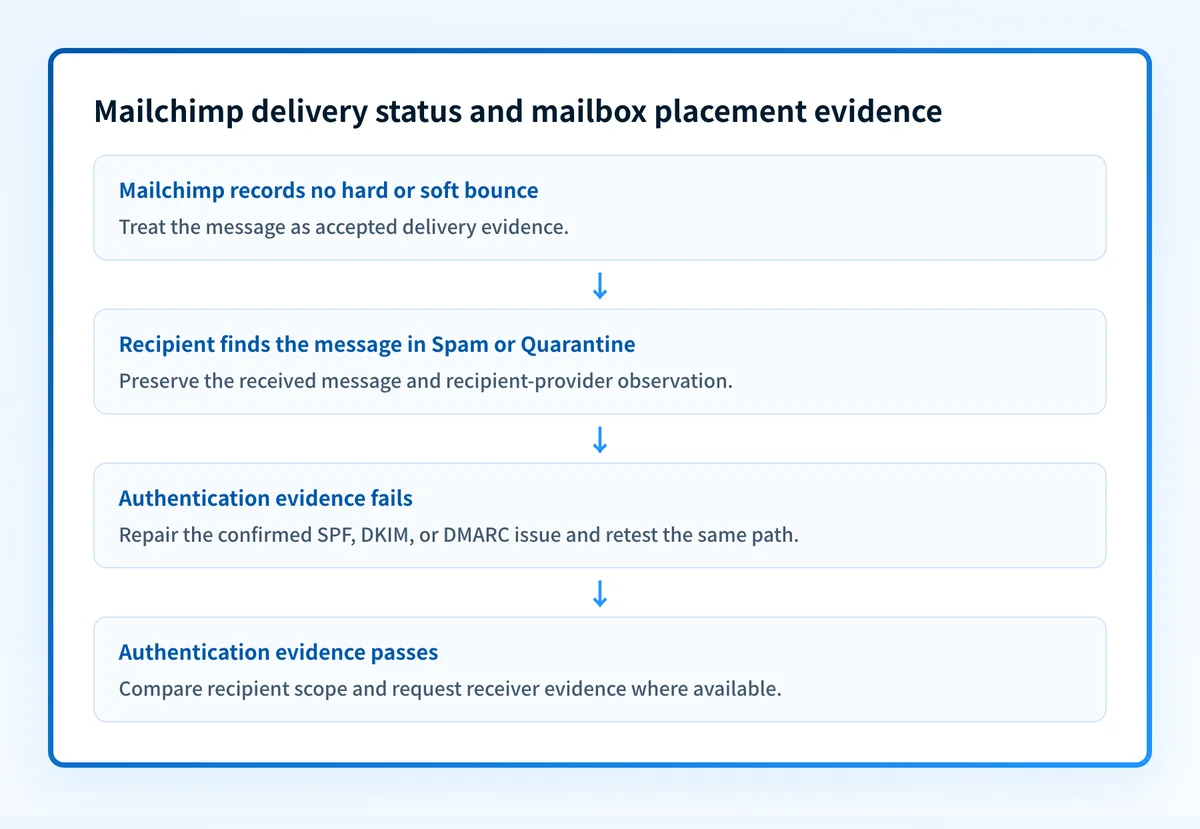
- Accepted delivery: Mailchimp did not record a hard or soft bounce for the recipient.
- Mailbox folder observation: A recipient or administrator found the accepted message in Inbox, Spam, Junk, Quarantine, or another folder.
- Receiver classification: The receiving provider's private filtering decision and its reasons. A sender cannot establish that decision from Mailchimp's delivered status alone.
What usually causes it?
Recipient-specific filtering or mailbox rules
When one recipient finds a campaign in spam while comparable recipients receive it normally, begin with mailbox-specific evidence. Ask the recipient or mail administrator to inspect mailbox rules, local allow and block lists, quarantine, and any security tooling that handled the accepted message.
This pattern does not prove the campaign has a broad reputation problem. It is an inference from the observed scope, and the recipient provider may expose more evidence in its own administrative tools.
A recipient domain quarantined the campaign
Mailchimp's campaign reporting documentation notes that a domain administrator may quarantine a message when most recipients use the same domain. If the issue appears at one company domain, request the receiving administrator's message trace, quarantine evidence, transport-rule evidence, and gateway verdict for the delivered copy.
A Gmail mailbox, a Microsoft 365 tenant, and a corporate filtering gateway can apply different controls. The sender should not infer one receiver's reason from another receiver's result. For Microsoft-specific recipient evidence, see how to stop emails going to spam in Outlook.
The production message does not authenticate as expected
Mailchimp distinguishes email domain verification from authentication. Verification confirms access to an email address. Authentication requires DNS records for the sending domain and can improve delivery.
An authenticated domain setting is useful vendor evidence, but it is not a delivered-message check. Inspect the received message before changing DNS. RFC 8601 defines the Authentication-Results field, which receiving systems use to report authentication results.
For DMARC, SPF or DKIM must pass with an identifier aligned to the visible From domain. A standalone spf=pass or dkim=pass does not establish alignment.
Authentication is clean, but recipient signals remain negative
Google's email sender guidelines require SPF or DKIM for all senders to personal Gmail accounts. Google requires bulk senders to use SPF, DKIM, and DMARC, align the From domain with SPF or DKIM for direct mail, keep spam rates below its published threshold, and support one-click unsubscribe for eligible marketing and subscribed messages.
Google states that authentication makes messages less likely to be rejected or marked as spam. It does not guarantee inbox placement. If authentication evidence is clean, compare the affected campaign with a recent healthy campaign. Review audience permission, campaign scope, send volume, subject, template, URLs, and abuse-report evidence in Mailchimp's campaign reporting.
How do I diagnose the failure?
1. Preserve one delivered copy from the affected recipient
Get the full source of a message that the recipient found in spam or quarantine. Do not diagnose from a forwarded copy because forwarding can change the route and authentication evidence.
Record the visible From address, recipient provider, delivery time, campaign reference, and whether comparable recipients received the same campaign elsewhere. Redact recipient addresses, message content, and tracking identifiers before sharing evidence outside the organization.
2. Classify the delivery and placement scope
Compare the affected result with a small permission-based cohort at the same provider and at another provider. Use the same Mailchimp audience type, From identity, authenticated sending domain, and campaign stream.
Use these safe next-action branches:
- Bounced or not delivered: Treat this as a delivery failure, not a spam-placement incident. Preserve the exact bounce evidence and investigate the receiving SMTP response or Mailchimp reporting evidence before changing authentication settings.
- One provider or company domain: Ask that recipient provider's administrator for trace, quarantine, and policy evidence. Do not infer its private filtering reason from a public DNS result.
- Repeatable spam placement across providers after authentication evidence is clean: Compare the affected campaign with a healthy one and narrow the changed audience, message, URL, send pattern, or permission signal. Authentication does not prove why a receiver classified a message as spam.
3. Inspect trusted authentication evidence in the received message
Use an email header analyzer to find the receiver-added Authentication-Results field. Also inspect the visible From domain, DKIM-Signature domain and selector, Return-Path, Received fields, and provider-specific anti-spam or quarantine headers where present.
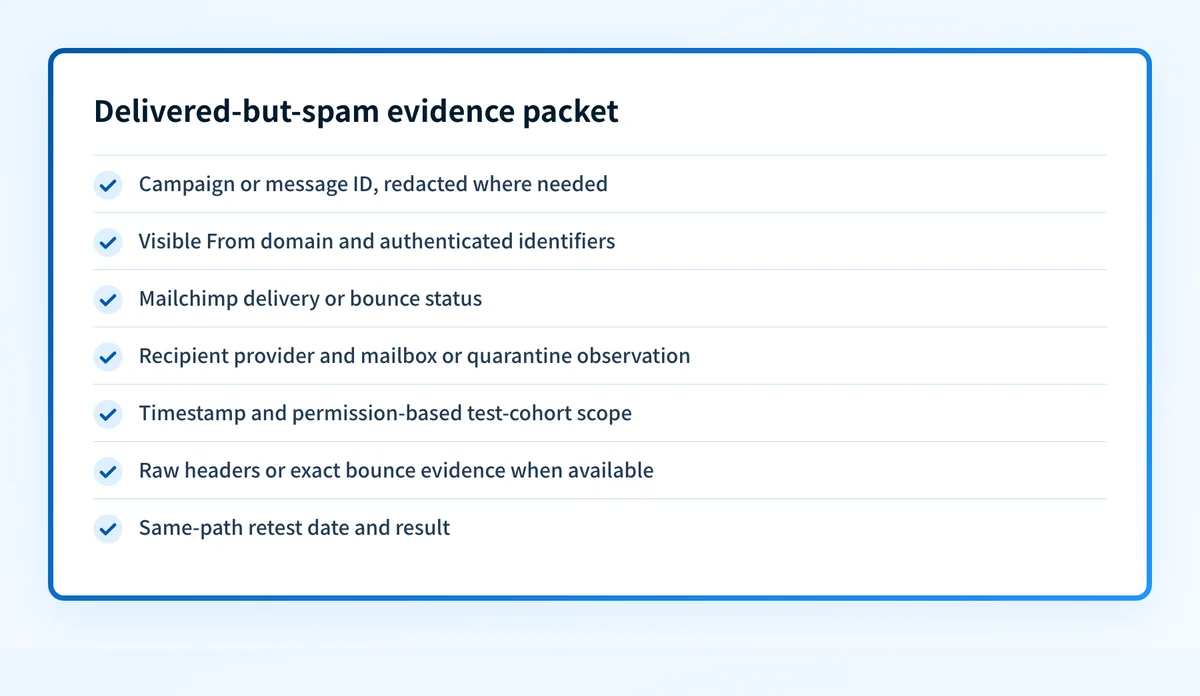
This is an illustrative, redacted observation record. Do not publish header values from a real message.
Campaign/message ID: redacted
Sending domain: yourdomain.com
Authenticated identifiers: DKIM d=yourdomain.com; SPF smtp.mailfrom=mail.yourdomain.com
Mailchimp delivery/bounce status: delivered, no recorded hard or soft bounce
Recipient/provider observation: recipient found message in Spam
Timestamp: 2026-08-12T14:30:00Z
Test cohort/scope: 1 of 5 permission-based test recipients at receiver.example
Header evidence:
Authentication-Results: receiver.example;
  spf=pass smtp.mailfrom=mail.yourdomain.com;
  dkim=pass header.d=yourdomain.com;
  dmarc=pass header.from=yourdomain.com
Retest date: pending
The record is an evidence packet, not proof of inbox placement. It links the Mailchimp delivery status to the exact message and recipient observation, while preserving the receiver's private classification as unknown unless its administrator provides it.
4. Confirm the Mailchimp sending domain and public DNS state
Follow Mailchimp's email domain authentication instructions for the exact domain used in the campaign. Check the vendor's current authentication status, then compare its configured identity with the received message's From, SPF, and DKIM identifiers.
Use the DMARC checker to inspect the public DMARC record for the visible From domain. A public DNS check can show the record published at the time of the lookup. It cannot prove the production sending path, the receiver's private classification, continuous DNS state, or future inbox placement.
Do not loosen p= to treat spam placement as fixed. A DMARC policy change affects requested enforcement. It does not alter a recipient's mailbox rule, quarantine decision, or private spam classification.
How do I fix it?
Repair a confirmed authentication or alignment problem
If the received production message shows failed SPF, DKIM, or DMARC, correct the specific DNS or sender configuration identified by that message. Follow Mailchimp's documented domain-authentication path for its vendor configuration, then verify the resulting message through the same campaign path.
This repair changes authentication or alignment. It does not guarantee a recipient will put later messages in the inbox.
Address a confirmed recipient-domain quarantine path
If a receiving-domain administrator confirms quarantine, transport policy, or a security-gateway action, work with that administrator on the evidence from the exact accepted message. Keep the change limited to the confirmed path, such as correcting an allow or block policy where the receiving organization authorizes it.
The sender cannot change another receiver's private policy without that receiver's authority.
Compare the changed campaign condition
When authentication passes and spam placement repeats across the test cohort, compare the affected campaign with a recent healthy campaign. Change one confirmed variable at a time, such as audience segment, template, URLs, subject, or send scope. Preserve the prior configuration so the test can be rolled back.
Do not present a reduced DMARC policy as a remedy. That changes enforcement reporting and handling, not recipient placement.
How do I validate the repair?
Send a new campaign or approved test message through the same Mailchimp account, authenticated domain, From identity, content path, and recipient-provider cohort. Update the evidence packet with the new campaign reference, timestamp, Mailchimp delivery or bounce status, mailbox observation, raw header evidence, and retest date.
Validate each applicable layer:
- DNS: Confirm the published DMARC record with the authoritative DNS operator and a public resolver.
- Vendor: Confirm Mailchimp shows the intended sending domain as authenticated under its documented workflow.
- Message: Inspect the receiver-added
Authentication-Resultsfield from a newly delivered message on the exact production path. - DMARC: Review aggregate-report data after it has accumulated to identify whether sources using the From domain authenticate and align as expected.
Check the DMARC record behind the Mailchimp sending domain
After you have preserved the delivery and placement evidence, inspect the public DMARC record for the visible From domain. This helps identify a published-record problem before changing policy and gives you a baseline for comparing the received message's alignment evidence.
A DMARC record check cannot explain one receiver's private spam decision, repair a Mailchimp campaign, monitor later sender changes, or guarantee inbox placement.
If recurring Mailchimp and other sending sources make it hard to maintain the evidence packet across domains, Start with Palisade. Palisade is agentic DMARC software that analyzes DMARC aggregate-report data, identifies sending sources and authentication or alignment issues, and proposes prioritized remediation work for human review. It does not control a receiver's private spam classification or guarantee delivery or inbox placement.
Evidence
Sources and further reading
Questions readers ask
Frequently asked questions
Does Mailchimp marked delivered mean the message reached the inbox?
No. Mailchimp's delivered status means it did not record a hard or soft bounce for that recipient. The receiving environment may still place the accepted message in Spam, Junk, Quarantine, or another folder.
Can a Mailchimp message go to spam when DMARC passes?
Yes. A passing DMARC result shows that the received message met DMARC authentication and alignment conditions. It does not reveal or override the receiver's private spam classification.
Should I change DMARC to p=none if Mailchimp email goes to spam?
No. Changing p= changes the domain's requested DMARC handling. It does not repair a recipient mailbox rule, a receiving-domain quarantine action, or a sender reputation signal.
What evidence should I collect from a recipient who reports spam placement?
Collect the campaign or message reference, sending domain and authenticated identifiers, Mailchimp delivery or bounce status, recipient-provider observation, timestamp, test-cohort scope, full headers or bounce evidence when available, and a retest date.
Can a public DNS checker tell me why one Mailchimp message went to spam?
No. A public checker can inspect the current published DNS record. It cannot inspect the exact production sending path, a receiver's private filtering logic, or the folder placement of an individual message.

Written by
Johanie DupontBrand & Ecommerce Email
Johanie Dupont works on brand and ecommerce email at Palisade: BIMI and verified marks, sender requirements, and getting marketing mail into the inbox.
More from Johanie →