What is Microsoft's equivalent to Google Postmaster Tools?
 ChatGPT
 Claude
 Gemini
 Perplexity
 Grok
GrokIn brief
Microsoft's closest Google Postmaster alternatives are SNDS and JMRP. Compare the Outlook.com data they provide and learn where their coverage stops.

Microsoft does not offer one feature-for-feature equivalent to Google Postmaster Tools. For mail sent to Outlook.com consumer addresses, the closest Microsoft services are Smart Network Data Services (SNDS), which provides IP-level sending and filtering data, and the Junk Mail Reporting Program (JMRP), which provides complaint feedback. They do not expose a universal reputation dashboard for every Microsoft 365 recipient domain.
At a glance
Quick takeaways
- SNDS and JMRP are Microsoft's closest equivalent to Google Postmaster Tools for Outlook.com consumer mail.
- SNDS is organized around authorized sending IP addresses, ranges, or autonomous system numbers.
- JMRP reports when participating Outlook.com users mark mail as junk.
- SNDS data does not reveal a corporate Microsoft 365 tenant's private filtering or mailbox decisions.
- A missing SNDS report can mean the IP did not meet Microsoft's reporting threshold. It is not a positive delivery result.
- Microsoft 365 message trace is tenant administration data, not a public sender-reputation service.
How Microsoft's postmaster services work
Microsoft Smart Network Data Services helps authorized senders understand traffic and reputation signals associated with sending IPs at Outlook.com. The same site provides access to JMRP feedback-loop settings.
SNDS is closest to the operational role of Google Postmaster Tools, but the services use different scopes. Google Postmaster Tools presents Gmail data for verified domains and IPs where enough data is available. Microsoft SNDS centers on the authorized sending IP and Outlook.com consumer infrastructure.
Microsoft's SNDS FAQ says authorization can begin with responsibility for an IP address, IP range, or autonomous system number. Microsoft uses reverse DNS, RDAP, and routing information to identify acceptable authorization contacts.
Once access is approved, SNDS can show daily activity and filtering information for qualifying traffic. Microsoft documents fields such as SMTP recipient and DATA command counts, recipient counts, aggregate filter results, complaint information, malware or virus observations, open-proxy status, and current IP status.
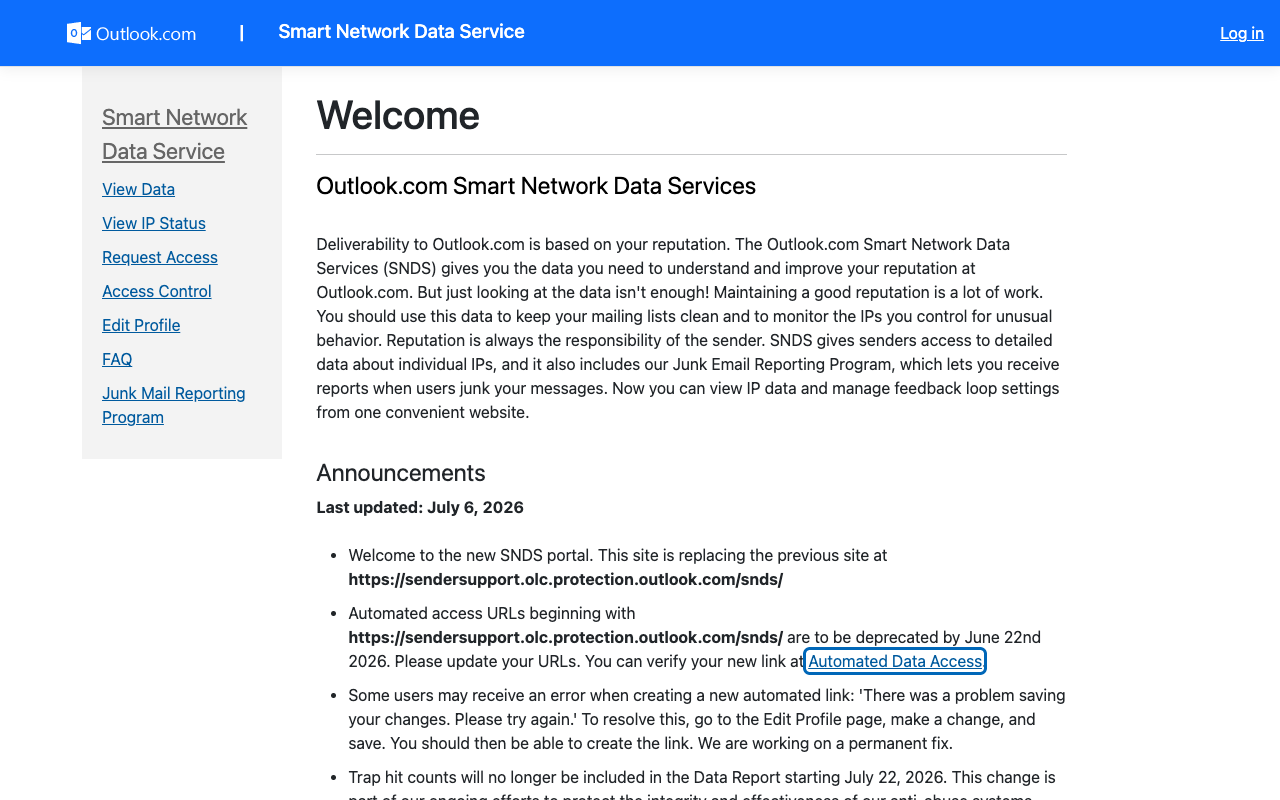
JMRP has a narrower job. It gives participating senders feedback when Outlook.com users report their messages as junk. A complaint report is evidence to investigate the campaign, consent record, sending IP, and authenticated domain. It should also trigger suppression for the affected mail stream where the sender can identify the recipient safely.
When the answer changes
The answer changes with the recipient infrastructure and the evidence available.
For outlook.com, hotmail.com, live.com, and msn.com recipients, SNDS and JMRP are the relevant Microsoft-owned services. They provide Microsoft consumer-mail telemetry, subject to authorization and reporting availability.
For a single business recipient using Microsoft 365, SNDS is not the equivalent. That organization controls its own Exchange Online policies, allow or block decisions, quarantine, and message trace. An outside sender needs evidence from the recipient organization's administrator, such as a message trace result or the exact SMTP response.
For a mixed audience, separate the results by recipient domain and sending path. A corporate domain can use Microsoft 365, another gateway, or a different provider over time. MX records and delivered-message headers identify the current path more reliably than an assumption based on the organization's brand.
Use this decision rule:
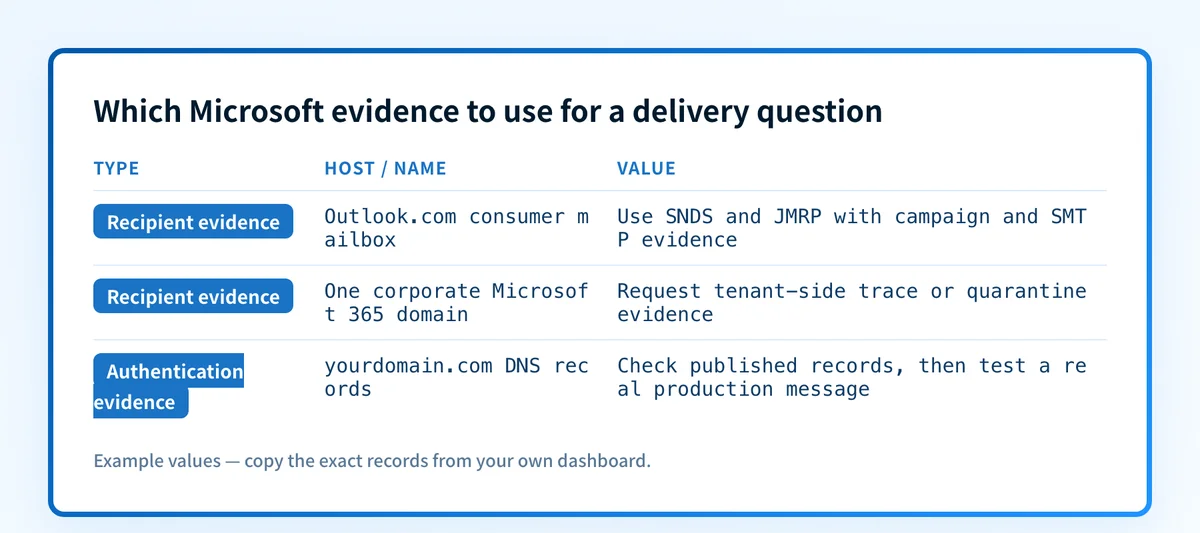
- Microsoft consumer mailbox traffic: check SNDS and JMRP, then compare the data with SMTP responses and campaign logs.
- One corporate Microsoft 365 recipient: request tenant-side trace, quarantine, or filtering evidence.
- Authentication question before sending: inspect the published DNS records with Palisade's free email tools, then test a real message through the production path.
- Cross-provider delivery issue: group evidence by receiver, IP, visible From domain, return path, DKIM domain, campaign, and time window.
A worked SNDS evidence record
SNDS data is useful when it is read as IP-level evidence rather than an inbox-placement score. Microsoft's FAQ says daily mail and spam data might be absent when an IP sent fewer than 100 messages that day. Microsoft also says its aggregate filter result does not directly represent final Inbox or Junk folder placement because recipient settings and safelists can affect handling.
Use an incident record like this when comparing SNDS with your own send logs:
Recipient service: Outlook.com consumer mail
Sending IP: 192.0.2.25
UTC send window: 2026-08-11T08:00:00Z to 2026-08-11T12:00:00Z
Visible From domain: yourdomain.com
Return-path domain: bounce.yourdomain.com
DKIM d= domain: yourdomain.com
SNDS observation: record the reported daily filter result and complaint data
Message evidence: preserve the SMTP response and redacted Authentication-Results header
This is illustrative only. Do not publish recipient addresses, unredacted headers, complaint samples, account identifiers, or other customer data.
A reported filter color can indicate that an IP needs attention, but it does not identify the responsible customer on a shared pool or prove why one campaign was filtered. JMRP reports, sender logs, and message-level evidence narrow that question.
What to do next
Start with the evidence you have.
If you control the sending IP, request SNDS access and enroll in JMRP where appropriate. Export or record the relevant date range before changing campaigns, lists, or infrastructure. Then compare the SNDS view with the exact IP and UTC window in the sending platform.
If an ESP controls the IP, ask the provider whether it is authorized for SNDS and JMRP, which complaint feedback it passes to customers, and how it maps complaints to an account. The provider may have the only direct access to shared-IP telemetry.
If the issue affects one delivered message, collect the SMTP result and a redacted copy of its Authentication-Results header. RFC 8601 defines the Authentication-Results field, which records an authentication service's results. DNS checks can confirm a published record, but they cannot prove the application signed the message or that Microsoft made a particular mailbox decision.
For the broader operating context, see Palisade's email deliverability learning hub.
Track the senders behind recurring Microsoft signals
SNDS can show an IP-level signal, while JMRP can show that recipients reported messages as junk. Neither view inventories every production sender using your visible From domain or proves that future messages will align.
Palisade's DMARC Agent can analyze DMARC aggregate-report data, identify sending sources and authentication or alignment issues, and create prioritized remediation tickets. A human reviews the evidence and applies any DNS or DMARC policy change.
Palisade does not change a receiver's private reputation decision, guarantee inbox placement, or prove that every future message will authenticate.
For a provider-specific implementation of these authentication checks, see What sender data does Yahoo Postmaster provide?.
Evidence
Sources and further reading
Questions readers ask
Frequently asked questions
Is SNDS the same as Google Postmaster Tools?
No. SNDS is Microsoft's closest equivalent for Outlook.com consumer traffic, but it is primarily IP-focused and differs from Google's Gmail-focused domain and IP dashboards.
Does SNDS cover every Microsoft 365 recipient domain?
No. SNDS covers Outlook.com consumer infrastructure. It does not expose private filtering, quarantine, or tenant-level message-trace data for every organization that uses Microsoft 365.
Does a green SNDS filter result mean messages reached the inbox?
No. Microsoft says the aggregate filter result does not directly represent final Inbox or Junk folder delivery. Recipient settings and safelists can change the final handling.
Can an ESP customer access SNDS directly?
Only if the customer can satisfy Microsoft's authorization requirements for the sending IP, range, or autonomous system number. On a shared IP pool, the ESP may be the authorized party.
What should I do with a JMRP complaint?
Suppress the recipient from the relevant mail stream when you can identify it safely, then investigate the campaign, consent, acquisition source, send time, sending IP, and authentication evidence.

Written by
Johanie DupontBrand & Ecommerce Email
Johanie Dupont works on brand and ecommerce email at Palisade: BIMI and verified marks, sender requirements, and getting marketing mail into the inbox.
More from Johanie →