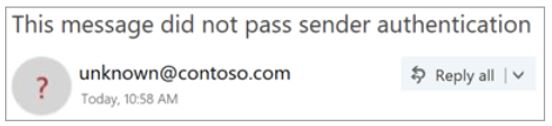
Why does Outlook show an unverified sender warning?
 ChatGPT
 Claude
 Gemini
 Perplexity
 Grok
GrokIn brief
Outlook flags a sender as unverified when it cannot authenticate the From domain with SPF, DKIM, or DMARC. Find the failing path and fix it.
Outlook can show an unverified sender warning when it cannot confirm the visible From address through the authentication evidence it evaluates, or when the authenticated identity differs from the displayed sender. Microsoft treats the indicator as a caution signal, not proof that a message is malicious. The repair is usually in the application, relay, or DNS configuration that sent the affected message, rather than in an Outlook setting.
If the notice instead says "Caution: This email originated from outside of the organization", it is an external-origin label rather than an unverified-sender result.
At a glance
Quick takeaways
- An Outlook unverified sender warning means Outlook could not confirm the displayed sender identity from the evidence it evaluated.
- A legitimate message can show the warning when its SPF or DKIM identity does not align with the visible From domain.
- A passing SPF or DKIM result alone does not prove that DMARC passes for the visible From address.
- The affected message's raw headers identify the sending path that needs investigation.
- A public DNS lookup can inspect a published record, but cannot prove Microsoft's private sender decision or future inbox placement.
- Validate a repair with a new message sent through the same production application, relay, and gateway.
What should I check before configuring Outlook?
First identify the path that produced the warning. Mailbox-hosted Microsoft 365 mail, a marketing platform, a ticketing system, an invoice application, and a transactional sender can all use the same visible From domain while using different envelope senders, DKIM signatures, and relays.
Preserve the original message source from the affected delivery before changing DNS or sender settings. A screenshot of the warning is useful context, but it does not show enough evidence to identify the sender-side change.
Confirm who controls each part of that path:
- The administrator for the sending application or SMTP relay.
- The administrator for the domain's authoritative DNS zone.
- The Microsoft 365 administrator when Microsoft-hosted mail is involved.
- The owner of any security gateway that rewrites links, adds footers, or re-signs messages.
Copy DNS values from the account and domain you are configuring. Do not publish selectors, targets, tokens, or hostnames from another account or from an online example.
Microsoft's guidance on phishing and suspicious behavior in Outlook documents the sender indicator. It does not document one tenant setting that removes the warning for every third-party sender. The correct change depends on the service that submitted, relayed, or signed the message.
Which setup method should I use?
Use the sender configuration that matches the failing production route.
If only one application produces the warning, investigate that application's domain-authentication settings. Do not alter unrelated Microsoft 365 mailbox mail that already authenticates correctly. If the application offers custom return-path or DKIM-domain settings, generate records in that account for the domain being configured. Those values are account-specific.
A dedicated IP address does not authenticate the visible From identity. It may affect infrastructure or reputation decisions, but it does not replace SPF authorization, DKIM signing, or DMARC alignment.
If a security gateway changes headers or body content after a service signs the message, establish which permitted system signs last. A later modification can break DKIM. The correction may belong in the gateway configuration or in the final sender's signing workflow.
For broader vendor-specific setup paths, use Palisade's vendor email authentication guides.
How do I configure SPF and DKIM for Outlook sending?
1. Open the settings for the system that sent the affected message
Identify the application from the delivered message's routing and header evidence. Open that application's sending-domain or authentication settings, rather than an unrelated Outlook mailbox setting.
For Microsoft-hosted mailbox mail, use the tenant's documented Microsoft 365 administration workflow. For a third-party sender, use that provider's domain-authentication workflow. Outlook's warning is recipient-side evidence. It does not identify the console that owns the repair.
2. Record the identities from the affected message
Select the visible From domain that appears on the warning, then collect the following evidence from the original message:
- Visible From domain: the domain after
@in the RFC 5322 From address shown to the recipient. - Return-Path or sender address: the envelope-sender identity, when the receiver exposes it.
- Authentication-Results: SPF, DKIM, and DMARC outcomes added by a trusted receiving system.
- DKIM
d=domain: the signing domain inDKIM-Signature. - Producing system: the Microsoft 365 tenant, application, SMTP relay, or other sender that generated the message.
Authentication-Results header field and explains that its results are meaningful only when the receiving system is trusted. Treat copied results from an unknown relay with caution.
Illustrative redacted header fragment:
Authentication-Results: mx.receiver.example;
 spf=pass smtp.mailfrom=mailer.example;
 dkim=pass header.d=mailer.example header.s=selector1;
 dmarc=fail header.from=yourdomain.com
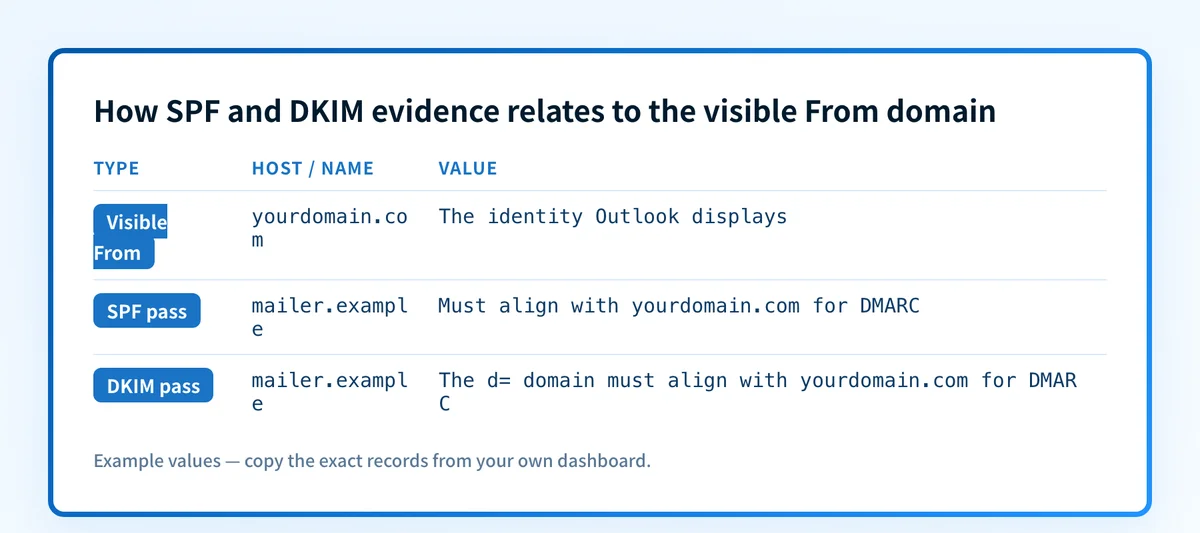
This example shows why an unverified-sender indicator can appear even when SPF or DKIM passes. The example's SPF and DKIM domains are mailer.example, while the visible From domain is yourdomain.com. A pass for an unrelated identifier does not establish DMARC alignment. The indicator plus a passing result also does not prove that the message is malicious, that Outlook made its decision solely from DMARC, or that one DNS change will remove the warning.
3. Publish the generated DNS records
Publish only SPF or DKIM records generated by the service and account that sends the affected message. SPF is a TXT policy for the envelope-sender domain. DKIM is commonly a TXT record below _domainkey, although some senders use CNAME delegation.
SPF record type: TXT
Host, illustrative only:
yourdomain.comValue, illustrative only:
v=spf1 include:sender.example -allDKIM record type: TXT
Host, illustrative only:
selector1._domainkey.yourdomain.comValue, illustrative only:
v=DKIM1; k=rsa; p=ZmFrZS1leGFtcGxlLWtleS1ub3QtYS1yZWFsLWRraW0ta2V5Do not publish these examples. Copy the exact host and complete value generated by the sending service for the account and domain you are configuring.
A domain has one SPF policy record. Merge a required sender mechanism into the existing policy after confirming the sender requires it, rather than publishing a second SPF TXT record. Do not overwrite an active DKIM selector unless the sender documents a rotation procedure.
Many DNS interfaces append the zone name to a host field. If the zone is yourdomain.com, entering selector1._domainkey.yourdomain.com can create a duplicated owner name. Confirm the final fully qualified owner before saving.
4. Verify the configuration in the sending service
Return to the sender's authentication page and wait for its verification status. This confirms what that sender can evaluate for the selected configuration. A green vendor indicator does not prove that the affected application used the configured route for the message that Outlook marked.
5. Send a new message through the same route
Send a new message from the same application, tenant, relay, and gateway that triggered the warning. Deliver it to a mailbox where you can inspect complete source.
Do not validate with a message sent before the DNS change, an internal test that bypasses the production relay, or a different application. Those paths can use different return-path domains, selectors, signatures, and transformations.
How does this setup affect DMARC?
DMARC evaluates the visible From domain against SPF and DKIM identifiers. RFC 9989 defines DMARC alignment between the RFC 5322 From domain and the authenticated SPF or DKIM domain. SPF helps only when the passing envelope-sender domain aligns with the visible From domain. DKIM helps only when the passing d= signing domain aligns with it.
Use Palisade's DMARC checker to inspect the published policy for the visible From domain. The checker accepts a public domain and can show the current DNS record. It cannot inspect the affected message, determine why Outlook marked it, or prove that the production sender uses the expected authenticated identities.
How do I validate the setup?
Check public DNS
Query the exact SPF policy or DKIM selector generated for the sender. Compare the authoritative answer with at least one public resolver. For an independent record check, use Palisade's DNS lookup tool.
dig +short TXT selector1._domainkey.yourdomain.com
dig +short TXT yourdomain.com
Confirm the final owner name and complete record value. Public DNS does not prove the sender is signing mail, using the expected return path, or receiving a private Microsoft determination.
Check the sender status
Confirm the selected sender account reports the domain or records as verified. Record the selected domain, account, and verification time. This is vendor-layer evidence only.
Inspect a delivered message
Open the original source of a newly delivered test message. Compare the visible From domain, Return-Path when present, DKIM-Signature d= and s= values, and trusted Authentication-Results with the evidence collected before the change.
Use the email header analyzer to read the message's authentication results and compare those identities. Use results added by the receiving system you trust; a pasted header alone cannot establish why Microsoft displayed the warning.
Accept the repair only when the production path now produces the expected authentication evidence and an SPF or DKIM pass aligns with the visible From domain where DMARC relies on that mechanism.
Review DMARC reports
After aggregate reports accumulate, check whether the sending source passes SPF or DKIM and aligns with the visible From domain. Separate the repaired source from every other sender using that domain. DMARC reports show reported traffic over time, but they do not guarantee that Outlook will never show an indicator.
Troubleshooting
SPF passes but Outlook still shows the warning
Compare smtp.mailfrom in the trusted Authentication-Results with the visible From domain. A pass for a provider-owned return-path domain may not align with the From domain. Configure a supported custom return path or use aligned DKIM, if the sending service supports it.
DKIM passes but DMARC fails
Compare header.d= with the visible From domain. A valid DKIM signature for a provider domain can pass DKIM while failing DMARC alignment. Configure the sender's authenticated domain or signing-domain option for the visible From domain.
The sender reports verified, but the delivered message differs
Inspect the message's relay path and selector. The application may be bypassing the configured sender profile, or a downstream gateway may be changing the message after signing. Test the same production route and determine which system signs after permitted modifications.
The DKIM record does not resolve
Check for a duplicated DNS suffix, a truncated TXT value, or a mismatch between the selector in the message and the selector published in DNS. Verify the fully qualified owner against the sender's generated instructions before changing the record.
A new SPF record broke another sender
Restore the prior known-good SPF policy, then merge the required mechanism into the single existing record. Publishing multiple SPF policy records for the same domain creates an ambiguous configuration that receivers can treat as a permanent error.
Track the sending sources behind the warning
After a repaired test message passes, the remaining operational gap is identifying other production sources that use the same visible From domain and later fail authentication or alignment. Palisade is agentic DMARC software that analyzes DMARC aggregate-report data, identifies sending sources and authentication or alignment issues, and creates prioritized remediation tickets. A human reviews the evidence and applies any DNS or DMARC policy change.
Palisade cannot remove Outlook's private indicator, change Microsoft's receiver decision, guarantee inbox placement, or prove every future message will authenticate.
Evidence
Sources and further reading
Questions readers ask
Frequently asked questions
Does an Outlook unverified sender warning mean the message is phishing?
No. Microsoft presents the warning as a caution signal when it cannot identify the sender through authentication evidence or when the authenticated identity differs from the displayed sender. Inspect the message and its trusted authentication results before deciding how to handle it.
Can SPF pass while the visible sender remains unverified?
Yes. SPF can pass for the envelope-sender domain shown in smtp.mailfrom while that domain does not align with the visible From domain. That SPF pass does not satisfy DMARC alignment for the displayed sender.
Can DKIM pass while DMARC fails?
Yes. DKIM can pass for the d= signing domain while that domain does not align with the visible From domain. DMARC requires an aligned SPF or DKIM pass under the applicable alignment mode.
Will changing the Outlook Safe Senders list fix sender authentication?
No. A recipient Safe Senders entry can affect that recipient's handling, but it does not repair the sender's SPF, DKIM, or DMARC configuration for other recipients.
Does a passing DMARC record lookup remove Outlook's warning?
No. A DMARC record lookup shows the currently published public DNS policy. It cannot prove which path sent a message, inspect Microsoft's private evaluation, or guarantee that Outlook will remove an indicator.
What evidence should I give the sender administrator?
Provide a redacted copy of the original message source, the visible From domain, Return-Path when available, trusted Authentication-Results, DKIM d= and selector, the sending application or tenant, and the time of delivery. Exclude message content, recipient data, credentials, tokens, and private keys.

Written by
Samuel ChenardCEO & Co-Founder, Palisade
Samuel Chenard is the CEO and co-founder of Palisade, agentic DMARC software for IT teams and MSPs, from one domain to thousands.
More from Samuel →