Why do Google Group messages go to spam?
 ChatGPT
 Claude
 Gemini
 Perplexity
 Grok
GrokIn brief
Google Group mail fails for reasons ordinary mail does not, forwarding breaks SPF and rewriting breaks DKIM. How to tell which, and what to change.

Google Group messages can go to spam for two different reasons: Google Groups may hold or reject the original post before distribution, or a recipient mailbox may filter a distributed copy into Spam. Start by establishing which happened. Then preserve the recipient's full headers and compare a direct delivery with the group-delivered copy before changing group settings, DNS, or the DMARC policy.
At a glance
Quick takeaways
- A message in a Google Groups moderation queue was stopped before the group distributed it to members.
- A conversation visible in the group can still be filtered by an individual recipient mailbox after distribution.
- Google Groups moderation controls, sender authentication results, and a recipient's spam classification are separate signals.
- The receiver-added
Authentication-Resultsheader is stronger evidence than the visible From address. - A passing DMARC result supports authentication but does not guarantee inbox placement.
- Do not loosen the DMARC policy to address a Google Groups moderation or recipient-filtering result.
What does the failure mean?
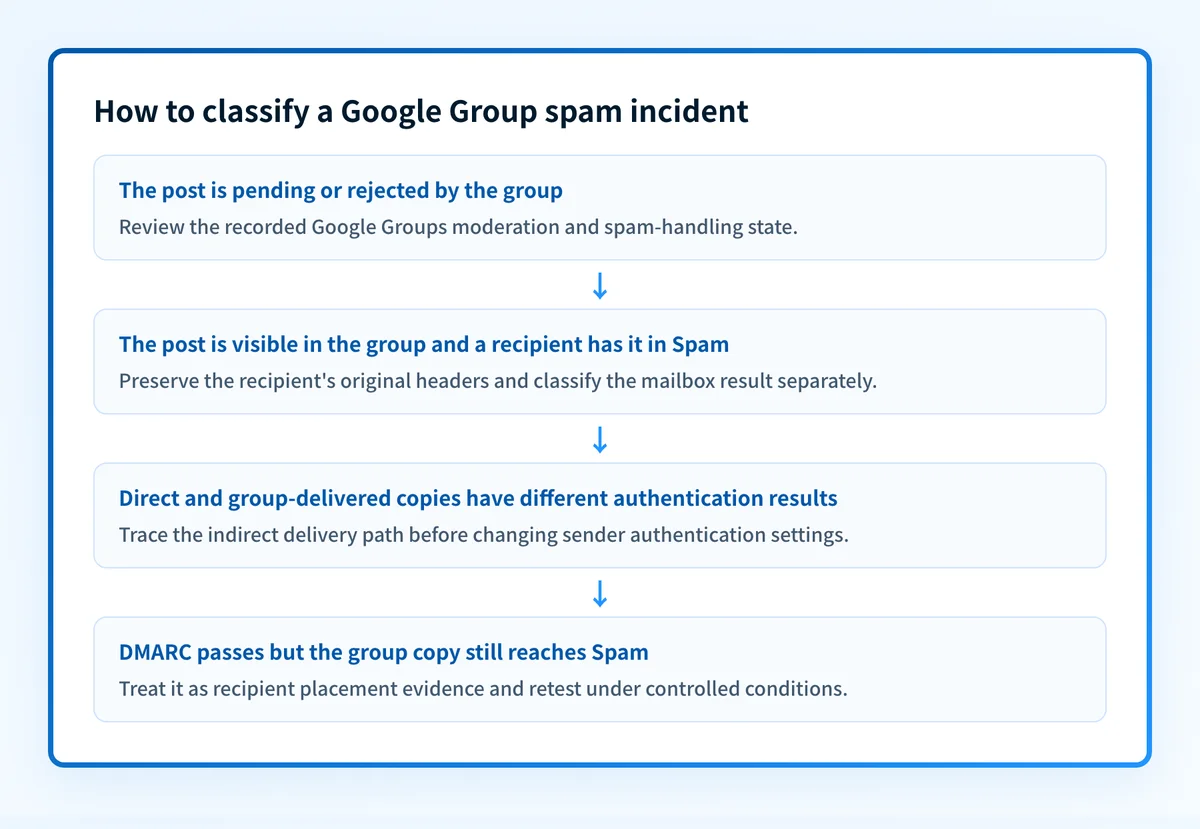
Google Groups can apply spam handling to messages sent to a group. Its group settings documentation describes options to reject messages marked as spam, send them for moderation, or post suspicious messages for eligible work or school groups. When a post is pending or rejected at this stage, members did not receive a normal distributed copy.
Reject all messages marked as spamThis is a Google Groups spam-handling option. Google notes that this setting can reject legitimate messages, so use the group's moderation state as the first piece of evidence rather than assuming a recipient mailbox filtered the message.
If the conversation appears in the group archive and an affected member has the delivered copy in Spam, Google Groups distributed the post. The later result is the recipient mailbox's classification. Google does not publish a complete list of signals that map a message to one specific spam decision. Treat a single recipient's Spam placement as evidence about that mailbox and message path, not proof of a universal Google Groups rule.
For indirect mail such as forwarding and mailing lists, Google's Gmail sender guidelines distinguish direct mail from indirect mail flows. That guidance helps legitimate indirect mail authenticate, but it does not require inbox placement.
What usually causes it?
Google Groups held or rejected the original post
This is the most likely cause when moderators can see the message in Pending, when the sender received a rejection, or when no member received a distributed copy. Google's moderate messages documentation describes how moderators review and act on pending messages.
A group-level setting changes how the group handles ingress. It does not repair the sender's SPF, DKIM, or DMARC results, and it does not control later recipient filtering.
The group-delivered copy has different authentication evidence
Mailing-list delivery is an indirect message path. SPF checks the SMTP envelope identity used for the delivery being evaluated, while DKIM verification depends on the signed message remaining valid. A remailing path can therefore produce different results from a direct copy.
DMARC RFC 9989 describes the interoperability problem that indirect mail flows can create for SPF and DKIM authentication. If a direct message passes and the group copy fails, the group path is a reasonable inference to investigate. It does not, by itself, prove which system caused the difference.
For broader context on trusted authentication assessments, see what ARC is. ARC can preserve earlier authentication results, but the receiving system decides whether to trust them.
The recipient mailbox classified a distributed copy as spam
A group can distribute a message successfully even if one recipient later finds it in Spam. Authentication may be valid, yet the recipient's mailbox can make a separate placement decision. Google's sender guidance does not promise delivery or inbox placement when its requirements are met.
Compare results across affected recipients only to identify a repeatable pattern. Do not use those results to infer unpublished classifier logic. For a broader Gmail-focused workflow outside Google Groups, see why emails go to spam in Gmail.
The member's delivery preference explains the apparent absence
Google Groups members can receive each message, a digest, no email, or another delivery mode depending on group and member settings. A message that appears in the group can be absent from a member's inbox without being a spam-placement event. Confirm the member's subscription and delivery preference before classifying the incident as filtering.
The visible From address hides the identities actually evaluated
The visible From address does not show the SMTP envelope domain used by SPF or the d= domain used by DKIM. RFC 8601 defines the Authentication-Results header field used to report message-authentication assessments. Use the receiver-added copy of that header, plus the return path and DKIM signature, to determine what the recipient system evaluated.
How do I diagnose the failure?
1. Establish whether Google Groups distributed the message
Record the group address, sender address, approximate sending time, subject, and Message-ID. Open the group with an account authorized to view moderation activity. Check whether the message is visible in the archive, Pending, or absent.
If the message is pending, capture the moderation outcome and the relevant spam-handling setting. Google's Workspace troubleshooting guidance for legitimate group mail marked as spam is the appropriate provider path for a Workspace group policy or moderation issue.
2. Preserve the affected recipient's original copy
When the group distributed the message, preserve one affected recipient's copy in Spam. In Gmail on the web, use More > Show original to access full headers, following Google's instructions for viewing full message headers.
Capture the receiver-added Authentication-Results, all Received fields, Message-ID, Date, From, Sender, Reply-To, return path, and any DKIM or ARC fields. Redact addresses, internal hostnames, message content, and recipient data before sharing the packet. Keep an access-controlled original with the incident record.
3. Build a group-message evidence packet
Use one labelled record per controlled test. This separates observable facts from conclusions about the cause.
Google Group message observation, illustrative and redacted
Group address: announcements@yourgroup.example
Sender address/domain: notices@yourdomain.com / yourdomain.com
Message-ID and sent time: <redacted-message-id> / 2026-08-12 14:30 UTC
Visible group outcome: Posted to archive, not pending
Group and Workspace policy context: Spam handling setting recorded; moderator review not triggered
Trusted receiver Authentication-Results: dmarc=pass; dkim=pass; spf=pass
Relevant group setting or pending state: No pending item observed
Controlled retest date: 2026-08-12
Recipient result: One test recipient placed the distributed copy in Spam
The packet has three distinct layers:
- Group moderation and spam controls: whether Google Groups accepted, held, rejected, or posted the original message.
- Sender authentication evidence: what the recipient's trusted
Authentication-Resultssays about SPF, DKIM, and DMARC. - Receiver classification: where the recipient mailbox placed that specific distributed copy.
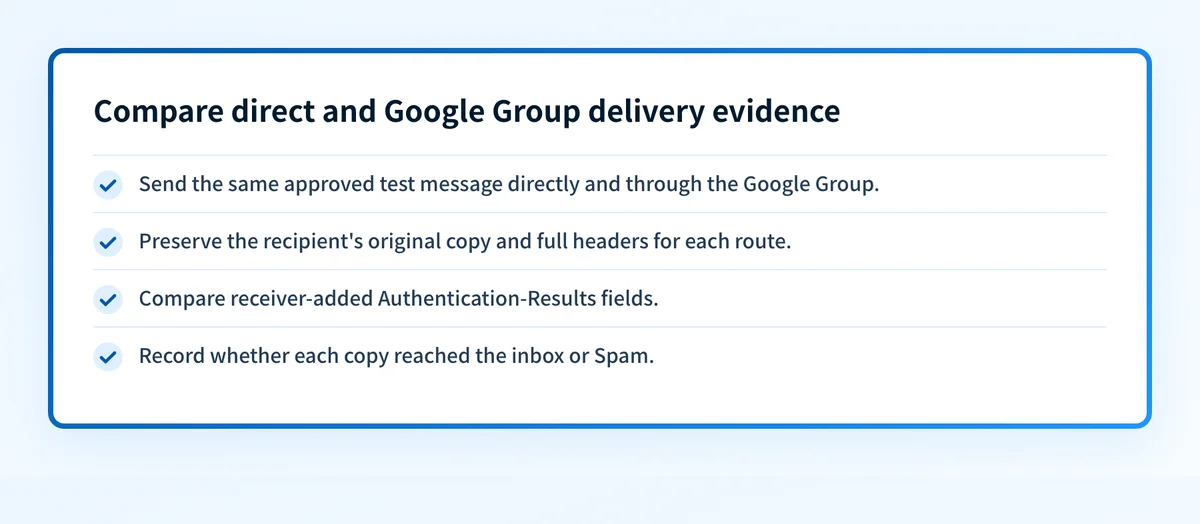
4. Compare a direct message with the group-delivered copy
Send the same approved test message directly to the affected recipient and through the Google Group. Keep the sender, visible From domain, content, and recipient mailbox the same where possible. Record a new evidence packet for each route.
Compare the final receiver-added Authentication-Results fields. A difference narrows the investigation to the indirect delivery path. It does not prove the exact intermediary or justify changing DNS without further evidence.
5. Classify the authentication result
Use a trusted receiver-added header, not a copied header supplied by the sender.
Authentication-Results: recipient.example;
  spf=pass smtp.mailfrom=yourdomain.com;
  dkim=pass header.d=yourdomain.com;
  dmarc=pass header.from=yourdomain.com
This is an illustrative, redacted structure only. Do not publish an unredacted production header.
If DKIM fails only on the group copy, investigate whether the signed message changed after signing. If SPF passes but its envelope domain does not align with the visible From domain, inspect the remailing path and whether aligned DKIM supports DMARC. If DMARC passes and the message still enters Spam, classify that as a recipient-placement result rather than an authentication failure.
How do I fix it?
Correct a confirmed group moderation or policy state
When the evidence packet shows Pending, rejection, or a group-level spam action, review the documented Google Groups spam-handling and moderation settings with the group owner or Workspace administrator. Change only the setting connected to the observed state, then repeat the same controlled test.
Do not set a group to accept all suspicious messages merely to clear one incident. That can increase unwanted mail reaching members.
This repair changes group ingress or moderation behavior. It does not change sender authentication or control a recipient's private spam classification.
Repair a confirmed sender authentication mismatch
When the group-delivered copy shows an authentication failure or loss of DMARC alignment that the direct copy does not show, trace the outbound and remailing path. Confirm the sending domain's published authentication records and compare the direct and indirect headers before changing configuration.
A public DMARC record check can inspect the current published DMARC record. It cannot prove which production message path Google Groups used, inspect full recipient headers, or explain why one recipient marked a copy as spam.
Do not relax p= as a repair. Changing the DMARC policy changes requested enforcement. It does not make an altered DKIM signature valid or change a group moderation result.
Isolate a repeatable group-specific result
When messages are posted, authentication is as expected, and the same group route repeatedly reaches Spam for the same recipient context, preserve the evidence packets and retest with controlled changes to one approved variable at a time. Examples include message content, sender identity, recipient mailbox, and direct versus group delivery.
Escalate the observed facts through the relevant Google Groups or Workspace support path when your organization has access to it. Do not present an escalation as a way to force inbox placement.
How do I validate the repair?
Repeat the same sender, group, recipient mailbox, content, and timing conditions used to capture the original evidence. First confirm the group outcome: posted, pending, or rejected. Then inspect the recipient's original delivered copy and record its trusted authentication results.
Validate each applicable layer:
- Check the published DNS record through the authoritative source and a public resolver when a DNS change was part of the repair.
- Confirm the relevant Google Groups moderation or Workspace policy state.
- Inspect a newly delivered message's receiver-added
Authentication-Results. - Review DMARC aggregate reports after enough data accumulates to confirm the expected sending source and aligned authentication pattern.
Track the sending sources behind the group delivery
If the group route exposes inconsistent authentication results, first inspect the published DMARC record and compare it with the delivered-message evidence. Then determine whether the same domain has other production sending sources that need separate review.
Start with Palisade to have Palisade analyze DMARC aggregate-report data, identify sending sources and authentication or alignment issues, and create prioritized remediation tickets for human review. Palisade does not control Google Groups moderation, change a recipient's spam decision, or guarantee inbox placement.
The vendor email authentication hub has related provider-specific implementation and troubleshooting guidance. If the same sender also has Outlook placement issues, compare that incident with how to stop emails going to spam in Outlook rather than assuming the recipient systems use the same decision.
Evidence
Sources and further reading
- Google Groups settings: spam handling options
- Google Groups moderation guidance
- Google Workspace troubleshooting for legitimate group email marked as spam
- Google Gmail sender guidelines
- RFC 8601: Authentication-Results header field
- RFC 9989: Domain-based Message Authentication, Reporting, and Conformance
Questions readers ask
Frequently asked questions
Does a Google Groups Pending message mean a recipient marked it as spam?
No. A Pending message indicates a group moderation or spam-handling state before normal group distribution. Check whether members received a distributed copy before investigating recipient mailbox filtering.
Can Google Groups break SPF or DKIM?
Yes. A Google Groups delivery path can change the SMTP delivery context used for SPF, and indirect message handling can affect DKIM if a signed message changes. Compare the recipient's direct and group-delivered copies to identify the observed difference.
Does DMARC pass guarantee that a Google Group message reaches the inbox?
No. DMARC pass indicates that the receiver found aligned SPF or DKIM evidence under DMARC evaluation. A recipient mailbox can still make a separate placement decision.
Should I change DMARC to p=none when Google Group messages go to spam?
No. A DMARC policy change affects requested enforcement for unauthenticated mail. It does not repair group moderation, restore a broken DKIM signature, or control recipient spam classification.
Can a public DMARC checker explain why one Google Group recipient received Spam?
No. A public checker can inspect the published DMARC record. It cannot inspect the recipient's original message, Google Groups moderation history, the production sending path, or the recipient provider's private spam decision.

Written by
Samuel ChenardCEO & Co-Founder, Palisade
Samuel Chenard is the CEO and co-founder of Palisade, agentic DMARC software for IT teams and MSPs, from one domain to thousands.
More from Samuel →