Proofpoint vs Abnormal: gateway and API approaches compared
 ChatGPT
 Claude
 Gemini
 Perplexity
 Grok
GrokIn brief
Proofpoint vs Abnormal on documented terms: what an MX gateway sees, what an API deployment sees, what each needs to deploy, and how to choose.
Proofpoint and Abnormal sit in different places in your mail path. Proofpoint can run as a secure email gateway, so mail reaches it before your mailbox provider and it can refuse a message at the edge. Abnormal connects to Microsoft 365 or Google Workspace through an API, reads mail the platform has already accepted, and measures each message against a behavioral baseline for the people involved. Neither approach wins in general. The right one depends on whether you can change MX and which attacks are getting through now.
At a glance
Quick takeaways
- Proofpoint documents two deployment modes for one product, a secure email gateway or an API integration, and calls the API route the low touch rollout.
- Abnormal documents one mode, a native API connection to Microsoft 365 or Google Workspace with no MX change, no agents and no proxies.
- A gateway reads every message before the mailbox provider accepts it, which is why it can stop mail at the edge and why it needs a DNS change to get there.
- An API product reads tenant signals a gateway cannot reach, and it pulls a bad message out of the mailbox instead of refusing it.
- Neither vendor publishes a price for the product compared here, and neither maintains your DMARC record.
Who this comparison is for
This is for the IT admin or MSP technician with both names on a shortlist who wants to know what actually differs before the demos start. It also applies when you run one already and someone asks whether the other adds anything.
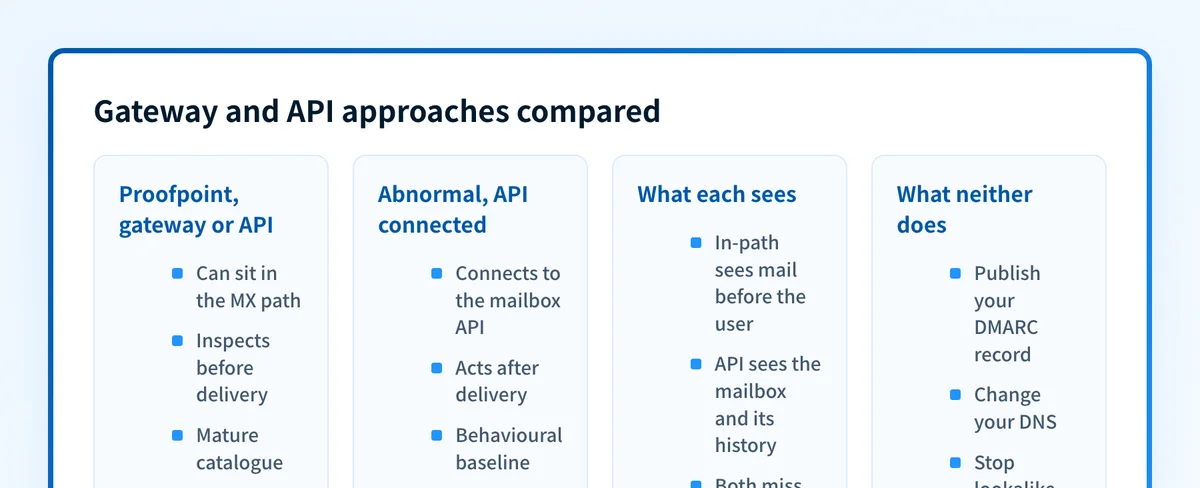
They compete for the same budget, so they get presented as alternatives. The sharper split is architectural: one can sit in the mail path, the other sits beside it. That changes what each can see, what each can do to a message, and what has to change in your environment first. For the wider category, see email security software and the comparison hub.
How the options were evaluated
Every vendor claim below comes from the vendors' own product, buying and documentation pages, checked on 12 August 2026. Review aggregators were left out on purpose: neither side's detection quality can be verified from a web page. Five criteria carry the comparison.
- Deployment: what changes in DNS or in the tenant before mail is inspected.
- Visibility: which messages and which signals the product reads once it is live.
- Disposition: what happens to a message the product decides is malicious.
- Commercial evidence: what each vendor states about price on its own pages.
- DMARC scope: whether domain authentication is included, sold separately, or absent.
The gateway path: Proofpoint in the mail path
A secure email gateway owns the MX record. Mail for your domain reaches the vendor first, and only what survives goes on to Microsoft or Google. A message refused at the edge never lands in a mailbox, so nobody gets a chance to click it.
Proofpoint documents both paths for one product. Its Core Email Protection page lists flexible deployment via API or SEG, calls the API route a rapid, low touch rollout through the Microsoft Graph API, and presents the gateway route as the one with more protection and customization. Its Email Protection page offers the same choice and adds threat intelligence, machine learning and behavioral analysis on top of Microsoft 365 and Google Workspace, so deployment mode and detection method are independent decisions.
Installing it costs you a DNS change with live mail behind it. Repointing MX is the moment mail flow depends on the new vendor, and backing out is another DNS change.
A gateway cannot read what never crosses its path. Mail between two mailboxes in the same tenant stays inside the platform, which is the gap that matters once an internal account is compromised. Proofpoint's stated answer is post-delivery work: rescanning delivered mail with updated threat intelligence and machine learning models, then pulling a confirmed malicious message from all inboxes, including forwarded copies.
Proofpoint's buying page names four enterprise packages, Core, Tier 2, Tier 3 and Prime, with no figure against any of them. Its only published list prices cover the Essentials line, and the two sheets disagree: a US sheet stamped 10/21 and an EMEA sheet stamped 5/22 with a different package set and different currency columns. Both are dated records, not a rate card.
The API path: Abnormal beside the mail platform
Abnormal has one deployment model. Its inbound email security page states deployment in 60 seconds via API with no MX changes, and its platform page states native API integrations with Microsoft 365, Google Workspace, Okta, CrowdStrike and Splunk, with no agents and no proxies. Installing it is an authorization inside the tenant, not a DNS change, so mail flow never depends on the vendor being reachable.
That position buys a different field of view. Abnormal states it reads identity, behavioral and content signals per message, and names authentication events, calendar activity and internal threads as sources a gateway cannot access. Its stated method is a per identity baseline: a behavioral fingerprint for every employee and vendor, so a sender is measured against that person's own history rather than a population average. The attack class it names is payload free business email compromise, which passes every authentication check.
Microsoft's documentation is a useful reference point for what behavioral detection means. It describes implicit email authentication as adding sender reputation, sender history and behavioral analysis on top of SPF, DKIM and DMARC. Its policy documentation then defines four phishing thresholds that set machine learning sensitivity, and states that false positives rise as the setting goes up. Every behavioral product makes that trade.
The limit of the API position is timing. The product acts on mail the platform has already accepted, so its remedy is removal rather than refusal. Abnormal says threats are removed before users engage, and publishes a Search and Respond function that remediates in bulk. How wide that window runs is a trial question. Abnormal publishes no price, and its position that it plus native platform protection replaces a gateway is its own claim, with no published test behind it.
The contrast does not map cleanly onto the two names, though. A buyer who cannot touch MX can deploy Proofpoint by API and land in the same position as Abnormal, including the loss of edge blocking. The gateway comes from one of these vendors; the API model comes from both.
What neither approach fixes
No detection layer, behavioral or otherwise, closes the lookalike domain and display name gap. Microsoft documents it plainly: an attacker who registers a lookalike domain and publishes valid records for it passes SPF, DKIM and DMARC while impersonating a trusted party. RFC 9989 section 2.2 agrees, placing visually similar domain names (cousin domains) and display name abuse outside DMARC's scope. DMARC covers exact domain spoofing, and that is the whole of it.
That layer is also the one neither product operates for you. DMARC lives in your DNS, and inbound filtering does not touch it. For Proofpoint it is a separate purchase, Email Fraud Defense, which the buying page places in the Prime package and whose product page describes hosted SPF, hosted DKIM and hosted DMARC with consultants guiding the rollout. Abnormal's pages describe no record management at all.
Palisade works on that layer and no other. Its documentation covers DMARC, SPF, DKIM, BIMI and MTA-STS record management, aggregate report processing and sender classification, with no filtering, sandboxing or quarantine in it. The agent investigates every sender, drafts every fix and proposes each policy step, and you approve before anything ships. If the consultant led DMARC model is the part you are weighing, the Proofpoint DMARC alternative page covers it.
How to choose
Take the deployment constraint first, because it rules out more than any feature does.
- If you can change MX, want mail refused before it reaches a mailbox, or need cover for mail that does not terminate in Microsoft 365 or Google Workspace, the gateway path fits, and Proofpoint is the one of these two that sells it.
- If MX is frozen by another team, a migration or a managed platform contract, the API path is the only one open to you, and both vendors serve it.
- If the losses you actually see are payload free impersonation of people your staff already trust, rather than malware and credential pages, weight the per identity behavioral model against your own recent misses.
- If both describe you, run the API product beside the platform's built in filtering for a month and count what it catches that the platform missed. That is the only number here that comes from your tenant.
Evidence
Sources and further reading
- Proofpoint Core Email Protection
- Proofpoint Email Protection deployment options
- Proofpoint Collaboration Security buying options
- Proofpoint Essentials EMEA price list, stamped 5/22
- Proofpoint Email Fraud Defense
- Abnormal inbound email security
- Abnormal platform integrations
- Microsoft anti-phishing protection in Defender for Office 365
- Microsoft anti-phishing policies and thresholds
- RFC 9989, Domain-based Message Authentication, Reporting, and Conformance (DMARC)
- Palisade documentation
Questions readers ask
Frequently asked questions
Is Abnormal a replacement for a secure email gateway?
Not on evidence either vendor publishes. Abnormal states its own position that it plus Microsoft or Google native protection replaces a gateway, with no independent test behind it, and Proofpoint still sells the gateway as a supported deployment.
Does Proofpoint require an MX record change?
No. Proofpoint documents two deployment modes, a secure email gateway and an API integration through the Microsoft Graph API. Only the gateway mode needs MX pointed at the vendor, and the API mode gives up edge blocking.
Can Abnormal stop a message before it is delivered?
Not at the SMTP edge, because it is not in the mail path. It connects by API to a platform that has already accepted the message, so its remedy is removal, with Search and Respond for bulk remediation.
Do Proofpoint or Abnormal publish list pricing?
No. Abnormal publishes no price on its inbound or platform pages, and Proofpoint shows none for its four enterprise packages. Its only published list prices cover the Essentials line, in two sheets stamped 10/21 and 5/22 that disagree.
Does either product manage my DMARC record?
Only Proofpoint, and only through a separate product. Email Fraud Defense sits in the Prime package and offers hosted SPF, hosted DKIM and hosted DMARC with consultant guided rollout. Abnormal's pages describe no record management.

Written by
Johanie DupontBrand & Ecommerce Email
Johanie Dupont works on brand and ecommerce email at Palisade: BIMI and verified marks, sender requirements, and getting marketing mail into the inbox.
More from Johanie →