Mimecast vs Barracuda: how the two compare
 ChatGPT
 Claude
 Gemini
 Perplexity
 Grok
GrokIn brief
Mimecast vs Barracuda compares documented email-security scope, deployment choices, plan disclosures, and fit for IT teams, security buyers, and MSPs.
Choose Mimecast if your evaluation starts with its documented support for Microsoft 365, Google Workspace, and on-premise email environments. Choose Barracuda if you need to evaluate its published Email Protection plan structure and deployment choices, including API, inline, and MX-record approaches. Neither product is universally better. The useful decision comes from matching the product scope, deployment path, operating model, and commercial details your organization can verify.
At a glance
Quick takeaways
- Mimecast and Barracuda both publish email-security products, but their public product pages organize the offer differently.
- Mimecast's Advanced Email Security page names Microsoft 365, Google Workspace, and on-premise email as supported environments.
- Barracuda publishes Advanced, Premium, and Premium Plus Email Protection plans with documented capability differences.
- Barracuda documents API, inline, and traditional MX-record deployment options for its Email Protection plans.
- A vendor feature page does not prove how either product will behave in your tenant, mail flow, or incident process.
- DMARC operations deserve their own evaluation because threat protection and DMARC enforcement are different operating jobs.
Who this comparison is for
This comparison is for an IT or security team, or an MSP evaluating a commercial email-security platform for an existing mail environment. It is also useful when the buyer needs to separate several questions that are often bundled into one request:
- Which mail environments must the product support?
- Does the deployment model fit the current mail flow and change-control process?
- Which capabilities are included in the plan under review?
- Does the buyer need email threat protection, DMARC operations, backup, archiving, or a combination?
- Which details still require a vendor quote, demonstration, or tenant-specific validation?
How the options were evaluated
The criteria below were checked against current first-party Mimecast and Barracuda product and pricing pages on August 12, 2026. A capability is treated as documented only when the vendor page describes it. Missing public detail is recorded as an open question, not as evidence that the capability is absent.
- Product scope: What the vendor's cited product page says the product protects or includes.
- Mail-environment fit: Which email environments the cited page identifies.
- Deployment: Which connection or mail-routing approaches the vendor documents.
- Packaging: Whether the vendor publishes named plans and which capabilities its plan page assigns to them.
- Commercial clarity: Whether the public pricing page provides an evaluable price or routes the buyer to a quote.
- Operating boundary: What still needs validation in the buyer's own tenant, delivered messages, and operational workflow.
Mimecast
- Best fit: Teams that need to evaluate an email-security product against Microsoft 365, Google Workspace, or on-premise email. Mimecast's Advanced Email Security product page explicitly names those environments.
- Relevant evidence: The same Mimecast page describes Advanced Email Security as protection against dangerous email-borne attacks and states that it scans email, attachments, and URLs for threats including impersonation fraud, ransomware, phishing, and spear-phishing. It also presents integrations and deployment options as product-page topics, checked August 12, 2026.
- Tradeoff: The cited public product page is an overview, not a buyer-specific implementation plan. Confirm the deployment design, exact included capabilities, licensing basis, support terms, and commercial terms with Mimecast before selecting it.
A buyer assessing DMARC separately should use the dedicated Mimecast DMARC alternative evaluation. Email threat protection can sit beside DMARC work, but neither a product overview nor a published DNS record proves which production senders authenticate and align for a domain.
Barracuda
- Best fit: Teams that need to compare named Email Protection plans and choose among documented API, inline, or MX-record deployment approaches. Barracuda's Email Protection plan page identifies Advanced, Premium, and Premium Plus plans and describes those deployment options.
- Relevant evidence: Barracuda documents spam, malware, ransomware, phishing, business email compromise, link protection, attachment sandboxing, DMARC reporting and analysis, email encryption, email continuity, and data-loss prevention on its plan page, checked August 12, 2026. The same page lists Microsoft 365 backup in Premium and Premium Plus, and cloud archiving in Premium Plus.
- Tradeoff: Plan names do not remove the need to verify the exact offer. Barracuda's pricing page indicates that minimums apply and includes purchase paths that can lead to a custom quote. Check the applicable region, user count, bundle, reseller or MSP arrangement, and contract terms before treating public pricing as a final cost.
For a DMARC-specific operating decision, compare the evidence and workflow in the Barracuda DMARC alternative evaluation. A DMARC report feature is not the same thing as an operating process for identifying all senders, fixing alignment failures, and deciding when a domain is ready for a policy change.
How to choose
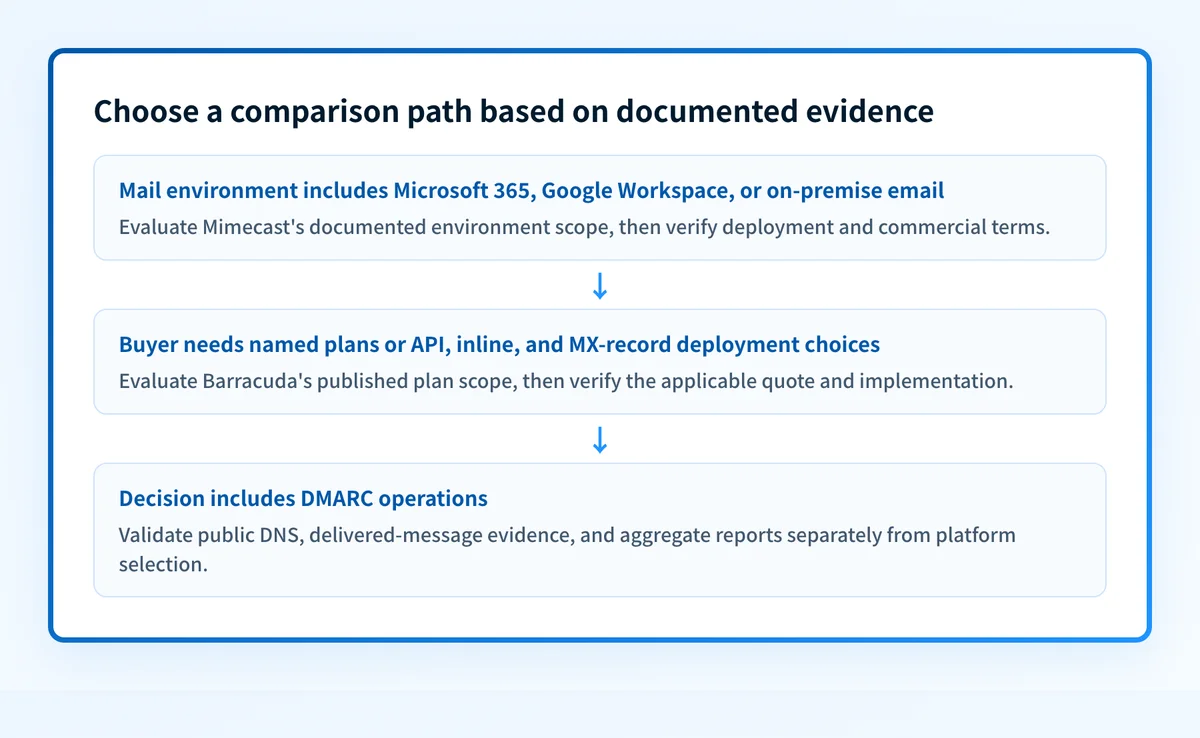
Start with the non-negotiable constraint. If the mail environment includes an on-premise system alongside Microsoft 365 or Google Workspace, Mimecast's cited product page directly documents that environment scope. If the buyer needs to select among Barracuda's named Email Protection tiers or assess API, inline, and MX-record deployment options, Barracuda's cited plan page provides more public detail for that comparison.
Then use this checklist:
- Confirm the exact mail environment, including any hybrid or on-premise components.
- Identify whether the mail-flow design permits an MX-record change, requires an API connection, or needs a different approach.
- Map every required capability to a named plan or written proposal.
- Ask each vendor to document excluded capabilities, regional availability, support coverage, implementation responsibilities, and renewal terms.
- Test the proposed deployment with a controlled message path before changing production mail flow.
- Keep DMARC sender inventory, alignment evidence, and policy rollout as a separate workstream.
option: Mimecast
checked_on: 2026-08-12
best_fit: "Evaluation involving Microsoft 365, Google Workspace, or on-premise email"
verified_evidence:
  - "Advanced Email Security page names those email environments"
  - "Product page describes scanning email, attachments, and URLs"
open_question:
  - "Exact deployment design, packaging, pricing, and support terms for this tenant"
---
option: Barracuda
checked_on: 2026-08-12
best_fit: "Evaluation requiring named Email Protection plans and documented deployment choices"
verified_evidence:
  - "Plan page lists Advanced, Premium, and Premium Plus"
  - "Plan page documents API, inline, and traditional MX-record deployment options"
open_question:
  - "Applicable price, minimums, implementation scope, and contract terms for this buyer"
Do not change MX records or route production mail from a feature comparison alone. Validate the authoritative DNS change, the vendor's configuration status, a real message from the production sending path, and DMARC aggregate-report evidence after messages accumulate.
Check the domain controls around the platform decision
Before choosing an email-security platform, run your sending domain through the Email Security Score to inspect public DMARC, SPF, DKIM, BIMI, MX, MTA-STS, and TLS-RPT evidence. This gives the buying team a documented baseline for the domain controls that sit around the platform decision.
A public DNS score cannot evaluate Mimecast or Barracuda, prove a production message path, reveal a mailbox provider's private filtering decision, or guarantee inbox placement. It also cannot replace tenant-specific vendor validation.
Evidence
Sources and further reading
Questions readers ask
Frequently asked questions
Is Mimecast better than Barracuda?
No. The documented pages support different decision paths. Mimecast explicitly names Microsoft 365, Google Workspace, and on-premise email on its Advanced Email Security page. Barracuda publishes named Email Protection plans and multiple deployment options. Choose based on the environment, required plan scope, deployment constraints, and commercial terms you can verify.
Does Barracuda Email Protection support MX-record deployment?
Yes. Barracuda's Email Protection plan page states that its plans offer API, inline, or traditional MX-record deployment options. Confirm the required DNS and mail-flow changes for the selected plan before making a production change.
Does Mimecast support Google Workspace?
Yes. Mimecast's Advanced Email Security product page names Google Workspace among the email environments it secures. The public page does not establish the exact implementation design or commercial terms for an individual Google Workspace tenant.
Can this comparison determine which product costs less?
No. Barracuda publishes pricing information but also states that minimums apply and provides custom-quote paths. The cited Mimecast product overview does not provide enough public pricing detail for a like-for-like cost comparison. Request written proposals with the same user count, term, scope, and support assumptions.
Do Mimecast or Barracuda replace DMARC enforcement work?
No. Email-security controls and DMARC enforcement solve related but different problems. A DMARC program still needs DNS validation, delivered-message authentication evidence, aggregate-report analysis, and a controlled policy rollout. Palisade can analyze DMARC aggregate-report data, identify sources and alignment issues, create prioritized remediation tickets, and propose the next policy step for human review.

Written by
Johanie DupontBrand & Ecommerce Email
Johanie Dupont works on brand and ecommerce email at Palisade: BIMI and verified marks, sender requirements, and getting marketing mail into the inbox.
More from Johanie →