Mimecast DMARC setup
 ChatGPT
 Claude
 Gemini
 Perplexity
 Grok
In brief
Mimecast DMARC setup: inventory legitimate senders, publish a valid DMARC TXT record, validate DNS and messages, then review aggregate reports.

Mimecast DMARC setup starts in your domain's authoritative DNS, not in a publicly documented authenticated Mimecast settings path. Identify every service that sends as the domain, publish one DMARC TXT record at _dmarc.yourdomain.com, begin with monitoring, then validate DNS, a real delivered message, and aggregate reports before advancing enforcement. See the DMARC learning hub if you need the protocol context first.
At a glance
Quick takeaways
- A DMARC record is a DNS TXT record that tells receiving servers how to handle mail that fails authentication checks.
- Mimecast advises identifying every legitimate email service, marketing platform, and third-party server before publishing enforcement.
- The required DMARC tags are
v=DMARC1and ap=policy. - Start with
p=none, review aggregate reports, then move gradually toquarantineandrejectafter legitimate sources authenticate correctly. - A public DNS result does not prove that a production mail stream passes SPF, DKIM, or DMARC alignment.
- Copy DNS values only from the domain and account you are configuring.
What should I check before configuring Mimecast?
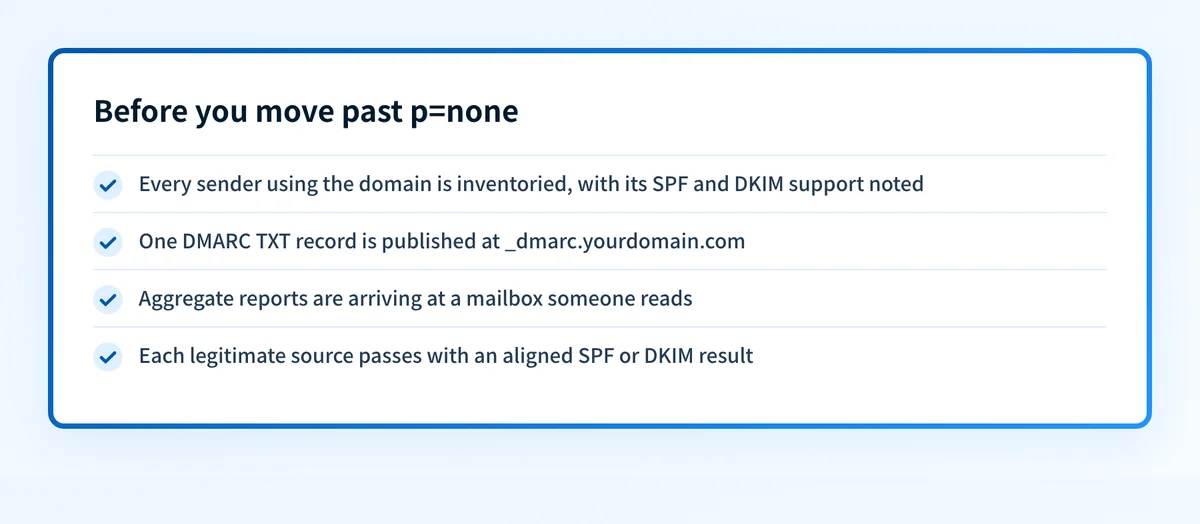
Before configuring Mimecast, confirm which systems send mail with the domain in the visible From address. Mimecast setup can involve employee mail, marketing platforms, support tools, transactional senders, and third-party services. Mimecast's DMARC record guidance recommends documenting each sender's domain, sending IP addresses, and SPF and DKIM support before you choose an enforcement policy.
This guide covers the domain-level DMARC record. It does not establish a current Mimecast console workflow for generating records, monitoring reports, or changing enforcement. Use your DNS provider for the record change and verify any Mimecast-specific feature or entitlement in your own authenticated account.
Make sure you have:
- Authority to change the DNS zone for the visible From domain.
- A current inventory of services that send as that domain.
- Access to a mailbox that can show full message headers.
- A destination for aggregate reports if you add an
ruatag. - A rollback owner who can restore the previous DNS value if a change introduces unexpected failures.
Copy DNS values from the account and domain you are configuring. Do not publish selectors, targets, tokens, or hostnames from another account or from an online example.
Which setup method should I use?
Use a manual DNS change for the DMARC record unless your DNS provider has an approved change workflow that manages TXT records for your domain. The available Mimecast guidance describes publishing the record in DNS. It does not document a current authenticated Mimecast interface that creates a universal customer-specific DMARC record. Mimecast's guidance does point to its DMARC Analyzer app for generating a record and reading reports, so if you use that product, follow its own record screen and the report address it gives you instead of the example in this article.
Choose p=none when you need visibility into legitimate and unauthorized sources before asking receivers to quarantine or reject failures. DMARC defines none, quarantine, and reject (RFC 7489), and Mimecast recommends moving through them in that order once legitimate sources authenticate.
How do I configure SPF and DKIM for Mimecast?
SPF and DKIM configuration is specific to each system that sends mail for your domain. Mimecast's public DMARC guidance supports identifying those systems and checking their authentication support, but it does not publish one current universal Mimecast UI path for every customer account. For the Mimecast DKIM steps, see Mimecast DKIM setup; this page covers the DMARC record.
1. Open your authoritative DNS provider
Open the DNS zone for the domain shown in the visible From address, such as yourdomain.com. Confirm that the zone is authoritative before editing records.
Do not create a second DMARC record because another system has its own reporting or authentication feature. A domain should publish one DMARC policy record at the DMARC owner name.
2. Inventory the sending domains and authentication paths
List every sender that uses the domain. For each one, record the visible From domain, SPF envelope domain if known, DKIM d= domain if known, and whether you can send a test message from that exact path.
This inventory prevents a common failure: a new enforcement policy affects a marketing or transactional sender that was omitted from the original test. The step-by-step DMARC setup guide can help with the broader sender inventory and rollout process.
3. Publish the DMARC DNS record
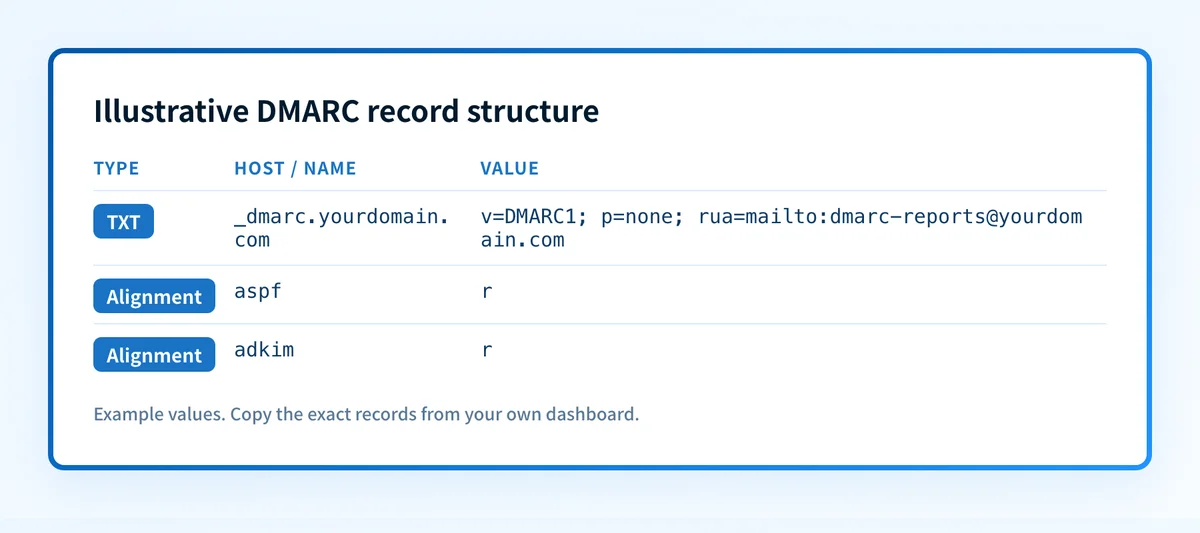
Mimecast identifies the record-name pattern as "_dmarc.yourdomain.com." and requires the v and p tags. The following is an illustrative record shape only.
Record type: TXT
Host (illustrative only):
_dmarcValue (illustrative only):
v=DMARC1; p=none; rua=mailto:dmarc-reports@yourdomain.com; aspf=r; adkim=rDo not publish this example unchanged. Use a report mailbox you control, and copy any account-specific reporting destination only from the account that generated it.
Some DNS providers append yourdomain.com automatically. If you paste _dmarc.yourdomain.com into a host field that already appends the zone, the final owner can become _dmarc.yourdomain.com.yourdomain.com. Check the final fully qualified name before saving.
Do not add a second SPF TXT record while working on DMARC. SPF has its own record rules, and multiple SPF policy records can cause SPF evaluation problems. Configure SPF and DKIM with each sending vendor, then use DMARC to evaluate whether an authenticated identifier aligns with the visible From domain.
4. Confirm the DNS record resolves
After saving the record, query the exact owner through the authoritative DNS server and at least one public resolver.
dig +short TXT _dmarc.yourdomain.comUse Palisade's DMARC checker to inspect whether the public record resolves and has valid basic syntax. A DNS check cannot show whether every production sender uses aligned SPF or DKIM.
5. Send a real test message from each sending path
Send new messages through each materially different production path. Inspect the raw source in the receiving mailbox. Look for the receiver-added Authentication-Results field, then compare it with the visible From domain.
RFC 8601 defines the Authentication-Results header and explains that it is an assertion by the receiver that added it. Do not treat a copied header from an untrusted forwarding path as proof of authentication. Check the recipient mailbox's trusted results.
How does this setup affect DMARC?
DMARC passes when SPF or DKIM passes and aligns with the visible From domain. In the DMARC record, r means relaxed alignment and s means strict alignment (RFC 7489). Relaxed alignment permits related subdomain-style matches, while strict alignment requires an exact domain match.
The example record uses relaxed aspf=r and adkim=r. That is a policy choice, not a universal requirement. Review the actual SPF envelope domain and DKIM d= value from each sender before changing either setting to strict.
A valid DKIM signature from an unrelated domain can pass DKIM while still failing DMARC alignment. Likewise, an SPF pass for a return-path domain that does not align with the visible From domain may not satisfy DMARC. The what is DMARC guide explains these protocol relationships in more detail.
How do I validate the setup?
This Mimecast DMARC validation checklist separates four kinds of evidence. Each layer answers a different question.
Check public DNS
Confirm that _dmarc.yourdomain.com returns one intended DMARC TXT record from the authoritative server and a public resolver. Verify that the answer includes v=DMARC1 and one p= value.
Check the vendor status
Check the status pages for each actual sender, including Mimecast features used in your environment. A vendor indicator can show that a system accepted a DNS configuration. It does not prove that a delivered production message passes DMARC.
Inspect a delivered message
Inspect a newly delivered message from each production path. Compare the visible From domain with the SPF and DKIM identifiers reported in the trusted receiver's Authentication-Results field.
Save a redacted copy of the headers with the change record. Remove recipient addresses, message IDs, and customer content before sharing it.
Review DMARC reports
Mimecast states that aggregate DMARC reports are XML and can show whether outbound sources authenticating as your domain are legitimate and correctly configured. Review reports after data accumulates, identify unknown sources, and correct authentication or alignment failures before increasing enforcement.
Do not treat a passing report from one source as proof that all senders are ready for quarantine or reject.
Troubleshooting
The DMARC record does not resolve
Check the fully qualified owner name in the DNS provider. A zone suffix added automatically can duplicate the domain. Also confirm that the record was published in the authoritative zone rather than a delegated or inactive zone.
The checker finds more than one DMARC record
Remove duplicate policy records and leave one intended TXT policy at _dmarc.yourdomain.com. Compare the DNS provider's record list with the authoritative response before deleting anything.
SPF passes but DMARC fails
Compare the SPF-authenticated envelope domain with the visible From domain. SPF can pass without aligning. Check the sender's configured return path or envelope sender before changing the DMARC policy.
DKIM passes but DMARC fails
Compare the DKIM signature's d= domain with the visible From domain. If they do not align under the current adkim mode, the DKIM result cannot satisfy DMARC alignment.
A legitimate service appears in aggregate reports as failing
Verify that the report row represents the expected sending path, then inspect a new message from that service. Confirm whether SPF, DKIM, or alignment failed before changing DNS. A public record lookup alone cannot identify the message-level cause.
Check the published DMARC record before enforcement
Run the domain through Palisade's DMARC checker after publishing the TXT record. Compare the public result with the authoritative DNS answer and with authentication results from a new production message.
If aggregate reports reveal multiple senders, recurring alignment failures, or a large domain inventory, Start with Palisade. Palisade is agentic DMARC software that analyzes aggregate-report data, identifies sending sources and alignment issues, and creates prioritized remediation tickets. It can propose the next policy stage, while your team reviews the evidence and applies any DNS policy change.
A DNS check does not prove every sender will authenticate, monitor future DNS drift, or control a receiver's private delivery decision.
Evidence
Sources and further reading
Questions readers ask
Frequently asked questions
Does Mimecast DMARC setup require a Mimecast console change?
No. The publicly available Mimecast guidance supports publishing a DMARC TXT record in DNS, but it does not establish a current universal authenticated Mimecast console path for all customers. Confirm account-specific Mimecast features in your own authenticated environment.
What DNS name should a DMARC record use?
A DMARC record uses the _dmarc owner under the sending domain. Mimecast gives the record-name pattern as "_dmarc.yourdomain.com.".
Should a new DMARC record start with reject?
No. Mimecast recommends moving gradually from none to quarantine and then reject after legitimate sending sources authenticate correctly.
Does a passing DNS lookup prove DMARC works?
No. A DNS lookup proves that a public record can be retrieved. It does not prove that a production message has aligned SPF or DKIM, or that every sending source is correctly configured.
Can SPF pass while DMARC fails?
Yes. SPF can pass for an envelope domain that does not align with the visible From domain. DMARC requires a passing SPF or DKIM result that also satisfies the configured alignment mode.

Written by
Samuel ChenardCEO & Co-Founder, Palisade
Samuel Chenard is the CEO and co-founder of Palisade, agentic DMARC software for IT teams and MSPs, from one domain to thousands.
More from Samuel →