dmarcian
Migrate from dmarcian without a reporting gap
 ChatGPT
 Claude
 Gemini
 Perplexity
 Grok
In brief
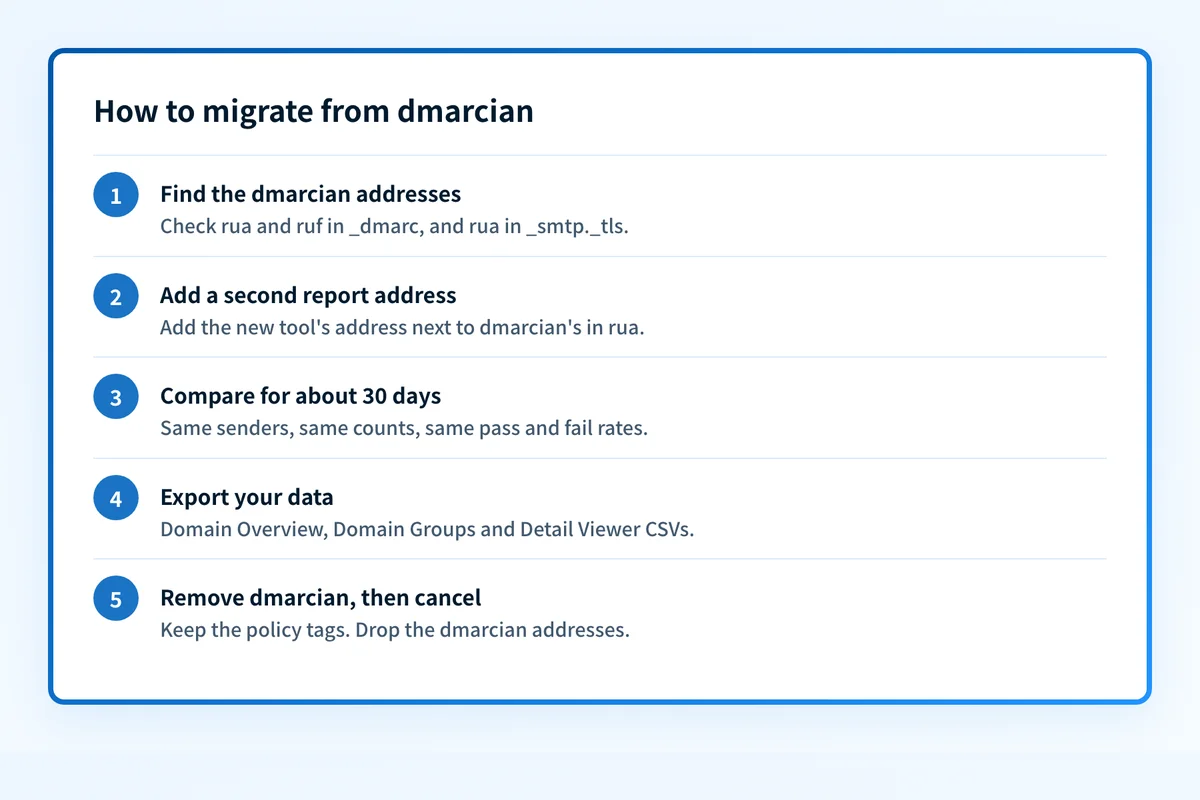
To migrate from dmarcian, add a second rua address, compare both tools for 30 days, export your data, then remove the dmarcian addresses from your records.

To migrate from dmarcian without losing reports, run the new tool beside it first. Add the new provider's reporting address next to dmarcian's in your DMARC record, compare both tools for about 30 days, export what you want to keep, and only then remove the dmarcian addresses. No DNS delegation has to be undone, because in its standard setup dmarcian does not host your records: your DMARC, SPF and DKIM records already sit in your own DNS.
That makes a dmarcian move one of the simpler DMARC migrations. The work is in the details: finding every record that points at a dmarcian address, saving the data your plan's history window will not keep, and finishing the last step instead of leaving two tools running.
At a glance
Quick takeaways
- A DMARC record can list more than one aggregate-report address, so dmarcian and another tool can read the same reports at once.
- dmarcian has you publish your DMARC record as a TXT record at your DNS provider, so you edit it in your own DNS, not in dmarcian.
- Look for dmarcian addresses in three places:
ruaandrufin the_dmarcrecord, andruain the_smtp._tlsTLS reporting record. - Your new tool's history starts the day its address is added, and dmarcian keeps history by plan (1 month on Personal to unlimited on Enterprise). Export what you need before you cancel.
- Keep the policy tags (
p,sp,np,adkim,aspf, plus anyt,psd,pct,foorrialready present) exactly as they are during the move. A provider change is not a policy change.
Step 1: Find every record that points to dmarcian
dmarcian's publishing guide has you create the DMARC record in dmarcian and publish it as a TXT record at your DNS hosting provider, and its MSP page describes a "read-only design" for client DNS (both checked 15 November 2026). So the records to change are the ones in your zone that name a dmarcian address.
Run these lookups for your own domain. Replace example.com with it.
dig +short TXT _dmarc.example.com
dig +short TXT _smtp._tls.example.com
dig +short TXT default._bimi.example.com
dig +short NS _dmarc.example.com
dig +short CNAME _dmarc.example.com
Any answer that contains dmarcian.com is a record to update. Write each one down. The usual patterns are:
- An aggregate address in
rua. Each dmarcian account gets its own reporting address. dmarcian's help article on missing reports gives the shape aswb32xefl1v@ag.dmarcian.com(dmarcian), but the subdomain is not alwaysag: dmarcian's own record, for example, sends to an address oncorp-ag-in.dmarcian.com(dig, 15 November 2026). - A forensic address in
ruf. If you turned on forensic (RUF) reports, which dmarcian processes from the Basic plan up (dmarcian pricing), the record carries a second dmarcian address inruf. - A TLS reporting address. Every dmarcian account also has a unique SMTP TLS reporting address, found under Preferences in the dmarcian account and published as
v=TLSRPTv1; rua=mailto:...at_smtp._tls(dmarcian TLS reporting).
rua points to one of your own mailboxes, check whether that mailbox forwards reports to dmarcian, which dmarcian supports as a second way to send data (getting started with dmarcian). And if _dmarc answers with an NS or CNAME record, another provider hosts the record, not dmarcian; change it there.
Step 2: Add the second reporting address
The rua tag takes a comma-separated list of addresses (RFC 9989, section 4.7), so both tools can receive the same aggregate reports. In Palisade, the domain's Manage DMARC page generates the record to copy; take the rua address from it (Palisade docs).
Keep every tag in your current record and add the second address after dmarcian's:
_dmarc.example.com TXT "v=DMARC1; p=quarantine; rua=mailto:abc123@ag.dmarcian.com,mailto:your-palisade-address@reports.example"Both addresses above are placeholders. Copy the real ones from your current record and from the record Palisade generates.
Reports sent to an address on another domain need that domain's permission (RFC 9990, section 4). If no reports reach Palisade after two days, check the address was copied exactly, then contact Palisade support. Allow for timing too: dmarcian's own guide notes that many receivers send reports only after the end of a UTC day, so the first reports can take more than a day (dmarcian).
Step 3: Compare both tools for about 30 days
Aggregate reports usually arrive once a day from each mailbox provider, so a month gives you enough days to see every regular sender, including monthly billing and newsletter runs. dmarcian itself recommends letting one to two weeks of data collect before drawing conclusions about a domain (getting started with dmarcian). During the overlap:
- Confirm both tools list the same sending sources and roughly the same message counts.
- Compare pass and fail rates for each sender. A large gap usually means a parsing or classification difference worth understanding before you switch.
- Note the alerts you rely on in dmarcian's Alert Central, which can notify by email, Slack, Teams or webhook (dmarcian Alert Central), and set up the equivalents in the new tool.
- Leave the policy alone. If a policy change is due, make it before or after the move, not during it.
Step 4: Export what you want to keep
The new tool's history starts the day its address goes into rua, the same way dmarcian's own guide says its data is only available "from the date you published the record onward." dmarcian keeps history by plan: 1 month on Personal, 3 months on Basic, 1 year on Plus and unlimited on Enterprise (dmarcian pricing, checked 15 November 2026). Anything older than your plan's window may already be gone, so export what you need while the account is open.
dmarcian's product changelog lists CSV exports you can use:
- Domain Overview export. Your domains with DMARC compliance rate, origin and nxdomain fields, plus their DMARC and SPF records. This is your inventory for the new tool.
- Domain Groups export. How domains are grouped, which for an MSP usually maps to clients.
- Detail Viewer export. The source-level data for the period on screen. Export the months you may need for audits.
Step 5: Remove the dmarcian addresses, then cancel
- DMARC. Republish the
_dmarcrecord with the same policy tags and dmarcian's addresses removed fromruaandruf. Keep anypct: receivers that still honour it will apply the policy to all mail if you drop it. Make this change only after the new tool has a full month of reports. - TLS reporting. Remove dmarcian's address from the
_smtp._tlsrecord, or replace it with the new provider's TLS reporting address. Palisade issues its TLS reporting address when you turn on hosted MTA-STS, and then generates the_smtp._tlsTXT record for you (Palisade TLS reports docs), so if you are not moving MTA-STS yet, removing dmarcian's address is the step for now. - Forwarding. Remove any mailbox rule that forwards DMARC reports to dmarcian.
- BIMI. If your
default._bimirecord loads its logo from admarcian.comhost, move the file before you change anything else, so the logo does not disappear. - Verify, then cancel. Run the lookups from Step 1 again. When no record answers with
dmarcian.com, cancel on your schedule. Subscriptions are chosen and changed on the Billing & Usage page in your dmarcian account (getting started with dmarcian, changelog).
_domainkey NS delegation (hosted DKIM docs). Do it after the reporting switch is finished, not during it.
A switch from dmarcian that stops halfway
The common unfinished move is two addresses left in rua for months. Both tools keep receiving reports, the dmarcian plan renews, and nobody owns the last step because the new tool already looks like it works.
With dmarcian this has a direct cost. dmarcian prices on "the volume of legitimate traffic that is reported to dmarcian via DMARC reports" (dmarcian pricing), so every report that still reaches its address counts toward the plan's message allowance. If dig +short TXT _dmarc.example.com still shows dmarcian.com long after the overlap, either finish Step 5 or decide on purpose to keep dmarcian as the second reader.
What changes for an MSP moving many client domains
The method is the same for every client domain, so an MSP can batch it. Use the Domain Groups export to work client by client: add the second address for a whole client at once, run the 30-day overlap for that group, then remove the dmarcian addresses together. Because dmarcian counts every sending subdomain as an active domain (dmarcian pricing FAQ), check the Domain Overview export for subdomains with their own _dmarc record, which need the same edit.
dmarcian's MSP terms are agreed with its partner team rather than published (dmarcian pricing FAQ), so check each contract's renewal date and notice period before you schedule the last client. For what dmarcian publishes about its plans and partner pricing, see dmarcian pricing.
For the general provider-change checklist, including rollback records and change approvals, see the DMARC provider migration guide, and for DMARC basics the DMARC learning hub. For how dmarcian and Palisade compare on price and MSP terms, see the dmarcian alternative comparison, and for what the platform does, the dmarcian review.
Evidence
Sources and further reading
- dmarcian: how to publish a DMARC record
- dmarcian: getting started with dmarcian
- dmarcian: published a DMARC record but haven't received any XML reports?
- dmarcian: SMTP TLS reporting
- dmarcian: Alert Central documentation
- dmarcian: product changelog
- dmarcian: pricing
- dmarcian for MSPs
- RFC 9989: DMARC
- RFC 9990: DMARC aggregate reporting
- Palisade docs: updating your DMARC record on your DNS provider
- Palisade docs: hosted DMARC
- Palisade docs: TLS reports
Questions readers ask
Frequently asked questions
Can I run Palisade and dmarcian at the same time?
Yes. A DMARC record's rua tag can list both tools' reporting addresses, so Palisade and dmarcian each receive the same aggregate reports. Because dmarcian has you publish the record as a TXT record in your own DNS, you add Palisade's address there yourself, next to the dmarcian address that is already in rua.
Does dmarcian host my DMARC record?
No, in its standard setup. dmarcian's publishing guide has you create the DMARC record in dmarcian and publish it as a TXT record at your DNS provider, and its MSP page describes a read-only design. If dig +short NS _dmarc.yourdomain.com or a CNAME lookup returns an answer, another provider hosts the record.
How do I find my dmarcian reporting address?
Your dmarcian reporting address is in the rua tag of your _dmarc record: run dig +short TXT _dmarc.yourdomain.com and look for an address on a dmarcian.com subdomain, such as one ending @ag.dmarcian.com. dmarcian also shows the address in your account preferences. The TLS reporting address is separate and sits in the _smtp._tls record.
Will I lose my DMARC report history when I leave dmarcian?
dmarcian's report history does not move to a new tool on its own, and the new tool's history starts the day its address is added. Export the Domain Overview, Domain Groups and Detail Viewer data you need while your dmarcian account is open, and remember that dmarcian keeps 1 month to unlimited history depending on the plan.
How long should dmarcian and the new tool run side by side?
Run dmarcian and the new tool side by side for about 30 days. Aggregate reports usually arrive daily, and a month covers monthly senders such as billing and newsletter platforms, so both tools have seen the same full set of sources before you remove the dmarcian address.
Does moving off dmarcian change my DMARC policy?
No. Moving off dmarcian does not change your DMARC policy as long as you keep p, sp, np, adkim and aspf, plus any t, psd, pct, fo or ri tags, exactly as they are when you edit the record. Changing provider and changing policy are separate changes, and doing both at once makes any delivery problem harder to trace.

Written by
Samuel ChenardCEO & Co-Founder, Palisade
Samuel Chenard is the CEO and co-founder of Palisade, agentic DMARC software for IT teams and MSPs, from one domain to thousands.
More from Samuel →