DMARC provider migration: keep control of your DNS
 ChatGPT
 Claude
 Gemini
 Perplexity
 Grok
GrokIn brief
DMARC provider migration keeps DNS under your control by preserving policy, mapping dependencies, validating reports, and retiring services with evidence.
A DMARC provider migration can keep your existing authoritative DNS: preserve the effective policy, update approved report destinations, and verify receipt before retiring the old service. First check whether the old provider also hosts active DMARC, SPF or DKIM dependencies; those need a replacement plan before cancellation.
At a glance
Quick takeaways
- DMARC reporting destinations and hosted authentication dependencies are separate migration scopes.
- Publish one DMARC policy record at each configured
_dmarcname; never competing TXT records. - Preserve existing
p,sp,np,adkim, andaspfvalues unless a separate policy change is approved. - External aggregate-report destinations require authorization from the destination domain owner.
- A public DNS result confirms the published record, not report receipt, sender coverage, or transferred history.
- An existing
_dmarcCNAME needs dependency mapping before any replacement is approved.
Scope and prerequisites
Use this guide to move DMARC reporting and analysis between providers while retaining control of authoritative DNS. It does not cover nameserver transfers, ESP migrations, vendor selection, or a change to the DMARC enforcement policy. For policy tags and rollout stages, use the DMARC learning hub.
Start with one production domain. Record the DNS owner, visible From domains, report accounts, sender-inventory owner and rollback approver. Export required history before cancelling; an export does not establish that the replacement can import it.
Obtain the complete _dmarc TXT or CNAME answer and the replacement account's own reporting destination and authorization instructions.
Restore the saved, known-good configuration if the cutover changes approved policy, removes a required destination or breaks a dependency. Investigate missing authorized reports while keeping the old account active.
The Sophos migration guide supports configuration backups and dependency inventory. The procedure below is our change-management recommendation; provider capabilities vary.
Choose the implementation approach
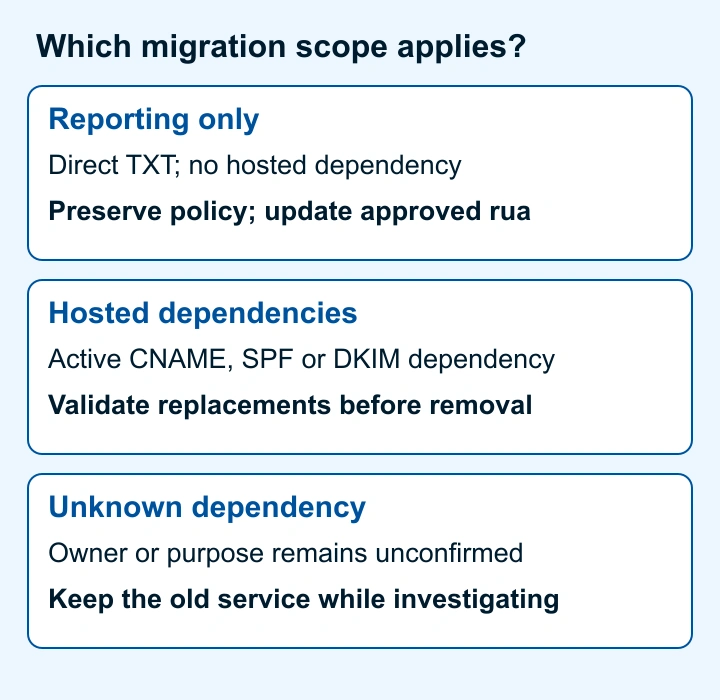
Use the reporting-only path only when authoritative DNS contains a direct DMARC TXT record that your organization controls, and the former provider does not host another active dependency. Preserve the policy and change only approved aggregate-reporting rua destinations. Any failure-reporting arrangement needs its own review.
Use the hosted-dependency path when the former provider supplies an active _dmarc CNAME, DNS-hosted policy, SPF include mechanism, DKIM selector CNAME, TLS reporting destination, or another record that production mail depends on. Record the owner, replacement and rollback method for each dependency before changing it.
RFC 9989 policy discovery discards multiple DMARC policy records returned at one name. Discovery can still find an applicable organizational-domain or public-suffix policy. Keep one record at each configured policy name, including during overlap; duplicates do not reliably disable DMARC.
A reporting-provider change does not itself require DKIM key rotation. For a separately planned signer transition, use the DKIM key rotation guide.
RFC 2181 explains that a CNAME owner cannot also hold ordinary DNS data such as TXT. If _dmarc.example.com resolves through a CNAME, never add a TXT record beside it. Identify what the CNAME currently provides, who controls it, and whether an approved replacement is ready.
An unknown dependency keeps the old service in place until its owner and replacement are verified.
How to configure a DMARC provider migration
1. Capture the current DNS and service state
Query the current DMARC owner through the authoritative nameserver and a public resolver. Save the full observed answer, TTL, record type, report destinations, effective policy tags, and any CNAME chain. Replace ns1.example.net with an authoritative nameserver for your zone and example.com with your own domain; these are illustrative values.
dig +short TXT _dmarc.example.com
dig +short CNAME _dmarc.example.com
dig @ns1.example.net TXT _dmarc.example.com
Record the migration worksheet before editing. All domains below are illustrative only.
domain: example.com
current_record_type: TXT
current_policy: "p=reject; sp=reject; adkim=s; aspf=s"
current_report_destinations:
  - "mailto:dmarc-reports@reports.example"
hosted_dependencies:
  - "record each dependency or explicitly confirm none"
replacement_report_destination: "mailto:aggregate@newreports.example"
destination_authorization: "record actual recipient-domain authorization evidence"
rollback_record: "saved current approved TXT value"
rollback_approver: "domain owner"
Do not replace the current record with a copied p=none example. A migration can retain p=reject, p=quarantine, or p=none. The existing sp, np, adkim, and aspf values affect subdomain or alignment behavior under RFC 9989.
2. Obtain the real report destination and authorization evidence
Obtain the aggregate-report destination from the replacement account. External reporting, beyond the policy domain's organizational domain, requires recipient-domain consent.
RFC 9990 external destination authorization puts the authorization record under the report-recipient domain's control. An address displayed in an account does not establish DNS authorization.
Have the recipient-domain owner confirm the required DNS authorization. Save that evidence alongside the exact destination; do not publish its authorization record in your sending zone.
3. Build the replacement record without changing policy
Retain approved policy and alignment tags while changing only the authorized reporting destination. This reserved-domain example illustrates an existing reject policy; it does not prescribe one.
Do not publish this example value. Use your current approved policy and the destination generated for your account.
_dmarc.example.com TXT "v=DMARC1; p=reject; sp=reject; adkim=s; aspf=s; rua=mailto:aggregate@newreports.example"If both services support overlap, list both authorized addresses in the same rua value, separated by a comma. RFC 9990 delivery rules include receiver limits; overlap cannot guarantee identical or complete datasets.
4. Publish the approved record or approved dependency replacement
For a reporting-only migration, update the existing TXT record. Verify that the DNS editor creates neither a duplicate record nor a doubled zone name.
For hosted dependencies, document and validate each replacement before removing the former provider's records. Test rollback for a separately approved CNAME-to-TXT change.
5. Keep the former service available during evidence collection
Leave the former provider accessible until the replacement receives expected reports for comparable reporting periods and the migration owner confirms that no active hosted dependency remains. There is no protocol-defined number of days that proves a migration is complete.
Compare source coverage and authentication outcomes across equivalent periods. The guide to understanding DMARC reports can help distinguish an expected source change from a reporting or alignment issue.
How to validate the setup
Validate the migration at four layers:
- DNS: Query authoritative DNS and at least one public resolver. Confirm one intended DMARC record, the expected policy tags, and the approved report destination. If
_dmarcuses a CNAME, confirm the entire resolution chain matches the approved design. - Provider: Confirm domain setup and destination authorization. A green account status does not establish report receipt.
- Message: Test material production paths, especially affected hosted dependencies. Inspect
Authentication-Resultsadded by the trusted receiving system, as RFC 8601 requires; sender-supplied copies are not proof. Compare the From domain,smtp.mailfromand DKIM signing domain with pre-cutover evidence. - DMARC reporting: Compare matching UTC intervals and reporting organizations using raw report IDs, avoiding duplicate imports. RFC 9990 report fields identify the reporting interval and policy. Preserve mixed-policy intervals separately; dashboard totals alone are not comparable evidence.
Troubleshooting
The replacement platform has no reports
First confirm the published rua value through authoritative and public DNS. Then confirm the replacement account's recipient authorization and domain status. Compare the destination character by character with the account-generated value.
Preserve policy while investigating DNS, authorization, processing delay and receiver reporting behavior.
The former provider remains in the resolution chain
Query _dmarc.example.com for CNAME and TXT answers. If a CNAME remains, identify its service owner before changing it. A direct TXT record cannot coexist with a CNAME at the same owner under the DNS rules in RFC 2181.
Restore the saved record if the CNAME removal changed the approved dependency design. Do not assume the CNAME exists only for aggregate reporting.
Report totals differ between providers
Compare equivalent reporting windows, reporting destinations, receiver coverage, and processing status. RFC 9990 permits reporting behavior that can vary by receiver and destination, so dual reporting does not guarantee matching totals.
Investigate which sources and authentication results account for the difference. Do not cancel the former service solely because the replacement has received some reports.
A legitimate sender's authentication results changed
Inspect a newly delivered message from the affected production path. Check the receiver-added Authentication-Results fields and compare the visible From domain, SPF identity, and DKIM signing domain with the pre-cutover evidence.
A DMARC reporting change should not alter sender authentication by itself. A changed result points to a separate sender, DNS, routing, or signing change that needs its own evidence-based repair.
Check the DMARC record after cutover
Compare the public DMARC policy and reporting destinations with the approved migration worksheet before you retire the former service.
Check the migrated DMARC record
The DMARC checker inspects public record syntax and tags. It cannot prove report receipt, complete sender coverage, historical data transfer, or zero interruption.
After cutover, Palisade's DMARC Agent analyzes aggregate reports and prioritizes authentication issues for human-approved remediation. Start with Palisade for recurring report investigation. Provider migration, history transfer and receiver delivery remain outside that workflow.
Evidence
Sources and further reading
Questions readers ask
Frequently asked questions
Do I need to move my nameservers to change DMARC providers?
No. A DMARC provider migration can use the existing authoritative DNS zone when your organization controls the relevant records. Moving nameservers is a separate infrastructure change and is not required to update an approved DMARC reporting destination.
Can I publish two DMARC records during migration?
No. Publish one DMARC policy record per DNS owner during migration. RFC 9989 discards duplicate policy records at that name; discovery can still find an applicable parent policy. Put approved reporting destinations in one record.
Should I change my policy to p=none while migrating?
No. A DMARC provider migration does not require reducing enforcement. Preserve p, sp, np, adkim, and aspf unless a separate policy change is approved.
Can I replace a hosted DMARC CNAME with a TXT record?
Only replace an old _dmarc CNAME after mapping its service and approving the replacement. RFC 2181 prohibits a TXT record alongside that CNAME; retain a tested rollback path.
When can I cancel the former DMARC provider?
Cancel the former DMARC provider only after DNS, replacement-account status, affected sender tests and comparable report periods support retirement, with no remaining hosted dependency. There is no universal wait period or zero-interruption guarantee.

Written by
Samuel ChenardCEO & Co-Founder, Palisade
Samuel Chenard is the CEO and co-founder of Palisade, agentic DMARC software for IT teams and MSPs, from one domain to thousands.
More from Samuel →