How can I send secure email using Outlook?
 ChatGPT
 Claude
 Gemini
 Perplexity
 Grok
GrokIn brief
How can I send secure email using Outlook? Choose Encrypt or a published sensitivity label, test recipient access, and validate domain authentication.
To send secure email using Outlook, compose a message, select Options > Encrypt and choose an available protection option, or apply a published sensitivity label in the compose window. The available controls depend on your Microsoft 365 tenant, license, Outlook client, and administrator configuration. Copy no settings from another tenant, then send a harmless test message to a representative recipient to confirm they can open it.
At a glance
Quick takeaways
- Outlook protection controls can include Encrypt and Sensitivity, depending on Microsoft 365 configuration.
- A published sensitivity label applies the protection settings your administrator configured for that label.
- Microsoft Purview Message Encryption protects message content, but it does not establish DMARC authentication for the visible From domain.
- S/MIME requires an organization-managed certificate workflow and compatible clients.
- A selected Outlook protection option does not prove that an external recipient can access the message.
- Validate public DNS, Microsoft 365 status, a delivered message, and DMARC reporting as separate checks.
What should I check before configuring Outlook?
Confirm that Outlook is the actual sending path in scope. This guide covers a person composing mail from a Microsoft 365 mailbox. It does not configure encryption for an application using SMTP relay, a transactional email service, or a marketing platform that sends with your domain.
Check that you can use the intended Outlook client, that your administrator has enabled the relevant Microsoft 365 capabilities, and that you can send harmless test content to a representative recipient. Microsoft's security and compliance guidance for new Outlook for Windows documents the compose-window Encrypt and Sensitivity controls.
Sensitivity labels are organization policy. Administrators create, configure, and publish Microsoft Purview sensitivity labels, so a sender cannot create a replacement label from the Outlook compose window. If the organization plans to use S/MIME, confirm its certificate and client-support process before changing user settings.
Copy DNS values from the account and domain you are configuring. Do not publish selectors, targets, tokens, or hostnames from another account or from an online example.
Which setup method should I use?
Use Encrypt when you need to protect an individual message and your tenant exposes an option that matches the intended sharing requirement. Microsoft describes Microsoft Purview Message Encryption as an email-encryption service that helps protect messages sent inside or outside the organization.
Use a Sensitivity label when the message belongs to an existing classification policy. The label can apply the protection behavior configured by your administrator, so the sender should select only a label published to their account.
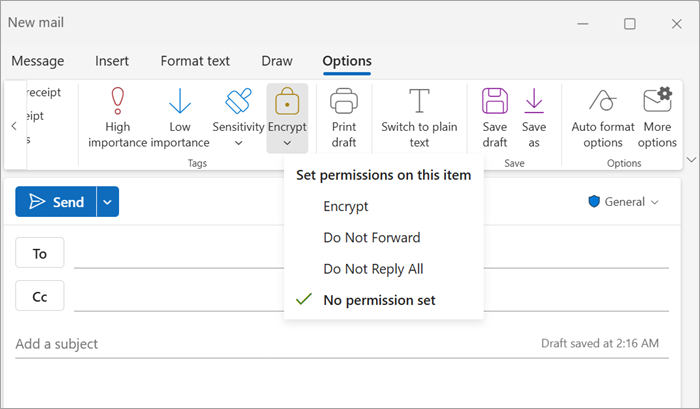
Use S/MIME only after the organization has established its certificate workflow and confirmed support for the Outlook client and recipient path. Do not infer S/MIME availability from the presence of a different Outlook protection control. The compose path below was verified from Microsoft's documentation, not from a live tenant.
Decision and evidence record
Record the choice before sending. This separates a recipient-access problem from a tenant setting, Outlook client limitation, or message-routing issue.
- Sensitivity and recipient requirement: Record the information classification and whether the recipient is internal or external.
- Selected method: Record Encrypt, the exact published sensitivity label, or S/MIME.
- Account and client context: Record the sending mailbox, Microsoft 365 tenant, and Outlook client used for the test.
- Recipient access condition: Identify the test recipient and the access path they are expected to use.
- Sent-message proof: Retain the send time, visible From address, recipient domain, selected option, and a redacted confirmation of the recipient outcome.
- Prerequisite: Record the applicable tenant policy, published-label requirement, or certificate requirement.
How do I configure secure email in Outlook?
1. Open a new message from the mailbox you will test
Create a new message from the same mailbox and through the normal route that will send protected email. Confirm the visible From address before proceeding, especially when using a shared mailbox or a domain with several sending identities.
A personal-mailbox test does not validate a shared mailbox, application relay, or a different domain. If the organization has multiple Outlook clients, record which client is used because the available controls can differ.
2. Select Encrypt or a published sensitivity label
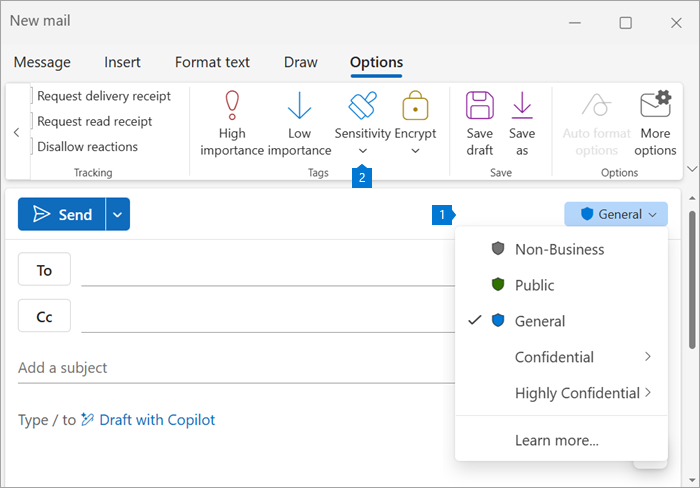
In new Outlook for Windows, open Options > Encrypt and choose the available protection option that fits the message. If the organization uses labels, select Sensitivity in the compose window and choose the appropriate published label. Microsoft shows both controls in its Outlook security and compliance documentation.
Use the exact choice available in the tenant. Do not copy label names, restrictions, or access assumptions from another organization.
3. Review recipients and use a safe subject line
Review every recipient before sending. Encryption cannot correct an incorrectly addressed message. Use a subject line that does not disclose information that should remain protected.
For external mail, arrange a test with a recipient who represents the access path you need to support. Their result helps distinguish recipient access from a typo, mail-flow rule, or provider filtering decision.
4. Send a new test message and capture the outcome
Send harmless test content to the representative recipient. Ask them to use their normal mail client or supported access path, then confirm what they can open.
Keep a redacted record of the selected method, send time, sender, recipient domain, and recipient outcome. A message sent before the protection choice changed is not evidence for the current configuration.
5. Check the sending domain's authentication separately
Message encryption and rights controls do not establish that the visible From domain is authorized to send the message. DMARC evaluates whether SPF or DKIM passed and aligned with that visible From domain. RFC 9989 defines DMARC identifier alignment.
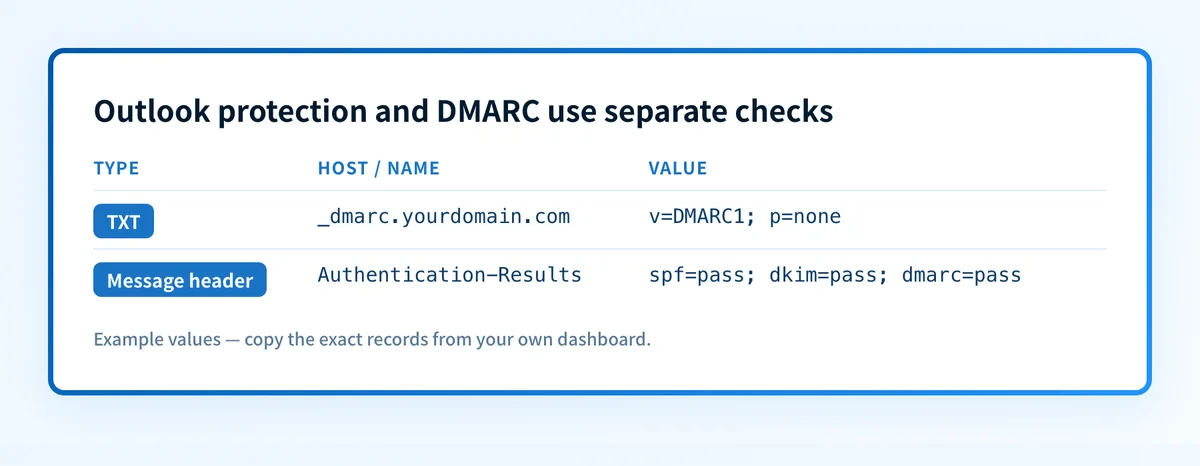
A DMARC record has this structural form:
Record type: TXT
Host: _dmarc.yourdomain.com
Value: v=DMARC1; p=none
Do not publish this example as a production policy. Use the record for your own domain and assess real sending sources before moving beyond monitoring.
Read the email authentication learning center for the relationship between Outlook mail, SPF, DKIM, and DMARC. If you have the visible From domain, use Palisade's DMARC checker to inspect its public DMARC record. A public DNS check does not prove the production Outlook path, a recipient's private decision, or future inbox placement.
How does this setup affect DMARC?
For an Outlook-sent message to pass DMARC through DKIM, the DKIM signing domain must align with the visible From domain. For SPF, the authenticated RFC 5321 MailFrom domain must align with that same visible From domain. RFC 9989 defines both alignment paths, and a passing authentication result for an unrelated domain does not satisfy DMARC.
Use a real delivered message to identify the actual path. RFC 8601 defines the Authentication-Results field and its trust boundary. Inspect results added by the receiving system you trust, rather than treating a copied header from an unknown intermediary as proof.
Outlook protection and domain authentication solve different problems. Encryption helps control access to message content. SPF, DKIM, and DMARC help receivers evaluate whether mail using a domain is authenticated. If Outlook messages reach junk, compare the delivered headers and recipient evidence with the practical causes in How to stop emails going to spam in Outlook.
How do I validate the setup?
Check public DNS
Query the domain's published DMARC record through the authoritative DNS service and at least one public resolver. Compare the answers before changing policy.
dig +short TXT _dmarc.yourdomain.comThis checks published DNS only. It does not show whether Outlook is signing a specific message or using the expected return path.
Check the Microsoft 365 sender-side status
Return to the same Outlook compose window and mailbox used for the test. Confirm that the selected Encrypt option or published Sensitivity label remains available, then record its exact displayed name and the client used. If the option or label is absent, stop and ask the Microsoft 365 administrator to check the tenant policy and label publication.
This verifies the documented sender-side configuration available to that mailbox. It does not prove recipient access or delivered-message authentication.
Inspect a delivered message
Open the raw source of a newly delivered test message. Confirm the visible From domain, then inspect the trusted receiver-added Authentication-Results header for spf=, dkim=, and dmarc= outcomes. Record only redacted headers in the change record.
The result should match the path you tested. If a shared mailbox, outbound gateway, or alternate domain sends mail differently, repeat the test for that route.
Review DMARC reports
After aggregate reports arrive, review whether Microsoft 365 traffic passes SPF or DKIM and aligns with the visible From domain. Separate expected Microsoft 365 traffic from other systems that use the domain.
A single successful Outlook test does not inventory every sender. The same distinction matters when investigating why mail goes to junk in Hotmail and Outlook.
Troubleshooting
Encrypt is missing from the compose window
Confirm the Outlook client and the mailbox used for the test. Microsoft's documented controls are subject to Microsoft 365 configuration. Ask the administrator to check whether the relevant encryption capability is enabled for that user before changing DNS or mail flow.
A sensitivity label is missing
Use only labels published to the sender. Microsoft documents that sensitivity labels are configured and published by administrators. Ask the label administrator to verify the label policy and the user's scope.
The recipient cannot open the protected message
Compare the recipient's result with the selected Outlook option, recipient type, and normal access path. Repeat with harmless content and a representative recipient. Do not weaken protection based only on an unverified report from a different client or recipient domain.
The message is protected but DMARC fails
Inspect the new message's trusted Authentication-Results header. Compare the SPF MailFrom domain and DKIM d= domain with the visible From domain. A valid protection choice does not repair an authentication or alignment problem.
Outlook mail passes DMARC but reaches junk
DMARC is one authentication signal, not a guarantee of inbox placement. Preserve the delivered headers and use recipient-side evidence to investigate the actual filtering result. The workflow for sending a secure email in Gmail is also separate because a different sender interface can use a different authentication path.
Track the sending sources behind the Outlook test
The Outlook test confirms one mailbox, client, recipient, and moment in time. It does not show every service that sends with the same domain, which sources later fail alignment, or when the domain appears ready for a safer DMARC policy.
Palisade is agentic DMARC software that analyzes DMARC aggregate-report data, identifies sending sources and authentication or alignment issues, and creates prioritized remediation tickets. It can propose the next policy step after a human reviews the evidence and applies the DNS change. Start with Palisade.
Palisade does not change the DMARC policy on its own, prove recipient access to an Outlook-protected message, or guarantee delivery or inbox placement.
For a provider-specific implementation of these authentication checks, see Zix email security: what the name means today.
Evidence
Sources and further reading
- Microsoft security and compliance in new Outlook for Windows
- Microsoft Purview Message Encryption documentation
- Microsoft Purview sensitivity labels documentation
- RFC 9989: Domain-based Message Authentication, Reporting, and Conformance
- RFC 8601: Message Header Field for Indicating Message Authentication Status
Questions readers ask
Frequently asked questions
Can Outlook encrypt an email sent to an external recipient?
Yes, if the Microsoft 365 tenant provides an encryption option that supports the recipient scenario. Select the available option, send harmless test content to a representative external recipient, and confirm their actual access result.
Does a sensitivity label encrypt every Outlook email?
Only if the administrator configured that published label to apply encryption or other protection. A label's name alone does not prove its protection behavior, so use the organization's documented label policy.
Does encrypting an Outlook email make it pass DMARC?
No. Outlook encryption protects message content and access. DMARC requires an aligned SPF or DKIM result for the visible From domain, which must be checked in a delivered message and later in DMARC reporting.
Can I use S/MIME in every Outlook client?
No. S/MIME requires certificates and compatible client and recipient support. Confirm the organization's certificate workflow and the supported Outlook experience before making it the required method.
Is a green Microsoft 365 setting enough to prove secure delivery?
No. It shows that the selected sender-side control is available or accepted for that mailbox. Test recipient access, inspect a newly delivered message, and review domain authentication separately.

Written by
Samuel ChenardCEO & Co-Founder, Palisade
Samuel Chenard is the CEO and co-founder of Palisade, agentic DMARC software for IT teams and MSPs, from one domain to thousands.
More from Samuel →