How secure is your email communication today?
 ChatGPT
 Claude
 Gemini
 Perplexity
 Grok
GrokIn brief
How secure is your email communication today? Check account access, message protection, authentication, real delivery evidence, and DMARC reports.
Your email communication is secure only to the extent that the account, message, transport, and domain-authentication controls match the risk and work on the real sending path. A strong password or a published DMARC record answers only part of the question. Check provider account evidence, the protection appropriate for sensitive content, authentication results from a delivered message, and DMARC reporting over time.
At a glance
Quick takeaways
- Account security controls who can enter a mailbox or its administration console.
- Transport encryption protects a connection between mail systems, not necessarily every stored copy or recipient workflow.
- SPF, DKIM, and DMARC help receivers assess whether a visible From domain is authorized.
- A public DNS lookup does not prove how a particular delivered message authenticated.
- A provider status indicator does not replace inspecting headers from the production sending path.
- DMARC aggregate reports help identify sending sources and authentication or alignment issues after reports accumulate.
How email communication security works
Email security has separate layers, each with a different job.
Account security concerns access to mailboxes and administrative settings. Review the sign-in methods, active sessions, recovery methods, privileged accounts, and alerts available in the provider that hosts your email. Google Workspace security guidance recommends stronger account protections such as 2-Step Verification for administrator accounts. Those controls reduce the risk of unauthorized mailbox access, but they do not establish that a message received by a user is legitimate.
Message protection concerns the information in the message and attachments. Before sending confidential material, use the protected-sharing process approved by both your organization and the recipient. Domain authentication does not encrypt message contents or decide whether ordinary email is suitable for the data.
Transport security concerns the connection between mail systems. For example, Google Workspace TLS guidance explains how TLS protects mail in transit when the sending and receiving systems support the connection. TLS for one delivery path does not prove end-to-end content protection, recipient access controls, or the treatment of copies after delivery.
Domain authentication concerns mail using your domain in the visible From address. RFC 9989 defines DMARC as a policy and reporting framework built on SPF and DKIM authentication with identifier alignment. DMARC can help a receiver assess unauthorized use of the From domain. It does not stop lookalike domains, compromised mailboxes, or every social-engineering attempt.
For protocol-specific guidance, use the email authentication learning hub.
When the answer changes
The best next check depends on the evidence and the risk.
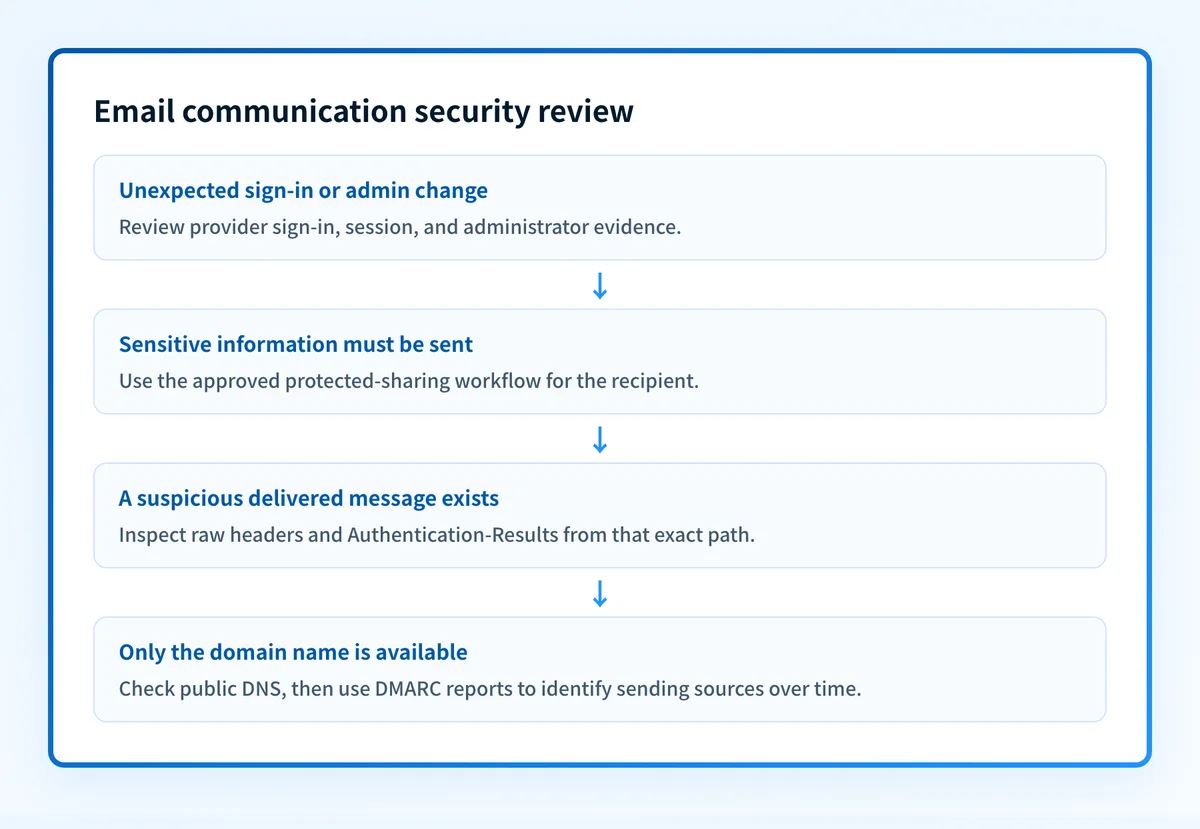
- If the concern is an unexpected sign-in or mailbox-rule change, begin in the email provider's sign-in and administrative audit views. Preserve the time, account, and activity details needed for your incident process.
- If the concern is confidential content, begin with the approved sharing method and the recipient's workflow. Do not treat a DMARC pass as protection for the content itself.
- If the concern is a suspicious message that appears to use your organization’s domain, preserve its raw headers. RFC 8601 defines the Authentication-Results header field, which records authentication assessments made by a receiving system.
- If the concern is your domain's exposure to spoofing, inspect the published DNS records, then review DMARC aggregate-report data once it has accumulated.
Do not change SPF, DKIM, or DMARC records solely because a checker reports a missing or weak result. Identify every legitimate sending path that uses the domain first. An incorrect DNS change can interrupt legitimate mail.
A worked email-security review
Use a recent non-sensitive test message sent through the same application, domain, and gateway used in production. Do not share private keys, tokens, recipient addresses, or unredacted headers in troubleshooting tickets.
Email communication review
Account:
- Confirm expected mailbox and administrator access methods.
- Review recent sign-ins, active sessions, and access changes.
Message:
- Decide whether the content needs an approved protected-sharing workflow.
- Confirm the intended sender, recipient, and sending application.
Delivered message:
- Obtain raw headers from the message delivered through the production path.
- Record the visible From domain and Authentication-Results values.
DNS:
- Look up the SPF, DKIM, and DMARC records for the sending domain.
- Compare them with the approved DNS configuration.
DMARC:
- Review aggregate-report data after reports arrive.
- Identify legitimate sources and authentication or alignment failures before changing policy.
Use four independent validation layers:
- DNS: query authoritative DNS and at least one public resolver to establish what is published.
- Vendor: inspect the current authentication or verification status in the service that sends the mail.
- Message: inspect a real delivered message from the exact production path.
- DMARC: review aggregate reports or monitoring after data accumulates.
What to check next
If you only have a domain name, use Palisade's Email Security Score tool to inspect public DNS signals. Compare the result with the DNS configuration your team intended to publish, then investigate differences through the responsible sender or DNS owner.
If you have a suspicious delivered message, preserve its raw headers and compare the visible From domain with the Authentication-Results values. A domain lookup cannot explain that individual message by itself.
If you administer several domains or several sending services, document each sending source, its owner, and the domain it uses. Then use aggregate reports to confirm whether those sources authenticate and align before proposing a DMARC policy change.
Inspect the public authentication posture
A public domain check is a useful starting point when the evidence you have is a domain name. It can reveal SPF, DKIM, and DMARC records that need review. It cannot show which production sources still fail alignment, whether a recipient accepted a specific message, or whether a later DNS change introduced a new sender.
Check the email security score
For ongoing DMARC work across domains or sending sources, Palisade is agentic DMARC software that analyzes DMARC aggregate-report data, identifies sending sources and authentication or alignment issues, and creates prioritized remediation tickets. It can propose the next policy step when the evidence supports it. A human reviews the evidence and applies any DNS or policy change.
Palisade does not prove every future message will authenticate, change the DMARC policy without human review, or guarantee delivery or inbox placement.
Evidence
Sources and further reading
Questions readers ask
Frequently asked questions
Is email secure enough for confidential information?
Only when the sender and recipient use protections appropriate for the information and follow an approved sharing workflow. SPF, DKIM, and DMARC authenticate domain use. They do not encrypt message content or control access after delivery.
Does a DMARC record make every email from a domain secure?
No. DMARC helps receivers assess whether mail aligns with an authorized SPF or DKIM identity. It does not prevent mailbox compromise, protect message content, or guarantee that every receiver will deliver the message.
Can a DNS checker prove that an email passed DMARC?
No. A DNS checker can show the public record that a domain publishes. A delivered message's raw headers and Authentication-Results fields provide evidence about that message's authentication assessment.
Does TLS mean that email is end-to-end encrypted?
No. TLS can protect a connection between participating mail systems. It does not by itself establish end-to-end encryption, secure every stored copy, or determine the recipient's access controls.
Should I move to p=reject as soon as I publish DMARC?
No. First identify legitimate sending sources and validate that important production paths have aligned SPF or DKIM authentication. Review aggregate reports and keep a rollback plan before requesting stronger handling for DMARC failures.

Written by
Samuel ChenardCEO & Co-Founder, Palisade
Samuel Chenard is the CEO and co-founder of Palisade, agentic DMARC software for IT teams and MSPs, from one domain to thousands.
More from Samuel →