Emailchaser email warmup
 ChatGPT
 Claude
 Gemini
 Perplexity
 Grok
GrokIn brief
Emailchaser email warmup gradually ramps up new mailboxes, according to Emailchaser. Learn what that claim covers and what it cannot prove here.
Emailchaser email warmup is Emailchaser's stated feature for gradually ramping up new mailboxes within its cold-email platform. Emailchaser says it will "Ramp new mailboxes up gradually, with no fake-engagement network." That describes a sending-volume approach, not proof of inbox placement, sender reputation, or the security posture of the domain. For the wider context, see the email deliverability learning hub.
At a glance
Quick takeaways
- Emailchaser lists email warm-up as part of its cold-email toolkit.
- Emailchaser says its software gradually increases the number of emails sent each day to minimize risk.
- Gradual sending is not an independently verified guarantee that messages will reach an inbox.
- Emailchaser says one subscription can connect an unlimited number of sending accounts.
- Inbox rotation and warm-up are separate stated features that can both affect how a campaign sends.
- Authentication and domain security still need their own review before sending volume increases.
How Emailchaser email warmup works
On its product site, Emailchaser describes email warm-up as a gradual ramp for new mailboxes and says it does not use a fake-engagement network. Its stated sending mechanism is that the software "gradually increases the number of emails sent per day, to minimize risk."
The useful distinction is between a platform's stated ramp-up behavior and a deliverability result. The first is a product feature: daily sending volume rises over time. The second is an outcome at a receiving mailbox provider, which can depend on factors beyond send volume. Emailchaser's public statement supports the first claim. It does not establish that every mailbox will gain reputation, avoid filtering, or reach the inbox.
Emailchaser also says it can connect an "unlimited number of email sending accounts." Its inbox-rotation description says that it rotates sending emails between connected accounts in a campaign "in a natural way." Rotation distributes campaign sending among accounts. Warm-up describes the gradual ramp of a new mailbox. Treat them as different controls, even when both are used in the same campaign.
For a broader explanation of delivery outcomes and the factors around them, read what email deliverability means.
When the answer changes
The answer changes according to the evidence you have and the decision you need to make.
If you only need to know what Emailchaser advertises, its public description supports this answer: its warm-up feature gradually ramps new mailboxes and its sending software gradually increases daily emails to minimize risk.
If you need to know whether a specific mailbox is ready for a higher volume, the public product description is not enough. Review evidence from the real sending path, such as delivery results from that mailbox and the authentication status of messages it sends. A product feature description cannot establish the condition of an individual domain or account.
If the concern is an email's authentication posture, use a separate check. Warm-up does not replace SPF, DKIM, or DMARC. These controls concern whether a message can authenticate in a way that supports the visible From domain. For a related explanation of feature claims and evidence limits, see AI email warmup: what it is and what it cannot prove.
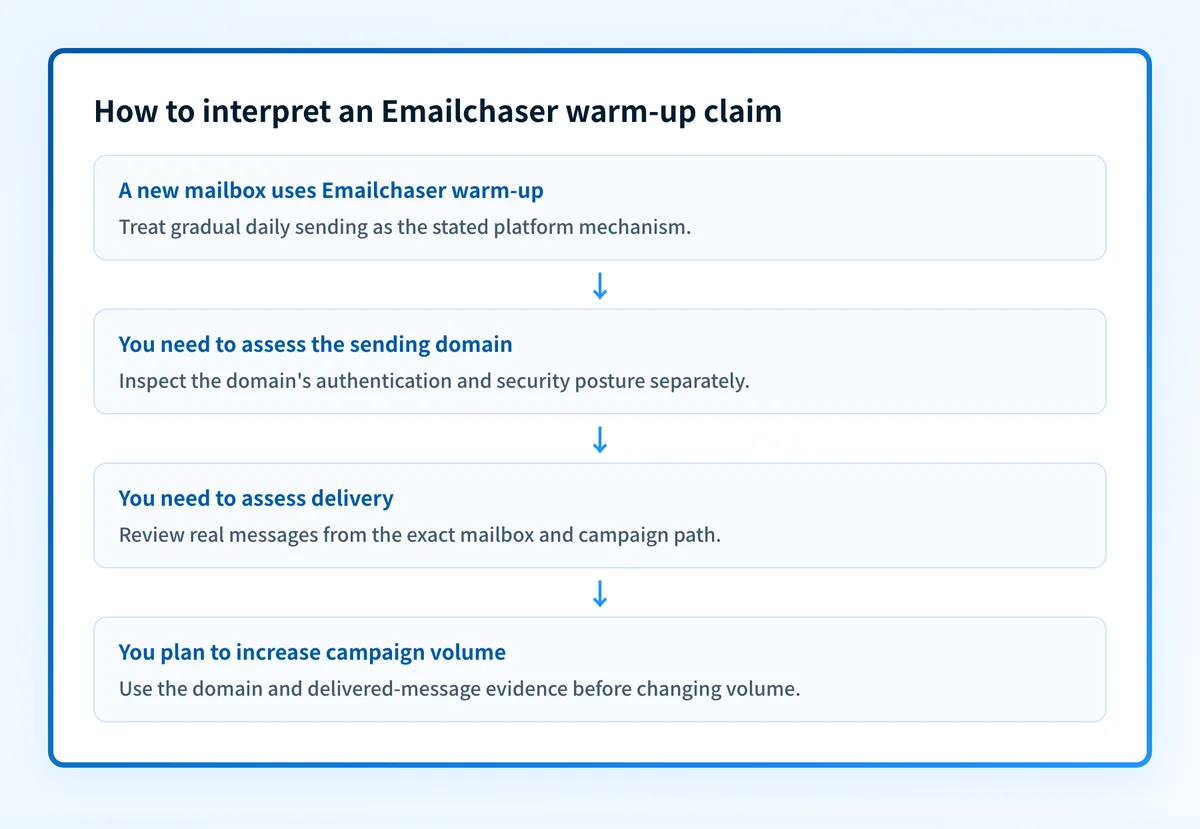
A practical decision rule is:
Use Emailchaser's stated warm-up feature to ramp a new mailbox gradually.
Do not treat the ramp as proof of inbox placement, reputation, or domain authentication.
Before increasing campaign volume, review the sending domain's current security and authentication posture, then inspect real delivery evidence from the same mailbox.
Worked example: what the product claim does and does not answer
Suppose a team connects a new sending mailbox to Emailchaser for an outreach campaign. Emailchaser's published description supports the expectation that the platform will increase daily send volume gradually. If the team connects multiple accounts, Emailchaser also states that inbox rotation can distribute campaign sends between those accounts.
That gives the team an operational claim to verify in its own account: whether the configured mailbox and campaign are following the intended volume pattern.
It does not answer these separate questions:
- Whether the visible From domain has correctly published SPF, DKIM, and DMARC records.
- Whether the production application is signing messages with DKIM or using the intended return path.
- Whether a receiving provider will accept, filter, or place a particular message in the inbox.
- Whether the new mailbox has a delivery issue unrelated to daily volume.
- Whether any connected account should receive more sending volume.
Do not increase business-critical sending volume based only on a warm-up setting or a public DNS result. Check messages sent through the real production path and keep a rollback option for campaign-volume changes.
Emailchaser's published commercial information also matters when evaluating the feature. The company says plans start at "$23 /month". Its listed Starter plan includes "5,000 emails / month · 1,000 active contacts" and "Unlimited email accounts." Emailchaser also advertises a "7-day free trial · Cancel anytime." Pricing, included features, and limits can change, so confirm the current plan details with Emailchaser before purchasing.
Take the next step based on your evidence
Start with the evidence closest to the question:
- If you are comparing Emailchaser's stated capabilities, check its current product and pricing pages for the feature and plan details that apply to your account.
- If you have a sending domain but no message evidence yet, check the domain with Palisade's Email Security Score before scaling campaign volume.
- If you have delivered messages, inspect the authentication results for messages from the exact mailbox and campaign path. A public DNS result alone does not prove that the application is using the records you published.
- If you are evaluating another platform's warm-up claim, compare its stated mechanism with the same evidence standard. Apollo email warmup is a related example.
Check the sending domain before scaling Emailchaser volume
A gradual mailbox ramp does not show whether the sending domain's authentication and security posture needs attention. Use Palisade's Email Security Score to inspect the domain before treating a higher campaign volume as safe to test.
Check the sending domain's Email Security Score
A score check does not prove that Emailchaser configured warm-up correctly, monitor a mailbox's ongoing delivery, explain a receiver's private filtering decision, or guarantee inbox placement. For teams that need ongoing DMARC aggregate-report analysis across sending sources, Start with Palisade. Palisade analyzes DMARC aggregate-report data, identifies authentication or alignment issues, and proposes policy steps for human review. It does not change DMARC policy automatically or guarantee delivery.
Evidence
Sources and further reading
Questions readers ask
Frequently asked questions
What is the best email warmup tool?
There is no best one, because no independent comparison of these products exists and none of them control where a receiver puts your mail. Emailchaser describes its own warm-up as a gradual ramp for new mailboxes with no fake-engagement network, which tells you its approach but not its ranking. Compare tools on the access each one needs and on what your own delivered mail shows.
How much does Emailchaser cost?
Emailchaser says plans start at $23 per month. Its listed Starter plan includes 5,000 emails per month, 1,000 active contacts, and unlimited email accounts. Check Emailchaser's current pricing page before purchase because plan details can change.
Does email warm up actually work?
Emailchaser says its gradual ramp lowers risk, and that is a claim about its own software rather than a measured deliverability result. No mailbox provider publishes a rule that rewards warm-up activity, so nobody can show the practice itself lifts placement for a given mailbox. Ramping up gradually is still sensible, but confirm it with real delivery evidence from that mailbox.

Written by
Johanie DupontBrand & Ecommerce Email
Johanie Dupont works on brand and ecommerce email at Palisade: BIMI and verified marks, sender requirements, and getting marketing mail into the inbox.
More from Johanie →