Email warmup software: how to evaluate your options
 ChatGPT
 Claude
 Gemini
 Perplexity
 Grok
GrokIn brief
Email warmup software can simulate inbox activity, but choose it only after verifying its scope, claims, controls, and deliverability tradeoffs.

Choose Warmup Inbox if you specifically want a vendor-operated service that connects a sending inbox and generates mailbox activity through its network. Choose Palisade if the job is DMARC operations across one or many domains. They do not solve the same problem: Warmup Inbox describes warmup activity and placement tracking, while Palisade analyzes DMARC aggregate reports and helps teams prioritize authentication remediation.
At a glance
Quick takeaways
- Warmup Inbox describes an automated email-warmup service that connects to a sending inbox and exchanges messages through its network.
- The vendor states that its network uses opens, replies, and stars, but the vendor's public statements do not establish how every receiving provider treats that activity.
- Warmup Inbox's placement and ramp guidance is vendor guidance, not a Gmail, Microsoft, or Yahoo requirement.
- A blacklist result is evidence from the list checked at that time, not proof of universal sender reputation or future inbox placement.
- Palisade is for ongoing DMARC analysis and remediation planning, not for generating warmup traffic.
- Treat unverified pricing, account controls, provider exclusions, and rescue-process details as open questions before purchase.
Who this comparison is for
This comparison is for an operator evaluating email warmup software before connecting a production sending inbox. The immediate question is usually whether a service can help establish or rehabilitate a sending pattern before a campaign begins.
That question needs a narrower answer than "which tool is best?" A warmup service and a DMARC platform address different evidence. A warmup vendor may describe simulated mailbox activity, while DMARC reporting identifies production sending sources and authentication or alignment failures. Neither category can guarantee inbox placement at a mailbox provider.
Readers comparing commercial email tools can use the broader Palisade comparison hub for vendor-evaluation context. If the core problem is authentication, message quality, sender reputation, or receiving-provider behavior, start with the wider email deliverability guide before assigning the problem to a warmup product.
How the options were evaluated
The criteria below were applied on August 6, 2026, using each vendor's own published product statements.
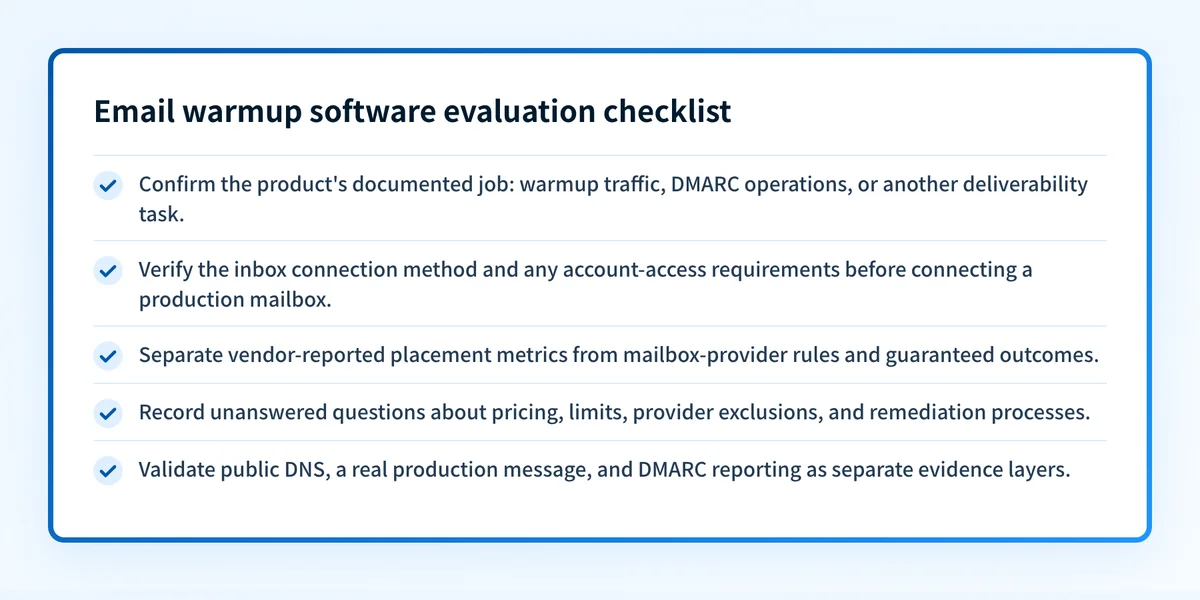
- Job fit: Whether the option addresses simulated warmup activity, DMARC operations, or another email-deliverability task.
- Documented inputs: What the vendor says an operator connects or provides.
- Documented evidence: What the product says it tracks, analyzes, or reports.
- Operational boundary: What the available documentation does not establish.
- Purchase readiness: Whether pricing, restrictions, setup controls, and terms are documented in the vendor's public materials.
Warmup Inbox
Warmup Inbox is the option in this comparison that positions itself as email warmup software. Its homepage calls the product "The email warmup tool that builds your sender reputation, automatically" and says a user can connect a sending inbox through Gmail, Outlook, or SMTP. The same page says its network has "30,000+ real inboxes" that exchange messages with opens, replies, and stars. These are Warmup Inbox product statements, checked August 6, 2026.
- Best fit: A sender who wants a vendor-operated warmup service for a connected inbox and accepts the vendor's stated network-based approach.
- Relevant evidence: Warmup Inbox states that it supports Gmail, Outlook, Google Workspace, Microsoft 365, custom SMTP, Yahoo, Zoho, ProtonMail, Fastmail, iCloud, AWS SES, and Mailgun. It also states that tracking includes inbox, spam, and bounce rates, plus DNS, SPF, DKIM, and blacklist checks. Warmup Inbox's homepage is the source for those statements, checked August 6, 2026.
- Tradeoff: This comparison could not verify current pricing, billing units, plan limits, cancellation terms, OAuth permissions, SMTP fields, provider exclusions, or the safeguards around its engagement network. Confirm each with the vendor before connecting an inbox.
The vendor recommends a gradual rollout. It says initial improvements may appear in 3 to 7 days and that a full ramp takes at least 14 to 21 days. It also gives "under 20-50 emails per day" during the first weeks as an example of low campaign volume. Those are Warmup Inbox recommendations, not universal sending thresholds published by mailbox providers.
Warmup Inbox's homepage also contains placement figures, including "+15% more email in Primary," "90% Primary placement by day 14," and "98% in Primary." The page labels at least one placement statement as an internal benchmark. Treat those figures as vendor-reported internal benchmarks, not as a forecast for a specific domain or campaign.
Palisade
Palisade is not email warmup software. It is agentic DMARC software for teams that need to understand which sources send for their domains, which sources fail authentication or alignment, and what to address before moving a DMARC policy forward.
- Best fit: An IT team or MSP that needs ongoing DMARC aggregate-report analysis and a remediation workflow across one domain or thousands.
- Relevant evidence: Palisade analyzes DMARC aggregate-report data, identifies sending sources and authentication or alignment issues, creates prioritized remediation tickets, and can propose the next DMARC policy step when evidence indicates readiness. A human reviews the evidence and applies the change.
- Tradeoff: Palisade does not generate warmup traffic, alter a mailbox provider's reputation decision, guarantee delivery, or autonomously change the DMARC policy.
For a focused public check, use the DMARC checker to inspect the published DMARC record. The result can show the public record available at the time of the lookup. It cannot prove the production sending path, monitor future changes, or show why a specific receiver placed a message in spam.
How to choose
Choose Warmup Inbox only if its vendor-stated operating model matches the inbox you intend to connect and the vendor can answer the unresolved questions that matter to your risk review. Ask for current pricing, account-access requirements, provider-specific exclusions, network controls, and the exact scope of any blacklist rescue process before connecting a production mailbox.
Choose Palisade when the recurring task is DMARC visibility and remediation across production sending sources. It is a different operating category. It does not replace a warmup service for teams committed to generated warmup traffic.
Use this evidence record to keep the decision tied to documented facts:
option: Warmup Inbox
checked_on: 2026-08-06
best_fit: Vendor-operated inbox warmup for a connected sending mailbox
verified_evidence:
  - Connects through Gmail, Outlook, or SMTP, according to the vendor
  - Vendor states its network exchanges emails with opens, replies, and stars
  - Vendor states it tracks inbox, spam, bounce, DNS, SPF, DKIM, and blacklist signals
open_question:
  - Current pricing, account permissions, service limits, exclusions, and rescue-process details
option: Palisade
checked_on: 2026-08-06
best_fit: Ongoing DMARC analysis and prioritized remediation for IT teams and MSPs
verified_evidence:
  - Analyzes DMARC aggregate-report data
  - Identifies sending sources and authentication or alignment issues
  - Proposes next policy steps for human review
open_question:
  - It does not provide email warmup traffic
Before deciding, separate public DNS, vendor status, real-message evidence, and DMARC reporting. A vendor dashboard indicator is not a delivered-message check. A public checker is not proof that the application signed a message or used the expected return path. The related article Does email warmup work? can help frame that evidence boundary.
Assess the deliverability problem before buying warmup software
If the underlying issue is unknown, evaluate the sending and authentication basics before treating warmup as the answer. Review the domain's published controls, a real message from the production path, and the mailbox-provider evidence available for the issue.
Read the email deliverability guide to map the problem to the right layer of evidence. It can help distinguish a public DNS configuration issue from an inbox-placement concern that requires real-message or provider-specific evidence.
A deliverability guide cannot prove that a particular warmup vendor will improve placement, repair a sender's reputation, or control a receiver's private filtering decision.
Evidence
Sources and further reading
- Warmup Inbox homepage, checked August 6, 2026.
- Palisade email deliverability guide.
- Palisade DMARC checker.
Questions readers ask
Frequently asked questions
Is Warmup Inbox email warmup software?
Yes. Warmup Inbox describes its product as an email warmup tool and says users can connect a sending inbox through Gmail, Outlook, or SMTP. Its homepage also states that its network exchanges messages with opens, replies, and stars.
Does email warmup software guarantee inbox placement?
No. No warmup product can guarantee placement at Gmail, Microsoft, Yahoo, or another mailbox provider. Placement decisions depend on receiver-controlled signals and the actual sending path.
Does Warmup Inbox support Google Workspace and Microsoft 365?
Yes. Warmup Inbox lists Google Workspace and Microsoft 365 among the providers it says it supports. Confirm each connection's setup conditions, permissions, and exclusions with the vendor during setup; the statements cited here do not cover them.
Can a blacklist check prove that a sender has good reputation everywhere?
No. A blacklist result applies to the list and input checked at that time. It does not expose every blocklist, a mailbox provider's private reputation data, or future delivery outcomes.
Is Palisade an email warmup service?
No. Palisade is DMARC software that analyzes aggregate-report data, identifies authentication and alignment issues, and helps teams prioritize remediation. It does not send warmup traffic or change a mailbox provider's private placement decision.

Written by
Johanie DupontBrand & Ecommerce Email
Johanie Dupont works on brand and ecommerce email at Palisade: BIMI and verified marks, sender requirements, and getting marketing mail into the inbox.
More from Johanie →