Email warmup by GMass: what the public site confirms
 ChatGPT
 Claude
 Gemini
 Perplexity
 Grok
GrokIn brief
Email warmup by GMass is not documented on GMass's public homepage. See what GMass confirms and what to check before sending campaigns safely.
Email warmup by GMass is not something the GMass public homepage documents as a standalone feature or workflow. GMass documents Gmail-based campaign creation, mail merge, follow-ups, scheduling, reporting, list verification, link testing, spam-trigger checks, and SPF checks. Those features may support campaign preparation, but they do not verify a warmup process or prove that a specific recipient will place a message in the inbox.
At a glance
Quick takeaways
- GMass documents campaign and pre-send deliverability features on its public homepage.
- GMass says campaigns start in Gmail and that "GMass requires Chrome."
- The public GMass page does not document a standalone email-warmup setup, sending ramp, or performance result.
- List verification, link checks, spam-trigger checks, and SPF checks are different from proof of inbox placement.
- Recipient inbox placement remains a receiver-controlled outcome.
- Check domain authentication and security signals separately from campaign controls.
What GMass publicly documents
GMass describes its product as a platform that turns Gmail into an email marketing and cold email platform. Its listed features include mass email, Google Sheets mail merge, campaign reporting, personalization, automatic follow-up emails, and scheduling.
Its public campaign description says users compose in Gmail, enter a list, subject, and message, then send a campaign. The same page states, "GMass requires Chrome." GMass also says it can "Verify your list, test links, & fix spam triggers before you send" and announces "Real-time SPF checks when you send a campaign."
These are campaign and pre-send checks. They are useful categories to distinguish because they answer different questions:
- Campaign controls concern how a sender prepares, schedules, personalizes, or follows up on mail.
- List verification concerns the addresses in a sending list.
- Link and spam-trigger checks concern pre-send content signals GMass chooses to inspect.
- SPF checks concern an authentication mechanism associated with the sending domain.
- Inbox placement concerns a receiving system's decision about a delivered message.
For the broader operational context, see email deliverability. Deliverability evidence comes from the real sending path and the receiving system, not solely from a campaign interface.
When the answer changes
The answer changes only when GMass publishes current documentation that specifically identifies an email-warmup feature and explains its operation. A feature page or help article would need to establish the relevant scope, such as how a mailbox is connected, what messages are sent, whether settings exist, and what GMass claims the feature does.
Use this decision rule:
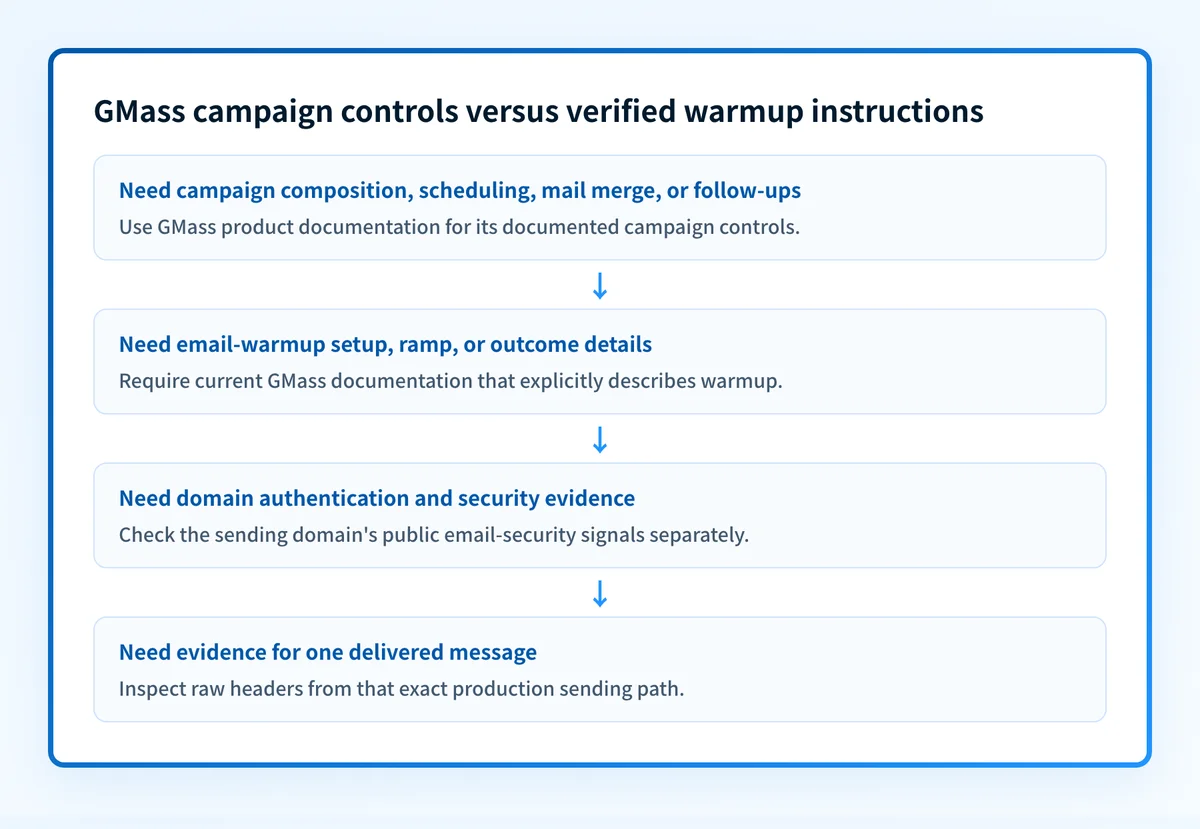
- If you need campaign composition, list handling, mail merge, follow-ups, scheduling, reporting, or GMass's stated pre-send checks, consult GMass's public product information.
- If you need verified instructions for an email-warmup function, do not infer them from the campaign features above. Look for a current GMass feature or help page that explicitly documents warmup.
- If you need to assess the domain's published email-security posture before a campaign, inspect the domain separately.
- If you need to know why a delivered message authenticated or failed authentication, inspect its raw headers. Analyzing email headers is the task that fits that evidence.
Worked example: campaign evidence versus warmup evidence
Suppose a sender can compose a Gmail campaign in GMass, schedules it, and sees that the list has been checked. That confirms activity in a campaign workflow. It does not answer whether GMass ran a warmup process, whether the production sending domain has all relevant authentication configured, or how a particular recipient handled the message.
Use the evidence you have to keep the questions separate:
Evidence: GMass campaign controls are available
Can confirm: A sender can prepare or schedule a campaign in GMass
Cannot confirm: A GMass warmup feature was configured or used
Evidence: GMass states it performs an SPF check
Can confirm: GMass publicly describes an SPF-related pre-send check
Cannot confirm: DKIM or DMARC status, domain alignment, or inbox placement
Evidence: A message arrives in a recipient mailbox
Can confirm: That specific message reached that mailbox
Cannot confirm: Future placement for every recipient or campaign
A production authentication check has more layers than a campaign setting:
- DNS: confirm the published DNS records through authoritative DNS and a public resolver.
- Vendor: check the sending service's current verification or authentication status where the service documents it.
- Message: send a real message through the exact production path and review its authentication results in the delivered headers.
- DMARC: use aggregate reports after data accumulates to identify sending sources and authentication or alignment issues.
What to check before relying on campaign delivery
Start with the evidence closest to the question:
- If you are deciding whether GMass includes warmup, use current GMass documentation that explicitly names and explains that feature. The available public homepage does not provide those instructions.
- If you are preparing a campaign and need to inspect the domain's public authentication and security signals, use an email security score check.
- If you have a delivered or rejected message, inspect the actual headers from that sending path. Public domain checks cannot explain every receiver decision.
- If you operate recurring mail across domains, use DMARC aggregate-report data to identify sending sources and prioritize authentication or alignment remediation.
Check the domain evidence behind the campaign
Before treating campaign preparation as deliverability proof, inspect the sending domain's public email-security signals. This is the useful next action when you have a domain but no current GMass documentation that verifies a warmup workflow.
Check the domain's email security score
That check does not prove that GMass provides email warmup, repair a sender configuration, show a receiver's private placement decision, or guarantee that future messages will reach the inbox.
For teams that need to work through recurring DMARC aggregate-report findings across domains, Start with Palisade. Palisade is agentic DMARC software that analyzes aggregate-report data, identifies sending sources and authentication or alignment issues, and proposes prioritized remediation work. A human reviews the evidence and applies changes. Palisade does not control GMass features, change a receiver's private reputation decision, or guarantee delivery.
Evidence
Sources and further reading
Questions readers ask
Frequently asked questions
Does GMass have email warmup?
No, the available GMass public homepage does not document a standalone email-warmup feature, its setup, or its results. It documents campaign features and pre-send checks. Confirm any current warmup capability through GMass documentation that specifically describes it.
Does GMass check SPF before sending?
GMass states that it provides "Real-time SPF checks when you send a campaign." The public page reviewed does not explain whether that check covers alignment, DKIM, DMARC, every plan, or every sending path.
Does a GMass campaign prove inbox placement?
No. A campaign can be composed, scheduled, or sent without proving how a particular recipient system will classify or place it. Recipient systems make their own delivery and placement decisions.
Do list verification and spam-trigger checks replace authentication checks?
No. GMass describes list verification, link testing, and spam-trigger checks as pre-send features. SPF, DKIM, DMARC, and alignment need separate DNS, vendor, message, and DMARC-report evidence.
Can a public domain check verify the GMass sending path?
No. A public domain check can inspect published DNS and email-security signals. It cannot prove which GMass configuration or production path sent a message, or how a receiving system handled it.

Written by
Johanie DupontBrand & Ecommerce Email
Johanie Dupont works on brand and ecommerce email at Palisade: BIMI and verified marks, sender requirements, and getting marketing mail into the inbox.
More from Johanie →