Mailshake email warmup
 ChatGPT
 Claude
 Gemini
 Perplexity
 Grok
GrokIn brief
Mailshake email warmup is a built-in deliverability tool, but it does not replace SPF, DKIM, DMARC, list quality, or real sending-path checks.
Mailshake email warmup is a deliverability tool Mailshake describes as "Free email warm up (via SMTP) to give your email a strong reputation." It may be part of a sending program, but it does not verify that your domain authenticates production mail, that your lists are suitable, or that a mailbox provider will place future outreach in the inbox. Check those conditions separately.
At a glance
Quick takeaways
- Mailshake publicly lists email warmup among its built-in deliverability tools.
- Mailshake's public site also lists an email domain setup assistant, list cleaning, and an in-app copy analyzer.
- The available public information does not establish Mailshake's current warmup settings, limits, timing, or performance labels.
- Warmup does not replace SPF, DKIM, or DMARC authentication checks.
- Inbox placement depends on more than an email warmup program.
- A public DNS or security check is a point-in-time result, not proof of future inbox placement.
How Mailshake email warmup fits into deliverability
Mailshake's product site describes its warmup offering as email warmup via SMTP and says, "Mailshake has multiple deliverability tools built in." The same page identifies an email domain setup assistant, email warmup, list cleaning, and an in-app copy analyzer.
That positioning matters because warmup is one part of deliverability work. It is separate from the technical question of whether the production sending domain has valid authentication records and whether messages sent through the actual outreach path produce an aligned SPF or DKIM pass for the visible From domain.
For broader context, email deliverability covers the factors that affect whether recipients receive and place a message. Sender reputation can influence delivery decisions, but no warmup result can guarantee inbox placement at a particular receiver.
Mailshake's documentation has a dedicated Email Warm-up section with articles covering the tool, how it works, adding an email, changing settings, and interpreting warmup performance. Those article titles confirm that Mailshake documents these subjects. They do not, by themselves, establish the current configuration path, technical behavior, settings, defaults, or recommended timing.
A useful way to treat warmup is as a bounded activity: it may support the reputation side of a sender program, while authentication, list handling, content, and actual campaign behavior need their own evidence. AI email warmup has the same practical boundary: a warmup service cannot prove what a production message will do after it reaches a receiver.
When warmup is not enough
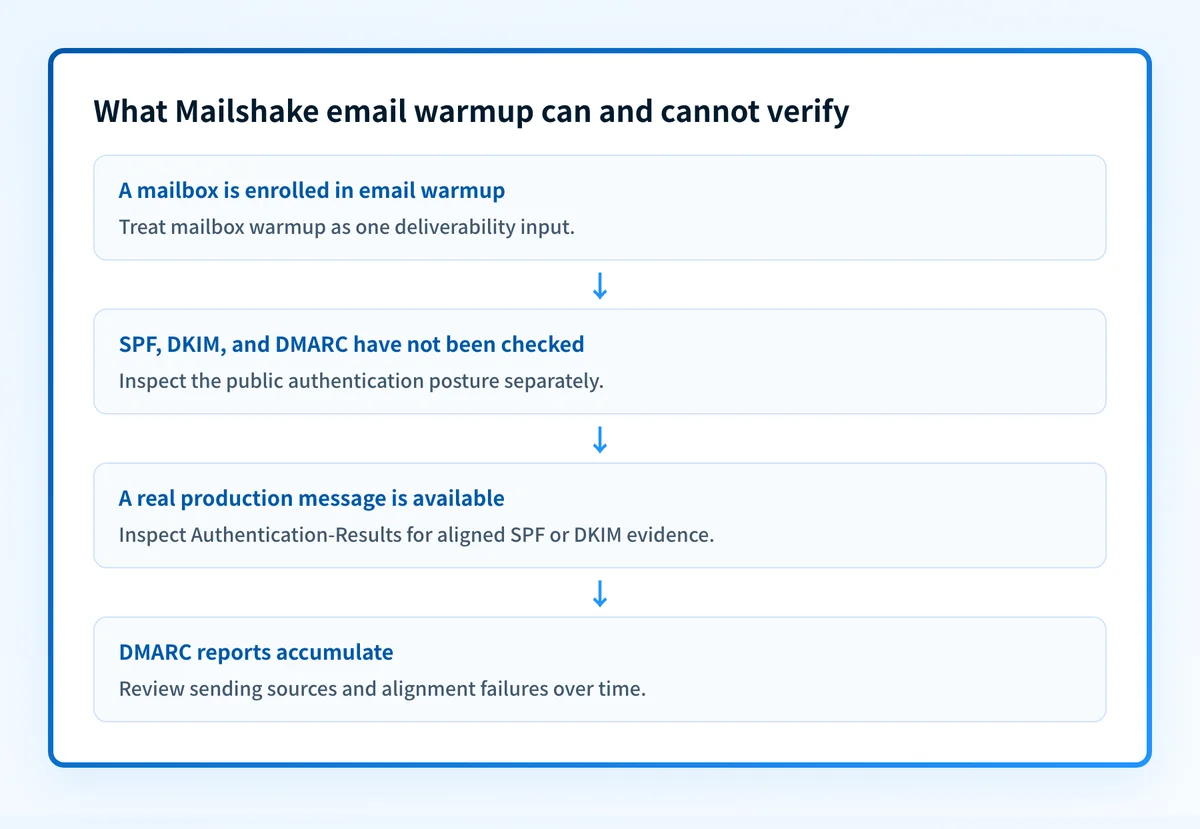
The answer changes when the question is not "Does Mailshake offer warmup?" but "Is this mailbox ready to send outreach safely?" That second question needs evidence from the real sending domain and sending path.
Use this decision rule:
- If you only know that a mailbox is enrolled in warmup, treat authentication and production delivery as unverified.
- If DNS records exist but no real message has been inspected, treat the sending application's use of those records as unverified.
- If a delivered production message shows authentication results, compare the visible From domain with the SPF and DKIM domains to confirm DMARC alignment.
- If aggregate DMARC reports are available, use them to identify sources and authentication or alignment failures over time.
Authentication-Results header field, which receivers can use to record authentication evaluations. This header can show results such as SPF or DKIM and the identity those checks used. It is evidence about that delivered message, not a guarantee for later mail.
A warmup vendor can also distinguish warmup from other placement factors. For example, Warm Up Your Email says that warming an email account is only one factor in inbox placement and identifies content as another factor. That statement is about its own service, not a description of Mailshake's implementation.
Do not treat a warmup status or a public DNS result as permission to increase sending volume. Check the exact production path first, especially when the mailbox sends business-critical outreach.
Worked evidence example
A mailbox can appear ready in a warmup product while its production message still has an authentication problem. Inspect a message sent through the real Mailshake-connected mailbox to a test recipient that preserves full headers. Redact personal addresses and message content before sharing the result.
Authentication-Results: receiver.example;
  spf=pass smtp.mailfrom=yourdomain.com;
  dkim=pass header.d=yourdomain.com;
  dmarc=pass header.from=yourdomain.com
This is an illustrative header shape, not a Mailshake output. In this example, SPF passes for yourdomain.com, DKIM passes with header.d=yourdomain.com, and DMARC passes for the visible From domain. The relevant comparison is the authenticated identifier and the visible From domain, not the presence of a warmup enrollment.
If the production header instead shows a passing SPF result for a different, unaligned domain and no aligned DKIM pass, warmup does not resolve that DMARC problem. Investigate the sending service's domain-authentication configuration and test again through the same mailbox and sending route.
The four useful validation layers are distinct:
- DNS: query the published SPF, DKIM, and DMARC records through authoritative DNS and a public resolver.
- Vendor: check the sending service's current domain-authentication status.
- Message: inspect headers from a real delivered message sent through the production path.
- DMARC: review aggregate-report data after mail has accumulated.
Check the evidence you have
Start with the evidence closest to the uncertainty.
If you have a domain but no message headers, use Palisade's email security score to inspect the public security and authentication posture. It can help identify published-record gaps before you send more mail.
If you have a delivered message, inspect its full Authentication-Results header and compare it with the DNS result. If the header and DNS disagree, investigate the sending application or connected mailbox before changing records.
If you have aggregate DMARC data, identify all observed sources and any authentication or alignment failures. A passing record today does not show which sources will appear later or whether a new campaign uses the same authenticated path. For another vendor-specific framing of this limit, see Apollo email warmup.
Check the sending domain alongside Mailshake warmup
Run the domain through the email security score tool to identify public authentication and security gaps that warmup does not check.
Check the email security score
A public check cannot prove Mailshake's current mailbox configuration, inspect a recipient's private reputation decision, or guarantee inbox placement for a future campaign.
Use an ongoing DMARC workflow after warmup
Warmup does not inventory every source that uses your domain or show whether later production messages fail alignment. Palisade is agentic DMARC software that analyzes DMARC aggregate-report data, identifies sending sources and authentication or alignment issues, and creates prioritized remediation tickets. It can propose the next policy step, while your team reviews the evidence and applies any DNS change.
Palisade does not change your DMARC policy autonomously, repair every sender automatically, or guarantee delivery or inbox placement.
Evidence
Sources and further reading
Questions readers ask
Frequently asked questions
Is Mailshake email warmup free?
Mailshake presents warmup as free, using the phrase "Free email warm up (via SMTP)" on its product site. Mailshake does not publish whether that covers every plan, what limits apply, or how long the feature stays available. Check your own plan's current terms before you build a process around it.
Does Mailshake email warmup guarantee inbox placement?
No, and Mailshake's own warmup description does not claim that it does. A warmup program cannot control a receiver's private reputation and placement decisions. Authentication, message content, list quality, and production sending behavior all still matter.
Does email warmup verify SPF, DKIM, and DMARC?
No, warmup and email authentication are separate checks that prove different things. To verify authentication, confirm the public DNS records, the sender's domain-authentication status, and the authentication results on a real message sent through the production route.
Can a passing SPF result still fail DMARC?
Yes, because DMARC needs an SPF or DKIM pass whose identifier aligns with the visible From domain. An SPF pass for a different domain does not meet that alignment requirement, so the message can still fail DMARC.
How do I know whether Mailshake is using my authenticated sending path?
Send a real message from the connected production mailbox and read its Authentication-Results header. Compare the SPF and DKIM identities in that header with the visible From domain and the records published in DNS. A status shown inside Mailshake cannot answer this on its own.

Written by
Dominic LandryDeliverability & DNS
Dominic Landry works on email deliverability and DNS configuration at Palisade, from SPF and DKIM records through to DMARC enforcement.
More from Dominic →