DMARC for parked domains: an IT setup checklist
 ChatGPT
 Claude
 Gemini
 Perplexity
 Grok
GrokIn brief
DMARC for parked domains: confirm no mail is sent, publish reject policy, SPF -all and null MX where appropriate, then document reactivation checks.
DMARC for parked domains should use a documented no-mail profile: confirm that the domain has no legitimate outbound sender, publish p=reject, publish SPF -all, and use a null MX only when the domain must not receive email. M3AAWG's parked-domain guidance supports direct rejection after that classification. If any legitimate sender or child domain with active or unverified mail use exists, stop and scope that mail path separately.
At a glance
Quick takeaways
- A parked-domain profile applies only after an accountable owner confirms that no legitimate mail is sent from the domain.
- A DMARC
p=rejectpolicy asks receivers to reject messages that fail DMARC, but each receiver makes its own final handling decision. - SPF
v=spf1 -allauthorizes no sending host for the exact SPF domain queried. - A null MX declares that a domain accepts no mail; it must be the sole MX record with priority
0and target.. - A parked domain does not need active DKIM signing keys, but old DKIM TXT and CNAME selectors need an intentional retirement decision.
- A quiet DMARC report period does not prove that a domain has never sent legitimate email.
Scope and prerequisites
Before changing DNS, name the business approver and DNS owner. List the domain, known subdomains and every system that could send or receive its mail.
Use an MSP email sender inventory to collect application evidence and owner signoff. DNS alone cannot establish that every application has stopped using a domain.
If a legitimate sender appears, stop the change and investigate its dependencies. Preserve the previous records and approved rollback plan. Do not use this profile while a migration or application still needs the domain.
Keep the approval in a change worksheet. The reserved domains below are illustrative only.
domain: example.com
classification: no legitimate inbound or outbound email approved
business_owner: corporate IT
dns_owner: infrastructure team
web_records: retain existing A and AAAA records
outbound_spf: "v=spf1 -all"
inbound_mail: null MX approved
dmarc_policy: "p=reject"
aggregate_reporting: approved external reporting destination only
old_dkim_selectors: inventory before retirement
rollback_trigger: legitimate sender, receiver, or child mail path identified
reactivation_requirement: validate DNS, sender state, delivered message, and DMARC reportsChoose the implementation approach
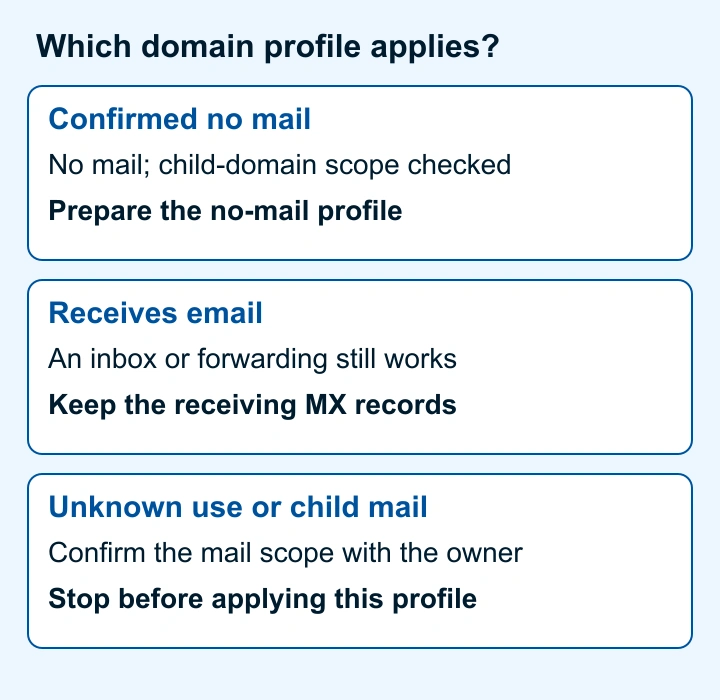
The full profile requires no approved outbound sender, no inbound mail service and reviewed child-domain ownership. If a child has active or unverified mail use, use the DMARC subdomain-policy reference to scope its configuration separately.
A confirmed no-sender domain can use direct p=reject, as M3AAWG recommends. An uncertain domain needs further inventory; an active sending domain needs a report-led policy rollout. A receiving-only domain must keep its receiving MX records and cannot use this full profile.
How to configure a parked-domain DMARC profile
1. Confirm that the domain has no approved mail path
Ask application owners about receipts, password resets, support, marketing and seasonal mail, including child domains. Compare their answers with DNS, mail-administration records and aggregate reports. Obtain approval for the exact domain scope.
Aggregate reports cover participating receivers' observations, so silence cannot establish no-mail status. Stop if evidence identifies an active sender.
2. Publish SPF denial for the exact domain
Publish an SPF record at the domain root that authorizes no sender.
example.com TXT "v=spf1 -all"This illustrative record is for a domain that sends no email. RFC 7208 defines -all as a fail mechanism and describes SPF evaluation for the queried identity. It does not create automatic SPF protection for every child domain, and it does not replace DMARC protection for the visible From domain.
Inspect the existing SPF record first. Deliberately replace its sender authorizations only after the no-sender decision; do not add a second SPF record or retain obsolete includes.
3. Publish null MX only when inbound email is prohibited
Publish this record only if the domain must not accept inbound SMTP email:
example.com MX 0 .Under RFC 7505, this illustrative record must be the sole MX: priority 0, exchange .. Absent MX can trigger fallback to A/AAAA addresses; leaving MX blank is a different configuration.
A null MX deliberately makes inbound email unavailable. Confirm that no mailbox, forwarding service or recovery workflow needs it before replacing receiving MX records.
Keep existing web-related A and AAAA records if they are needed. Null MX applies to SMTP routing, not HTTP hosting.
4. Publish the DMARC reject policy
Publish a DMARC record for the organizational domain after the no-mail classification is approved.
_dmarc.example.com TXT "v=DMARC1; p=reject; rua=mailto:dmarc-reports@example.net"This example is illustrative, not a production value. Use your approved report destination. A no-mail domain cannot receive its own aggregate reports. For the separate organizational domains in this example, RFC 9990 external-destination verification requires consent published by the receiving domain's DNS owner:
example.com._report._dmarc.example.net TXT "v=DMARC1;"Use a reporting service's exact supplied destination and authorization instructions when applicable. Confirm receipt separately; publishing a rua address alone does not prove delivery.
RFC 9989 defines DMARC policy discovery and the p=reject disposition request. A receiving mailbox provider can apply its own local policy, so p=reject does not guarantee identical handling at every receiver.
RFC 9989 makes the legacy pct tag historic. This minimal example omits it. Review existing child policies rather than assuming the parent overwrites them.
5. Inventory and retire DKIM selectors deliberately
A parked domain needs no active DKIM signer. M3AAWG recommends that parked domains not publish DKIM keys. Before removing or changing records, inventory existing DKIM TXT and CNAME selectors and determine whether a legacy sender still uses them.
RFC 6376 defines an empty p= as a revoked key. That record revokes the queried key; it is not a requirement to create a new signer or publish a wildcard.
A wildcard does not override existing DNS names under RFC 4592. Review old TXT and CNAME selectors individually; use the DKIM key rotation guide for a real sender that needs a transition.
How to validate the setup
Keep separate evidence for each applicable validation layer.
- DNS: query authoritative DNS and at least one public resolver. Confirm one SPF TXT record, the intended DMARC record, and either a sole null MX or the documented inbound-mail alternative.
- Domain scope: confirm the approved owner still states that the domain has no legitimate outbound sender. Recheck known child domains and delegated zones.
- Sender state: mark delivered-message validation as inapplicable only while no sender exists. Do not create a sender solely to test this profile.
- Message: before reactivation, configure the approved sender, replace no-mail SPF with its verified authorization and restore receiving MX if needed. Then inspect a production-path message's receiver-added
Authentication-Results, defined by RFC 8601, and confirm aligned SPF or DKIM. Review the DMARC policy before enabling that sender. - DMARC reporting: review aggregate reports after traffic accumulates. Reports can identify observed sources, but their absence is not proof that no system sends mail.
dig +short TXT example.com
dig +short TXT _dmarc.example.com
dig +short MX example.com
Expect 0 . without competing MX and the approved DMARC policy. These example commands use reserved domains; substitute the domain under review. To query authoritative DNS, add @ followed by that zone's authoritative nameserver to each command; repeat against a public resolver and retain both answers.
Troubleshooting
The domain still has a legitimate sender
Stop the parked-domain change. Record the application owner, visible From, SPF return path and DKIM signing domain. Investigate the real path and agree an approved configuration before enabling mail.
A child domain sends email
Check the child's explicit DMARC record and parent sp policy. Keep the child outside the blanket no-mail change and assign its own mail-system owner.
The null MX is ignored or mail still arrives elsewhere
Confirm that the null MX is the only MX record and uses priority 0 with target .. Check that forwarding, aliases, or a separate subdomain are not handling the mail. A null MX does not disable mail routing for another domain name.
Old DKIM records remain after retirement
Confirm that no queued or legacy mail still needs the selector. Record whether its TXT key or CNAME delegation was removed or its key deliberately revoked.
Check the parked domain's published DMARC policy
Compare the parked domain's public DMARC record with the policy and reporting destination approved in your worksheet.
Check the parked domain's DMARC policy
A public DNS check cannot prove that no application sends mail, that reports reach the approved destination, that every child domain is covered, or how a receiver will handle a future message.
For ongoing review across domains, Palisade's DMARC Agent analyzes aggregate-report data, identifies observed sending sources and creates prioritized remediation tickets. A human reviews proposed changes and applies DNS changes. Palisade does not prove that a domain has no future sender. Start with Palisade.
Evidence
Sources and further reading
Questions readers ask
Frequently asked questions
Should a parked domain use DMARC reject?
Yes. A parked domain can use direct p=reject after documented confirmation that it has no legitimate sender. M3AAWG supports this no-sender configuration.
Does SPF -all protect every subdomain?
No. SPF v=spf1 -all applies to the SPF identity queried for that exact domain. Review active child domains separately and do not assume a root SPF record protects every child sender.
Should a parked domain have a null MX record?
Only if the parked domain must not receive inbound email. A null MX is a sole MX 0 . record and intentionally tells SMTP senders that the domain does not accept mail.
Does a parked domain need DKIM records?
No active DKIM signing key is needed for a confirmed parked domain. Inventory old DKIM TXT and CNAME selectors before removing or revoking them, because a legacy sender may still depend on them.
Can I validate a parked domain with a test email?
No. Successful delivery from a parked domain does not validate a no-sender policy. Before reactivation, replace the no-mail configuration with an approved sending design and validate DNS, sender state, message authentication and reporting.

Written by
Samuel ChenardCEO & Co-Founder, Palisade
Samuel Chenard is the CEO and co-founder of Palisade, agentic DMARC software for IT teams and MSPs, from one domain to thousands.
More from Samuel →