MSP email sender inventory
 ChatGPT
 Claude
 Gemini
 Perplexity
 Grok
GrokIn brief
MSP email sender inventory: build a client-by-client record of senders, evidence, ownership, authorization, exceptions, and review dates today.
An MSP email sender inventory is a per-client record of each service that sends as a client domain, the evidence for that activity, its business owner, its authentication state, and its authorization decision. Build it before changing SPF, DKIM, or DMARC policy. DMARC reports and public DNS identify candidates, but they do not prove that a client approves a sender or that the service uses the expected production path.
At a glance
Quick takeaways
- Keep sender records separate by client, domain, service, and sending identity.
- Treat DMARC reports, DNS answers, interviews, and delivered-message headers as different evidence types.
- Record business approval separately from SPF, DKIM, and DMARC results.
- Give unknown, seasonal, retired, and blocked sources an exception state and review date.
- A public DMARC lookup documents a published record, not the full production sender population.
- Use the inventory as the handoff record for remediation, enforcement decisions, and client reporting.
Operating context and ownership
A sender inventory is the durable record produced during a broader client email security assessment. The assessment finds initial domains and sources. The inventory keeps those findings reviewable when a client adds a marketing service, changes a return path, retires an application, or acquires another domain.
This is a Palisade-authored operating framework, not a mailbox-provider requirement. RFC 9989 defines DMARC evaluation and receiver policy disposition for the RFC5322.From domain. A source observed in DMARC data is therefore a candidate for review. It is not automatically an approved sender.
Assign responsibilities for every client record:
- The MSP maintains the register, collects evidence, coordinates remediation, and records handoffs.
- The client service owner confirms the business purpose and authorizes continued use of the domain.
- The sender owner confirms the sending-service configuration and supplies a delivered-message sample.
- The DNS change owner approves and applies DNS changes after the required client approval.
- The sender platform controls its own configuration options.
- The receiving mailbox provider controls its own message-handling decision.
This separation matters across tenants. Palisade's MSP guidance is relevant when an MSP needs a repeatable record, but an approval, exception, or owner for one client must never transfer to another client using the same sending platform.
Before technicians use the same inventory process across clients, review Palisade’s DMARC onboarding and training for MSP teams. It covers sender review, DNS options, approvals, and the runbook for subsequent client deployments; dedicated support depends on the rollout.
Evidence to collect
Create one record per client domain and sending identity. RFC 9990 defines DMARC aggregate feedback reports that include source IP, authentication, and policy-result data. Aggregate reports help discover candidates, but they need corroboration before an MSP treats a source as authorized.
Collect four evidence layers where they apply:
- DNS: public DMARC, SPF, and DKIM records from authoritative DNS and a public resolver.
- Vendor: the sender platform's current authentication or verification status.
- Message: a real delivered message from the exact production path.
- DMARC: aggregate-report evidence after data accumulates.
Authentication-Results field also needs a trust boundary: RFC 8601 requires a consumer to assess its trust relationship with the validating MTA and message path.
Use this portable record in a PSA ticket, internal register, or client reporting package:
client: northwind.example
domain: yourdomain.com
sending_platform_service: billing-service
owner: client-finance-operations
business_purpose: invoices and payment notices
visible_from: billing@yourdomain.com
envelope_domain: mail.yourdomain.com
dkim_d_selector: yourdomain.com / selector1
spf_authorization_reference: include:spf.example-sender.test
dmarc_alignment_result: pending message verification
evidence_capture_date_source: 2026-08-12 / aggregate report and redacted header
change_approval: pending client approval
review_owner_date: msp-service-owner / 2026-10-01
authorization_state: pending-confirmation
next_action: sender owner supplies a current production-message sample
This is a fictional, redacted example. Do not copy account-generated selectors, CNAME targets, tokens, or hostnames from another tenant. Record the actual generated values only in the applicable client's restricted operational record.
Use the DMARC checker to record the publicly visible policy and aggregate-report destination for each client domain. That is a useful inventory input. A public lookup cannot reveal every sender, confirm a sender-platform account, authorize a source, verify the exact production path, or predict a mailbox provider's future handling decision.
How to run the workflow
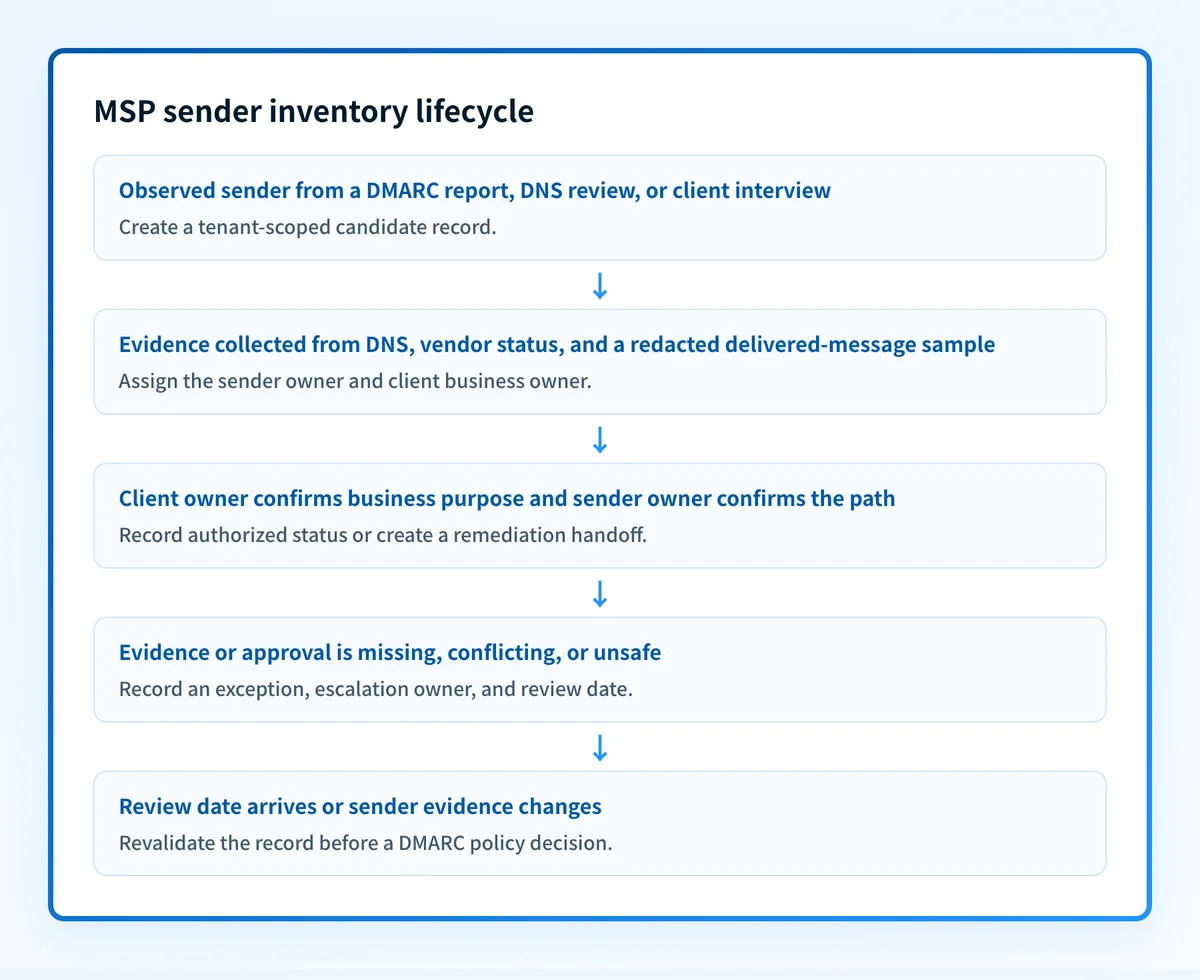
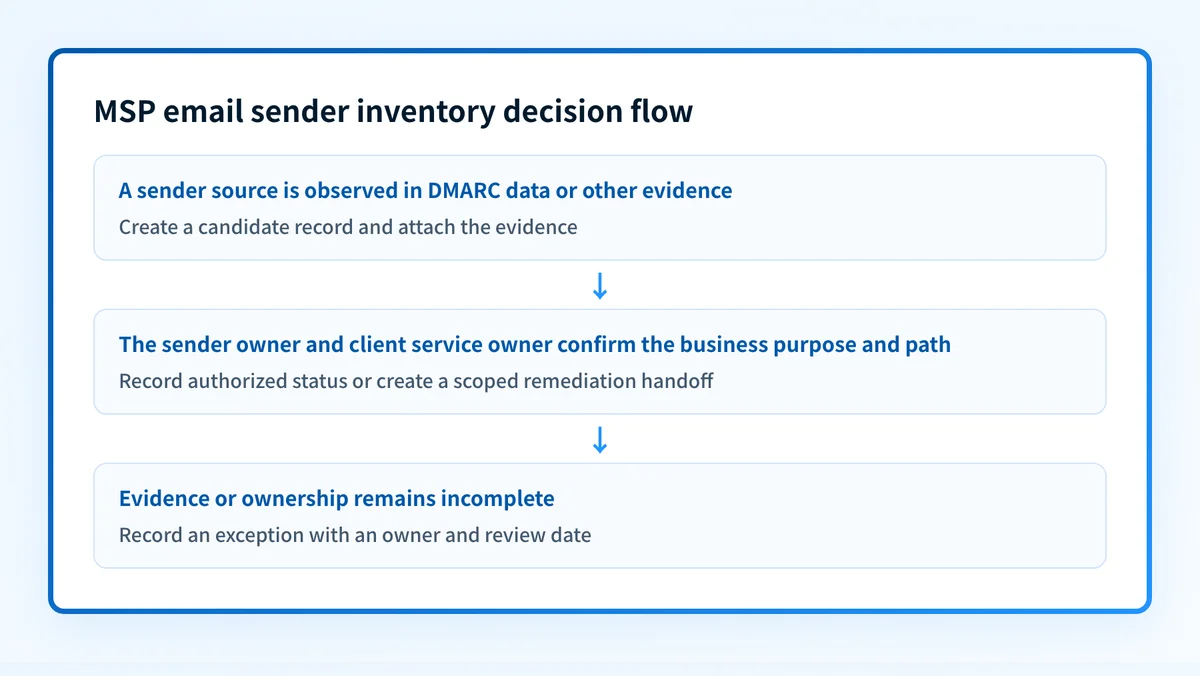
1. Define client scope and accountable owners
Owner: MSP service owner. Input: contracted domain list, client contacts, and DNS ownership details. Output: a client-scoped domain register with named business approvers and DNS change owners.
List organizational domains, sending subdomains, and protected non-sending domains separately. Use the parked-domain setup checklist only after confirming that a non-sending domain has no legitimate mail dependencies. Record the client boundary before collecting candidates. If a discovered source belongs to an out-of-scope domain, record it as a handoff rather than treating it as an authorized change request.
2. Add observed sender candidates
Owner: MSP analyst. Input: DMARC aggregate reports, DNS records, client interviews, and sender documentation. Output: candidate records marked report-observed or unknown.
Google's sender guidelines recommend DMARC reports to monitor mail sent from, or appearing to be sent from, a domain. Compare report observations with client context and published DNS.
Ask owners of billing, support, marketing, HR, and line-of-business systems what each service sends, which visible From domain it uses, whether it remains active, and who can provide a current message sample. A quiet report period does not establish that a low-frequency source is retired.
3. Attach evidence and test the claimed path
Owner: MSP analyst with the sender owner. Input: report period, DNS answers, vendor status, and a message sent through the real path. Output: an evidence-backed record or a stated evidence gap.
For a material sender, retain the relevant report period, DNS result, and a redacted message sample from the exact sending route. Confirm the visible From domain, envelope domain, DKIM d= domain and selector, plus SPF and DMARC results. The purpose is to prove the claimed path well enough to make an operational decision, not to claim that a single sample proves every future message will authenticate.
Do not advance a DMARC policy because a public record looks correct. Validate the sender platform, a delivered message, and later aggregate-report evidence for the affected client domain.
4. Obtain owner confirmation and record the decision
Owner: client service owner and sender owner. Input: the candidate record and attached evidence. Output: an authorization state and owner-specific next action.
Use states such as authorized, pending-confirmation, unauthorized, retired, and exception. Record why the state was selected, who made the decision, and when it must be reviewed.
An SPF include is not business authorization. RFC 7208 specifies SPF evaluation through DNS mechanisms, but it does not define client ownership or business approval. Treat authorization as an MSP operating decision supported by client confirmation.
5. Create a scoped remediation handoff
Owner: MSP service owner. Input: an authorized record with an authentication or alignment gap. Output: a ticket assigned to the sender owner or DNS owner.
Write the handoff around observable evidence: affected domain and identity, current result, requested limited change, approving party, rollback condition, and same-path retest. "Fix DMARC" does not identify a safe action.
For clearly inventoried services that change sender authorization frequently, Hosted SPF can be considered as a documented SPF-maintenance option. It does not replace sender ownership, message validation, or client approval.
6. Hand verified inventory into policy planning
Owner: MSP service owner and client approver. Input: completed sender records, exceptions, and review dates. Output: a client-specific enforcement recommendation or a documented reason to wait.
Use the inventory as the input to a staged policy decision. Google's stricter sender requirements may affect client priorities, but provider requirements do not remove the need to validate each sender path and obtain client approval.
Do not use portfolio progress as proof that a particular client is ready. Each domain needs its own evidence, approval, rollback condition, and post-change review.
Exceptions and escalation
Keep an exception register linked to the sender inventory. Escalate when:
- No client owner can confirm whether a source has a business purpose.
- The sender owner cannot provide a safe production-message sample.
- DNS ownership or approval authority is unclear.
- A business-critical sender has no test window or rollback path.
- Public DNS, vendor status, and delivered-message evidence conflict.
- A sender is retired in client documentation but continues to appear in reports.
Use an exception state when evidence is incomplete. Do not convert it to authorized because a service name is familiar or because another client uses the same provider.
Reporting and success measures
Review the portfolio monthly and provide a client-facing summary on the agreed cadence. Report evidence and decisions, not a universal protection score:
- In-scope domains with a named client approver and DNS change owner.
- Sender records by authorization state.
- Unknown sources without an assigned owner.
- Exceptions past their review date.
- Authentication or alignment remediation tickets by owner.
- Policy changes with recorded approval, before-and-after evidence, and rollback conditions.
If repeated source investigation and ticket preparation are consuming technician time, see how Palisade supports the technician’s DMARC workflow. The agent prepares findings and proposed fixes while technicians retain review and approval.
Start with Palisade when the sender register has become recurring portfolio work rather than a one-time intake task. Palisade does not authorize a client's senders, make external DNS changes without the required access and approval, or guarantee delivery outcomes at receiving mailbox providers.
Evidence
Sources and further reading
Questions readers ask
Frequently asked questions
What is an MSP email sender inventory?
An MSP email sender inventory is a client-specific register of services that send as a domain, their authentication evidence, business purpose, accountable owners, authorization decision, exceptions, and review date.
Can an SPF record identify every approved sender?
No. SPF evaluates DNS-based authorization for an envelope identity. It does not identify the client business owner, confirm a service is still approved, or prove the application uses the expected production configuration.
Should MSPs keep one sender list for all clients using the same platform?
No. Each client needs a separate authorization, owner, evidence record, exception state, and review date. A platform used by one client does not establish approval for another tenant.
When can an MSP use a public DMARC checker?
An MSP can use a public DMARC checker to capture the published DMARC policy and reporting destination as domain-level evidence. The result does not verify the complete sender population or the exact production sending path.

Written by
Taylor TabusaCo-Founder & Head of Business Development, Palisade
Taylor Tabusa is the co-founder and Head of Business Development at Palisade, helping managed service providers turn email security into a practical, valuable service.
More from Taylor →