How do MSPs run an email security assessment for a new client?
 ChatGPT
 Claude
 Gemini
 Perplexity
 Grok
GrokIn brief
MSPs run a client email security assessment by collecting domain evidence, assigning owners, validating sending paths, and tracking exceptions.

MSPs should run a new-client email security assessment as a repeatable evidence-and-ownership workflow, not as a one-time DNS scan. Define the client domains and sending paths in scope, collect public DNS and delivered-message evidence, identify who controls each finding, and keep unresolved risks in a dated register. The result is a client-approved remediation plan that can continue into an ongoing service.
At a glance
Quick takeaways
- A useful assessment separates public DNS evidence, sender-platform status, delivered-message evidence, and DMARC report evidence.
- The client decides which sending systems are legitimate and accepts business risk, unless the service agreement delegates those decisions.
- The MSP coordinates the assessment, evidence record, remediation queue, and escalation path.
- A public checker can inspect a published record, but it cannot prove a production sending path or a mailbox provider's private delivery decision.
- Every unresolved finding needs an owner, a next action, a client decision where needed, and a review date.
- A portfolio report should show evidence and decisions rather than claim that one score proves complete email security.
Operating context and ownership
A client assessment becomes an MSP operating task because every client has different domains, sender platforms, approval paths, DNS ownership, and business-critical sending periods. The MSP needs a consistent record across the portfolio, while each client retains its own business context.
This is a Palisade-authored operating framework, not an external requirement. It is designed to make assessment findings portable between onboarding, tickets, client reviews, and recurring security work.
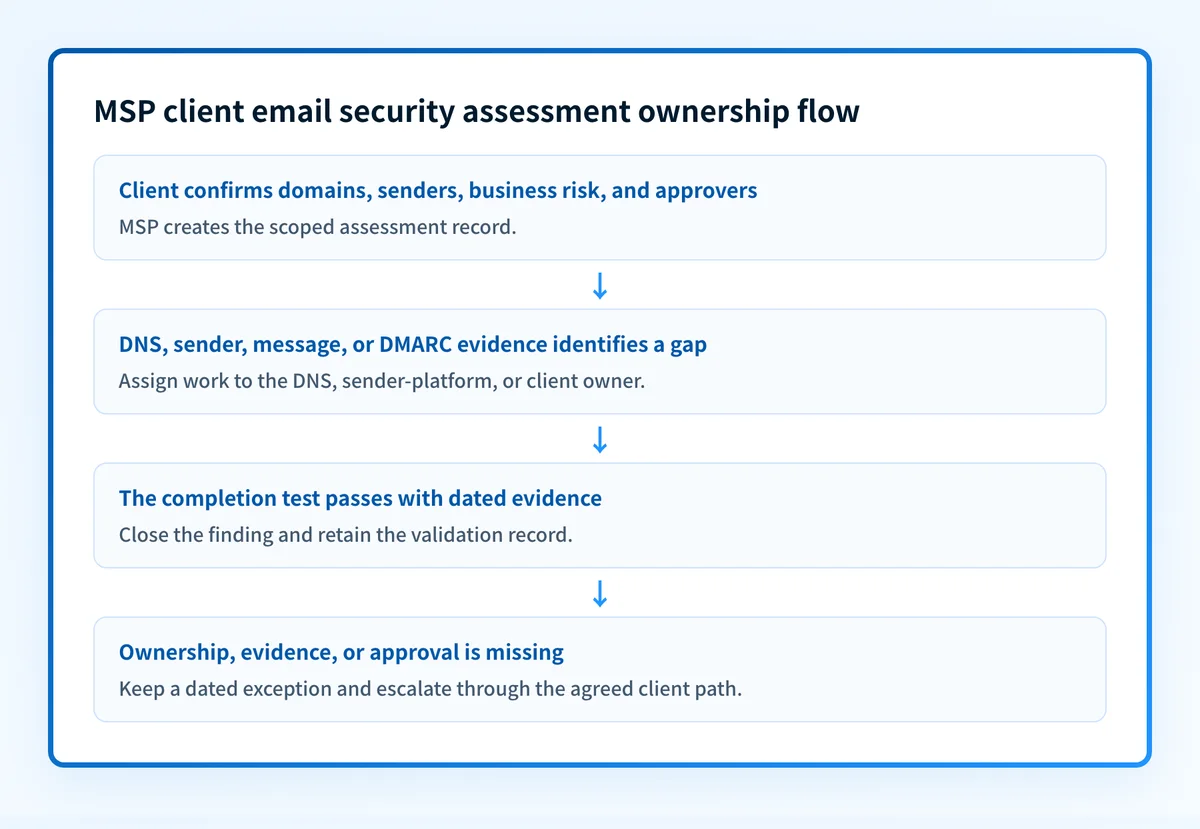
The MSP owns the process: collecting evidence, documenting findings, coordinating requests, and reporting progress. The client confirms whether a sender is legitimate, provides business-risk context, and approves changes unless those responsibilities are explicitly delegated. The DNS host controls record publication. The sending-platform owner controls platform configuration. Receiving mailbox providers make their own handling decisions.
DMARC in RFC 9989 evaluates whether SPF or DKIM produces an aligned result under the domain's published DMARC policy. That protocol result does not disclose a receiver's private reputation logic or guarantee inbox placement. For broader service design, see the Palisade MSP resources, email threats MSPs should prioritize, and why MSPs should offer email security services.
Evidence to collect
Create one intake record for each in-scope client domain. Keep the detailed operating record separate from the client-facing summary because a sender inventory and exception register may contain sensitive operational context.
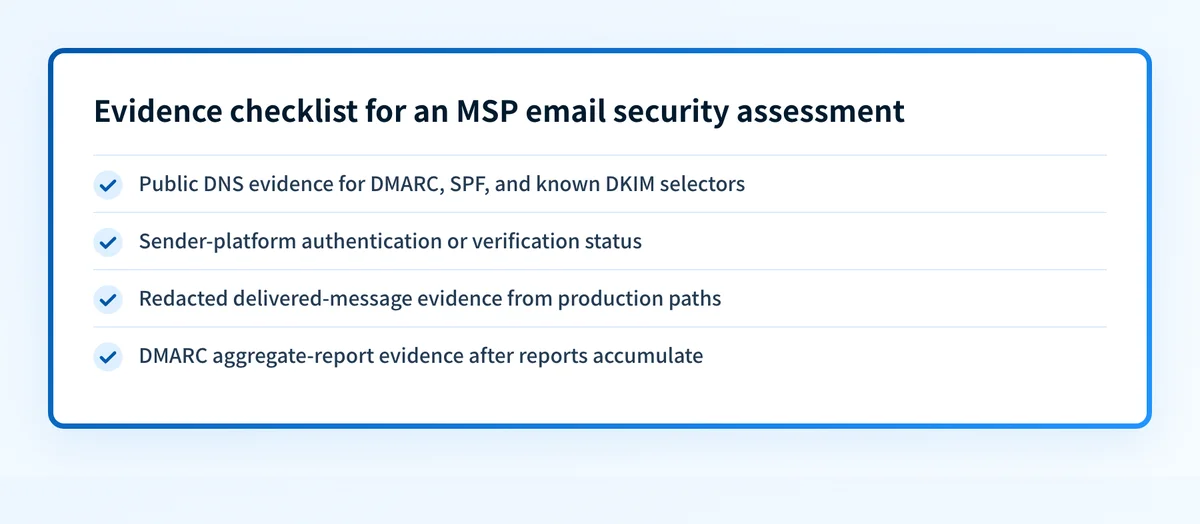
Collect public DNS evidence for DMARC, SPF, and DKIM where a selector is known. Capture the source and time for every result. Also request redacted evidence from actual delivered messages and any available sender-platform verification status. These sources answer different questions.
Use the following record as a fictional, redacted example. It is a Palisade-authored operating artifact, not a DNS record or a universal compliance requirement.
client: example-client
domain: yourdomain.com
scope:
  included_paths:
    - employee-mail
    - billing-platform
    - marketing-platform
  excluded_paths:
    - acquired-brand.example
dns_evidence:
  captured_at: 2026-08-12T10:30:00Z
  source: authoritative-DNS-and-public-resolver
  dmarc: published-record-captured
  spf: published-record-captured
  dkim: selector-and-record-confirmation-pending
message_evidence:
  captured_at: 2026-08-12T11:00:00Z
  source: redacted-header-from-production-path
sender_inventory_owner: client-email-administrator
unresolved_findings:
  - billing-sender-owner-not-confirmed
business_risk_context: invoices-send-on-the-first-business-day
remediation_owner: billing-platform-owner
escalation_path: MSP-service-lead-to-client-technical-approver
approval_change_reference: CHG-EXAMPLE-1042
review_on: 2026-08-19
For each known or observed sender, record its purpose, visible From domain, return-path domain where available, client contact, platform owner, evidence state, evidence date, next action, and review date. Useful evidence states include client-confirmed, message-verified, report-observed, unknown, retired, and out-of-scope.
Use an email security score check only as a public baseline for one domain. A public DNS and reputation check does not prove the production sending path, continuous state, a receiver's private decision, or future placement.
Do not recommend a DMARC enforcement change from a public-record check alone. Get client approval and validate the affected production sending path before changing policy.
How to run the workflow
1. Confirm scope and authority
- Owner: MSP service lead.
- Input: Client contacts, domain list, service agreement, and known sending systems.
- Output: Approved scope and named decision owners.
Confirm who can approve remediation, publish DNS, and authorize access to each sender platform. If there is no client decision owner, record the finding as blocked. A technical observation without someone authorized to act on it is not a remediation plan.
2. Build the sender inventory
- Owner: MSP assessment operator.
- Input: Client-provided sender list, public DNS evidence, redacted message headers, and available DMARC reports.
- Output: A sender inventory with dated confidence labels.
Do not treat a domain with no stated sender as inactive. Mark it unconfirmed until the client verifies it. Likewise, a platform named by the client but absent from current message or report evidence is client-confirmed, not message-verified.
3. Record observable authentication gaps
- Owner: MSP assessment operator.
- Input: DNS evidence, sender status, and redacted evidence from actual delivered messages.
- Output: A prioritized finding record.
A finding should include the domain, sender or service, observed condition, evidence date, remediation owner, client decision needed, completion test, and escalation path. The test may be an authoritative DNS answer, current sender-platform status, a delivered message from the same path, or later DMARC aggregate-report evidence.
4. Assign remediation at the control point
- Owner: MSP service lead.
- Input: Prioritized findings and the ownership record.
- Output: A client-approved remediation queue.
This avoids a common handoff failure: a request to "fix DMARC" may actually require a platform setting, DNS access, client approval, and a production-path retest. If an SPF record needs maintenance because a newly approved sender must be authorized, use the sender's official configuration instructions and preserve DNS lookup limits. Do not add a sender solely because it appears in a list of possible includes.
5. Validate each repair in four layers
- Owner: Responsible change owner, reviewed by the MSP.
- Input: Approved remediation, implementation evidence, and a same-path test.
- Output: A dated validation record or an open exception.
- DNS: Query the authoritative DNS path and at least one public resolver to confirm the intended record is published.
- Vendor: Review the sender platform's current authentication or verification status when it provides one.
- Message: Inspect a real delivered message from the exact production path. RFC 8601 defines Authentication-Results header fields for communicating authentication results to later message handlers.
- DMARC: Review aggregate-report evidence after reports have accumulated for the domain and sending path.
6. Close or escalate the finding
- Owner: MSP service lead and client technical approver.
- Input: Validation record, remaining uncertainty, and business-impact context.
- Output: Closed finding, accepted exception, or escalation ticket.
Exceptions and escalation
Use a simple decision path for every unresolved item:
- If the sender is unknown, ask the client to confirm whether it is legitimate before changing DNS or policy.
- If the sender is legitimate but lacks an aligned authentication path, assign configuration work to the sender owner and set a production-path retest.
- If DNS ownership is unclear, escalate to the client technical approver before proposing a record change.
- If a business-critical sender has no safe test window, keep it as an exception with business context and a dated review.
- If the evidence conflicts, preserve both sources and request a new delivered-message sample or report period.
Reporting and success measures
Use a monthly operational report and a client review cadence appropriate to the service agreement. The report should include:
- In-scope domains and their assessment state.
- Confirmed, unknown, retired, and unverified senders.
- Findings by owner, evidence age, and next review date.
- Changes awaiting client approval and changes validated after implementation.
- Exceptions, client decisions, and escalation status.
- Gaps in evidence, such as domains without a delivered-message sample or reports that have not yet accumulated.
Turn assessment evidence into a recurring client queue
A one-time assessment often exposes a recurring portfolio gap: new senders, stale records, unresolved alignment issues, and policy decisions that need evidence over time. Palisade is agentic DMARC software that analyzes DMARC aggregate-report data, identifies sending sources and authentication or alignment issues, and creates prioritized remediation tickets. It can propose the next DMARC policy stage when evidence indicates readiness, while a human reviews the evidence and applies any change.
Palisade does not confirm a client's business authorization, change DMARC policy without human review and approval, prove every production path from a public check, or guarantee a receiver's delivery decision.
For a provider-specific implementation of these authentication checks, see MSP email sender inventory.
Evidence
Sources and further reading
Questions readers ask
Frequently asked questions
Does a DNS check complete an MSP email security assessment?
No. A DNS check can confirm what is publicly published, but it cannot show whether a sender platform uses the intended production path, whether a delivered message passes authentication, or how a mailbox provider handles that message.
Should an MSP change DMARC policy during the initial assessment?
Only after the client has approved the change and the affected sending paths have evidence. DMARC policy changes should have a documented rollback condition, ownership record, and same-path validation plan.
Who decides whether an unknown sender is legitimate?
The client should make that business decision because it knows whether the sender supports a valid process. The MSP can provide evidence, identify the control owner, and record the risk of leaving the sender unresolved.
Can a green sender-platform status replace a message-header check?
No. A platform status can show its own verification state, while a delivered-message header provides evidence from the exact path used to send the message. Both can be useful, but they support different claims.
What should an MSP report when evidence is incomplete?
Report the evidence gap directly: what is missing, which domain or sender it affects, who owns the next action, any client-supplied business-risk context, and the next review date. Do not convert missing evidence into a passing security score.

Written by
Taylor TabusaCo-Founder & Head of Business Development, Palisade
Taylor Tabusa is the co-founder and Head of Business Development at Palisade, helping managed service providers turn email security into a practical, valuable service.
More from Taylor →