DMARC reporting template for MSPs
 ChatGPT
 Claude
 Gemini
 Perplexity
 Grok
GrokIn brief
DMARC reporting template for MSPs: track client domains, sender authentication evidence, exceptions, ownership, DNS changes, SLA status, and decisions.
A DMARC reporting template for MSPs should give every client the same evidence trail: domain status, observed senders, SPF, DKIM, and DMARC results, open exceptions, DNS changes, owners, review dates, and decisions needed from the client. The report is not a compliance score. It is a portfolio operating record that lets an MSP show what is known, what remains unresolved, and who controls the next action.
At a glance
Quick takeaways
- Use one reporting structure across clients, while keeping each client's domains, approvals, and exceptions separate.
- Report sender evidence and ownership, not only the published DMARC policy.
- A public DNS result confirms a published record, but it does not prove the production sender authenticates.
- Give every unresolved item an owner, next action, review date, and client decision status.
- Treat reporting cadence and SLA definitions as a practical service framework, not a protocol requirement.
- Keep DNS hosts, sending platforms, receiving mailbox providers, clients, and the MSP accountable for their own controls.
Operating context and ownership
An MSP reporting process changes when the service covers many client organizations. Each client needs a clear record of its own sending domains, sources, business-critical mail paths, approvals, and accepted risks. The MSP needs a portfolio view that makes overdue work and blocked decisions visible without mixing tenant evidence.
DMARC reports are useful because they can show sending sources and authentication outcomes. A DMARC reporting platform may process aggregate and forensic reports and present SPF, DKIM, and DMARC pass or fail information. For client stakeholders who need protocol context, link the reporting discussion to what DMARC checks.
This article's template is a Palisade practical operating framework. It is not an industry-standard report layout or a protocol requirement. Set the service boundary in writing for each client:
- The client approves business risk, confirms whether a sender is legitimate, and authorizes material changes.
- The MSP collects evidence, maintains the report, coordinates remediation, and recommends the next decision.
- The DNS host publishes approved DNS records.
- The sender owner configures the sending platform and supplies a delivered-message sample when public DNS cannot prove the active path.
- The receiving mailbox provider controls its own message handling and private reputation decisions.
Evidence to collect
Create one working record per client domain. Keep evidence dates with the record so a client can distinguish an observed production sender from an onboarding assumption.
The reporting template should capture:
- Client and domain in scope.
- Current published DMARC policy and the date it was checked.
- Sender identity, source volume, and whether the sender is client-confirmed, report-observed, unknown, or retired.
- SPF, DKIM, and DMARC authentication evidence for the sender.
- The evidence source, such as an aggregate report, public DNS answer, delivered-message header, or client confirmation.
- Open exception, severity definition used by the MSP, owner, next action, and review date.
- DNS changes proposed or completed, including approval and rollback details.
- SLA status under the service agreement, plus any decision required from the client.
client: example-client
domain: yourdomain.com
evidence:
  sender: billing.example-sender.com
  source_volume: observed-in-report
  spf_status: pass-unverified-alignment
  dkim_status: pass
  dmarc_status: pass
  source: aggregate-report-and-header-sample
owner: client-email-admin
next_action: confirm-billing-sender-and-retain-header-sample
review_on: 2026-09-01
The status labels are a reporting convention. They do not replace protocol results. For example, pass-unverified-alignment can mean the available record check looks correct but the MSP has not yet retained a message from the exact production path.
For the DNS portion of the report, use the DMARC checker to inspect the public record. When an observed source needs SPF or DKIM remediation, the SPF checker and DKIM checker can help inspect published DNS evidence. These checks do not prove that the application is currently using the expected return path or signing key.
Do not mark a sender as remediated solely because a DNS record exists. Confirm the sender's current status and retain evidence from a real delivered message when the production path matters.
How to run the workflow
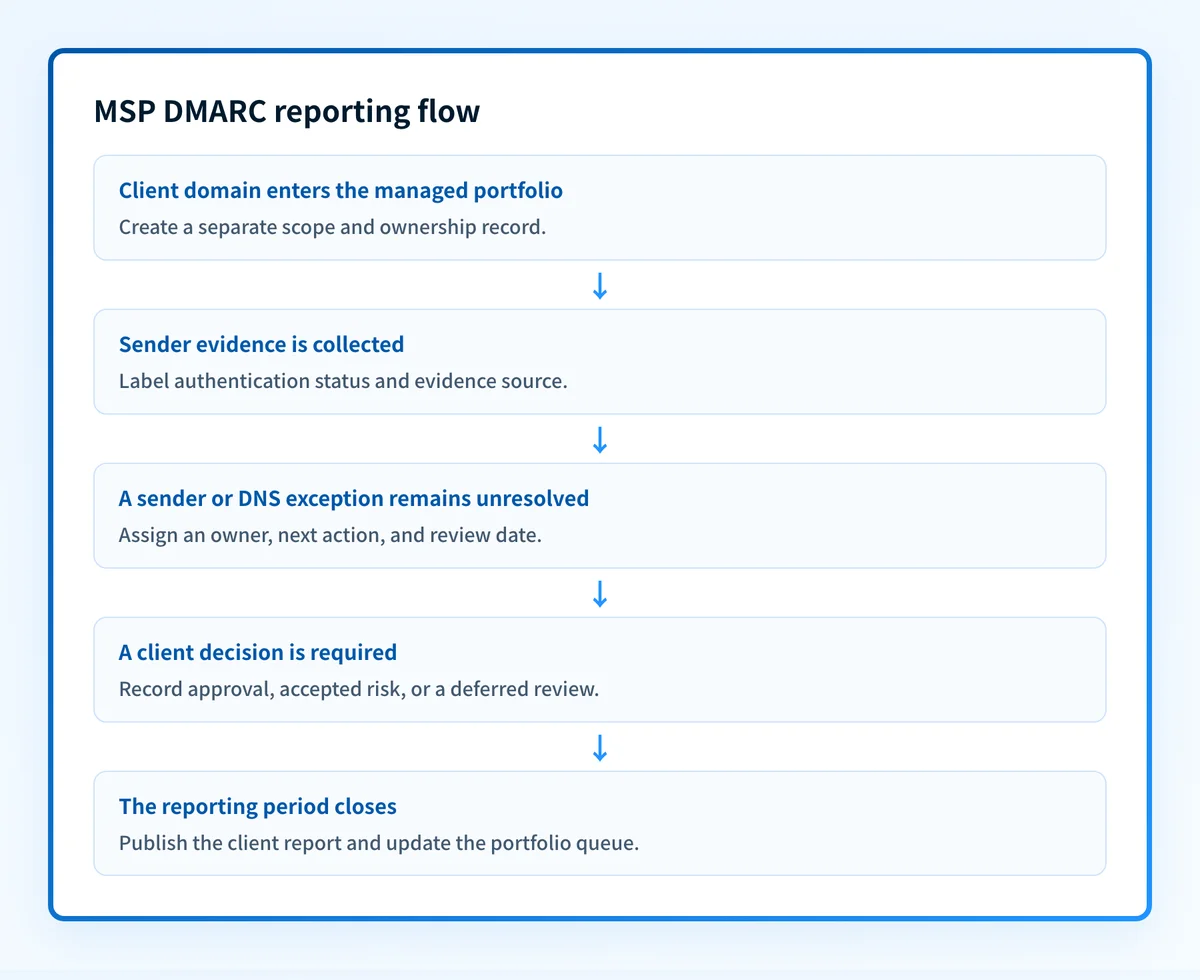
1. Set the client reporting scope
Owner: MSP service owner. Input: Approved client domain list, contacts, service boundary, and reporting cadence. Output: A client scope record with an approver and escalation contact.
Record which domains are in scope, which are parked or retired, and which subdomains send mail independently. Identify business-critical sending paths such as billing, support, marketing, and application mail. A domain without an accountable client contact remains an onboarding exception.
2. Collect and label the evidence
Owner: MSP analyst. Input: DMARC reporting data, public DNS checks, client sender inventory, and delivered-message samples where available. Output: A dated sender inventory with evidence labels.
Separate what the client says should send mail from what reports show. A sender can be client-confirmed but not yet observed. Another can be report-observed but unknown to the client. Keep these states separate because they require different decisions.
A public DMARC record check belongs in the report, but it only captures one point in time. If an authentication issue appears for a sender, the remediation ticket should state whether the next evidence must come from DNS, the sending platform, or a raw delivered message.
3. Turn exceptions into owner-specific work
Owner: MSP analyst assigns, client or sender owner completes. Input: Unknown sender, authentication failure, missing approval, DNS discrepancy, or overdue review. Output: A tracked exception with a defined completion test.
Write the exception as an observable condition. For example:
Exception: Invoice sender appears in report data with DMARC failure.
Owner: Client finance systems owner.
Next action: Confirm whether the sender is legitimate and provide a redacted delivered-message header.
Completion test: SPF or DKIM passes and aligns on the confirmed production path, or the sender is documented as unauthorized.
Do not use “fix DMARC” as the task description. The owner needs to know what evidence is missing and what outcome will close the item.
4. Review DNS changes before reporting them as complete
Owner: DNS change owner, reviewed by the MSP. Input: Approved DNS change, previous value, intended value, and rollback condition. Output: A change record with verification evidence.
Report a DNS change separately from sender remediation. The DNS host can publish a record, but the sender platform may still use another identity or selector. Record the before value, approved after value, publication time, public resolver result, and the message-level validation still required.
5. Request client decisions at the reporting boundary
Owner: Client approver. Input: Exceptions that have evidence but require business authorization or risk acceptance. Output: Approved action, accepted exception, or deferred decision with a new review date.
Use a distinct decision section in each client report. Examples include an unconfirmed sender, a business-critical system without a safe test window, or a proposed policy-stage change. The MSP can recommend a path, but the client owns the business decision unless the agreement delegates that authority.
The related DMARC policy rollout across client domains process can help keep policy decisions separate from routine reporting work.
6. Publish the client report and update the portfolio queue
Owner: MSP service owner. Input: Reviewed evidence, exception updates, DNS changes, SLA state, and client decisions. Output: Client report, internal portfolio queue, and next review date.
Use the same headings for every client. A consistent template makes it easier to compare open work without treating clients as identical. Include a short executive section, followed by an operational appendix for senders, evidence, changes, and exceptions.
The report should state the date range and evidence boundary. It should not claim that every future message will authenticate or that a receiver will deliver every message.
Investigate this with your coding agent
Use this when a redacted reporting export or runbook exists but fields are inconsistent across clients. Remove private headers, recipient data, tokens, credentials, and customer identifiers before sharing evidence.
Agent handoff
Copy the prepared prompt
Give this to a coding agent that can inspect the relevant repository or configuration source of truth.
Problem: A multi-client DMARC report has inconsistent fields for sender evidence, ownership, exceptions, and review dates.
Evidence: Redacted reporting export or runbook, field names, example anonymized rows, and known report collection locations.
Repository scope: The reporting schema, transformation scripts, runbooks, and tests for the MSP reporting workflow.
Constraints: Inspect before editing. Do not apply changes until I approve the proposed diff. Do not cross tenant boundaries, access credentials, private keys, tokens, unredacted headers, or customer data. Do not make client or production changes.
Requested output: A field-to-evidence mapping, minimal proposed schema or runbook change, rollback, and unknowns.
Verification: Confirm every client row has an evidence source, owner, review date, and unresolved-item status in a redacted test export.
Stop if: Credentials, private data, production mutation, client authorization, an active incident, or missing evidence is required.
Human approval required: Review the proposed diff and verification plan before allowing changes. Do not paste secrets, private keys, API tokens, unredacted headers, or customer data.
Exceptions and escalation
Use an escalation tree that distinguishes a technical gap from a missing decision:
- Unknown sender with meaningful volume: Ask the client to confirm ownership. Keep the item open until the sender is confirmed, remediated, or documented as unauthorized.
- Known sender with authentication failure: Assign the action to the party that controls the sender configuration or DNS. Request message-level evidence after the change.
- DNS change cannot be approved: Mark the item blocked. Record the approver needed and the next review date.
- Business-critical sender cannot be tested safely: Escalate to the client approver with the delivery risk, proposed test window, and rollback condition.
- Report data conflicts with the sender inventory: Treat the conflict as unresolved. Do not remove the observed source because it is absent from an onboarding list.
Reporting and success measures
Use a monthly operational report and a quarterly service review. The monthly artifact should cover current evidence and work ownership. The quarterly review should show trend, decisions, overdue exceptions, and changes to the service scope.
Track measures that expose operational state:
- In-scope domains with a named client approver.
- Domains with current sender evidence.
- Open exceptions by owner and age.
- Overdue reviews and blocked approvals.
- DNS changes with before, approval, after, and rollback records.
- Sender remediation items with a delivered-message verification result.
For a recurring managed-DMARC service, align the report structure with the client onboarding and policy workflow. The DMARC onboarding checklist for MSPs can provide the intake handoff that feeds this reporting template.
Build a repeatable reporting workflow for your client portfolio
A shared reporting template exposes the recurring portfolio gap: one-off checks cannot maintain sender evidence, exception ownership, approvals, and review dates across many client domains. Palisade is agentic DMARC software that analyzes DMARC aggregate-report data, identifies sending sources and authentication or alignment issues, and creates prioritized remediation tickets. A human reviews the evidence and applies any change.
A demo does not prove a client's current production sending path, authorize DNS changes, repair every sender, or guarantee how receiving mailbox providers handle mail.
Evidence
Sources and further reading
Questions readers ask
Frequently asked questions
What should an MSP include in a DMARC client report?
An MSP DMARC client report should include domains in scope, sender evidence, SPF, DKIM, and DMARC status, unknown or unauthorized sources, open exceptions, owner assignments, DNS changes, review dates, SLA state, and decisions required from the client.
Should every client receive the same DMARC report?
Yes, the report structure should be consistent so the MSP can operate a portfolio reliably. The evidence, sender inventory, approvals, exceptions, and business priorities must remain client-specific.
Can a DMARC DNS check prove a sender is fixed?
No, a DNS check can confirm the public record returned at the time of the check. It cannot prove that a production application uses the expected return path, DKIM selector, or authenticated identity. Retain evidence from a delivered message for the relevant sending path.
Should an MSP report unknown sending sources to the client?
Yes, unknown sources should appear as open exceptions with the observed evidence, a client confirmation request, an owner, and a review date. Do not silently remove an observed source because it is absent from the original sender inventory.
Does a client report prove that all future mail will pass DMARC?
No, a report describes the evidence available for its stated period. New senders, DNS changes, configuration drift, and receiver-specific decisions can change the outcome after the report is issued.

Written by
Taylor TabusaCo-Founder & Head of Business Development, Palisade
Taylor Tabusa is the co-founder and Head of Business Development at Palisade, helping managed service providers turn email security into a practical, valuable service.
More from Taylor →