DMARC onboarding checklist for MSPs
 ChatGPT
 Claude
 Gemini
 Perplexity
 Grok
GrokIn brief
DMARC onboarding checklist for MSPs: define ownership, inventory domains and senders, collect evidence, manage exceptions, and report each client decision.
A DMARC onboarding checklist for MSPs should create one repeatable evidence record for every client domain before anyone recommends a DNS or sender change. Define who owns the client decision, DNS access, and each sending system. Then inventory domains and senders, record the available evidence, assign missing information, and route exceptions to an accountable owner. This turns onboarding into an operating workflow that can be reviewed across a portfolio.
At a glance
Quick takeaways
- One client can have many domains, sending platforms, approvers, and change windows.
- An MSP should record observed evidence separately from a client's stated sender inventory.
- DNS ownership, sender ownership, and client approval are different responsibilities.
- A public DMARC lookup is useful for visible DNS evidence, but it cannot prove a production sending path or a receiver's future handling decision.
- Every incomplete onboarding item needs an owner, a next action, and a review date.
- This checklist is a Palisade operating framework, not an external protocol requirement.
Operating context and ownership
DMARC onboarding changes when an MSP manages a portfolio. The work is not a one-time record review for one administrator. The MSP needs a consistent way to determine what is in scope, who can make decisions, which sending paths need evidence, and what must remain blocked until a client or sender owner responds.
Start with a service boundary for each client. Record whether the MSP is responsible for collecting evidence only, making technical recommendations, coordinating sender configuration, publishing DNS after approval, or reporting on an established service. The client retains business ownership of its domains and approval decisions unless a written agreement delegates a specific action.
Separate these responsibilities in the onboarding record:
- The client owner confirms business-critical domains, approves changes, and decides whether an unfamiliar sender is legitimate.
- The MSP service owner maintains the evidence register, assigns follow-up work, and records decisions and handoffs.
- The DNS host publishes DNS records when an authorized person makes a change.
- The sender owner controls settings in the marketing, billing, support, CRM, or application platform that sends mail.
- The mailbox provider controls its own message handling decisions. An MSP cannot promise a receiver will accept or place future mail.
Centralized records, revision control, and access logs can help an MSP maintain service documentation. IT Portal describes those capabilities as part of its documentation product, but the checklist below is an original Palisade operating framework rather than a requirement imposed by that vendor or by every MSP.
Evidence to collect
Create one working record per domain, then group those records under the client. Do not merge every domain into one generic client status. A parked domain, an active corporate domain, and a domain used only by a billing application can require different owners and decisions.
Collect the following before calling a domain onboarded:
- Client name, business owner, technical approver, and escalation contact.
- Domain and subdomains in scope, including whether each is active, dormant, or awaiting confirmation.
- DNS provider, DNS change owner, and the required approval path.
- Known sending systems supplied by the client.
- Visible DNS evidence for DMARC, SPF, and DKIM where applicable.
- Evidence from a real delivered message for important production paths, with private data removed before sharing.
- Missing evidence, unresolved sender ownership, and client decisions still required.
- A next action, accountable owner, and review date for each open item.
Keep the register in a portable format that can move between a PSA, ticket system, documentation platform, or client report:
client: your-client-name
domain: yourdomain.com
evidence:
  dns_status: public-record-check-completed
  sender_inventory: client-supplied-pending-review
  message_sample: missing
owner: client-technical-approver
next_action: confirm-billing-platform-and-provide-redacted-message-header
review_on: 2026-08-20
The values above are illustrative only. Do not place customer names, private headers, API tokens, selectors, or DNS change credentials in a shared checklist.
How to run the workflow
1. Confirm portfolio scope
Owner: MSP service owner. Input: client agreement, domain list, and onboarding contacts. Output: an approved domain scope with named business and technical contacts.
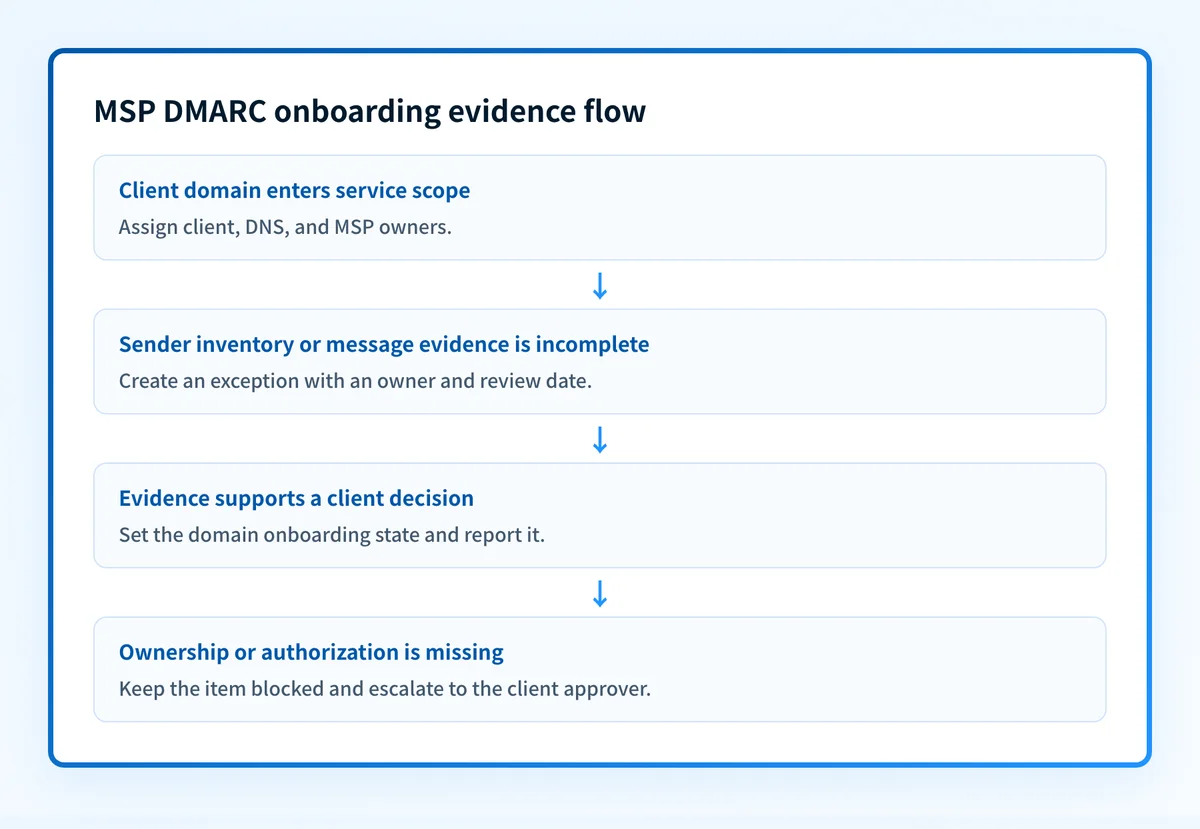
Ask the client to identify domains that send mail, receive mail, redirect to another site, are dormant, or have an uncertain purpose. Mark uncertainty rather than removing it from scope. A domain with no known owner is an onboarding exception, not a completed item.
Record the client-approved boundary for the service. This prevents a later assumption that the MSP may edit DNS, access a sender platform, or decide whether a message stream is legitimate.
2. Establish the ownership map
Owner: MSP service owner with the client technical approver. Input: scope record and access information. Output: a responsibility map for DNS, senders, approvals, and escalations.
Assign one accountable party to each domain's DNS access and each known sender. A client may use different teams for marketing, finance, support, and infrastructure. Treat those as separate handoffs even when they use the same domain.
Include a backup client contact for business-critical sending paths. If an owner cannot be identified, record missing-owner and set a review date. Do not turn an unassigned item into a technical remediation ticket.
3. Build the sender inventory
Owner: client business owner, supported by the MSP. Input: client-provided system list, historical documentation, and available message evidence. Output: a sender inventory with confidence labels.
Classify every sender as client-confirmed, evidence-observed, unknown, retired, or requires-human-approval. These labels preserve the difference between a platform someone remembers using and a sender supported by current evidence.
For each sender, record its business purpose, domain used, technical owner, normal sending frequency, and whether a redacted delivered-message sample is available. Monthly invoices, annual event mail, and emergency notices can disappear from a short observation period. They still need a decision.
4. Record DNS and delivered-message evidence
Owner: MSP technical operator. Input: domain names, approved public DNS checks, and redacted message samples. Output: dated evidence attached to the correct domain and sender.
Check visible DNS records through the authoritative source where access is available and compare with at least one public lookup. Save the result date and the domain queried. A public result is evidence of what was visible at that moment, not proof that an application is signing mail or using a particular return path.
For high-impact senders, request a real delivered message from the exact production path. The client should redact addresses, content, message IDs, and other private information before sharing it. Record whether the message evidence supports the sender inventory or raises a question that needs escalation.
Do not publish, replace, or remove a DNS record during onboarding solely because a public checker returns a result. The client approval path and sender evidence remain separate controls.
5. Create the exception register
Owner: MSP service owner. Input: missing evidence, unknown senders, unclear ownership, and conflicting records. Output: a visible queue with a decision path.
Write each exception as an observable condition. “Review DMARC” is too broad. “Billing sender has no client-confirmed owner and no redacted production message evidence” tells the owner what is missing.
Set the next action and review date when the item enters the register. The client can confirm the sender, the sender owner can provide configuration evidence, or the client approver can accept that the item remains blocked. The MSP records the decision and does not invent authority that it does not have.
6. Make the service decision
Owner: client approver, with an MSP recommendation. Input: completed domain record and open exceptions. Output: an onboarding state for each domain.
Use clear states such as ready-for-monitoring, evidence-incomplete, blocked-by-client-decision, blocked-by-sender-owner, or out-of-scope. These are service decisions, not claims that a domain is universally protected or guaranteed to deliver.
A domain can be ready for ongoing review while one lower-priority domain remains blocked. Portfolio onboarding does not require an all-or-nothing result, but it does require that exceptions stay visible.
Investigate this with your coding agent
Use this when the client has a redacted configuration repository or operational runbooks that may list domains and sending services. Prepare only approved, redacted repository access and a domain list. Do not include credentials, private keys, tokens, or unredacted customer data.
Agent handoff
Copy the prepared prompt
Give this to a coding agent that can inspect the relevant repository or configuration source of truth.
Problem: Build a read-only onboarding evidence register for managed client domains and known sending systems.
Evidence: Redacted domain list, approved repository paths, redacted DNS and sender configuration references, and existing runbook excerpts.
Repository scope: Inspect only the approved client configuration repository and operational runbook directories.
Constraints: Inspect before editing. Do not apply changes until I approve the proposed diff. Do not cross tenant boundaries, read secrets, change DNS, modify sender settings, or create tickets.
Requested output: Diagnosis of each domain's available evidence, a minimal proposed onboarding register, missing owners or sender inventory entries, rollback guidance for any proposed future change, and unknowns.
Verification: Compare the register against the client-approved domain scope and retest visible DNS only after a human-approved change.
Stop if: Credentials, private data, production mutation, active incident handling, client authorization, or missing approved repository access is required.
Human approval required: Review the proposed diff and verification plan before allowing changes. Do not paste secrets, private keys, API tokens, unredacted headers, or customer data.
Exceptions and escalation
Escalate when the evidence record cannot answer a service decision:
- A sender is business-critical but no client owner can confirm it.
- DNS access or the authorized DNS change owner is unclear.
- A sender owner cannot provide a safe message sample or configuration reference.
- A visible DNS result conflicts with client documentation.
- A client requests a change without approving the domain scope, rollback condition, or responsible owner.
- An active delivery incident appears during onboarding.
- If the domain owner is known, request a client decision and set a review date.
- If the sender owner is known, request sender-specific evidence and retain the domain in an incomplete state.
- If DNS ownership is unknown, route the item to the client technical approver.
- If an active incident exists, follow the agreed incident process instead of treating the work as routine onboarding.
- If no owner responds, keep the item visible as blocked. Do not silently close it.
Reporting and success measures
Use a recurring portfolio review that distinguishes completed evidence from unresolved service work. The cadence is an MSP service-design choice, not a universal SLA requirement.
A useful client-facing report includes:
- Domains by onboarding state.
- Domains with complete ownership records.
- Known senders by confidence label.
- Exceptions by owner, age, and next review date.
- DNS checks and delivered-message evidence collected during the reporting period.
- Decisions awaiting client approval.
- Changes proposed, approved, or deferred.
Turn onboarding evidence into a portfolio service
When recurring client onboarding produces a growing queue of domains, sender questions, and remediation decisions, the bottleneck is maintaining a consistent portfolio workflow. Palisade's MSP offering is the appropriate next conversation for teams that need an operating model for managed DMARC work across clients.
Book a demo to discuss the portfolio workflow behind your onboarding checklist.
Create a Palisade account to begin.
A consultation does not prove a production sender is configured correctly, authorize client DNS changes, or guarantee how receiving mailbox providers will handle future mail.
Evidence
Sources and further reading
Questions readers ask
Frequently asked questions
What should an MSP collect before onboarding a client domain for DMARC work?
An MSP should collect the client and technical owners, domain scope, DNS change owner, known senders, visible DNS evidence, available redacted delivered-message evidence, open exceptions, and a next action with a review date. The record should show which facts are confirmed and which still require a client decision.
Can a DMARC checker complete an MSP onboarding checklist?
No, a DMARC checker cannot complete the checklist, because it only reads one domain's public DNS at one moment. Onboarding also needs the client and technical owners, the DNS change approver, the sender inventory, and the open exceptions, and none of that appears in a DNS answer. Use the checker as one evidence item inside the record, not as the record.
Should unknown senders be removed from the onboarding record?
No, keep unknown senders in the record, because removing one hides an unresolved decision that can hurt the client later. Move each into an exception register with the evidence you have, the owner who must investigate it, the next action, and a review date. An unknown sender is a question waiting for an answer, not noise to clear out.
Does completed onboarding prove that all client mail will authenticate?
No, finishing onboarding does not prove that all client mail will authenticate. It proves the MSP has recorded the current scope, evidence, ownership, and open decisions. Each production sending path still needs its own delivered-message evidence, and every receiving mailbox provider makes its own handling decision.

Written by
Taylor TabusaCo-Founder & Head of Business Development, Palisade
Taylor Tabusa is the co-founder and Head of Business Development at Palisade, helping managed service providers turn email security into a practical, valuable service.
More from Taylor →