How should MSPs price DMARC management services?
 ChatGPT
 Claude
 Gemini
 Perplexity
 Grok
GrokIn brief
How should MSPs price DMARC management services? Scope onboarding, evidence review, remediation ownership, exceptions, approvals, and reporting separately.

MSPs should price DMARC management around the work they agree to own, not the act of publishing one DNS record. Quote onboarding separately for discovery and sender inventory, then define recurring scope by domain portfolio, evidence reviews, remediation coordination, approvals, exception handling, and reporting. Keep client, sender, DNS host, and MSP responsibilities explicit before assigning a package.
At a glance
Quick takeaways
- Separate uneven onboarding work from the recurring operational service.
- Domain count helps define portfolio scope, but it does not measure sender complexity or approval effort.
- Price recurring work around dated evidence reviews, change intake, exceptions, and client reporting.
- Put DNS authority and sender-platform ownership in the service record before promising remediation work.
- Treat urgent delivery incidents and unidentified senders as visible exceptions with a decision owner.
- A public DNS check can inspect a published record, but it cannot prove every production sender or future receiver outcome.
Operating context and ownership
DMARC management becomes a different service when an MSP operates it for multiple clients. Each client can have different domains, DNS hosts, sender platforms, business-critical sending periods, contacts, and approval rules. The commercial scope needs to reflect the workflow needed to manage those differences consistently.
The MSP can collect evidence, maintain an operating record, coordinate remediation, prepare recommendations, and report open work. The client retains business approval and any authority it has not delegated. The DNS host publishes DNS records. Each sender owner controls configuration in its platform. Receiving mailbox providers apply their own message-handling decisions.
DMARC policy and identifier alignment are specified in RFC 9989. The service-design framework below is Palisade guidance for MSP operations, not an RFC requirement or evidence of market pricing.
Define the handoff points before the quote:
- The client approves business risk, policy changes, and any work not delegated to the MSP.
- The MSP owns the agreed evidence review, coordination, operational record, and reporting artifact.
- The DNS host owner publishes or approves DNS changes according to the agreed change process.
- The sender owner enables and validates authentication settings in the relevant platform.
- The mailbox provider controls its own local treatment of received mail.
Evidence to collect
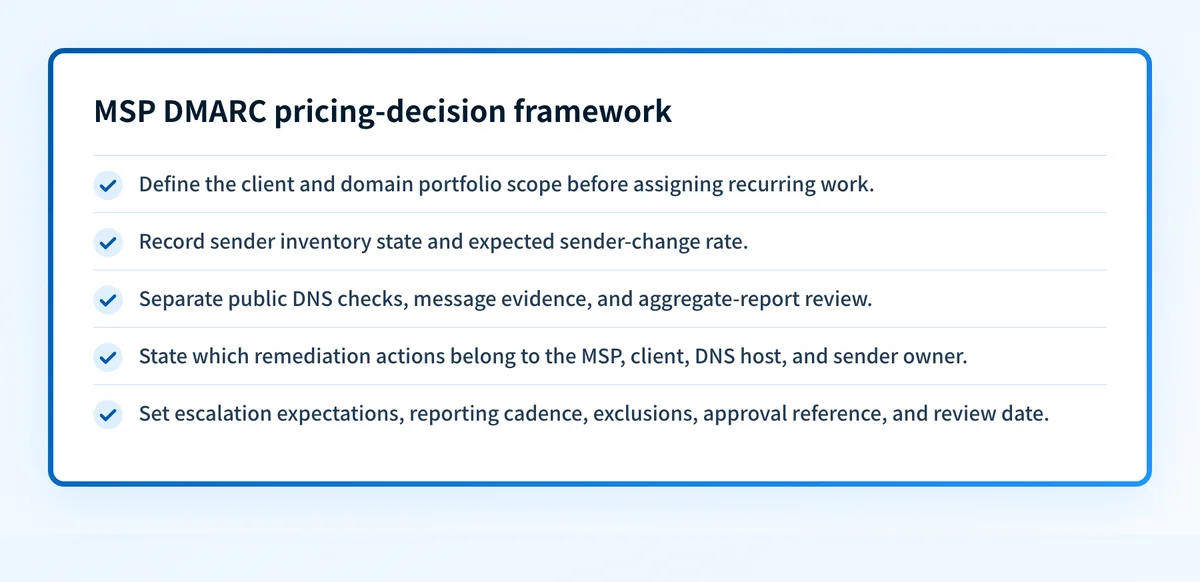
Collect enough information to estimate review and coordination work before placing a client in a service package. Keep client-reported senders separate from sources observed in DMARC aggregate reports or in a delivered production message. A known marketing platform with a named owner is different from an unexplained source that needs investigation.
Use one portable service-design record for each client-domain combination. This is a Palisade-authored pricing-decision framework, not market data.
client: example-client
domain: yourdomain.com
portfolio_scope:
  included_domains: 3
  subdomains_in_scope: false
sender_inventory:
  known_senders: client-supplied
  change_rate: occasional
evidence_and_reporting:
  public_dns_review: monthly
  delivered_message_evidence: requested-for-changes
  aggregate_report_review: monthly
remediation_boundary:
  msp: coordinate-and-propose
  client_or_sender_owner: approve-and-configure
escalation_expectations:
  active_mail_flow_incident: separate-approved-work
reporting_cadence: monthly-client-summary
excluded_work: sender-platform-configuration-not-delegated
assumptions_approval_reference: client-change-policy-2026-08
owner: msp-service-owner
next_action: confirm-sender-owners-and-approval-path
review_on: 2026-09-01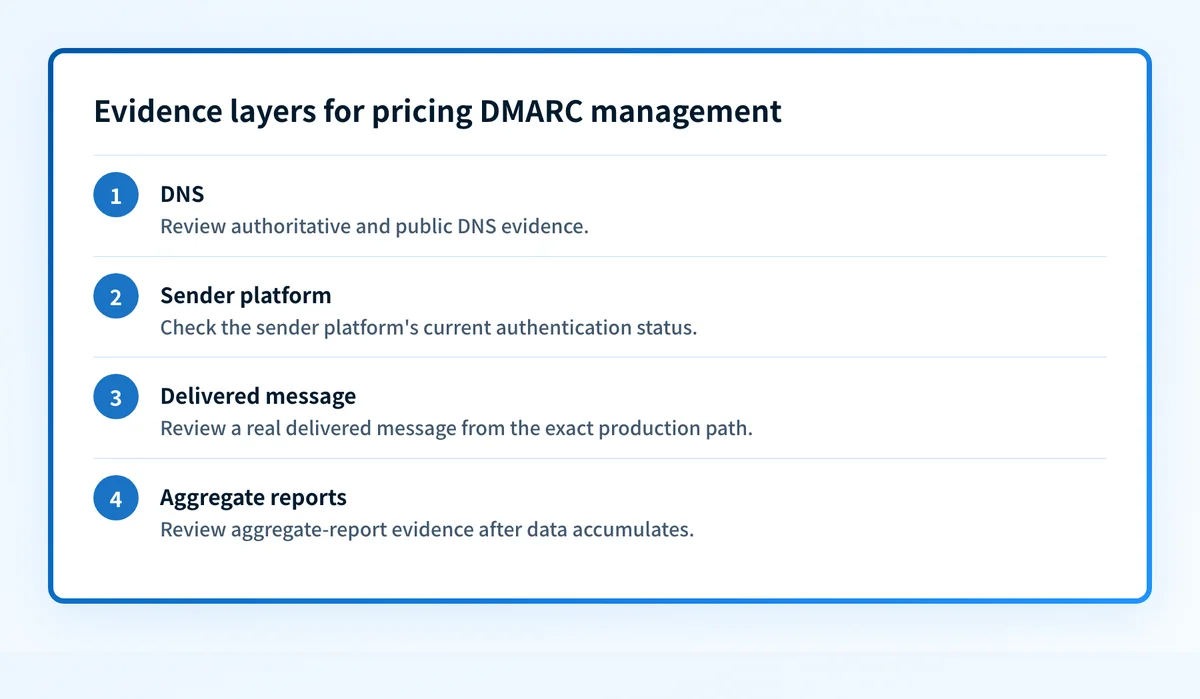
The fields make pricing assumptions reviewable. They also prevent a quote from treating a missing sender inventory, unclear DNS authority, or frequent platform changes as invisible work.
For each client-domain record, collect:
- Portfolio scope, including domains, subdomains, and excluded domains.
- Known senders, their owners, and the expected rate of sender additions or changes.
- Public DNS evidence, sender-platform status where available, delivered-message evidence, and aggregate-report evidence.
- The client approver, technical contact, DNS change owner, and MSP service owner.
- Remediation boundaries, including whether the MSP only coordinates or may make delegated changes after approval.
- Escalation expectations for business-critical mail and active delivery incidents.
- Reporting audience, cadence, and the client artifact required.
- Excluded work, assumptions, approval reference, and the next review date.
A working service needs evidence at four layers: authoritative and public DNS, the sender platform's current status, a real delivered message from the exact production path, and aggregate-report evidence after data accumulates. An Authentication-Results field records an evaluator's authentication assessment, but it is not a universal promise about every receiver's decision. Its syntax and trust boundary are defined in RFC 8601.
How to run the workflow
1. Define the quoteable service unit
Owner: MSP service lead. Input: client domain list, intended service outcome, and available contacts. Output: a documented service unit.
Choose a unit technicians can administer consistently. It can be a domain with a specified review cadence, a client portfolio with an agreed domain allowance, or a recurring package with separately approved exception work. Do not quote undefined "DMARC management" before defining the evidence reviews, reporting, and sender-change responsibilities included.
2. Separate onboarding from recurring management
Owner: commercial owner and service lead. Input: service-design record and identified evidence gaps. Output: an onboarding statement and recurring service boundary.
Onboarding may include sender-inventory collection, DNS review, ownership mapping, report-destination coordination, remediation planning, and an initial policy recommendation. Recurring work may include scheduled evidence review, sender-change intake, exception tracking, and a client reporting artifact.
For the commercial offer built around this recurring work, see Palisade’s managed DMARC revenue model for MSPs. Keep the quoted service boundary explicit when turning assessments, remediation, monitoring, and reporting into a recurring package.
Setup effort is uneven. A client with missing access, unknown sources, or urgent remediation may require more coordination before it reaches normal operations. Describe that work in the onboarding scope instead of absorbing it into an unspecified recurring fee.
3. Set package boundaries by operating complexity
Owner: MSP service designer. Input: normalized client-domain records. Output: technician-usable package rules.
Use boundaries based on repeatable operational work. This is a Palisade framework, not a statement about what other providers charge.
- Baseline scope includes defined domains, a client-supplied sender inventory, scheduled public-record checks, and a fixed review cadence.
- Managed scope includes baseline work plus aggregate-evidence review, remediation coordination, an exception register, and a recurring client artifact.
- Custom scope covers multi-domain portfolios, varied ownership, frequent sender changes, additional reporting needs, or client-specific approval and escalation requirements.
4. Put change authority in the quote
Owner: client approver and MSP service owner. Input: package scope and client authorization. Output: a responsibility record.
State whether the MSP can prepare a DNS change, submit it for approval, publish it after documented approval, or only provide a recommended value. Apply the same distinction to sender-platform work. This keeps the service scope aligned with the authority the client has granted.
Do not change DNS or a sender configuration during an active mail-flow incident without documented client authority and a rollback path. A rushed change can interrupt legitimate mail.
For a broader discussion of the operational tradeoff between internal work and ongoing service, see Should you DIY DMARC or use an automated service?.
5. Price exceptions as visible work
Owner: MSP service lead. Input: exception register. Output: an included-action rule or separately approved statement of work.
Exceptions are conditions outside the agreed steady-state service. They can include an unknown sender, an unavailable client owner, an unsupported platform, disputed domain ownership, missing DNS access, or an active delivery incident.
For each exception, retain the evidence, owner, requested decision, business impact, and review date. Then classify it as included work, work that uses a defined allowance, or work requiring separate approval. The client can see why the work is different from routine evidence review.
6. Review service economics against completed work
Owner: MSP operations lead. Input: closed onboarding records, completed recurring reviews, and exception history. Output: revised package assumptions.
Review completed work by operational category rather than by an invented protection score. Look for assumptions that repeatedly fail, such as clients with a high sender-change rate, approvals that delay routine work, or domains without reliable sender ownership. Update future scope definitions to name those conditions.
Which MSP tools should every managed service provider have in 2025? can help place DMARC operations within the wider tooling decisions that affect service delivery.
Exceptions and escalation
Use a simple escalation tree for every portfolio:
- If the sender is known and the owner can act, assign a dated remediation action to that owner.
- If the sender is known but the MSP lacks authority, request client approval or delegated access before changing the scope.
- If the sender is unknown, retain the evidence and ask the client to confirm its business purpose before any enforcement recommendation.
- If a business-critical production path is failing, follow the agreed incident route and pause unrelated policy changes.
- If DNS ownership, sender ownership, or approval authority remains unclear, mark the item blocked and set a review date.
Reporting and success measures
Use a recurring operational review and client summary that show work and decisions rather than implying that one metric proves complete protection.
Include:
- Domains and subdomains in scope, added, removed, or awaiting confirmation.
- Current sender inventory state, including confirmed, unknown, and owner-pending sources.
- Evidence reviewed during the reporting period and evidence still missing.
- Remediation actions by owner, approval state, and next review date.
- Exceptions opened, closed, accepted, or blocked.
- DNS and policy changes with their approval and rollback references.
Build a repeatable portfolio scope before quoting
For recurring multi-client DMARC work, Palisade's MSP workflow can support a discussion about organizing domain evidence, sender review, remediation work, and policy recommendations across the portfolio. Palisade is agentic DMARC software that analyzes aggregate-report data, identifies authentication or alignment issues, and proposes the next policy step for human review.
Book a demo to map the service-design record to your client portfolio before standardizing a package. A product discussion does not establish client authority, repair a sender configuration, publish DNS, or guarantee how receiving mailbox providers will handle mail.
Evidence
Sources and further reading
Questions readers ask
Frequently asked questions
Should MSPs charge a one-time DMARC onboarding fee?
Yes. Onboarding work is often uneven because it includes sender discovery, ownership mapping, DNS review, approval planning, and remediation planning. Price that defined work separately from the recurring review and reporting service.
Should MSPs price DMARC management only by domain count?
No. Domain count can define portfolio scope, but it does not show sender-change rate, missing ownership, approval cycles, reporting requirements, or exception work. Use a domain allowance alongside documented complexity boundaries.
Can a public DMARC checker validate an MSP's managed service?
No. A public checker can inspect a published DMARC record. It cannot prove that every production sender authenticates, that sender-platform configuration is current, or that a receiving mailbox provider will accept a specific message.
Who should approve a DMARC policy change for a client?
The client should approve the business risk unless it has explicitly delegated that authority. The MSP can prepare evidence and a recommendation, while the DNS host or authorized MSP publishes the approved record.
Should an active delivery incident be included in recurring DMARC management?
Only if the service definition explicitly includes incident response. Otherwise, record the incident as an exception with its business impact, owner, authorization requirements, and rollback condition before work begins.

Written by
Taylor TabusaCo-Founder & Head of Business Development, Palisade
Taylor Tabusa is the co-founder and Head of Business Development at Palisade, helping managed service providers turn email security into a practical, valuable service.
More from Taylor →