Cloudflare SPF setup for Email Sending and Email Routing
 ChatGPT
 Claude
 Gemini
 Perplexity
 Grok
In brief
Cloudflare SPF setup for Email Sending or Email Routing: onboard a domain, merge an existing policy, verify records, and validate email delivery safely.
Cloudflare SPF setup for Email Sending or Email Routing starts in the Cloudflare dashboard under Compute > Email Service, then Onboard Domain. Cloudflare creates an SPF record for the Email Service path, but you must merge it with an existing SPF policy instead of publishing a second SPF TXT record. The required include and record location differ between Email Sending and Email Routing.
At a glance
Quick takeaways
- Cloudflare Email Sending creates its SPF record on the
cf-bouncesubdomain. - Cloudflare Email Routing creates its SPF record at the root domain.
- A domain must have one SPF policy, so an existing SPF record needs a merged value.
- Cloudflare documents an SPF limit of
10 DNS lookups total. - A
LockedorUnlockedrecord status means Cloudflare considers the Email Service record configured correctly. - Public DNS, Cloudflare status, a delivered message, and DMARC evidence check different parts of the setup.
What should I check before configuring Cloudflare?
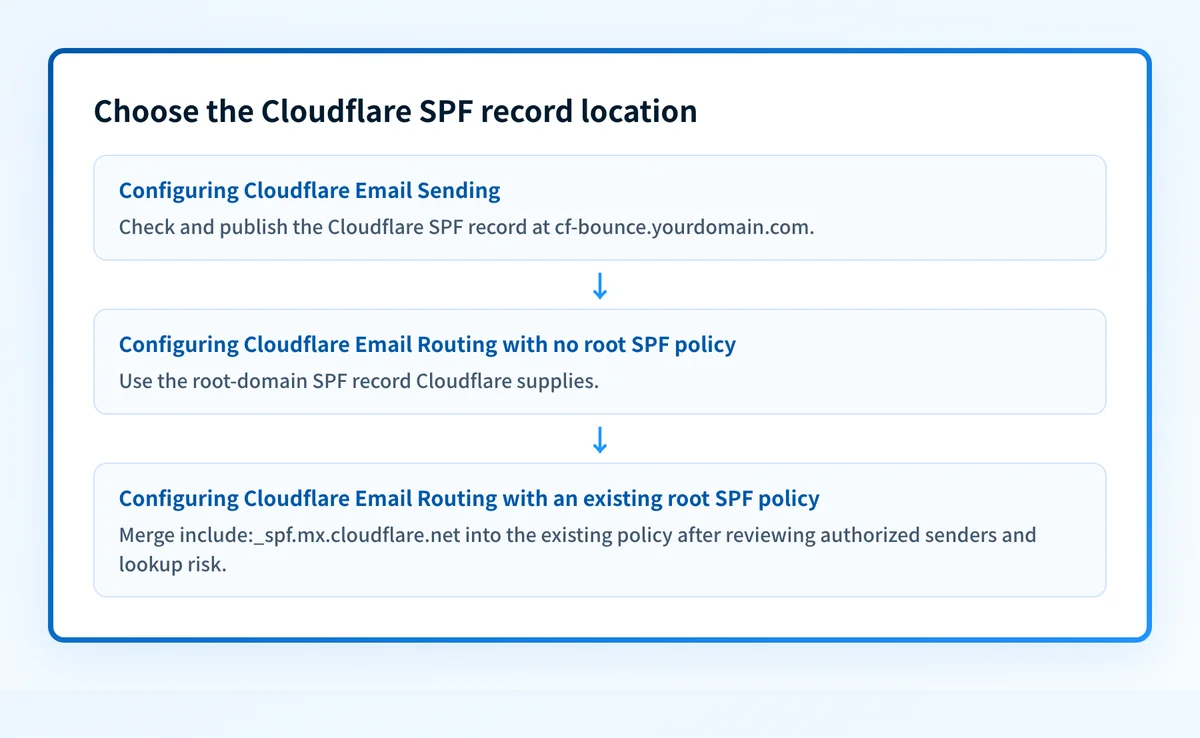
Confirm which Cloudflare Email Service path sends mail for the domain. Cloudflare Email Sending and Email Routing use different SPF record locations: Email Sending uses cf-bounce.yourdomain.com, while Email Routing uses the root domain.
This guide covers Cloudflare Email Service onboarding. It does not document a generic third-party sender setup in Cloudflare DNS. If you need general domain onboarding or DNS administration, see Cloudflare DNS management guidance. For SPF identity and authorization fundamentals, use the SPF learning hub.
Before making changes, identify:
- The selected Cloudflare account and domain.
- Whether the domain uses Email Sending, Email Routing, or both.
- The existing root-domain SPF TXT record, if one exists.
- Every service currently authorized to send mail for the domain.
- The person or team that can approve DNS changes and inspect a delivered test message.
Copy DNS values from the account and domain you are configuring. Do not publish selectors, targets, tokens, or hostnames from another account or from an online example.
Which setup method should I use?
Use Cloudflare's Email Service onboarding when Cloudflare is configuring Email Sending or Email Routing for the selected domain. Cloudflare can automatically configure required DNS records during domain onboarding, but an existing SPF policy needs a merge decision before you accept a changed record.
Use Email Sending when the Cloudflare Email Sending configuration is the sending path in scope. Cloudflare documents the SPF record under the cf-bounce subdomain, which keeps it separate from a root-domain SPF policy used by other services.
Use Email Routing when configuring inbound routing for the root domain. Cloudflare documents its SPF include at the root domain. That is where an existing SPF policy commonly exists, so review all authorized senders before accepting the record.
The Cloudflare DMARC Management product overview below is context for Cloudflare's email-security tools. It does not prove an Email Sending or Email Routing settings screen, record state, or control label.
Do not replace a root SPF record with Cloudflare's include alone if another approved sender already uses that domain. Cloudflare's documented example combines its include with Google Workspace's include, but the other includes in your policy must match your own sender inventory.
How do I configure SPF for Cloudflare?
1. Open the Cloudflare Email Service area
For Email Sending, open Compute > Email Service > Email Sending, then select Onboard Domain. For Email Routing, open Compute > Email Service > Email Routing, then select Onboard Domain. These paths are documented by Cloudflare's domain-configuration guide.
Confirm the account and domain before continuing. A Cloudflare account can contain multiple zones, and the SPF record belongs to the selected domain configuration.
2. Select the Email Service path and domain
Select the domain that uses Cloudflare Email Sending or Email Routing. Treat Email Sending and Email Routing as separate configuration paths because Cloudflare places their SPF records differently.
If the domain has other outbound senders, collect their current SPF requirements before enabling or changing the root-domain Email Routing record. Do not guess an include: value from an unrelated tenant or example.
3. Review and publish the SPF record
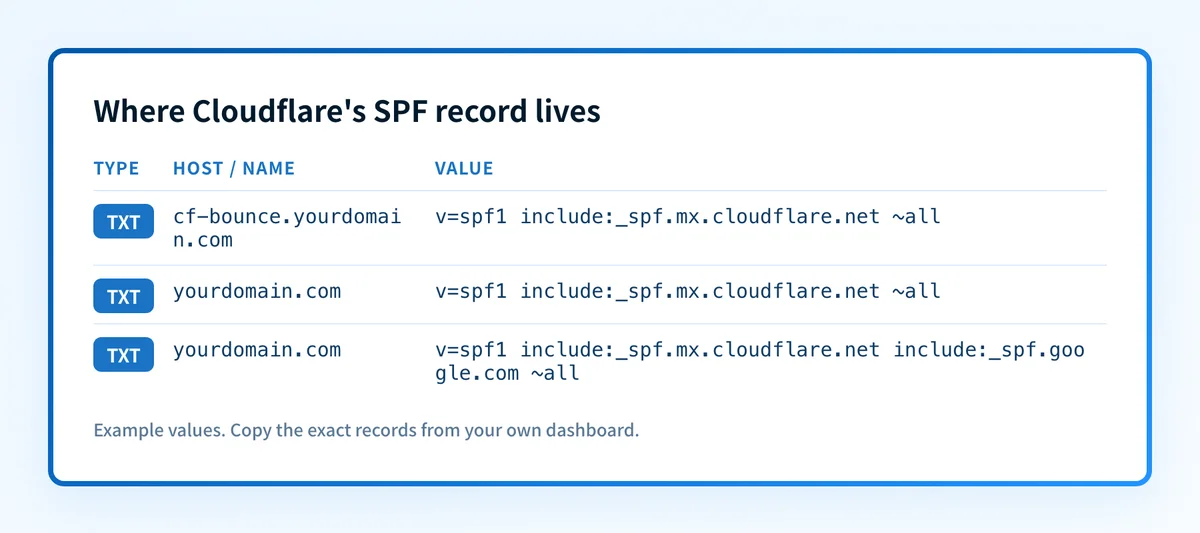
Cloudflare documents this SPF syntax for its Email Service include:
Record type: TXT
Email Sending host:
cf-bounce.yourdomain.comEmail Sending value:
v=spf1 include:_spf.mx.cloudflare.net ~allEmail Routing host:
yourdomain.comEmail Routing value when no other sender is authorized:
v=spf1 include:_spf.mx.cloudflare.net ~allThese are structural examples based on Cloudflare's published Email Service record. Do not publish a new root-domain SPF record until you have checked whether one already exists.
If another sender already has a root SPF record, merge Cloudflare's include into the one policy. Cloudflare illustrates this shape:
v=spf1 include:_spf.mx.cloudflare.net include:_spf.google.com ~allThe Google include is illustrative only. Keep only includes required by your actual sending services. Google's own SPF setup guide for Google Workspace gives include:_spf.google.com as the Workspace include and shows combining one include: per sender in a single record.
Cloudflare states that SPF records have a limit of 10 DNS lookups total. If the merged policy exceeds that limit, Cloudflare advises flattening or removing non-essential include: entries. Review the sender inventory before removing any include, because an omitted authorized sender can cause SPF failures.
If your DNS interface appends the zone name automatically, enter only the relative host it expects. For example, entering cf-bounce.yourdomain.com into an interface that appends yourdomain.com can create a duplicated owner name.
4. Verify the record in Cloudflare
For Email Sending, open Compute > Email Service > Email Sending > Settings. For Email Routing, open Compute > Email Service > Email Routing, select the domain, then open Settings.
Cloudflare reports the Email Service DNS record as Locked or Unlocked, and its documentation states that either status means the record is configured correctly. Only root-domain Email Routing records support unlocking. Cloudflare documents the path as Compute > Email Service > Email Routing > [domain] > Settings, then select Unlock beside the record.
Do not unlock an Email Routing SPF record only to make it look like a generic manually managed DNS record. Email Sending records at cf-bounce remain managed for the lifetime of the domain configuration.
5. Send a real test message
Send a new message through the exact Cloudflare Email Service path you configured to a mailbox where you can inspect the full message source. A message sent before the DNS and Cloudflare configuration completed is not a useful test.
Inspect the receiver-added authentication result for the test message. RFC 8601 defines the Authentication-Results field and its trust boundary. Compare the result with the visible From domain and the envelope sender path used by the Cloudflare configuration.
Investigate this with your coding agent
Use this when your DNS records are declared in a repository and you have a redacted sender inventory. Prepare the current SPF record, the proposed Cloudflare include, and the relevant DNS-as-code files without secrets or customer data.
Agent handoff
Copy the prepared prompt
Give this to a coding agent that can inspect the relevant repository or configuration source of truth.
Problem: Add Cloudflare Email Routing SPF authorization without creating a duplicate root-domain SPF record.
Evidence: Redacted current TXT records for yourdomain.com, the proposed include:_spf.mx.cloudflare.net value, and a redacted inventory of approved sending services.
Repository scope: Inspect the DNS-as-code repository and the files that declare TXT records for yourdomain.com.
Constraints: Inspect before editing. Do not apply changes until I approve the proposed diff. Do not access credentials, change production DNS, expose tenant values, or remove sender includes without evidence they are unused.
Requested output: Diagnose duplicate SPF records or merge conflicts, provide the minimal proposed SPF change, rollback steps, lookup-risk unknowns, and any missing sender evidence.
Verification: Query the published TXT record for yourdomain.com from the authoritative DNS provider and a public resolver, then retest a message through the same Cloudflare path.
Stop if: Credentials, private data, production mutation, or missing SPF record evidence is required.
Human approval required: Review the proposed diff and verification plan before allowing changes. Do not paste secrets, private keys, API tokens, unredacted headers, or customer data.
How does this setup affect DMARC?
SPF helps DMARC only when the SPF-authenticated identity aligns with the visible From domain. A passing SPF result for an unrelated envelope-sender domain does not create SPF alignment for the visible From domain. The SPF protocol guide explains why authorization and DMARC alignment are separate checks.
Use Palisade's DMARC checker to inspect the published DMARC policy before changing DMARC enforcement. A public record check does not prove which production paths authenticate, how a receiver evaluates a message, or whether future messages will pass.
Cloudflare's separate DMARC Management security-record workflow starts by selecting the account and domain, opening Email > DMARC Management, selecting View records, then choosing its SPF option. The published documentation does not establish the exact SPF editor controls or generated value for that workflow, so use the Email Service onboarding path above for Cloudflare Email Sending and Email Routing records.
How do I validate the setup?
Check public DNS
Query the exact record owner Cloudflare configured. For Email Sending, query cf-bounce.yourdomain.com. For Email Routing, query the root domain.
dig +short TXT yourdomain.com
dig +short TXT cf-bounce.yourdomain.com
Compare the authoritative DNS answer with a public resolver. Cloudflare says DNS changes can take up to 24 hours globally, though domains using Cloudflare DNS usually complete within 5-15 minutes. You can also check the published SPF record. A public SPF lookup confirms the DNS answer, not the message path or a receiver's final decision.
Check the Cloudflare status
Return to the applicable Email Service Settings page and confirm the record shows Locked or Unlocked. This confirms Cloudflare recognizes the required record for that domain configuration. It does not prove that a message was sent through the expected path.
Inspect a delivered message
Open the raw source of a newly delivered message from the configured path. Inspect the receiver-added Authentication-Results field and preserve a redacted copy with the DNS change record.
Check that the message was actually sent through the intended Cloudflare path. A green Cloudflare record state is not a delivered-message check.
Review DMARC reports
After DMARC aggregate reports accumulate, review the Cloudflare-related traffic separately from other sending sources. Confirm whether the SPF-authenticated identity aligns with the visible From domain when SPF is expected to support DMARC.
For ongoing analysis, Palisade is agentic DMARC software that analyzes DMARC aggregate-report data, identifies sending sources and authentication or alignment issues, and creates prioritized remediation tickets. It proposes a next DMARC policy step for human review. It does not change your DMARC policy or guarantee future message authentication.
Troubleshooting
Cloudflare wants to add SPF but a root SPF record already exists
The likely issue is a merge requirement. Cloudflare documents that an existing SPF record must be merged rather than duplicated.
Inspect the current root TXT answer and sender inventory. Add the Cloudflare include to the existing policy only after confirming that each retained include still represents an approved sender.
The record is missing from public DNS
Check the exact owner name. Email Sending uses the cf-bounce subdomain, while Email Routing uses the root domain. Also check whether a DNS interface duplicated the zone suffix.
Wait for propagation before changing the record again. Cloudflare documents a global window of up to 24 hours.
The merged SPF record exceeds the lookup limit
Cloudflare documents a limit of 10 DNS lookups total for SPF. Count the lookup-causing mechanisms and include: dependencies before publishing a merge.
Remove an include only when the associated sender is no longer authorized. If a lookup reduction needs flattening, validate the resulting policy against the sender inventory and a delivered message before relying on it.
Cloudflare shows a correct status but the message does not pass SPF
The Cloudflare status establishes the Email Service record state, not the complete sending path. Inspect a new delivered message from the exact route and compare its envelope-sender identity with the published SPF record.
Do not change DMARC policy based on the Cloudflare status alone. First establish which identity the receiver evaluated and whether it aligns with the visible From domain.
Check the published Cloudflare SPF record
After Cloudflare has onboarded the domain and DNS has had time to propagate, use Palisade's SPF checker to inspect the public SPF record for the root domain or cf-bounce subdomain. Compare the result with the record Cloudflare shows in the applicable Email Service settings.
Start with Palisade when you need to identify which sending sources still fail SPF or DMARC alignment after this one Cloudflare configuration is complete. Palisade analyzes accumulated DMARC reports and proposes remediation work for human review. An SPF lookup cannot prove every production route, monitor later DNS drift, or guarantee receiver acceptance.
Evidence
Sources and further reading
Questions readers ask
Frequently asked questions
Does Cloudflare Email Sending use the root-domain SPF record?
No. Cloudflare documents that Email Sending creates its SPF record on the cf-bounce subdomain. Check that subdomain when validating an Email Sending configuration.
Does Cloudflare Email Routing use the root-domain SPF record?
Yes. Cloudflare documents that Email Routing creates its SPF record at the root domain. Merge the Cloudflare include into an existing root SPF policy instead of publishing a second SPF TXT record.
Can I have two SPF records for one domain?
No. Cloudflare's Email Service documentation directs readers to merge an existing SPF record with Cloudflare's include. A domain should publish one SPF policy at the identity being evaluated.
Does a Locked Cloudflare SPF record prove mail passes SPF?
No. A Locked or Unlocked status means Cloudflare considers the Email Service record configured correctly. Inspect a newly delivered message to confirm the actual sending path and receiver result.
Can Cloudflare DMARC Management create my Email Sending SPF record?
Not established by Cloudflare's published DMARC Management security-record documentation. That documentation describes an SPF option under Email > DMARC Management > View records, but it does not establish the exact editor controls or generated value. Use the documented Email Service onboarding flow for Email Sending and Email Routing.

Written by
Samuel ChenardCEO & Co-Founder, Palisade
Samuel Chenard is the CEO and co-founder of Palisade, agentic DMARC software for IT teams and MSPs, from one domain to thousands.
More from Samuel →