SPF and Constant Contact: what to configure
 ChatGPT
 Claude
 Gemini
 Perplexity
 Grok
GrokIn brief
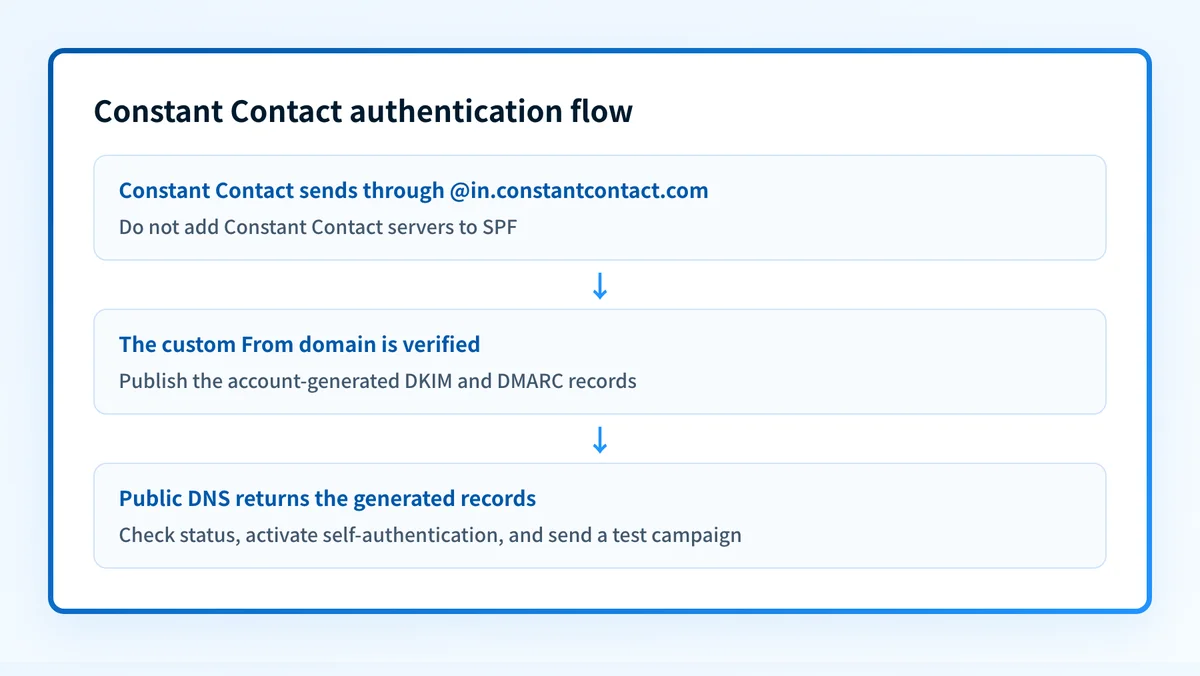
Constant Contact does not require its servers in SPF. Self-authenticate with DKIM and DMARC, then verify a campaign from your custom domain.

For Constant Contact Email and Digital Marketing, do not add Constant Contact server addresses to your domain's SPF record. Constant Contact says receivers check its envelope domain, @in.constantcontact.com, so SPF cannot align with your visible From domain. Instead, self-authenticate your custom domain with the account-generated DKIM CNAME or TXT records and DMARC record, then send a test campaign. Keep any existing SPF policy for the services that actually use its envelope domain.
At a glance
Quick takeaways
- Do not add a Constant Contact
include:mechanism or IP address to SPF for its Email and Digital Marketing product. - SPF alignment cannot pass for that sending path because Constant Contact uses
@in.constantcontact.comfor the Header or Bounce address. - DMARC can still pass when self-authentication produces DKIM alignment with the visible From domain.
- Choose DKIM CNAME records for the normal single-account path, or DKIM TXT when several Constant Contact accounts use the same domain.
- Copy the generated DNS names and values only from the account and domain you are configuring.
What should I check before configuring Constant Contact?
Confirm that you are using Constant Contact's Email and Digital Marketing product, have access to DNS for the visible From domain, and can use a verified address at that domain. The current authentication overview from Constant Contact distinguishes this product from Lead Gen & CRM, which has a different authentication workflow.
Check the domain's existing SPF policy before making any DNS change. Do not add a second v=spf1 TXT value and do not remove mechanisms for other active senders. Constant Contact's documented path does not need a new SPF authorization for its marketing sends.
Copy the DKIM and DMARC names and values from the Constant Contact account that owns this domain. Do not publish a selector, target, TXT value, or DMARC value copied from another account or an online example.
Which setup method should I use?
Use Self-authenticate using DKIM CNAME records for the normal path. Constant Contact calls it the simplest and most secure option. Use Self-authenticate using DKIM TXT record when multiple Constant Contact accounts use the same domain. The self-authentication instructions state that the account generates the DKIM record information and the DMARC policy information for both paths.
This is not an SPF-record setup. If another platform sends mail with an envelope domain under your control, assess that sender separately with the SPF record checker. Do not treat a successful DNS lookup as proof that a Constant Contact campaign used DKIM or that DMARC passed.
How do I configure authentication for Constant Contact?
1. Open the self-authentication settings
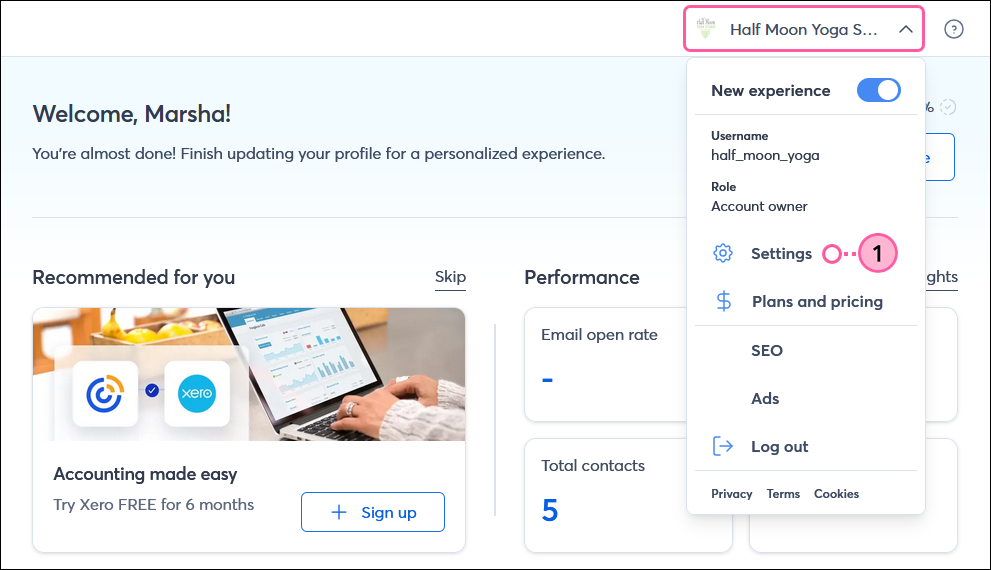
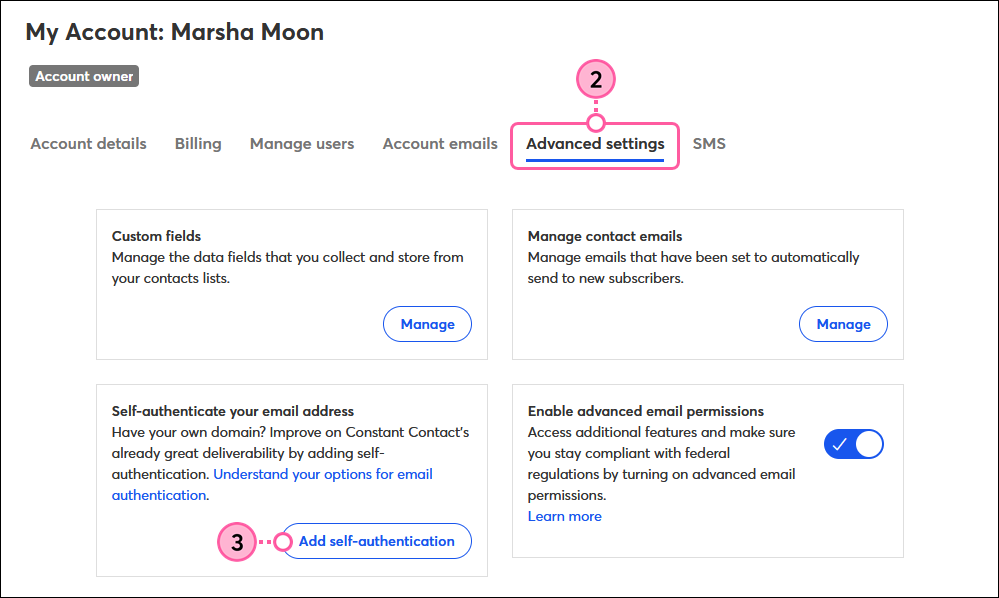
In Constant Contact, select your profile name in the upper-right, choose Settings, open Advanced settings, and select Add self-authentication. This current path and the button labels are documented in Constant Contact's self-authentication guide. Do not rely on this prose as a substitute for a current screen review.
2. Select the domain and DKIM method
Choose the verified custom domain used by the campaign's From address. Select the CNAME method unless the same domain is used by multiple Constant Contact accounts, in which case select the DKIM TXT method. Constant Contact documents that an account can authenticate one domain and that the TXT option is intended for the multi-account case.
3. Publish the account-generated DNS records
Use the copy controls in Constant Contact to obtain each DKIM record and the DMARC record, then publish them at the DNS provider that hosts the domain. The names, selectors, targets, and public-key values are account-generated. They are not safe to reuse across tenants.
Record type: CNAME or TXT, as generated by Constant Contact
Host and value: account-generated
Copy the DKIM and DMARC record names and values from Constant Contact for this exact domain.The code block describes the procedure only. Do not publish the text above as a DNS record. Keep the domain's existing SPF policy unless you are separately changing a sender that SPF evaluates.
4. Check status and activate
After the DNS records have propagated, return to the same self-authentication area and select Check status or Activate. Constant Contact says propagation can take from a couple of hours to a couple of days and directs readers to activate only when the records are ready. If status does not become ready, compare every published name and value with the current account-generated values before changing mail flow.
5. Send a real test campaign
Copy a recent campaign, send it to a private test list, and use a From address with the authenticated domain. Constant Contact's test instructions recommend this before a production send. Keep the delivered message for header inspection.
How does this setup affect DMARC?
For this Constant Contact path, SPF does not align with the visible From domain because the Header or Bounce address is @in.constantcontact.com. Constant Contact explicitly says there is no requirement for SPF alignment when DMARC can pass through aligned DKIM. When self-authentication is active and the campaign uses a custom-domain From address, Constant Contact says the message is DKIM aligned for DMARC purposes. Review the DMARC alignment guide before changing a policy from monitoring to enforcement.
How do I validate the setup?
Check public DNS
Query the exact CNAME or DKIM TXT owner name that Constant Contact generated, plus the DMARC record at _dmarc.your-domain.example. The DKIM checker can confirm a selector's public DNS answer, while the DMARC checker can confirm the published DMARC policy. Do not test SPF by adding Constant Contact to the root policy because that is not the documented sending identity for this product.
Check the vendor status
Return to Settings, Advanced settings, and the self-authentication state. The expected outcome is a ready state followed by activation. This validates that Constant Contact can resolve the account-generated records. It does not prove a recipient accepted a particular campaign.
Inspect a delivered message
Open the full headers of the test campaign in the receiving mailbox. In the receiver-added Authentication-Results field, look for a DKIM pass whose header.d matches the visible From domain or its organizational domain, then compare the DMARC result with that visible From domain. RFC 8601 defines the Authentication-Results header; the receiver, not the sender, adds the result you should trust.
Review DMARC reports
Review DMARC aggregate reports after campaigns have run through the normal sending schedule. Look for the Constant Contact source, the visible From domain, DKIM result, and alignment result. Reports reveal observed receiver traffic, but they cannot replace the vendor status check or a delivered-message header from your own test.
Troubleshooting
I added Constant Contact to SPF and nothing improved
Remove only the Constant Contact mechanism you added after confirming that no other service uses it. Constant Contact's official documentation says its servers do not need to be added to your SPF record for this product. Preserve authorizations for other active senders, and keep one SPF policy at each exact DNS name.
Check status does not find the DNS records
Compare the DNS owner name and value character-for-character with the current account-generated record. Check whether the DNS provider automatically appends the domain suffix, then allow the documented propagation window before retrying. Do not substitute a record from another Constant Contact account.
My campaign uses an unauthenticated From address
Use a verified From address under the authenticated domain. Constant Contact notes that, after self-authentication, a From address outside that domain is likely to bounce. Test with a private list before sending to campaign contacts.
Check the public records before you send
After you publish the generated records, run the Email Security Score for the visible From domain. It can inspect the public SPF, DKIM, and DMARC posture that recipients can query.
The score cannot confirm that Constant Contact activated self-authentication, read a private campaign, prove DKIM alignment for an unseen message, or guarantee inbox placement. Use it with the vendor status and delivered-message checks above.
Evidence
Sources and further reading
Questions readers ask
Frequently asked questions
Do I add Constant Contact to my SPF record?
No. For Constant Contact Email and Digital Marketing, receivers check Constant Contact's envelope domain rather than your visible From domain. Add no Constant Contact SPF mechanism unless Constant Contact documents a different sending product and identity for your account.
Can SPF alignment pass for a Constant Contact campaign?
No. Constant Contact says its Header or Bounce address uses @in.constantcontact.com, which does not match a custom visible From domain. DMARC can still pass through aligned DKIM after self-authentication.
Should I use DKIM CNAME or TXT records?
Only use CNAME records for the normal single-account setup. Use the DKIM TXT option when multiple Constant Contact accounts use the same domain. Copy the exact record type, name, and value generated in the account.
Does self-authentication replace my existing SPF record?
No. Self-authentication configures DKIM and DMARC for the Constant Contact path. Keep the SPF policy that authorizes the services whose envelope or HELO identities actually use the DNS name being evaluated.
How long should I wait before activating self-authentication?
Constant Contact says newly published authentication records can take from a couple of hours to a couple of days to propagate. Check status only after public DNS returns the generated records, then activate when the account marks them ready.

Written by
Samuel ChenardCEO & Co-Founder, Palisade
Samuel Chenard is the CEO and co-founder of Palisade, agentic DMARC software for IT teams and MSPs, from one domain to thousands.
More from Samuel →