Amazon report phishing email
 ChatGPT
 Claude
 Gemini
 Perplexity
 Grok
GrokIn brief
Report a suspicious Amazon email to stop-spoofing@amazon.com, learn the claims these messages make, and verify any order notice inside Amazon itself.
To report a phishing email that claims to be from Amazon, do not click its links, open attachments, or use contact details inside the message. Instead, verify any claimed account issue by opening Amazon independently, then forward the suspicious email to stop-spoofing@amazon.com, as instructed in Amazon's suspicious-email reporting guidance. If you entered credentials, a one-time verification code, or payment details, change course from reporting to account recovery.
At a glance
Quick takeaways
- Do not reply to, click, download, open attachments in, or call a number listed in a suspicious Amazon-branded email.
- Open Amazon independently rather than following a link from the message.
- Amazon directs recipients to forward suspicious purported Amazon emails to
stop-spoofing@amazon.com. - Forwarding the email preserves more useful evidence than sending only a screenshot or retyped text.
- A suspicious email can be reported even if you are unsure whether it is genuine.
- If you shared account credentials, a verification code, or payment details, recovery steps matter in addition to reporting.
How Amazon phishing email reporting works
A phishing email tries to persuade a recipient to disclose information, install something harmful, or follow a link controlled by someone else. In this case, the attacker uses Amazon's name, account language, order notices, delivery claims, or payment prompts to make the request look familiar.
Amazon's Report Suspicious Emails page warns that purported Amazon messages can contain malicious links or attachments. Its reporting instruction is deliberately separate from the email itself: forward the suspicious message to stop-spoofing@amazon.com.
That separation matters. A report address copied from a message could itself be controlled by an attacker. Use Amazon's published guidance, or independently type a known Amazon address into your browser before taking action.
The safest sequence is:
- Leave the email's links, buttons, attachments, and reply controls unused.
- Open Amazon outside the message and check whether the claimed order, alert, or account issue appears there.
- Forward the suspicious email to Amazon's published reporting address.
- Take account-recovery steps if you entered a password, a one-time verification code, a payment detail, or other sensitive information.
How to recognize an Amazon phishing scam email
An Amazon phishing scam email is a message that impersonates Amazon to make you click a link, open an attachment, call a number, or hand over account details. A message can be suspicious without being conclusively proven fraudulent, and the safe handling is the same either way.
These messages almost always claim one of a short list of things, because each one makes a recipient act quickly:
- An order you do not recognize, or an order about to be cancelled.
- A refund waiting to be claimed.
- An account suspension or a locked account.
- An unusual sign-in or a security alert.
- A payment method that has failed.
- A request to confirm or update account details.
- A phone number to call about any of the above.
- A display name that reads "Amazon".
- A familiar logo or an Amazon-styled template.
- An order number, tracking number, or account reference.
- A sender address that resembles an Amazon address.
Sender authentication has the same limit. SPF, DKIM, and DMARC describe whether a sender authenticated a domain. They do not establish that a private message is harmless, because a compromised or abused authenticated sender can still send harmful content. See why phishing emails can pass SPF and DKIM for that distinction, and how to spot fake emails and protect yourself from scams for signs that apply across impersonation attempts.
When reporting is not the only action
Forwarding a suspicious email is appropriate when you received it and did not interact with its contents. The answer changes when the email led to an action that exposed something valuable.
Use this decision rule:
- If you only received the message, do not interact with it. Verify the claim independently, then report it.
- If you clicked a link but did not submit information or download anything, stop using the linked page and inspect the account independently. Review what to do if you clicked a phishing link for the next recovery actions. A URL reputation lookup can also show whether that address already appears on threat blocklists.
- If Amazon shows a real matching order, notice, or account event, the underlying issue may be genuine even though the email is still not trustworthy. Continue only in the independently opened app or site, and do not go back to the email's links, buttons, or contact details.
- If you entered an Amazon password, a one-time verification code, payment information, or another account detail, treat the situation as possible account compromise. A verification code counts even if you never typed a password: handing one over can be enough to let someone else into the account, so change the password as well. Use Amazon's independent account-recovery and security controls, then report the original email.
- If the message reached a work mailbox, report it through your organization's security process as well. An internal team may need the original message to investigate who else received it, so send it to that process rather than to coworkers for an informal opinion. Forwarding a message with live links or attachments spreads the payload.
For the broader concepts behind these messages, see email threats and phishing guidance. If the message is a general scam rather than an Amazon impersonation, how to report email phishing scams covers wider reporting options.
Worked example: choose the safe reporting path
Suppose an email says that an Amazon order will be cancelled unless you confirm your account details. The message includes a button and an attachment.
The email claims: "Confirm your account details to avoid order cancellation." The safe response, in order:
- Step 1. Do not select the button or open the attachment.
- Step 2. Open Amazon independently and check orders and account notices.
- Step 3. Forward the original suspicious email to stop-spoofing@amazon.com.
- Step 4. If account details or a one-time verification code were submitted, start recovery through the official site.
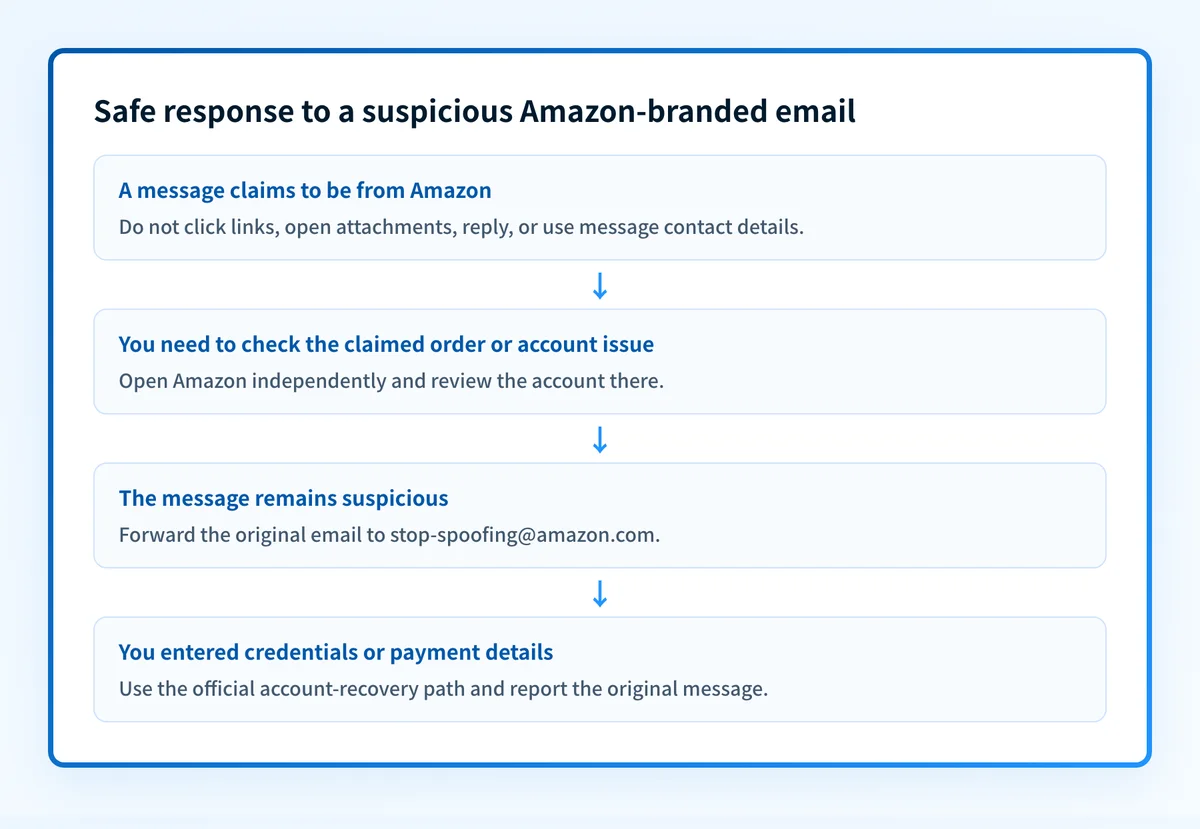
Forward the original email when possible. The full message can retain technical details that help investigators assess the report. Do not include passwords, payment card numbers, or other sensitive information in the forwarded content.
Warning: Do not use a phone number, reply address, web link, or attachment supplied by the suspicious email to report or recover the account. Find Amazon's official reporting or account path independently.
What to do next with the evidence you have
If you still have the suspicious email and did not interact with it, follow Amazon's published suspicious-email reporting route and forward it to stop-spoofing@amazon.com.
Amazon's reporting page states that a recipient who believes a purported Amazon email is a forgery "may submit a report," and may "also forward phishing emails and other suspected forgeries directly to stop-spoofing@amazon.com." If you cannot forward the message, use that report form instead, reached from Amazon's own site rather than from anything in the suspicious email.
If you only have a screenshot or copied text, do not reopen a malicious attachment to recreate the message. Report what you have through the official route and independently review your Amazon account for the specific claim.
If you manage email for a team, keep the original message available for your security process. A phishing report can support investigation, but it does not show whether other recipients received the same campaign or whether a similar sender will appear later.
Build a safer response path for suspicious email
After you have reported the Amazon-branded message, use the email security learning hub to review phishing-response and email-protection guidance for your organization.
Review email security guidance
An educational guide cannot inspect a private Amazon email, submit Amazon's report, confirm account compromise, or replace your organization's incident-response process.
Evidence
Sources and further reading
Questions readers ask
Frequently asked questions
How do I report phishing emails to Amazon?
Do not interact with the message's links or attachments. Verify any claimed account issue by opening Amazon independently, then forward the suspicious purported Amazon email to stop-spoofing@amazon.com under Amazon's reporting guidance.
Where can you report a phishing email?
You can report it to the organization being impersonated, your employer's security team when it reached a work account, and relevant official reporting channels in your jurisdiction. For a purported Amazon email, that route is stop-spoofing@amazon.com or Amazon's report form; for another brand, use that organization's independently located official abuse route. Start with the impersonated organization's published route, not any reporting address or link included in the suspicious message.
How will I know if my Amazon account has been hacked?
You cannot tell from the phishing email alone. Independently sign in to Amazon and look for unexpected orders, account-detail changes, payment activity, or security notices. If you entered credentials, a one-time verification code, or payment details through the suspicious message, treat that as possible exposure and begin recovery through Amazon's official site.
Should I click the link to see whether the Amazon warning is real?
No. Amazon advises recipients not to open links or attachments in suspicious purported Amazon emails. Open Amazon independently and check for the claimed order, security notice, or account issue there.
Can an email-security score confirm that an Amazon email is legitimate?
No. An email security score assesses a domain's public email-security configuration. It cannot inspect a private message, prove that a specific email is legitimate, or establish whether Amazon sent it.
How can I tell whether an email is really from Amazon?
Do not judge it from the message. Open the Amazon app or type Amazon's address into a browser yourself, sign in there, and check Your Orders and account notifications for the claimed issue. If no matching order, notice, or security event appears, treat the email as a suspected forgery and report it. If a matching order, notice, or event does appear, handle it inside that independently opened session: a real underlying issue does not make the email safe to click.
Where should I check a claimed Amazon security notice?
Inside your Amazon account, not from the email. Amazon's reporting guidance tells recipients not to open links or attachments in a suspicious purported Amazon message, so an independently opened session is the place to confirm whether a notice exists. The exact notification format can vary by account, service, and region.
Can SPF, DKIM, or DMARC prove that an Amazon email is safe?
No. Those protocols report whether a sender authenticated a domain. They cannot establish that the content of a private message is legitimate, and an authenticated sender that has been compromised or abused can still deliver a harmful message.
Is there an Amazon email scam going around?
Amazon-branded phishing circulates continuously rather than as a single identifiable campaign, so the useful question is not whether a scam is going around but whether this message can be verified. Check the claimed order or notice inside an independently opened Amazon session, and report the message if nothing matches.

Written by
Ian BussieresCTO & Co-Founder, Palisade
Ian Bussieres is the CTO and co-founder of Palisade, agentic DMARC software for IT teams and MSPs.
More from Ian →