2 factor authentication Yahoo email: what to enable
 ChatGPT
 Claude
 Gemini
 Perplexity
 Grok
GrokIn brief
Yahoo calls it two-step verification. Pick a second factor you can actually recover, and create app passwords for older mail clients that still need them.

Yahoo Mail uses Yahoo Account two-step verification to require a second proof when a new device or browser signs in. Yahoo documents push notifications, phone verification, authenticator-app codes, and security keys as available methods. Choose a method you can recover, keep recovery details current, and use Yahoo's current two-step verification instructions to make the account change. This is account-login protection, not SPF, DKIM, or DMARC for a domain you send from.
At a glance
Quick takeaways
- Yahoo calls the feature 2-step verification, although people often search for 2 factor authentication.
- An authenticator app requires at least two recovery methods on the Yahoo account, according to Yahoo.
- Yahoo says Account Key must be disabled before 2-step verification can be enabled.
- Save any emergency recovery code where you can access it without the Yahoo account.
- Third-party mail apps may need an app password after you turn on 2-step verification.
What Yahoo two-step verification protects
Yahoo states that two-step verification adds a code or other second step when a new device or browser signs in. That can reduce the usefulness of a stolen password, but it does not make a phishing page safe or reverse a compromise that has already happened. If you entered a Yahoo password or approval code into a suspicious site, start with the recovery steps in what to do after a phishing link before treating two-step verification as the only response.
Yahoo's documented options are a prompt in a Yahoo app, a code delivered to a phone, an authenticator-app code, or a security key. The precise choices available can depend on the account and recovery setup, so use the current Yahoo two-step verification help rather than relying on an old screen capture or a copied menu path.
Choose the second factor before you turn it on
Start with the method you can still use if your primary phone is lost. Yahoo's help says an authenticator-app setup needs at least two recovery methods, and its security-key guidance says an emergency recovery code is provided during setup. Yahoo also documents that its Account Key and two-step verification are not used together, so an account using Account Key needs that feature disabled before the two-step option can be enabled.
Use this decision record before following Yahoo's current instructions:
Yahoo account sign-in decision
Account Key enabled?     Disable it before selecting 2-step verification.
Authenticator app chosen? Confirm two recovery methods are available first.
Security key chosen?     Store the emergency recovery code separately.
Third-party mail app?    Plan to create an app-specific password if the app needs one.
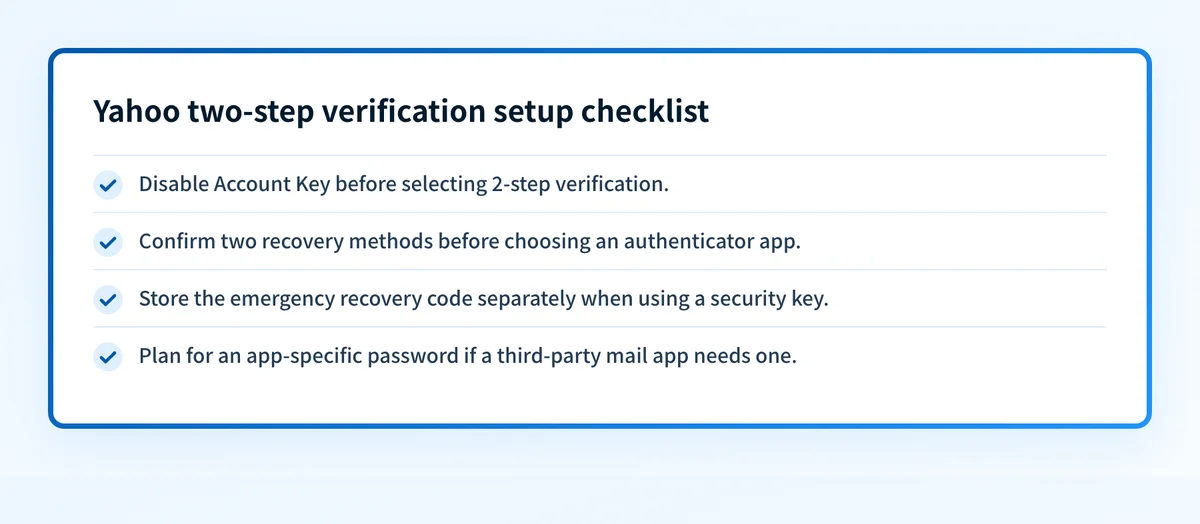
The Yahoo Account Key documentation explains how to move back to password sign-in, and Yahoo's security-key guidance describes the supported key requirements. Those pages are the source of truth for account-specific prompts and recovery options.
Keep Yahoo Mail working in other apps
Two-step verification can change how an older or non-Yahoo mail client signs in. Yahoo says a third-party mail app that does not use Yahoo's branded sign-in page may need an app password. An app password is separate from the main Yahoo password, and Yahoo says it remains active until you remove it.
Before changing a mail client, record which app and device use the Yahoo account. Then use Yahoo's app-password instructions to create a separate password only for that app when needed. Remove an app password you no longer need instead of sharing or reusing it.
Verify the account is still recoverable
After the account change, test a sign-in only from a device and browser you control. Confirm that the chosen second factor works, that the recovery details are current, and that a lost-device plan does not depend on the same mailbox. Yahoo says it sends alerts when two-step verification is turned on or off, or when the verification method changes. Review any security alert you did not expect in the Yahoo security changes help.
For broader account protection, prevent account hijacking explains why strong factors and session recovery matter after credentials are exposed. If a suspicious email prompted this work, learn how to recognize phishing before opening another sign-in link.
Check the message before you sign in
If an unexpected message sent you toward a Yahoo sign-in page, use Yahoo and Gmail email error-code guidance only for sender-side SMTP failures. It cannot verify a Yahoo account or enable two-step verification. For a suspicious account message, open Yahoo directly rather than following the message link.
Evidence
Sources and further reading
Questions readers ask
Frequently asked questions
Is 2 factor authentication available for Yahoo Mail?
Yes. Yahoo calls it 2-step verification and documents several methods, including a Yahoo-app prompt, phone verification, authenticator-app codes, and a security key. The methods shown can depend on the account's recovery setup.
Do I need to turn off Yahoo Account Key first?
Yes. Yahoo says Account Key must be disabled before you enable two-step verification. Follow Yahoo's current Account Key instructions because the available sign-in choices can vary by account.
Can I use an authenticator app with Yahoo?
Yes. Yahoo documents authenticator-app verification. It also says that the account must have at least two recovery methods before that option is available.
Will Yahoo two-step verification affect Outlook or another mail app?
Yes, it may. Yahoo says third-party mail apps that do not use Yahoo's branded sign-in page may require an app password. Generate a separate app password only when Yahoo's current instructions call for it.
Does Yahoo two-step verification stop phishing?
No. It adds protection at sign-in, but it does not make a fraudulent site trustworthy or undo information already submitted to one. Treat a suspicious login page or unexpected approval request as a separate security incident.

Written by
Samuel ChenardCEO & Co-Founder, Palisade
Samuel Chenard is the CEO and co-founder of Palisade, agentic DMARC software for IT teams and MSPs, from one domain to thousands.
More from Samuel →