Yahoo email authentication
 ChatGPT
 Claude
 Gemini
 Perplexity
 Grok
GrokIn brief
Yahoo email authentication can refer to Yahoo account security or sender authentication. Use Yahoo Help to identify the account issue before acting.
Yahoo email authentication is an ambiguous phrase. It can refer to access to a Yahoo account, or to authentication of messages sent to Yahoo recipients. Yahoo Help lists account-help topics including "Account Key," "Account security," "Fix problems signing into your Yahoo account," and "Fix issues with Yahoo Account Key." That help index does not define sender-side SPF, DKIM, or DMARC requirements.
At a glance
Quick takeaways
- Yahoo Help separates account-help topics from sender-side email authentication documentation.
- "Account Key" appears in Yahoo Help's account-help index.
- A sign-in or account-security question needs Yahoo account-help guidance.
- A question about messages sent to Yahoo recipients needs sender-authentication evidence.
- The Yahoo Help index does not document SPF, DKIM, DMARC, alignment, or sender enforcement rules.
- Do not treat an account sign-in prompt as evidence that a sending domain has an email-authentication failure.
How the distinction works
Yahoo Help's account-help index includes the topics "Account Key," "Account security," "Reset or change your Yahoo password," "Fix problems signing into your Yahoo account," and "Fix issues with Yahoo Account Key."
Those labels establish that Yahoo provides help paths for account access and account security. They do not establish what an individual Yahoo Mail authentication prompt means, how Account Key works, or how to repair a specific sign-in problem. The exact cause can depend on the account and the prompt shown to the user.
Sender authentication is a separate question. It concerns evidence attached to a message and the domain that appears in the message's visible From address. The Yahoo Help index supplied for this topic does not document Yahoo's current sender requirements, its enforcement rules, or its interpretation of SPF, DKIM, or DMARC.
For a general explanation of that sender-side topic, see email authentication. The distinction matters because an account-access issue cannot be resolved by changing a domain's DNS records, and a message-delivery issue cannot be diagnosed from an account-help topic alone.
When the answer changes
Use the evidence you already have to separate the two meanings.
- If the question is about signing in, a password, account security, Account Key, or a Yahoo prompt, begin with Yahoo Help's account-help topics.
- If the question is about mail sent to Yahoo recipients, gather evidence from the actual sending path before deciding that Yahoo account authentication is involved.
- If the question is about a domain's email authentication generally, start with the protocol context in what email authentication is and why it matters.
- If the issue is that Yahoo is blocking or rejecting a message, use the message evidence and the specific delivery symptom. Why is Yahoo blocking my emails? covers that separate problem.
Do not change SPF, DKIM, or DMARC records because a Yahoo account asks for authentication. First establish whether the affected person is signing in to an account or whether a sent message has a delivery problem.
If you need to check your sender domain's authentication records, Start with Palisade.
A worked evidence example
Suppose a user says, "Yahoo is asking me for authentication."
The statement alone does not identify a sender-authentication failure. The verified next evidence is the account screen or help topic involved. Yahoo Help lists these relevant account-help labels:
Account Key
Account security
Fix problems signing into your Yahoo account
Fix issues with Yahoo Account Key
The list is a navigation aid, not a diagnosis. It does not say which prompt the user received, whether Account Key is enabled, or which repair applies.
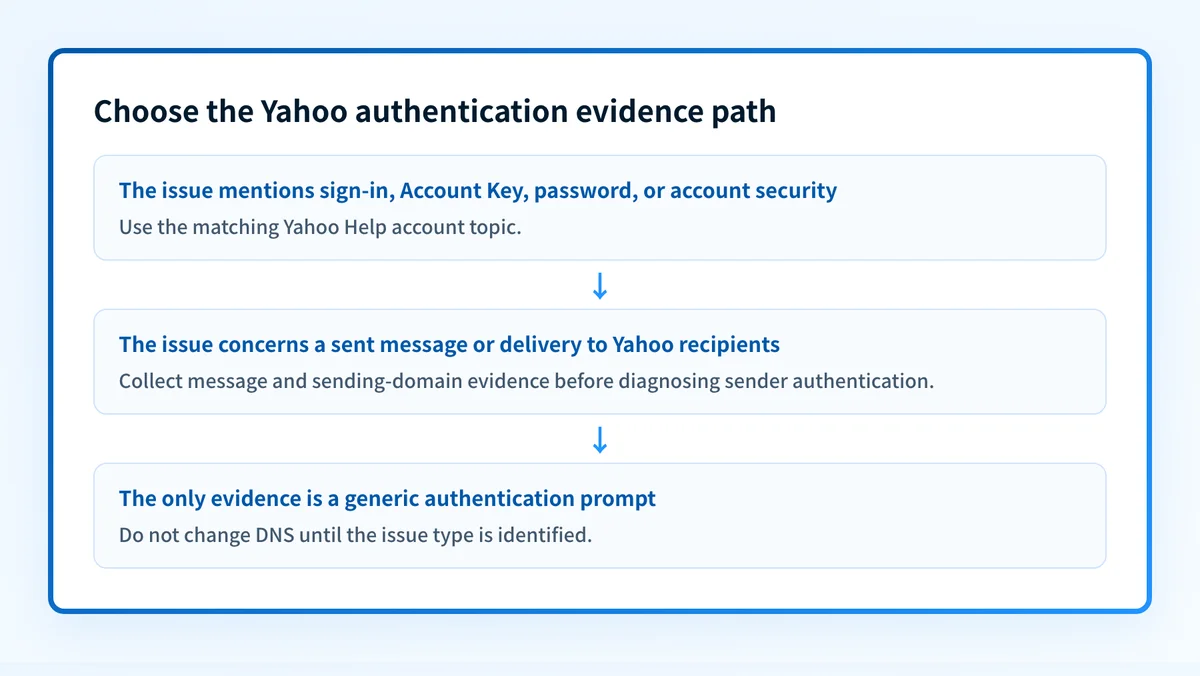
For a message-delivery case, collect the message's actual delivery result and the sending domain involved. A public DNS result alone cannot prove the production sending path, a receiver's private decision, or future placement. Likewise, an account sign-in result cannot establish whether a message used authenticated sender infrastructure.
What to do next
Start with the narrowest available evidence.
For a Yahoo account-access question, open Yahoo Help and choose the topic that matches the visible account issue. The available index labels include account security, sign-in problems, and Account Key issues.
For a sender-domain question, keep account support and sender authentication separate. Record the sending domain, the recipient domain, and the actual message outcome. If the problem is a delivery block, work from the message evidence rather than guessing from a Yahoo sign-in prompt.
For broader sender-domain context, the DKIM learning hub explains the authentication protocol area that can be relevant to outbound mail. It does not establish Yahoo's current provider-specific requirements.
Read the sender-authentication context
If the unresolved question is about mail sent from a domain rather than access to a Yahoo account, read email authentication before changing DNS or asking the account holder to repeat a sign-in step.
That explainer provides protocol context. It does not diagnose a Yahoo account prompt, prove why Yahoo handled one message a certain way, or document Yahoo's current sender requirements.
Evidence
Sources and further reading
Questions readers ask
Frequently asked questions
Does Yahoo Mail have an authenticator?
Yahoo Help lists "Account Key" and "Fix issues with Yahoo Account Key" among its account topics, so the account does have a sign-in feature under that name. Yahoo's help index does not define what Account Key does or call it an authenticator. Open Yahoo Help and choose the topic that matches the prompt shown on the account.
How do I authenticate my Yahoo email account?
Open Yahoo Help and pick the account topic that matches what you see: account security, a sign-in problem, or Account Key. Yahoo does not publish a single generic procedure, because the right step depends on the prompt your account displays. This is account access, which is separate from the sender authentication a domain publishes in DNS.
How do I fix a Yahoo Mail authentication problem?
Work out first whether the problem is an account sign-in prompt or a problem with mail sent to Yahoo recipients, because the two have different repairs. For a sign-in prompt, use Yahoo Help's topics "Fix problems signing into your Yahoo account" and "Fix issues with Yahoo Account Key." For a delivery problem, work from the message evidence and the sending domain instead.
Why is Yahoo Mail asking for authentication?
Yahoo does not publish what triggers an individual authentication prompt, so the wording on screen is your starting point. Its help index covers account security, Account Key, and sign-in problems, which are the areas such a prompt usually comes from. Match the exact prompt to the Yahoo Help topic and follow that support path.
Does a Yahoo account prompt mean my domain has a DMARC problem?
No, because an account prompt concerns access to a Yahoo mailbox while DMARC concerns messages sent using your visible From domain. The prompt on its own is no evidence about the sending domain. Do not change SPF, DKIM, or DMARC records in response to a sign-in prompt.

Written by
Samuel ChenardCEO & Co-Founder, Palisade
Samuel Chenard is the CEO and co-founder of Palisade, agentic DMARC software for IT teams and MSPs, from one domain to thousands.
More from Samuel →